Oracle Utilities Cloud Services Integration Scenario
In this integration scenario, Oracle Utilities Testing Accelerator is used to develop and run a test flow spanning two different Oracle Utilities cloud services, such as Oracle Utilities Customer Cloud Service (OUCCS) and Oracle Utilities Work and Asset Cloud Service (OUWACS).
In the above case, assuming that the Oracle Utilities Testing Accelerator that is part of Oracle Utilities Customer Cloud Service is being used for the flow development and execution, Oracle Utilities Work and Asset Cloud Service becomes the external application (in the context of Oracle Utilities Testing Accelerator integration testing) to which Oracle Utilities Testing Accelerator needs to post the integration test request to.
Before adding components from the external Oracle Utilities cloud service to the flow, import its product pack. For details, refer to the Product Pack Import section in Chapter 9.
In the flow and user configuration sets in Oracle Utilities Testing Accelerator, which is part of Oracle Utilities Customer Cloud Service, 3 properties pertaining to Oracle Utilities Work and Asset Cloud Service can be found, provided that the Oracle Utilities Work and Asset Cloud Service and Oracle Utilities Customer Cloud Service are part of the same tenancy. The parameters are listed as follows:
- wacs
- wacs_gStrUserName
- wacs_gStrPassword
Depending on the Oracle Utilities enterprise cloud service available for the integration scenario, the properties corresponding to Oracle Utilities Meter Solution Cloud Service, Oracle Utilities Customer Care and Billing Cloud Service and others can be found in the flow and user configuration sets.
Enter the following values corresponding to each of the parameters:
- wacs: Prefix “$” to the parameter name and provide it as the value for that parameter. Example: $wacs
- wacs_gStrUserName: Provide the username for web service authentication to Oracle Utilities Work and Asset Cloud Service application.
- wacs_gStrPassword: Provide the password corresponding to the username for web service authentication to Oracle Utilities Work and Asset Cloud Service application.
Figure 8-37 Integration web service environment
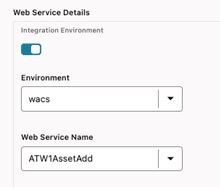
This ensures that the W1- AssetAdd component posts the request to Oracle Utilities Work and Asset Cloud Service whose configuration has been specified in the flow configuration set or user configuration set using the keyword prefix “wacs”.
More than one such configuration can be set so that a test flow can interact with multiple applications/cloud services. Each application can have its own keyword which is used while specifying the web service name in the component step's test data in a flow.
Note:
For the Oracle Utilities Testing Accelerator integration flows to be able to communicate with the external environment on SaaS/PaaS/on-premises, the corresponding environment end points must be added to the cloud allow list. Please log a ticket with the Dev Ops team to allow listing of the URI.