Running Subroutine in a Loop
To achieve the capability to loop one or more components within a flow, create the component(s) as a subroutine flow. A subroutine flow can be run in a loop either a fixed number of times or until an exit condition is satisfied.
Example: If the subroutine creates a meter read, the user can loop the subroutine 24 times to create a meter read for every hour of a particular day.
Note:
This feature only works with simple subroutines and not intended for nested subroutines. The flow re-run (from the point of failure) feature will not work if the flow has a subroutine loop defined.To define subroutine looping, add the sub-routine flow to the parent flow. To specify the loop criteria and other details for the subroutine, open the Test Data page of the subroutine within the parent flow. Right-click the subroutine flow and select Edit Test Data. Enable the Loop subroutine switch and click Open Looping Interface to provide the criteria for executing the subroutine in a loop.
Figure 8-30 Subroutine loop controls
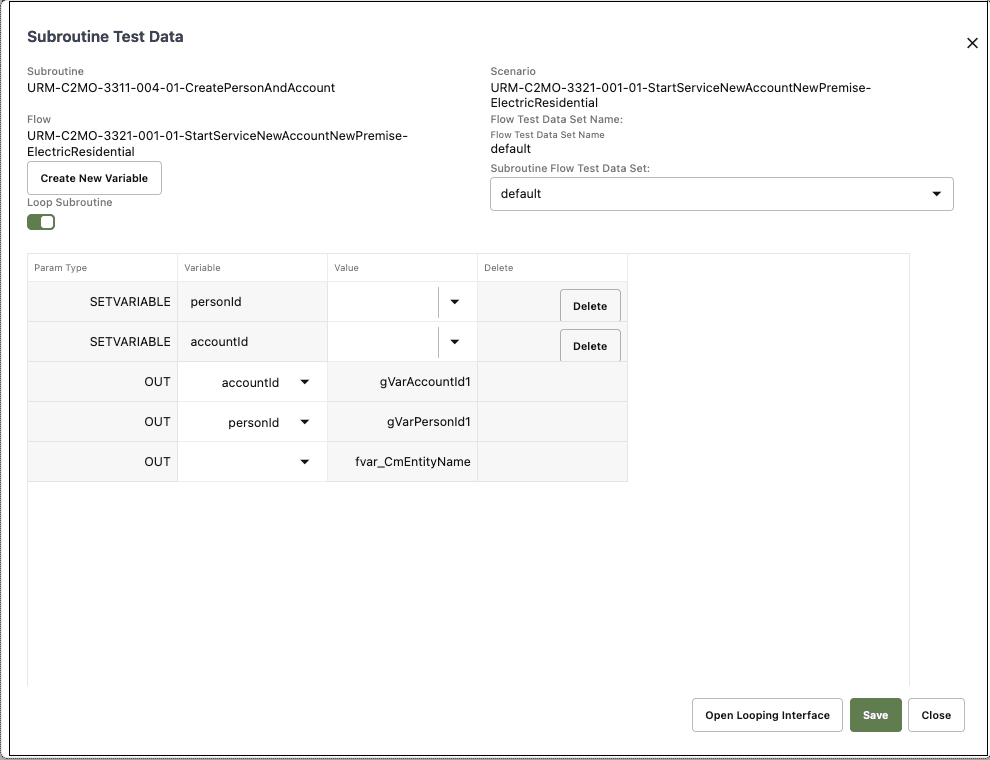
Open Looping Interface provides the following options:
- Maximum Number of Iterations: Represents the maximum number of iterations that the subroutine will be run for, irrespective of the exit criteria specified. This is useful in scenarios where the subroutine can wait but not run indefinitely (either due to wrong test data/unexpected application behavior). Use this option to run the subroutine a fixed number of times.
Example: If the subroutine creates a person entity in the application, specify the value 10 to run the subroutine 10 times resulting in creation of 10 person entities in Oracle Utilities Customer Cloud Service.
- Incrementor Type: Indicates if the loop incrementor would be a number or a date-time or list variable based, user can choose date as incrementor in case the subroutine creates meter reads for a meter and user wants to run the subroutine to create meter reads in a certain date range. The value of this incrementor sis available for usage in the subroutine flow, through the use of “incrementor” variable.
- Initial Number/Initial Date-Time: Based on the Incrementor Type selected, specify the starting number or the starting date-time to be used. This is not applicable for list variable based looping.
- Increment Value: Based on the Incrementor Type selected, specify the value by which the initial number/date should be incremented by (either a number or in days, hours, minutes and seconds). This is not applicable for list variable based looping.
Figure 8-31 Subroutine looping interface
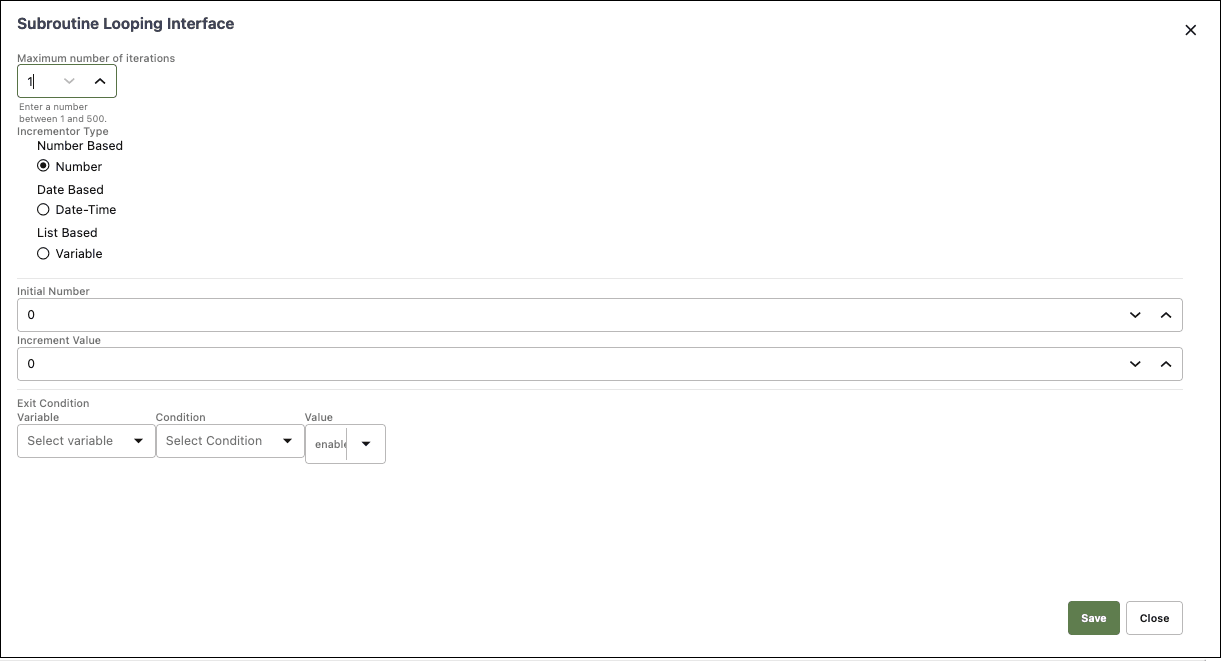
- Exit Condition: The exit condition controls when the subroutine loop would end before the Maximum Number of Iterations. This is not applicable for list variable based looping. Specify the exit condition as follows:
- Variable: Can be either based on a value of the incrementor variable or any OUT variable of the subroutine. An OUT variable of a subroutine can be used if the subroutine loop should be terminated after a particular value is available in the selected variable.
Example: We may expect that the subroutine loop should terminate if a specific value is returned in the response element of the subroutine flow. This value can be stored in an OUT variable of the subroutine flow and can be used here.
- Condition: Specifies if the value of variable should be less than, greater than, equal to etc. of the value that is specified for the Exit Condition.
- Value: The value that the variable is compared with using the condition specified above, to check if the loop needs to be terminated or continued.
Example: Assuming that the Incrementer Type was number and Initial value was 1 and Increment Value was 1 then the below values for the Exit Condition means that the subroutine is looped until the Incrementer value is equal to 5.
Variable: “Incrementer” Condition: “equals to” Value: “5”
The incrementer is a global variable that can used for setting incrementing test data in the flow.
- Variable: Can be either based on a value of the incrementor variable or any OUT variable of the subroutine. An OUT variable of a subroutine can be used if the subroutine loop should be terminated after a particular value is available in the selected variable.
Note:
To specify the exit condition value when using a date, the date format to be specified is the same as the initial date format. To use the incrementer date as an input to a test data field, the date format may be converted to suite the test data needs, using the delivered functions in the COREDATETIMELIB or if necessary, a custom function may be created.- List variable based looping: Subroutine looping can be used to iterate through a list of values stored in a variable.
Example: A list of values retrieved from a component's response, such as accountIds retrieved using a search component. The setVariableFromResponseList function from CORERESPONSEUTILIB can be used to retrieve a list of values from the response into a variable.
- After the incrementor type is set as “Variable” in the Subroutine looping interface GUI, the select variable field will be enabled.
- Select the variable containing the list of values that need to be iterated through, as part of the subroutine looping runs. Click Save to set the subroutine looping based on list values in a variable.
- The subroutine iterations will continue until the list of values in the variable is exhausted or until it reaches the maximum number of iterations specified, which ever comes first.
- For each iteration through the list of values, the value corresponding to the iteration from the list will be automatically stored in the variable “gvar_list_loopvar” that can be used as input to any component within the subroutine flow. This variable is automatically created as an IN variable for the subroutine flow as and when the looping is defined using the list variable option in the subroutine looping interface.
Example: If the subroutine looping is defined using a list variable that holds a set of account IDs, the gvar_list_loopvar will hold a specific ID of the account that is being used/processed as part of a specific subroutine loop.