Runtime Configuration for Flow Run
A test flow is run using flow configuration sets and user flow configuration sets that contain the required properties, such as URL of the environment against which the flow to be run, username/password to be used, etc.
The flow configuration set includes configuration applicable for a particular environment. It is expected that the flow level configuration sets do not contain any user specific properties, thereby allowing many users to use a single flow configuration set.
The user configuration sets, on the other hand, are specific to each user and typically contain user-specific properties, such as the username/password used to connect to an environment.
It is expected that customers setup some generic flow configuration sets with common runtime properties and users have their personal user configuration sets that contain their credentials. While running a test flow/flow set, specify a flow configuration set and a user configuration set in combination to get generic runtime properties and user specific properties to be used for test flow/flow set run.
Note:
Configuration in the user configuration sets overrides configuration in the flow configuration if the same parameter is defined in both the configuration sets.The properties under flow and user configuration sets are categorized to make it easier to identify specific properties applicable for your testing.
The following properties are available by default:
- Base Category: Lists the properties that are common for SOAP and REST based web services. This category is further divided into the following:
- Authentication Properties
- Application URL: The common web service’s end point URL of the application that is being tested needs to be specified against this property.
Note that for Oracle Utilities Testing Accelerator that is available as part of Oracle Utilities Enterprise cloud services, the corresponding environment's URL is predefined within Oracle Utilities Testing Accelerator. Users need not provide the Application URL for the same. However, users can provide the user name and password for authentication.
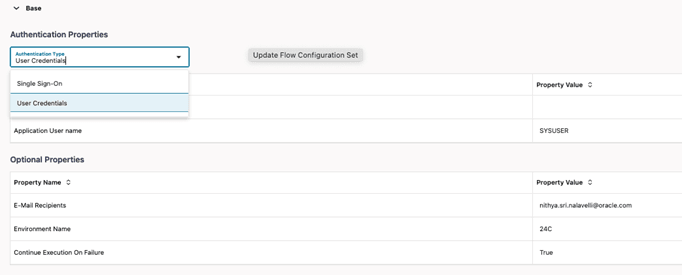
- Authentication Type: Select User Credentials based authentication from the Authentication Properties drop-down list to provide the Application User Name and Application User Password. This option uses basic authentication for web service authentication with the application being tested.
If the Authentication Type is set as “Single Sign-On”, then the username and password need not be provided. The Single Sign-On federated authentication is used for web service authentication with the application being tested. Selecting the Single Sign-On option automatically removes the username and password from the view and sets the SSO Federated Login to “true”.
This parameter can be set to “Single Sign-On” only in Oracle Utilities Testing Accelerator that is available as part of Oracle Utilities Enterprise cloud services. For Oracle Utilities Testing Accelerator on-premises installations, this option cannot be used.
- Application URL: The common web service’s end point URL of the application that is being tested needs to be specified against this property.
- Authentication Properties
Figure 8-40 Flow run authentication properties
- Application User Name: The user name for authentication of the web services of the application being tested needs to be specified here, if the Authentication Type is “User Credentials”.
- Application User Password: The password corresponding to the above application user name for authentication of the web services of the application being tested needs to be specified here, if the Authentication Type is “User Credentials”.
- SSO Federated Login: In the flow configuration set or the user configuration set, the Single Sign On Federated Login parameter can be set to “true”, in which case, the web service request from Oracle Utilities Testing Accelerator to the corresponding Oracle Utilities cloud service will use the current user’s Single Sign On authentication, implicitly. This is automatically set to “true” if the Authentication Type is set to “Single Sign On”.
- Other Properties (Optional)
- Continue Execution on Failure: Setting this flag to “true” will cause a flow run to execute all the components defined in the flow, even if one or more of the component steps fail. Setting this flag to “false” will ensure that the flow execution stops at the first component step that has failed, during a flow run.
- Environment Name: A custom free text environment name can be provided to denote the environment against which the flows are/will be run. This name appears in the summary report so users reviewing the report know the environment the flow/flows were run against.
- Email Recipients: The summary report is automatically emailed to the email addresses specified against this property. Multiple email addresses can be provided, separated by a “;”(semi-colon).
- REST Category: Lists the properties that are specific to REST based web services.
- isRest: Determines if the web service component used in the flow is REST or SOAP based component. Setting this to ‘true’ will ensure that the Oracle Utilities Testing Accelerator runtime triggers all component requests as REST requests during the flow run. Default is blank which is the same as ‘false’. This setting is applicable to components whose SETAPPTYPE is set to ‘WS’.
Note that this setting does not apply to Generic REST components. The Generic REST components are always run as REST service based components.
- hasOpenAPI: This setting will be applicable when IsRest is set to ‘true’. It is used to determine if the REST endpoint supports OpenAPI specifications. If the REST end point supports Open API, then this value needs to be set to ‘true’. Default is blank which is the same as ‘false’.
- Rest Authorization Type: This property is applicable to REST based components and allows for adding authorization type in the header. Supported values: [basic|none]. Default is ‘none’.
- Rest Proxy: In cases where a REST end point needs to be accessed through a proxy, this rest proxy can be set against this property.
- Rest Redirect: Setting this property to ‘true’ will enable Oracle Utilities Testing Accelerator to access the any end points that are a result of redirection of the REST API request. Default value is ‘false’.
- isRest: Determines if the web service component used in the flow is REST or SOAP based component. Setting this to ‘true’ will ensure that the Oracle Utilities Testing Accelerator runtime triggers all component requests as REST requests during the flow run. Default is blank which is the same as ‘false’. This setting is applicable to components whose SETAPPTYPE is set to ‘WS’.
- Custom Category: Lists all custom properties that have been added to the configuration set.
To create a custom property:
- Click Add Property in the Update Flow Configuration Set or Update User Configuration Set section.
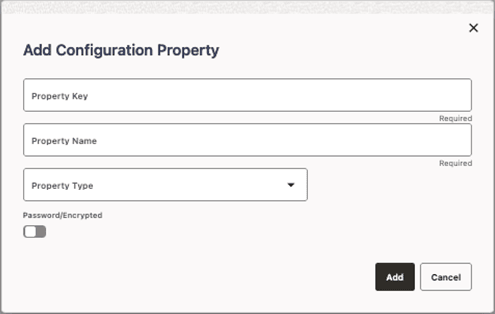
- Enter the following details:
- Property Key: An unique identifier for the property.
- Property Name: A descriptive name for the property.
- Property Type: Choose between “Text” and “Boolean” based on the type of property that is being added. Selecting “Boolean” as the property type will limit the user input in the flow and user configuration sets to just “true” or “false” that can be selected from a drop down.
- Password/Encrypted: Enable this flag to specify if the custom property needs to be encrypted. Enabling this flag will automatically encrypt any user input against the property in the flow and user configuration sets.
Figure 8-41 Configuration property settings
- Click Add to create the configuration property.
The remainder of this section focuses on managing the flow and user configuration sets: