Note:
- This tutorial requires access to Oracle Cloud. To sign up for a free account, see Get started with Oracle Cloud Infrastructure Free Tier.
- It uses example values for Oracle Cloud Infrastructure credentials, tenancy, and compartments. When completing your lab, substitute these values with ones specific to your cloud environment.
Configure Notifications for AIDP Workflow Jobs and Custom Scenarios Using OCI Notifications
Introduction
This tutorial explains how to configure notifications for AIDP workflow jobs using OCI Notifications and Events service. You will also learn how to implement custom notification logic using a Python program in an AIDP notebook.
OCI Notifications service uses a publish-subscribe model to deliver messages reliably and securely.
Objectives
By the end of this tutorial, you will be able to:
- Create an OCI Notification topic and subscription
- Configure event rules for AIDP workflow job status
- Receive email notifications for job failures
- Implement custom notification logic using Python
- Trigger notifications programmatically
Prerequisites
- Access to OCI Console
- AIDP workspace with workflow jobs
- Permissions to create Notifications and Events
- OCI config setup for Python SDK usage
Task 1: Create Notification Topic and Subscription
- Log in to OCI Console.
- Navigate to Developer Services → Notifications.
- Click Create Topic and provide:
- Name
- Description
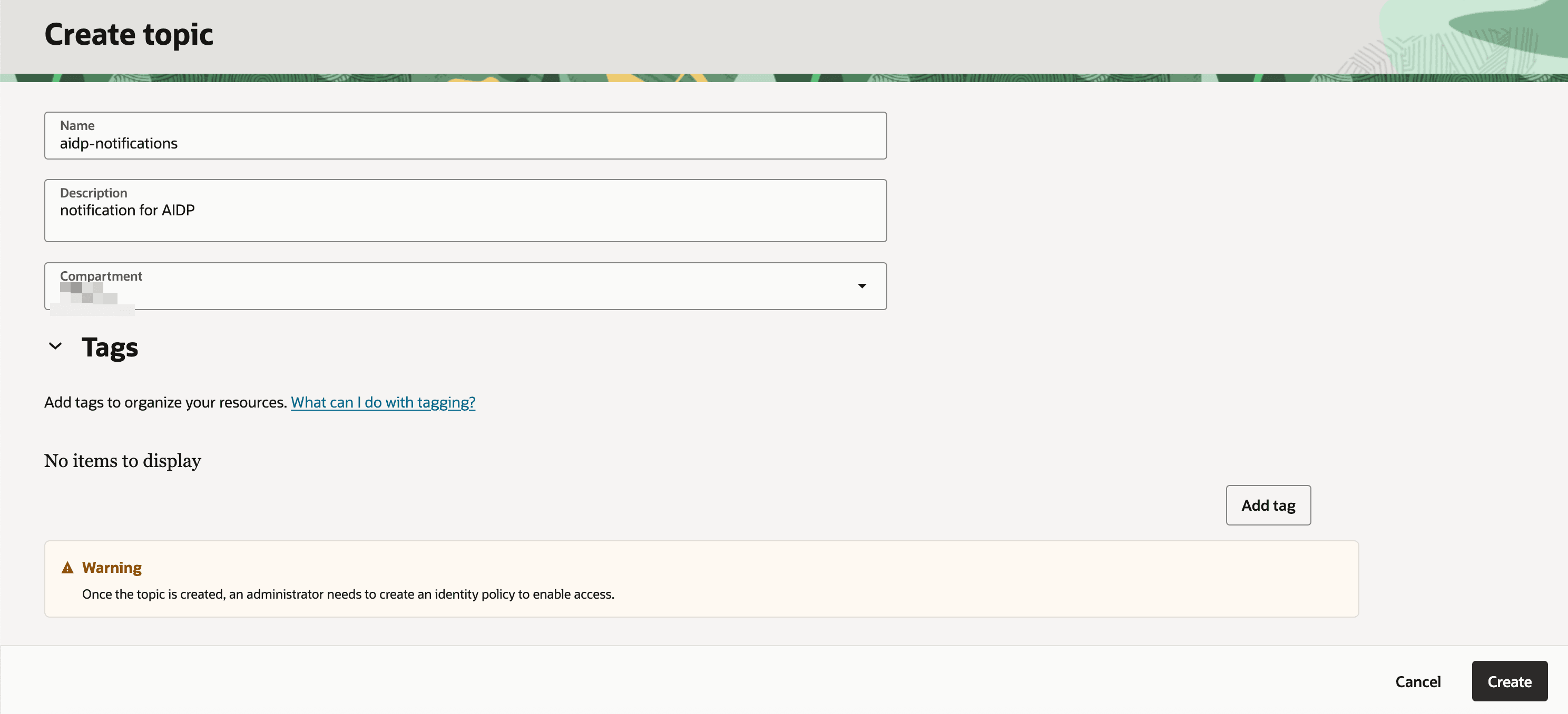
- Create a subscription:
- Protocol: Email
- Email: Your email address
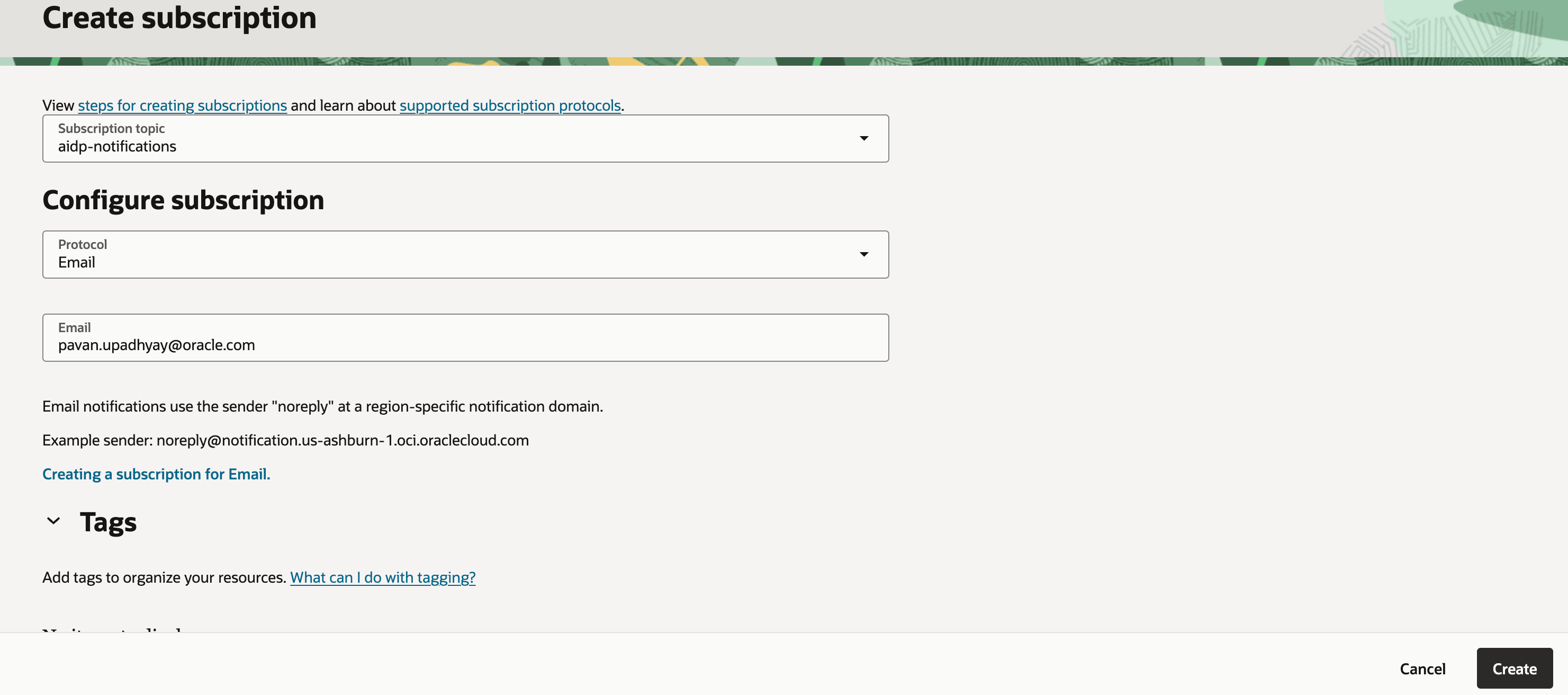
-
Check your email and confirm the subscription.
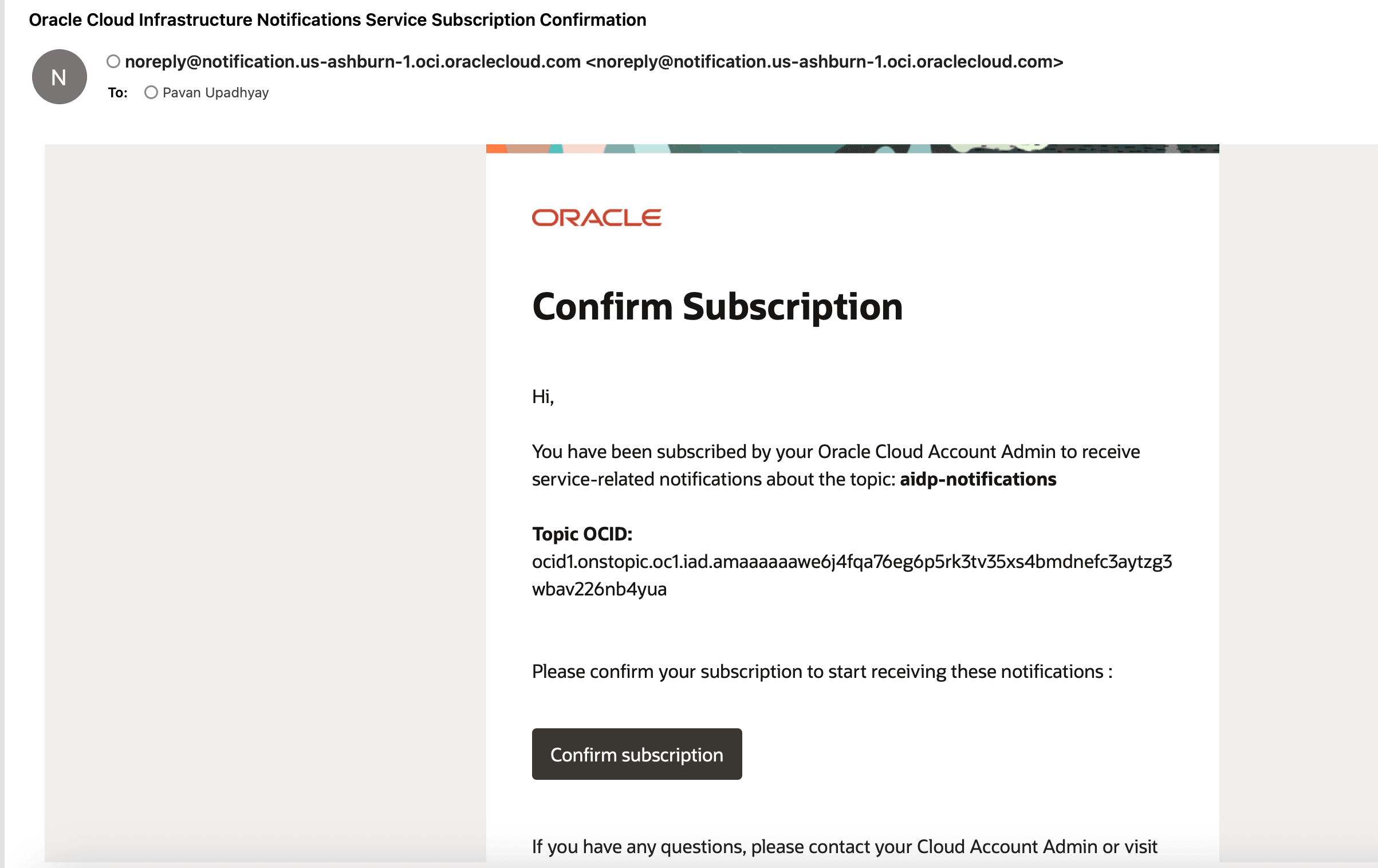
Note: Subscription status changes from Pending to Active after confirmation.
Task 2: Configure Event Rule for AIDP Workflow
- Navigate to Observability & Management → Events Service → Rules.
- Click Create Rule.
- Configure:
- Service: Intelligent Data Lake
- Event Type: Run Job - End
- Attribute Name1 : jobKey
- Attribute values1: Keep aidp workflow id
- Attribute Name2 : jobStatus
- Attribute values2: Failed
- Set Action:
- Select Notification Topic created earlier
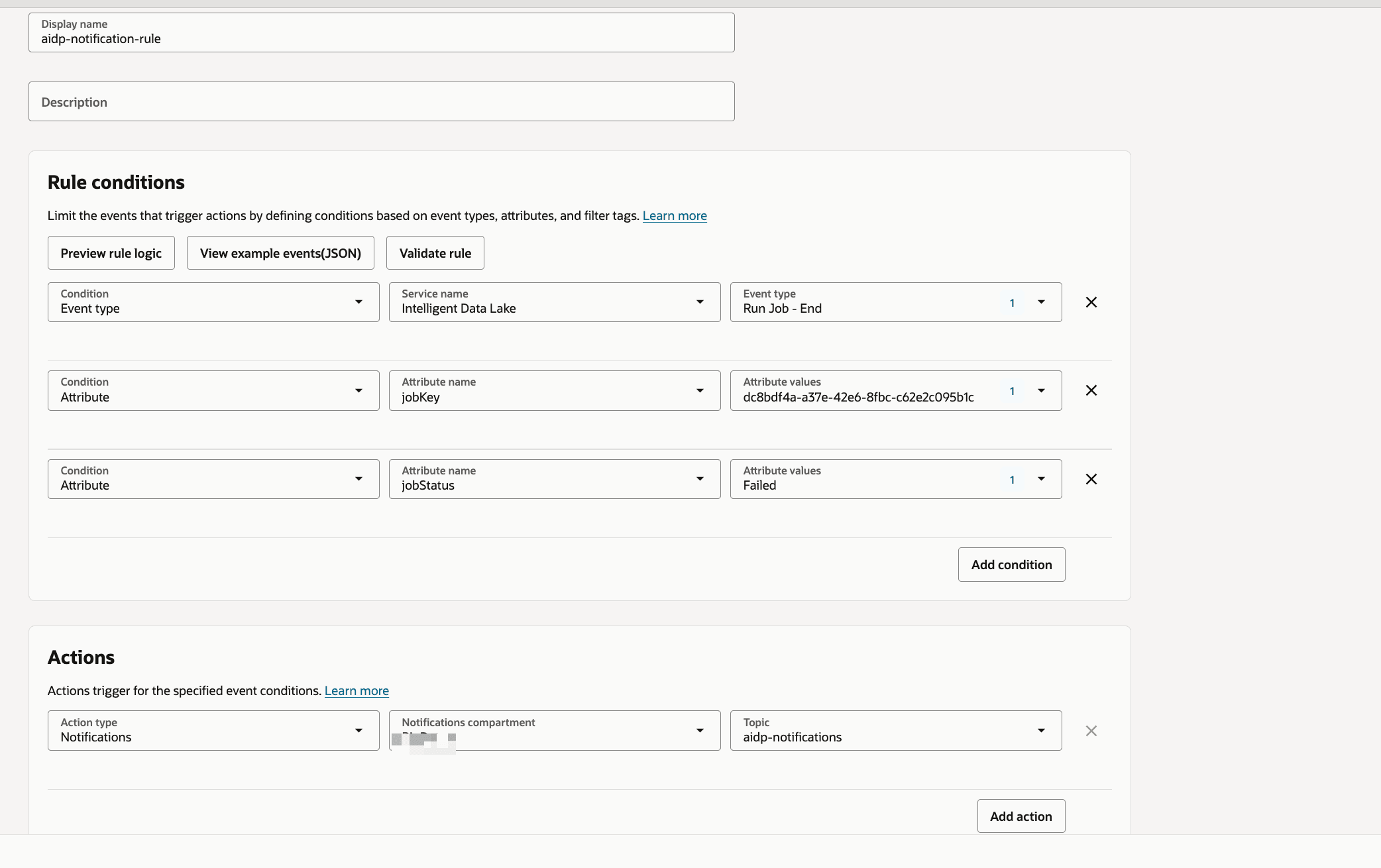
Tip: You can customize rules for other statuses like Success or Running.
Task 3: Validate Email Notification
- Trigger or run a workflow job.
- Force a failure scenario if needed.
-
Check your email inbox.
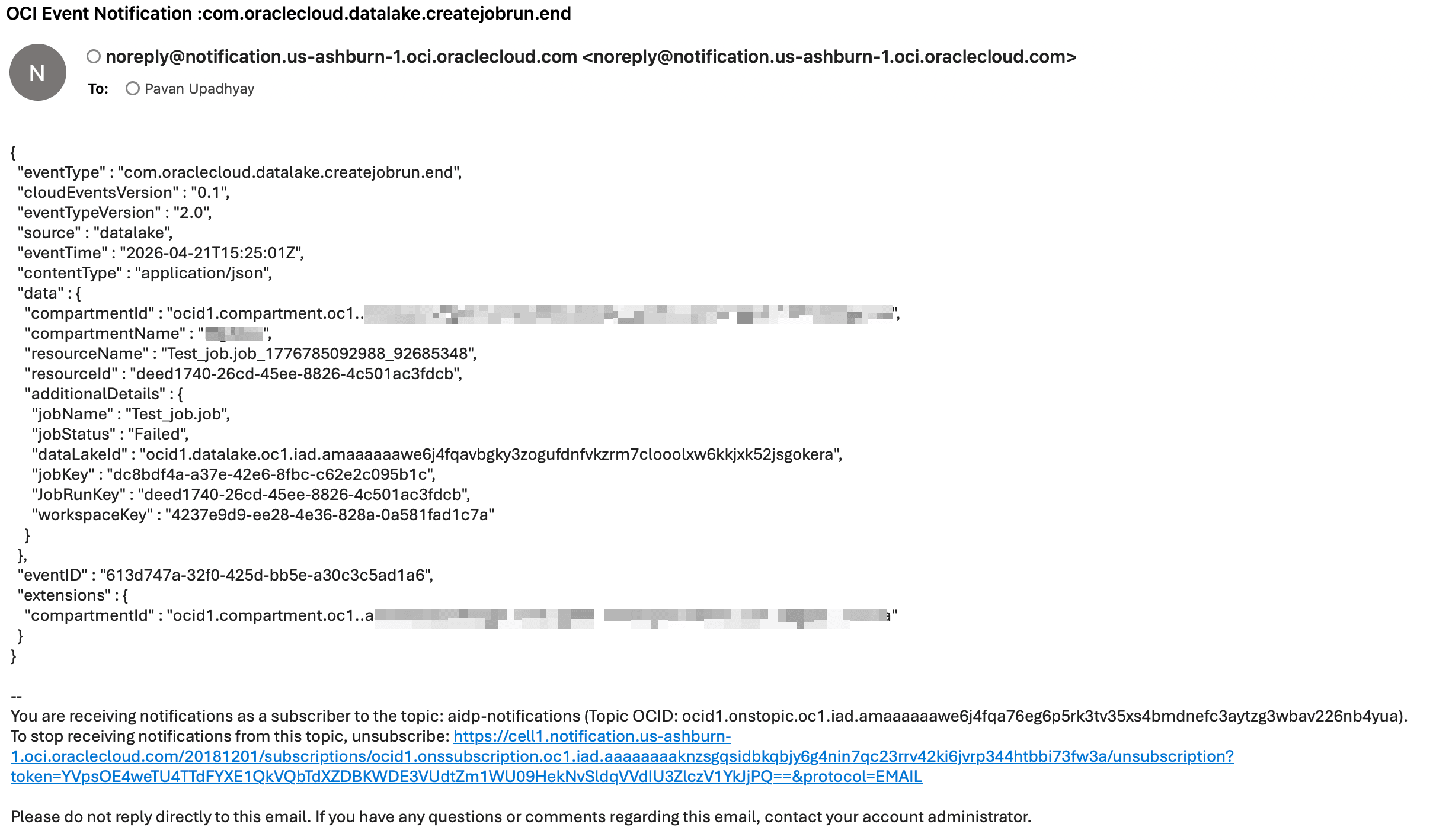
Note: Notification includes job details like job name and status.
Task 4: Implement Custom Notification Using Python
Below is a sample Python program to send notifications using OCI SDK.
import oci
from oci.ons.models import MessageDetails

config = oci.config.from_file("~/.oci/config", "DEFAULT")
client = oci.ons.NotificationDataPlaneClient(config)

topic_id = "<your_topic_ocid>"

message_details = MessageDetails(
    title="Test Notification",
    body="Hello from AIDP!"
)

response = client.publish_message(
    topic_id=topic_id,
    message_details=message_details
)

print("Message sent:", response.data.message_id)
Task 5: Advanced Custom Notification Class
import oci
import logging
import time
from typing import List, Optional, Dict

logger = logging.getLogger("OCI_Notifier")
logger.setLevel(logging.INFO)

handler = logging.StreamHandler()
formatter = logging.Formatter(
    "%(asctime)s - %(name)s - %(levelname)s - %(message)s"
)
handler.setFormatter(formatter)
logger.addHandler(handler)

class OCINotifier:
    def __init__(
        self,
        topic_id: str,
        config_file: str = "~/.oci/config",
        profile: str = "DEFAULT",
        max_retries: int = 3,
        retry_delay: int = 2,
    ):
        """
        Initialize OCI Notification client

        Args:
            topic_id: OCI Notification Topic OCID
            config_file: Path to OCI config
            profile: Config profile name
            max_retries: Retry attempts
            retry_delay: Delay between retries (seconds)
        """
        self.topic_id = topic_id
        self.max_retries = max_retries
        self.retry_delay = retry_delay

        try:
            self.config = oci.config.from_file(config_file, profile)
            self.client = oci.ons.NotificationDataPlaneClient(self.config)
            logger.info("OCI Notifier initialized successfully")
        except Exception as e:
            logger.error(f"Failed to initialize OCI client: {e}")
            raise


    def send(
        self,
        title: str,
        message: str,
        metadata: Optional[Dict] = None,
    ) -> bool:
        """
        Send notification message

        Args:
            title: Notification subject
            message: Notification body
            metadata: Optional metadata dictionary

        Returns:
            bool: True if success, False otherwise
        """

        payload = {
            "title": title,
            "body": message,
        }

        if metadata:
            payload["metadata"] = metadata

        for attempt in range(1, self.max_retries + 1):
            try:
                response = self.client.publish_message(
                    self.topic_id,
                    payload
                )
                logger.info(
                    f"Notification sent successfully | "
                    f"Message ID: {response.data.message_id}"
                )
                return True

            except Exception as e:
                logger.error(
                    f"Attempt {attempt} failed: {str(e)}"
                )
                if attempt < self.max_retries:
                    time.sleep(self.retry_delay)
                else:
                    logger.error("Max retries reached. Notification failed.")
                    return False


def notify_success(notifier: OCINotifier, job_name: str):
    notifier.send(
        title=f"{job_name} SUCCESS",
        message=f"Job '{job_name}' completed successfully."
    )


def notify_failure(notifier: OCINotifier, job_name: str, error: str):
    notifier.send(
        title=f"{job_name} FAILED",
        message=f"Job '{job_name}' failed.\nError: {error}"
    )
Task 6: Call Custom Notification from AIDP Notebook
You can invoke the notification logic inside your workflow or notebook:
from notifier import notify_failure

notify_failure(notifier, "SampleJob", "Error details here")
Troubleshooting and Tips
Tip: Ensure OCI config file path is correct.
Note: Verify topic OCID and subscription status.
Tip: Use retries in custom notifier for reliability.
Next Steps
- Add Slack or HTTPS subscriptions
- Extend notifications for success events
- Integrate with monitoring dashboards
Acknowledgements
- Author - Pavan Upadhyay (Principal Cloud Engineer), Saket Bihari (Principal Cloud Engineer)
More Learning Resources
Explore other labs on docs.oracle.com/learn or access more free learning content on the Oracle Learning YouTube channel. Additionally, visit education.oracle.com/learning-explorer to become an Oracle Learning Explorer.
For product documentation, visit Oracle Help Center.
Configure Notifications for AIDP Workflow Jobs and Custom Scenarios Using OCI Notifications
G55968-01