Note:
- This tutorial requires access to Oracle Cloud. To sign up for a free account, see Get started with Oracle Cloud Infrastructure Free Tier.
- It uses example values for Oracle Cloud Infrastructure credentials, tenancy, and compartments. When completing your lab, substitute these values with ones specific to your cloud environment.
Configure Private Service Access (PSA) in Oracle Cloud Infrastructure to Securely Access Oracle Services from Your VCN
Introduction
Oracle Cloud Infrastructure (OCI) introduces Private Service Access (PSA), a new networking construct that provides private IP connectivity to OCI Services (including APIs, Object Storage, and Yum repositories) directly within your Virtual Cloud Network (VCN). With PSA, workloads can securely reach OCI Services without traversing the public internet, while continuing to use the same familiar FQDNs.
Until now, customers had two main options for private connectivity. The Service Gateway (SGW) made it possible to access the Oracle Services Network (OSN) from a private VCN, but it relies on public IP addressing and offers broad, all-or-nothing access. On the other hand, many services introduced private endpoints to deliver more isolated access, but these had to be configured on a per-service basis, creating complexity at scale.
PSA bridges these approaches by combining the best of both worlds:
-
A unified, VCN-native model for private access to multiple OCI Service APIs.
-
Private IPs inside your VCN mapped transparently to the service FQDNs you already use.
-
Per-service access control, making it possible to align with security and compliance requirements without application changes.
In this tutorial, you will learn how to configure PSA in your VCN, validate private connectivity by testing access to an OCI Service API (such as Object Storage, Oracle Yum, ZPR api, etc), and confirm that the traffic stays on private IPs rather than using the public internet. By the end, you will understand how PSA compares to Service Gateway and private endpoints, and how to adopt it as part of a secure, modern OCI networking strategy.
Why is this Tutorial Essential?
Private connectivity to Oracle services has always been possible in OCI, but the options have come with trade-offs. The Service Gateway gave customers a simple way to reach the Oracle Services Network, yet it still relied on public IPs and only allowed broad access. Service-specific private endpoints offered stronger isolation, but required you to deploy and manage them individually, adding operational overhead as you scaled.
Private Service Access (PSA) fills the gap by providing a unified, VCN-native solution for accessing OCI Service APIs. It ensures traffic stays on private IPs, enforces per-service access control, and preserves the same FQDNs your applications already use.
This tutorial is essential because it shows you how to configure PSA from end to end, validate that your workloads connect to OCI Service APIs without touching the public internet, and understand how PSA compares with existing approaches. By completing it, you’ll gain the foundation to adopt PSA confidently in your own OCI environments.
Architecture
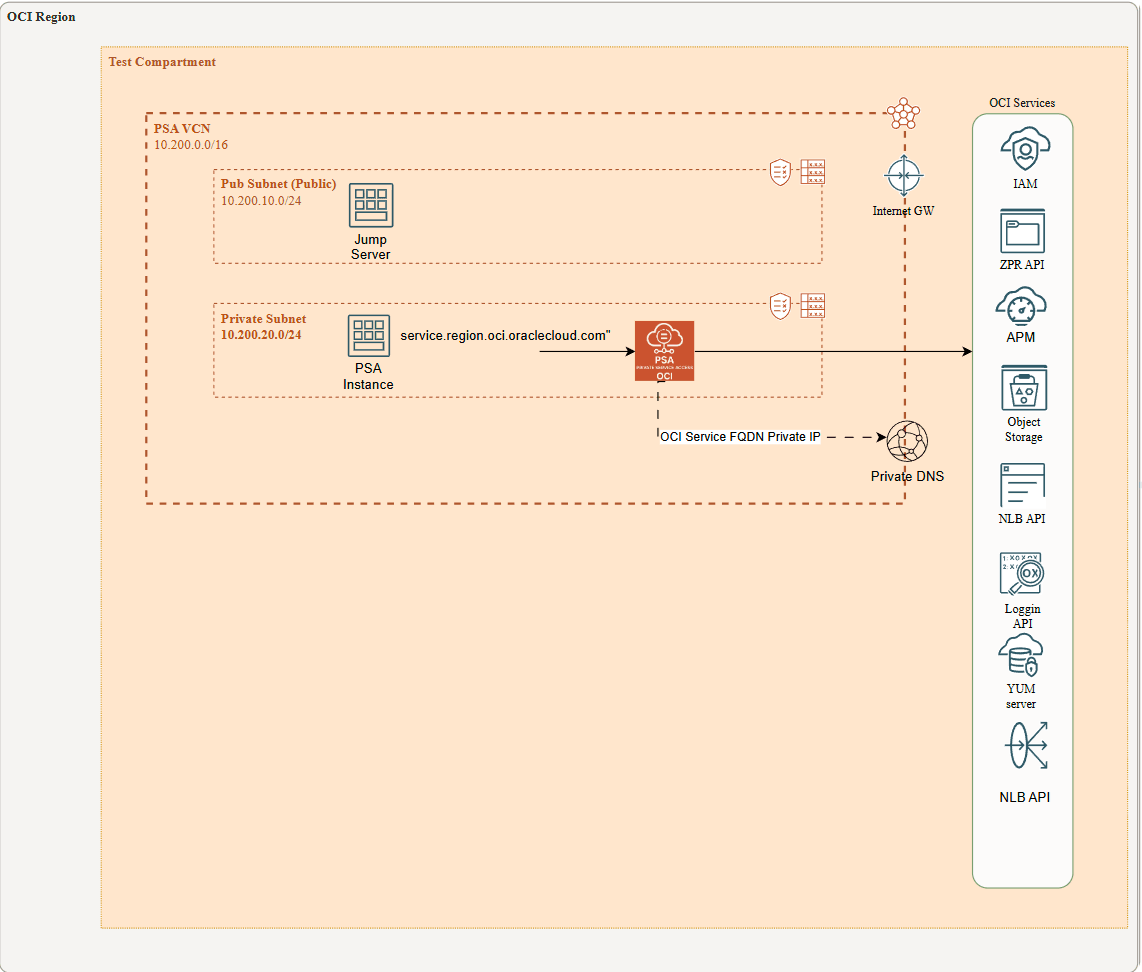
This architecture shows a client virtual machine (VM), referred to as the PSA Instance, running in a private subnet with no Internet access (through IGW or NAT GW) and no connectivity to OCI services via a Service Gateway. Instead, the VM uses Private Service Access (PSA) to reach OCI public services. A jump server in a public subnet is used to connect to the PSA Instance via ssh during the tests.
When a PSA endpoint is created, the service automatically updates the VCN’s private DNS resolver by adding the fully qualified domain names (FQDNs) of the target OCI public services to the private views and mapping them to the PSA service’s private IP address. Likewise, when the PSA endpoint is deleted, those FQDNs are removed. Examples include yum.eu-madrid-1.oci.oraclecloud.com, network-load-balancer-api.eu-madrid-1.oci.oraclecloud.com, and others.
Objectives
By the end of this tutorial, you will:
- Understand how Private Service Access (PSA) enables private subnet workloads to securely connect to OCI public services.
- Learn how PSA integrates with VCN private DNS to automatically map service FQDNs to private IPs.
- Deploy and configure a PSA endpoint in Oracle Cloud Infrastructure.
- Verify connectivity from a private VM through PSA to selected OCI services.
Prerequisites
-
An active OCI tenancy. You must have the necessary permissions to create and manage network resources in OCI.
-
A basic understanding of Linux Operating System, OCI, Oracle Linux, including how to install and configure software in Linux.
-
A good understanding about how to use the OCI Console to create and manage network resources.
-
A good understanding about OCI CLI tool.
Task 1: Deploy Networking Component (VCN, Subnets, and VMs)
1.- Deploy a Virtual Cloud Network (VCN) with at least two subnets (Public and Private subnet) in your tenancy, using an IPv4 CIDR of your choice or following the recommended architecture. For more information, see:
2.- Deploy two linux VMs (Jump Server in public, PSA instance in private), one for each subnet. For more information, see:
Task 2: Test Jump Server VM to access PSA instance
We will use the Linux Jump Server VM as the access point to reach the VM hosted in the private subnet (the PSA Instance). As you know, VMs in private subnets are only reachable through their private IPs and have no Internet connectivity. To enable access, you must upload the SSH private key of the PSA Instance to the Jump Server. From there, you can initiate SSH connections to the PSA Instance. We recommend using SFTP to securely upload the key.
Once you upload the private key to jump server via SFTP, you ssh into jump server and:
ssh -i private_PSA_instance_ssh.prv 10.200.20.X ( your vm PSA instace ip)Note: If you encounter compatibility issues when using the SSH private key generated in OCI, you can convert it into the required format using a tool such as PuTTYgen (for Windows) or OpenSSL (for Linux/macOS). These tools allow you to transform the key between formats so it can be used seamlessly with your SSH client.
Refer to this documentation for puttyGen: PuttyGen
Task 3: Install OCI cli into PSA instance
Now that you are logged into the PSA instance, you need to install OCI CLI
Refer to this documentation for installing OCI CLI: OCI CLI install
Note that this PSA VM, hosted in a private subnet, will temporarily require internet access. We recommend adding a NAT Gateway to your VCN and creating a 0.0.0.0/0 route pointing to it.
Refer to this documentation for configuring and using NAT Gateway: OCI Nat Gateway
After the installation, it is very important to remove the NAT Gateway from the private subnet. The goal is to test the Oracle service from a strictly private subnet with no public access, either ingress or egress.
Task 4: Add the PSA services to test
In this task we are going to add a bunch of PSA services to be tested later on from the private PSA instance via OCI CLI api.
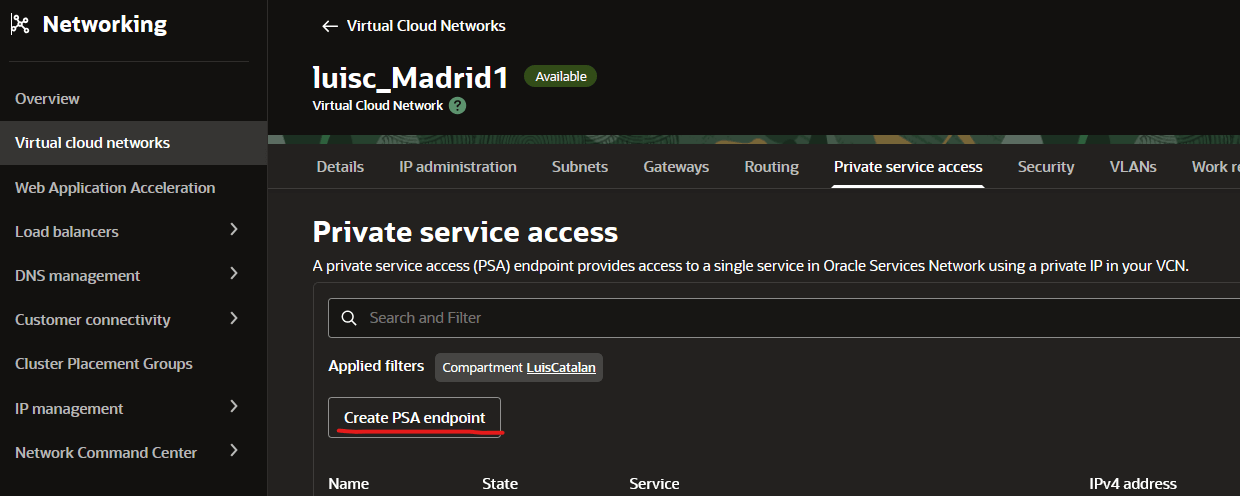
1.- Go to OCI Console: Networking-VCN
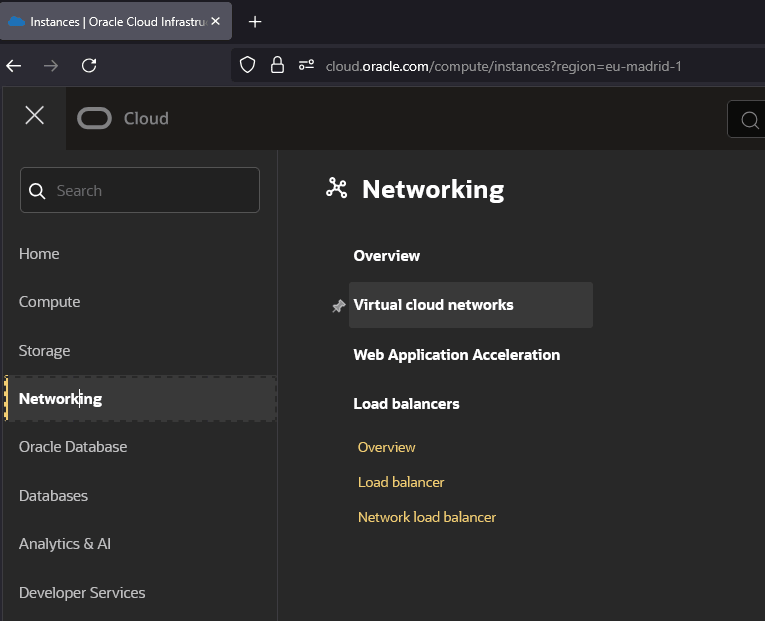
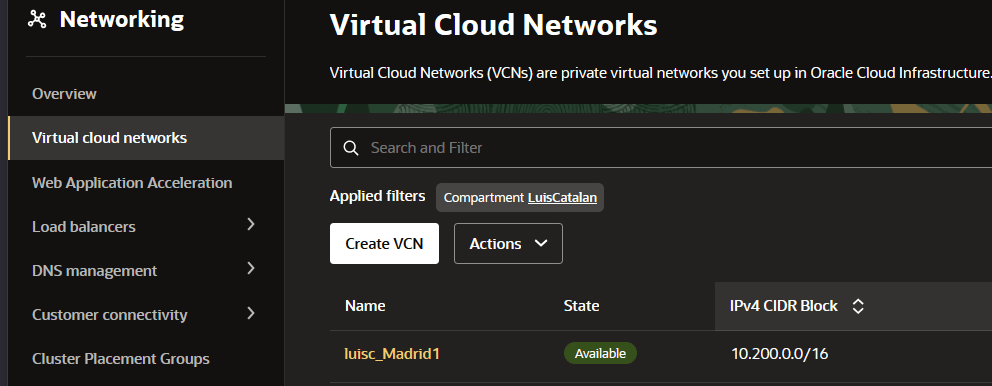
2.- Click “Virtual Cloud Networks” and choose the VCN where PSA private instance is.
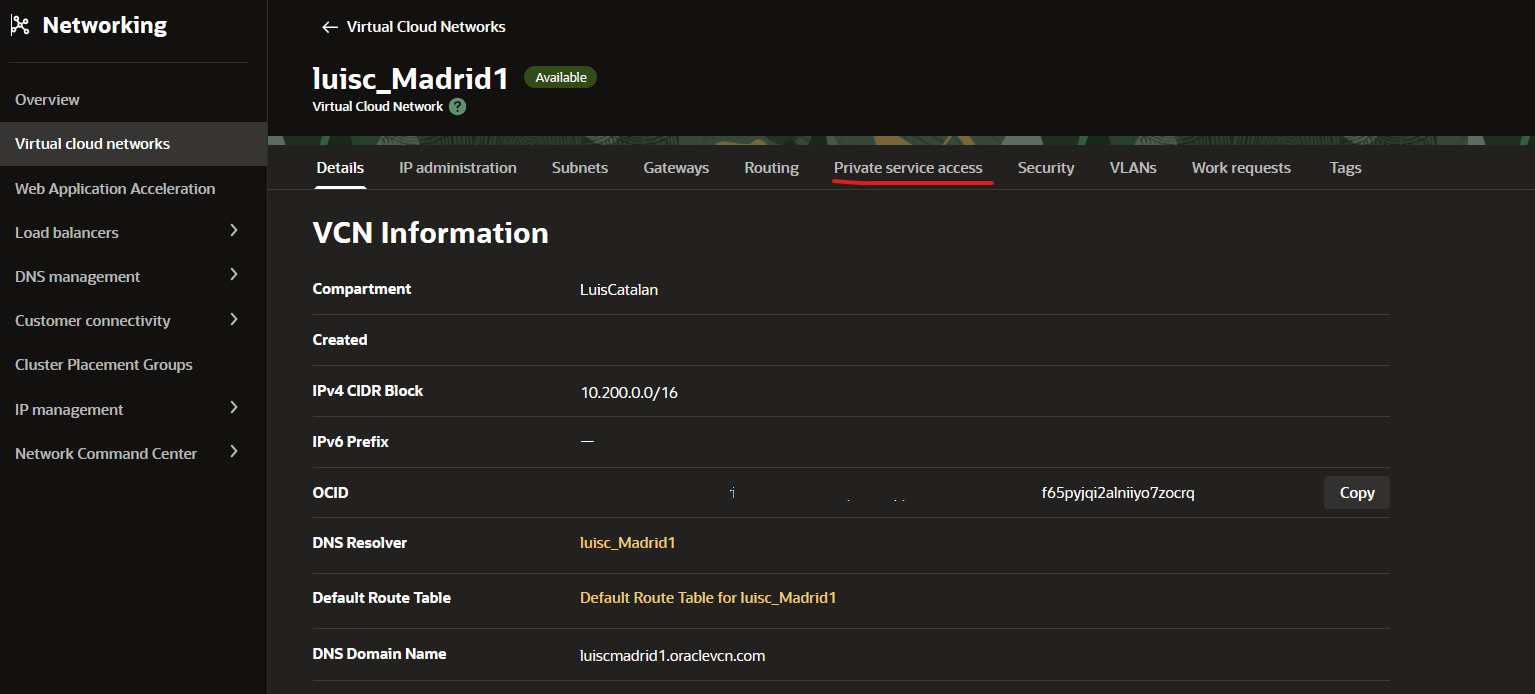
3.- Within VCN, Choose Private Service Access.
4.- Press Create PSA endoint button.
5.- Once in the create PSA menu, you will need to choose a name for the PSA service, the compartment where it will be created, PSA type of service you want to create, the subnet Compartment and subnet where endpoint will be created. Additionally you can choose an automatic assign of private IP or manual. The final option is about Security. It is highly recommended assigning a ZPR security attribute or NSGs to allow the traffic toward that endpoint.
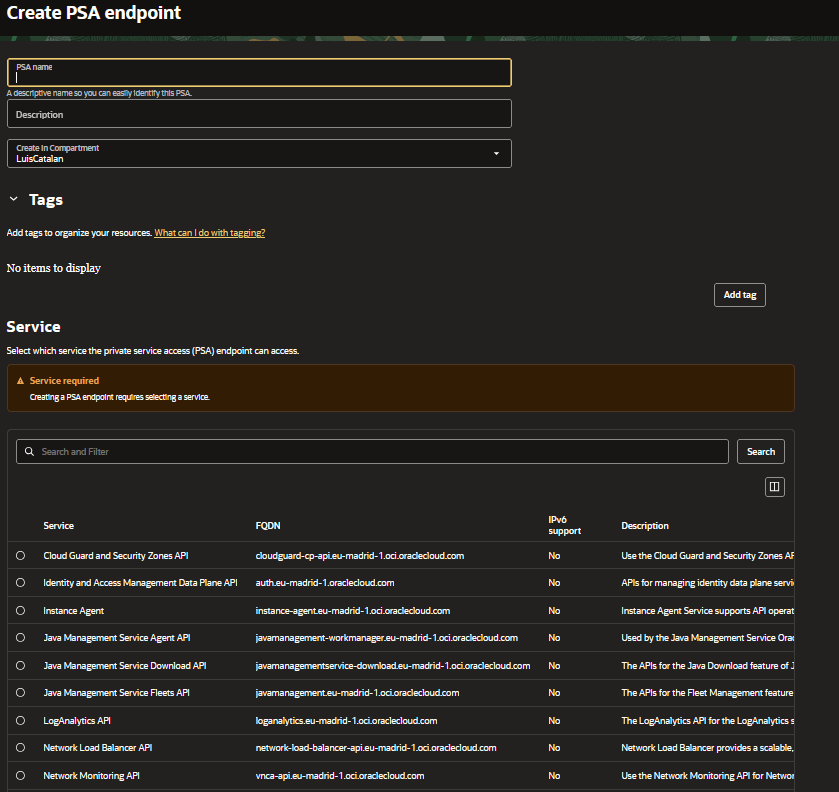
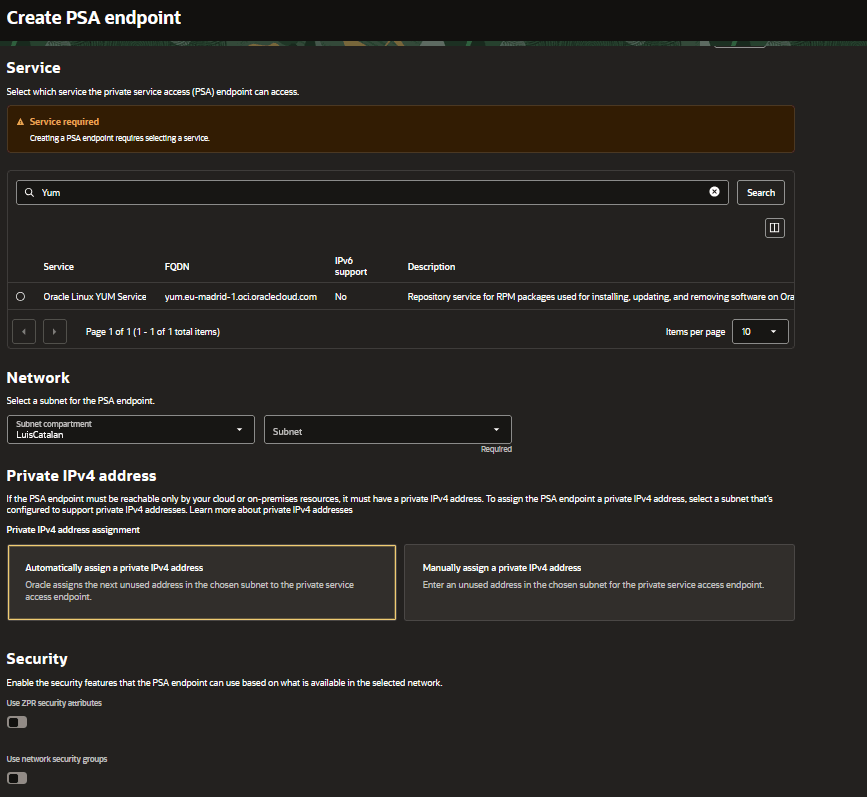
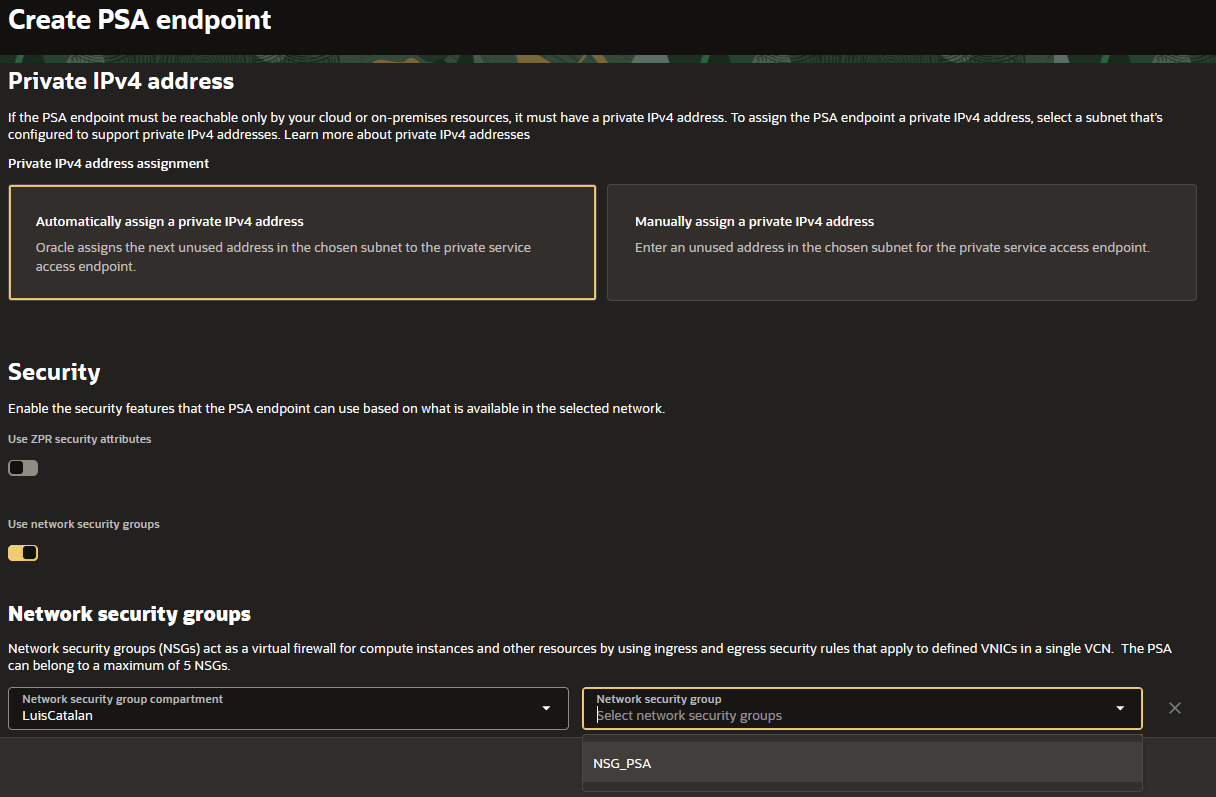
Once created, the PSAs will be displayed in the following list:
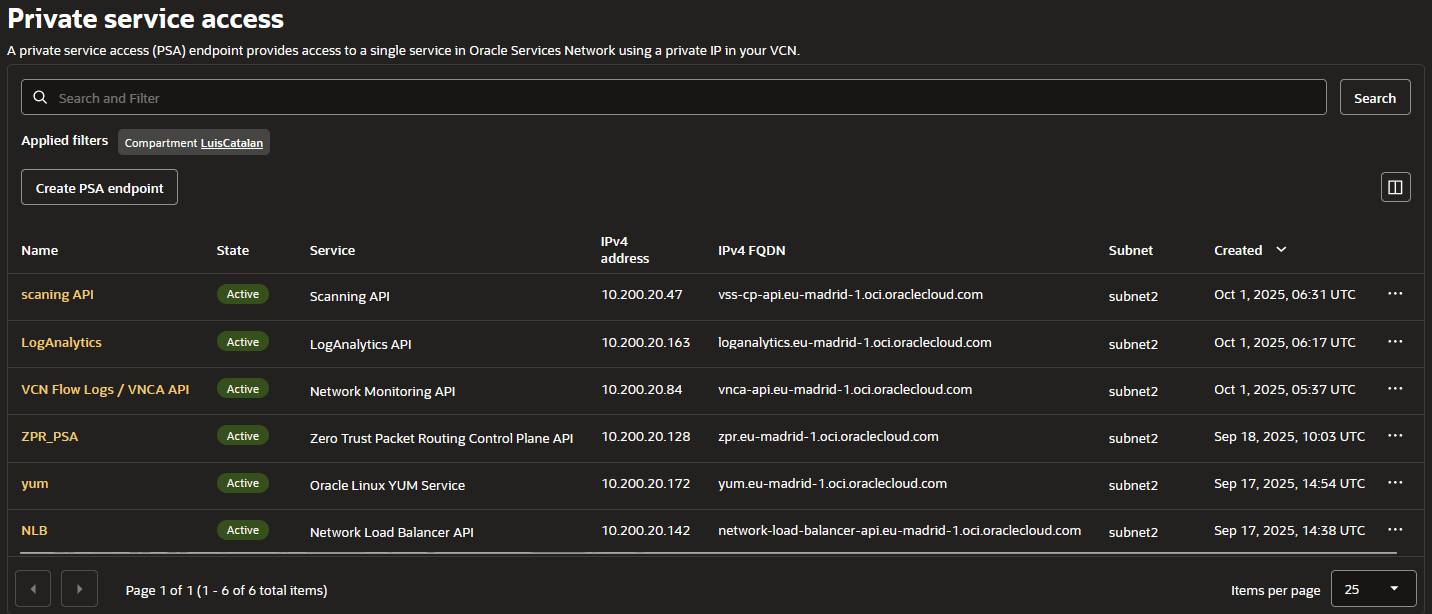
The PSA is assigned a private IP address from the subnet where it was created. This private IP can be either automatically assigned or manually chosen from the subnet, and in the console it is shown as ‘IPv4 address’. The PSA also has an associated FQDN (domain name) for the private service, shown in the console as ‘IPv4 FQDN’, which maps to the same private IP.
Task 5: Testing the PSA endpoint
Now we need to test the PSA endpoint. In this example, we’ll test the YUM server and the Zero Trust Packer Routing Control Plane API.
1.- First, connect to the jump server via SSH.
2.- From the jump server, SSH into the private PSA instance.
Note: This instance does not have internet access and is not connected to either a Service Gateway or a NAT Gateway.”
[opc@jumpserver ~]\$ ssh -i private_OCI_v2_ssh.prv 10.200.20.67

[opc@privateinstace-psa-test ~]\$
As a pre-check we are going to test if the IPv4 FQDN is actually pointing toward its private IP
dig +short yum.eu-madrid-1.oci.oraclecloud.com
10.200.20.172
If you see a public IP instead of a private IP, then, something went wrong. For further information about IPv4, IPv4
Now, let call yum update
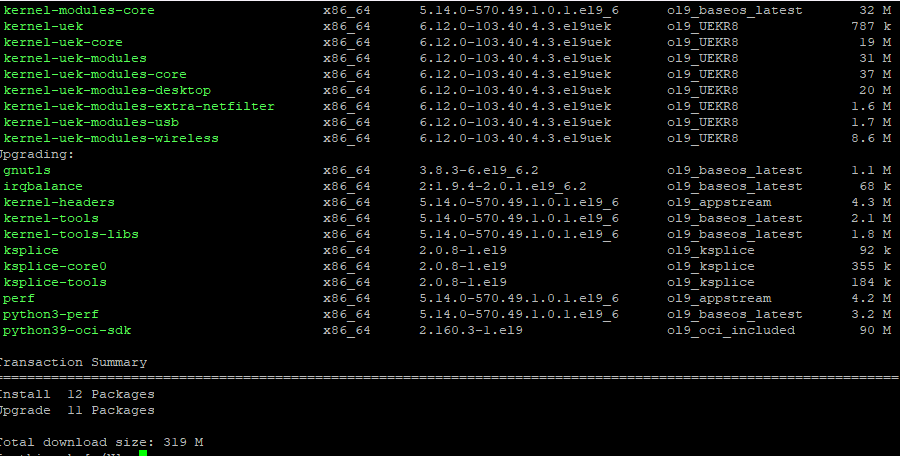
Yum service is going through its PSA private endpoint ‘yum.eu-madrid-1.oci.oraclecloud.com’ at 10.200.20.172 !!
Now the ZPR one:
dig +short zpr.eu-madrid-1.oci.oraclecloud.com
10.200.20.128
Now, lets list the number of ZPR policies in a given tenancy
oci zpr zpr-policy list --compartment-id ocid1.tenancy.oc1..aaaaaaaabh2affulc4dt4tqs7lbojyhqi6hzXXXXXX --region eu-madrid-1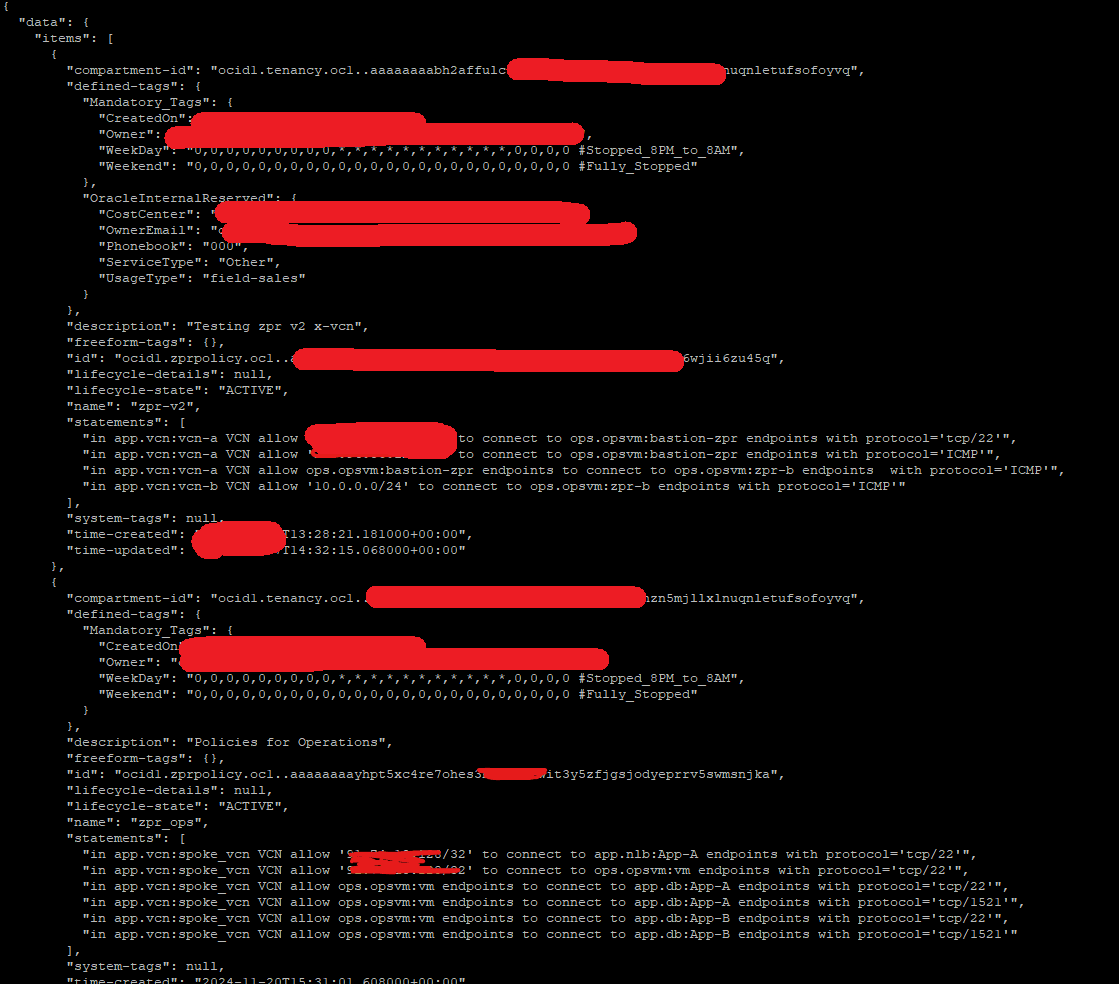
Conclusion
In this tutorial, you learned how Private Service Access (PSA) enables workloads in private subnets to securely reach Oracle Cloud Infrastructure public services without requiring Internet or Service Gateway connectivity. We walked through the configuration of a PSA endpoint, the role of the VCN’s private DNS in mapping service FQDNs to private IPs, and how to access the private instance through a Jump Server.
PSA is important because it gives you greater control and flexibility over which services are exposed through private endpoints. Instead of opening broad access, you can define exactly which OCI public services are reachable, making your architecture more secure and more granular in terms of access control.
By completing the setup and verification steps, you have seen how PSA provides a simple yet powerful way to enhance security while keeping traffic entirely within your VCN. With these foundations in place, you can now integrate PSA into more complex scenarios.
Related Links
Acknowledgments
- Authors - Luis Catalán Hernández (Cloud Infrastructure Networking Black Belt), Cristian Sarafoleanu (Cloud Infrastructure Networking Black Belt)
More Learning Resources
Explore other labs on docs.oracle.com/learn or access more free learning content on the Oracle Learning YouTube channel. Additionally, visit education.oracle.com/learning-explorer to become an Oracle Learning Explorer.
For product documentation, visit Oracle Help Center.
Configure Private Service Access (PSA) in Oracle Cloud Infrastructure to Securely Access Oracle Services from Your VCN
G51101-01