Train a Predictive Model Using AutoML in Oracle Autonomous AI Lakehouse
When you use data from Oracle Autonomous AI Lakehouse, you can use its AutoML capability to recommend and train a predictive model. AutoML analyzes your data, calculates the best algorithm to use, and registers a prediction model in Oracle Analytics so that you can make predictions on your data.
Using AutoML means that Oracle Autonomous AI Lakehouse does all of the hard work for you, so that you can deploy a prediction model without machine learning or artificial intelligence skills. The generated prediction model is saved in the Models area of the Machine Learning page. To predict data based on the new model, create a data flow and use the Apply Model step.
Before you start:
- Create a dataset based on the data in Oracle Autonomous AI Lakehouse that you want to make predictions about. For example, you might have data about employee attrition, including a field named ATTRITION indicating 'Yes' or 'No' for attrition.
- Make sure that the database user specified in the Oracle Analytics connection to Oracle Autonomous AI Lakehouse has the role
OML_Developerand isn't an 'admin' super-user. Otherwise, the data flow fails when you try to save or run it.
- For the Target, click Select a column, and select the data column containing the value you're trying to predict.For example, to predict employee attrition, you might select a field named ATTRITION indicating 'TRUE' or 'FALSE' for whether employees have left an organization or not.
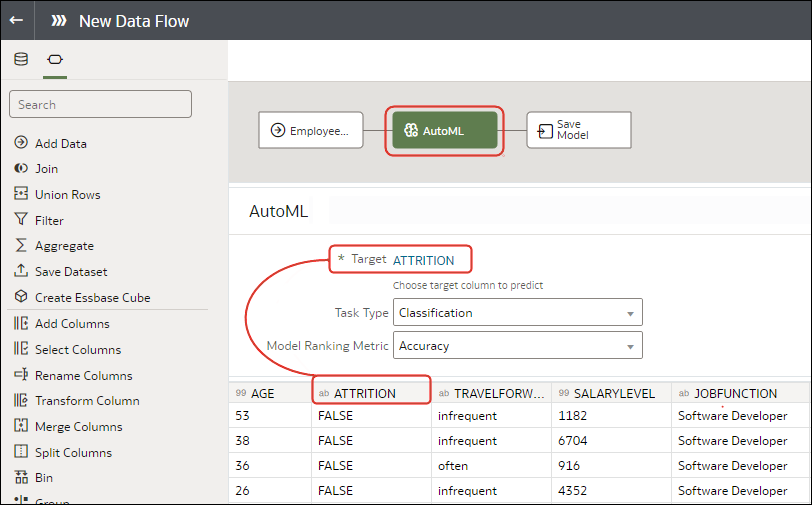
You can locate the model that Oracle Analytics generates on the Machine Learning page on the Models tab. Inspect the model to assess its quality. See Assess a Predictive Model's Quality. You can also refer to related datasets that are generated for models generated by AutoML. See What Are a Predictive Model's Related Datasets?.