Correlation Rules
When you create a Target application, the connector uses correlation rules to determine the identity to which Oracle Identity Governance must assign a resource.
Predefined Identity Rules
By default, the Google Cloud Platform Connector provides a complex correlation rule when you create a Target application. The connector uses this correlation rule to compare the entries in Oracle Identity Governance repository and the target system repository, determine the difference between the two repositories, and apply the latest changes to Oracle Identity Governance.
If required, you can edit the default correlation rule or add new rules. You can create simple correlation rules also. For more information about adding or editing simple or complex correlation rules, see Updating Identity Correlation Rule in Oracle Fusion Middleware Performing Self Service Tasks with Oracle Identity Governance.
The following block of code lists the default complex correlation rule for a Google Cloud Platform Connector application:
"ruleOperator": "OR",
    "ruleElement": [
        {
            "targetAttribute": "__UID__",
            "userAttribute": "GCP User GUID",
            "elementOperator": "Equals",
            "transformName": "None"
        },
        {
            "targetAttribute": "__NAME__",
            "userAttribute": "User Login",
            "elementOperator": "Equals",
            "transformName": "Tokenize",
            "transformParams": [
                {
                    "name": "Space Delimiter",
                    "value": "FALSE"
                },
                {
                    "name": "Token Number",
                    "value": "1"
                },
                {
                    "name": "Delimiters",
                    "value": "'@'"
                }
            ]
        }
    ]
}
The preceding complex rule consists of 2 rule elements that are joined by the rule operator OR.
The first rule element is:
__UID__ equals GCP User GUID.
-
__UID__ is an attribute on the target system that uniquely identifies the user account.
-
GCP User GUID is a field on the OIM User form that holds the unique ID of the Google Cloud Platform Connector user.
The second rule element is:
Tokenize (__NAME__) equals User Login.
-
Tokenize (__NAME__) is the name part in the email address of the Google Cloud Platform Connector account.
-
User Login is the field on the OIM User form.
Predefined Situations and Responses
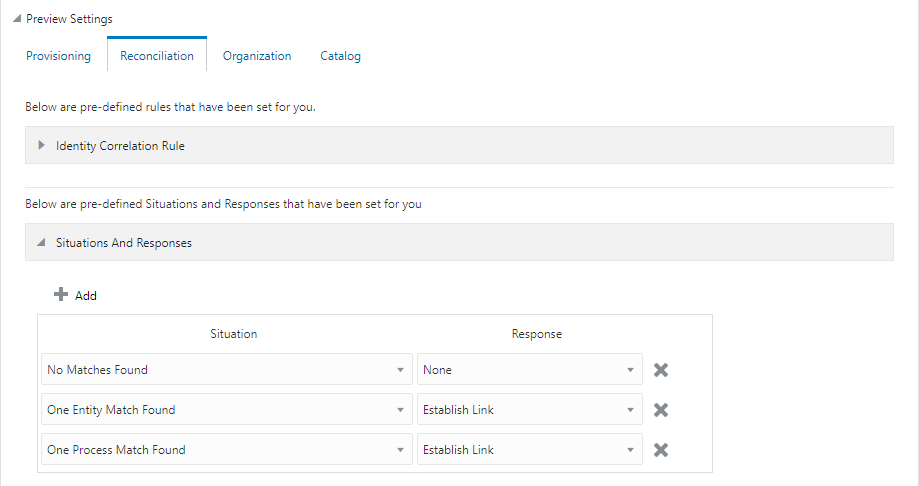
The Google Cloud Platform Connector provides a default set of situations and responses when you create a Target application. These situations and responses specify the action that Oracle Identity Governance must take based on the result of a reconciliation event.
Table 3-10 Predefined Situations and Responses for Google Cloud Platform Connector
| Situation | Response |
|---|---|
| No Matches Found | None |
| One Entity Match Found | Establish Link |
| One Process Match Found | Establish Link |
Figure 3-7 shows the situations and responses that the connector provides by default.
Figure 3-7 Predefined Situations and Responses for Google Cloud Platform Connector