3 Configuring the Connector
While creating a target application, you must configure connection-related parameters that the connector uses to connect to Oracle Identity Governance with your target system and perform connector operations. In addition, you can view and edit attribute mappings between the process form fields in Oracle Identity Governance and target system columns, predefined correlation rules, situations and responses, and reconciliation jobs.
3.1 Basic Configuration Parameters
These are the connection-related parameters that Oracle Identity Governance requires to connect to an Oracle Primavera application.
Note:
Unless specified, do not modify entries in the below table.
Table 3-1 Parameters in the Basic Configuration
| Parameter | Mandatory ? | Description |
|---|---|---|
| authenticationType | Yes |
Enter the type of authentication used by your Oracle Primavera target system. For this connector, the target system supports Basic credentials. This is a mandatory attribute while creating an application. Do not modify the value of the parameter. Default value: basic |
| username | Yes |
Enter the user name of the target system that you create for performing connector operations. Sample value: |
| password | Yes |
Enter the password of the target system user account that you create for connector operations. Sample value: |
| Host | Yes |
Enter the host name of the machine hosting your Oracle Primavera target system. This is a mandatory attribute while creating an application. Sample value: api.primavera.us |
| Connector Server Name | No | This field is blank. If you are using this connector with the Java Connector Server, then provide the name of Connector Server IT Resource here. |
| Port | No |
Enter the port number at which the target system is listening. Sample value: 443 |
| proxyHost | No | Enter the name of the proxy host used to connect to an external target. |
| proxyPassword | No | Enter the password of the proxy user ID of the target system user account that Oracle Identity Governance uses to connect to the target system. |
| proxyPort | No | Enter the proxy port number. |
| proxyUser | No | Enter the proxy user name. |
| SSL | No |
If the target system requires SSL connectivity, then set the value of this parameter to true. Otherwise set the value to false. Default value:true |
3.2 Advanced Settings Parameters
Note:
- Unless specified, do not modify entries in the below table.
- All parameters in the below table are mandatory.
Table 3-2 Advanced Settings Parameters
| Parameter | Mandatory | Description |
|---|---|---|
| Bundle Name | No |
This entry holds the name of the connector bundle. Default value:
|
| Bundle Version | No |
This entry holds the version of the connector bundle. Default value: 12.3.0 |
| Connector Name | No |
This entry holds the name of the connector class. Default value:
|
| relURIs | Yes |
This entry holds the relative URL of every object class supported by this connector and the connector operations that can be performed on these object classes. This is a mandatory attribute while creating an application. Default value:
|
| pollingInterval | Yes |
This entry holds the Polling time in milliseconds. Default value: 3000 |
| pollingCount | Yes |
This entry holds the Polling count in numbers for retry. Default value: 5 |
| httpHeaderContentType | No |
This entry holds the content type expected by the target system in the header. Default value: application/json |
| httpHeaderAccept | No |
This entry holds the accept type expected from the target system in the header. Default value: application/json |
3.3 Attribute Mappings
The following topic provides the attribute mappings details.
3.3.1 Attribute Mappings for the Target Application
The Schema page for a target application displays the default schema (provided by the connector) that maps Oracle Identity Governance attributes to target system attributes. The connector uses these mappings during reconciliation and provisioning operations.
The following table lists the user-specific attribute mappings between the process form fields in Oracle Identity Governance and Oracle Primavera target application attributes. The table also lists whether a specific attribute is used during provisioning or reconciliation and whether it is a matching key field for fetching records during reconciliation.
If required, you can edit the default attribute mappings by adding new attributes or deleting existing attributes as described in Creating a Target Application Creating a Target Application in Oracle Fusion Middleware Performing Self Service Tasks with Oracle Identity Governance.
Table 3-3 Default Attributes for Oracle Primavera Target Application
| Display Name | Target Attribute | Data Type | Mandatory Provisioning Property? | Provision Field? | Recon Field? | Key Field? | Case Insensitive? |
|---|---|---|---|---|---|---|---|
| Id | __UID__ | String | No | No | Yes | No | Not Applicable |
| Login ID | __NAME__ | String | Yes | Yes | Yes | Yes | Yes |
| Password | __PASSWORD__ | String | No | Yes | No | No | Not applicable |
| User Status | __ENABLE__ | String | No | No | Yes | No | Not applicable |
| Email Address | emailAddress | String | Yes | Yes | Yes | No | Not applicable |
| First Name | firstName | String | Yes | Yes | Yes | No | Not applicable |
| Last Name | lastName | String | Yes | Yes | Yes | No | Not applicable |
| User Type | userType | String | No | Yes | Yes | No | Not applicable |
| Company | Company | String | Yes | Yes | Yes | No | Not applicable |
| IT Resource Name | __ | Long | No | No | Yes | No | Not applicable |
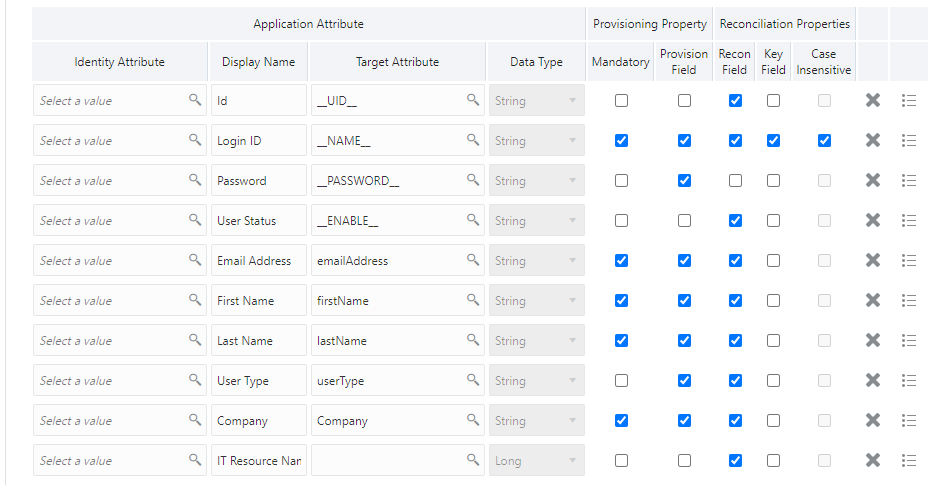
The following figure shows the default User account attribute mappings.
Figure 3-1 Default Attribute Mappings for Oracle Primavera User Account
Oracle Primavera Role Entitlement
The following table lists the roles forms attribute mappings between the process form fields in Oracle Identity Governance and Oracle Primavera target application attributes. The table lists whether a given attribute is mandatory during provisioning. It also lists whether a given attribute is used during reconciliation and whether it is a matching key field for fetching records during reconciliation.
If required, you can edit the default attribute mappings by adding new attributes or deleting existing attributes as described in Creating a Target Application in Oracle Fusion Middleware Performing Self Service Tasks with Oracle Identity Governance.
The following table shows default Attribute Mappings for Roles
Table 3-4 Default Attribute Mappings for Roles
| Display Name | Target Attribute | Data Type | Mandatory Provisioning Property? | Recon Field? | Key Field? | Case Insensitive? |
|---|---|---|---|---|---|---|
| Role Name | Roles~__ROLE__~name | String | No | Yes | Yes | No |
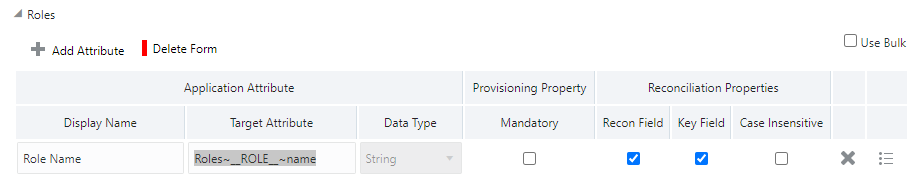
The following figure shows the default Roles Entitlement mapping.
Figure 3-2 Default Attribute Mappings for Oracle Primavera Roles
3.4 Correlation Rules
Learn about the predefined rules, responses, and situations for Target applications. The connector uses these rules and responses for performing reconciliation.
3.4.1 Correlation Rules for the Target Application
When you create a target application, the connector uses correlation rules to determine the identity to which Oracle Identity Governance must assign a resource.
Predefined Identity Correlation Rules
By default, the Oracle Primavera connector provides a simple correlation rule when you create a target application. The connector uses this correlation rule to compare the entries in Oracle Identity Governance repository and the target system repository, determine the difference between the two repositories, and apply the latest changes to Oracle Identity Governance.
The following table lists the default simple correlation rule for an Oracle Primavera connector. If required, you can edit the default correlation rule or add new rules. You can create complex correlation rules also. For more information about adding or editing simple or complex correlation rules, see Updating Identity Correlation Rules in Oracle Fusion Middleware Performing Self Service Tasks with Oracle Identity Governance.
Table 3-5 Predefined Identity Correlation Rule for an Oracle Primavera Connector
| Target Attribute | Element Operator | Identity Attribute | Case Sensitive? |
|---|---|---|---|
| __NAME__ | Equals | User Login | No |
In this identity rule:
- __NAME__ is a single-valued attribute on the target system that identifies the user account.
- User Login is the field on the OIG User form.
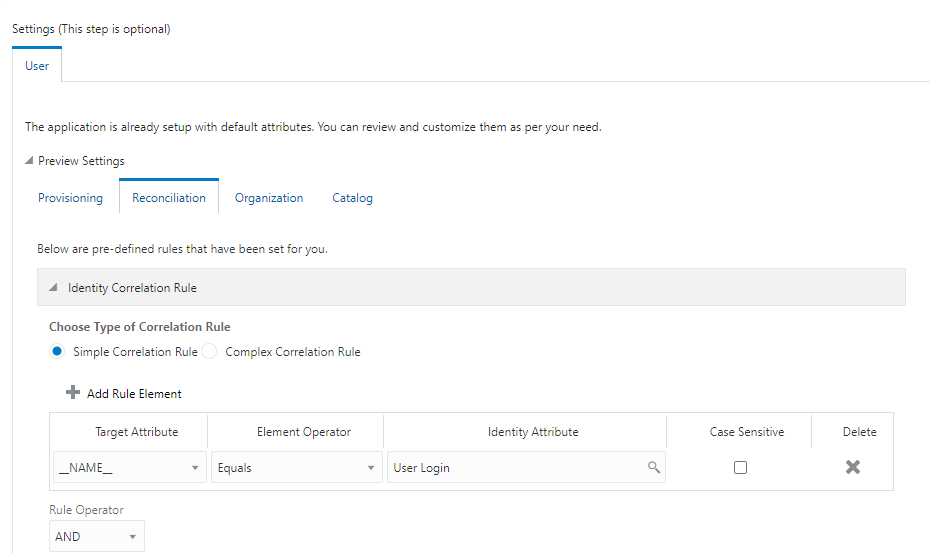
The following shows the Simple Correlation Rule for Oracle Primavera Target Application
Figure 3-3 Simple Correlation Rule for Oracle Primavera Target Application
Predefined Situations and Responses
The Oracle Primavera connector provides a default set of situations and responses when you create a target application. These situations and responses specify the action that Oracle Identity Governance must take based on the result of a reconciliation event.
The following lists the default situations and responses for an Oracle Primavera Target application. If required, you can edit these default situations and responses or add new ones. For more information about adding or editing situations and responses, see Updating Situations and Responses Updating Situations and Responses in Oracle Fusion Middleware Performing Self Service Tasks with Oracle Identity Governance
Table 3-6 Predefined Situations and Responses for an Oracle Primavera Target Application
| Situation | Response |
|---|---|
| No Matches Found | None |
| One Entity Match Found | Establish Link |
| One Process Match Found | Establish Link |
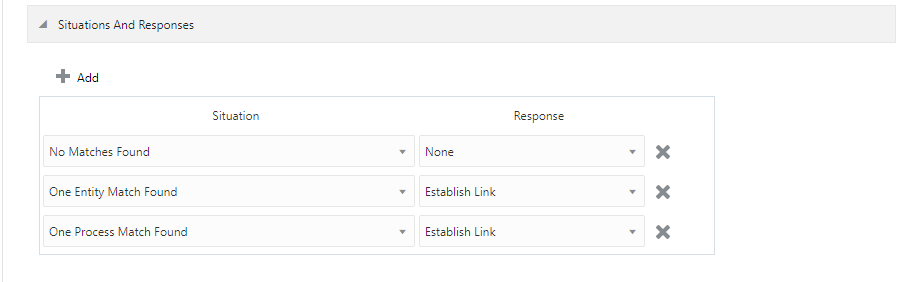
The following figure shows the situations and responses for an Oracle Primavera that the connector provides by default.
Figure 3-4 Predefined Situations and Responses for an Oracle Primavera Target Application
3.5 Reconciliation Jobs
These are the reconciliation jobs that are automatically created in Oracle Identity Governance after you create the application.
User Reconciliation Jobs
You can either use these predefined jobs or edit them to meet your requirements. Alternatively, you can create custom reconciliation jobs. For information about editing these predefined jobs or creating new ones, see Updating Reconciliation Jobs in Oracle Fusion Middleware Performing Self Service Tasks with Oracle Identity Governance.
The following reconciliation jobs are available for reconciling user data:
- Oracle Primavera Full User Reconciliation: Use this reconciliation job to reconcile user data from a target application.
- Oracle Primavera Limited User Reconciliation: Use this reconciliation job to reconcile records from the target system based on a specified filter criterion.
The following table describes the parameters of the Oracle Primavera Full User Reconciliation job.
Table 3-8 Parameters of the Oracle Primavera Full User Reconciliation Job
| Parameter | Description |
|---|---|
| Application name |
Name of the AOB application with which the reconciliation job is associated. This value is the same as the value that you provided for the Application Name field while creating your target application. Do not change the default value. |
| Filter Suffix |
Enter the search filter for fetching user records from the target system during a reconciliation run. Filter suffix for single user:
For more information about creating filters, see Configuring Reconciliation Jobs. |
| Object Type |
This parameter holds the name of the object type for the reconciliation run. Default value: User Do not change the default value. |
| Scheduled Task Name |
Name of the scheduled task used for reconciliation. Do not modify the value of this parameter. |