5.7.3.2 Viewing Target Resource Reconciliation Action Rules in the Design Console
You can view the reconciliation rule for reconciliation by performing the following steps:
- Click the Object Reconciliation tab, and then click the Reconciliation Action Rules tab. The Reconciliation Action Rules tab displays the action rules defined for this connector. Figure 5-1 shows the reconciliation action rules for target resource reconciliation.
Figure 5-1 Target Resource Reconciliation Action Rules
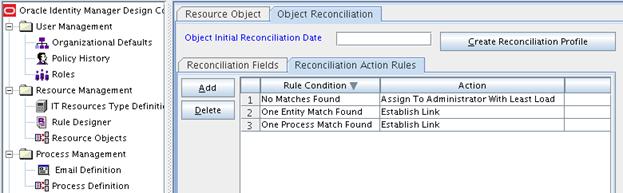
Description of "Figure 5-1 Target Resource Reconciliation Action Rules"