Configuring an Editable Component's help.instruction Attribute

Configure an editable component's help text using the help.instruction attribute. This will display a note window with advisory text (often called a tooltip) when the input component has focus.

The following image shows two oj-input-text elements configured to display text when the user sets focus in the input field. In the first example, the help.instruction attribute is defined for the oj-input-text element without formatting. In the second example, the attribute value has HTML formatting added to the advisory text.
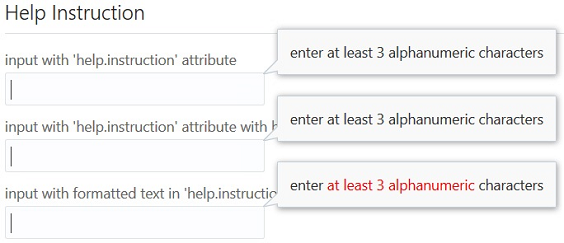
To configure an editable element's help.instruction attribute:

  1. Add the editable element to your page.
  2. In the markup, add the help.instruction attribute in the element tag.

    The following code sample shows the markup for defining the three oj-input-text components.

    <div id="form-container" class="oj-form">
      <h3 class="oj-header-border">Help Instruction</h3>
        <oj-label for="text20">input with 'help.instruction' attribute</oj-label>
        <oj-input-text id="text20" name="text20"  autocomplete="off" validators="[[validators]]"
            help.instruction="enter at least 3 alphanumeric characters" value="{{text}}"></oj-input-text>
            
        <oj-label for="text21">input with 'help.instruction' attribute with binding</oj-label>
        <oj-input-text id="text21" name="text21"  autocomplete="off" validators="[[validators]]"
            help.instruction="{{helpInstruction}}" value="{{text}}"></oj-input-text>
            
        <oj-label for="text22">input with formatted text in 'help.instruction' attribute</oj-label>
        <oj-input-text id="text22" name="text22"  autocomplete="off" validators="[[validators]]"
            help.instruction="<html>enter <span style='color:red'>at least 3 alphanumeric</span> characters</html>"
            value="{{text}}"></oj-input-text>
    </div>
  3. In your application script, bind the component's value to a Knockout observable.

    In this example, each oj-input-text element's value attribute is defined as text which is set to a Knockout observable in the following script. The script also defines regular expression validators to ensure that the user enters at least three letters or numbers.

      require(['ojs/ojcore', 'knockout', 'jquery', 'ojs/ojknockout', 'ojs/ojinputtext', 'ojs/ojlabel'],
      function(oj, ko, $)
      {
        function MemberViewModel() 
        {
          var self = this;
          self.text = ko.observable();
    
          self.validators = ko.computed(function()
            {
              return [{
                 type: 'regExp', 
                 options: {
                   pattern: '[a-zA-Z0-9]{3,}', 
                   messageDetail: 'You must enter at least 3 letters or numbers'}}];
            });
          self.helpInstruction = "enter at least 3 alphanumeric characters";
        };
    
        $(
          function()
          {
            ko.applyBindings(new MemberViewModel(), document.getElementById('form-container')); 
          }
        );
      }); 	
    

For the complete example, see Help and Title in the Oracle JET Cookbook. For additional detail about the oj-input-text component, see the ojInputText API documentation.

For additional information about the regular expression validator, see About Oracle JET Validators and Converters.