About Securing Oracle JET Applications
Oracle JET applications are client-side HTML applications written in JavaScript, and you should follow best practices for securing your Oracle JET applications.
There are a number of Internet resources available that can assist you, including the Open Web Application Security Project (OWASP), Web Application Security Project (WASP), Web Application Security Working Group (WASWG), and various commercial sites.
Topics:
Oracle JET includes components that follow best practices for security and provides the oj.OAuth plugin for providing secure access to a user's private data. However, the application developer is expected to perform tasks that are not included in Oracle JET.
Oracle JET Components and Security
Oracle JET components follow best practices for security. In particular:
-
All JavaScript code is executed in
strictmode using theuse strictdirective.Strict mode changes warnings about poor syntax, such as using undeclared variables, into actual errors that you must correct. For more information, see http://www.w3schools.com/js/js_strict.asp.
-
Oracle JET code does not use inline
scriptelements.Because browsers can't tell where the inline script originated, the World Wide Web Consortium (W3C) Content Security Policy prohibits the use of inline scripts. For additional information, see https://w3c.github.io/webappsec/specs/content-security-policy.
-
Oracle JET code does not generate random numbers.
-
Any HTML generated by an Oracle JET component is ether escaped or sanitized.
For information about why this is needed, see https://www.owasp.org/index.php/DOM_based_XSS_Prevention_Cheat_Sheet#Guidelines_for_Developing_Secure_Applications_Utilizing_JavaScript.
Oracle JET Security and Developer Responsibilities
Oracle JET components follow established security guidelines and ensure that strings provided as options and user input will never be executed as JavaScript to prevent XSS attacks. However, Oracle JET does not include a mechanism for sanitizing strings, and you should consult established guidelines for dealing with XSS attacks in your own code and content.
You can find more information about securing JavaScript applications at https://www.owasp.org/index.php/DOM_based_XSS_Prevention_Cheat_Sheet#Guidelines_for_Developing_Secure_Applications_Utilizing_JavaScript.
Oracle JET Security Features
The Oracle JET API provides the oj.OAuth authorization plugin which supports the OAuth 2.0 open protocol. OAuth standardizes the way desktop and web applications access a user's private data. It provides a mechanism for users to grant access to private data without sharing their private username and password credentials.
OAuth 2.0 defines the following roles:
-
Resource owner: An entity that can grant access to a protected resource, such as the end user.
-
Client: Application making protected and authorized resource requests on behalf of the resource owner.
-
Resource server: Server hosting the protected resources that can accept and respond to protected resource requests using access tokens.
-
Authorization server: Server that issues access tokens to the client after it successfully authenticates the resource owner and obtains authorization.
Note:
The authorization server can be the same server as the resource server. In addition, an authorization server can issue access tokens accepted by multiple resource servers.
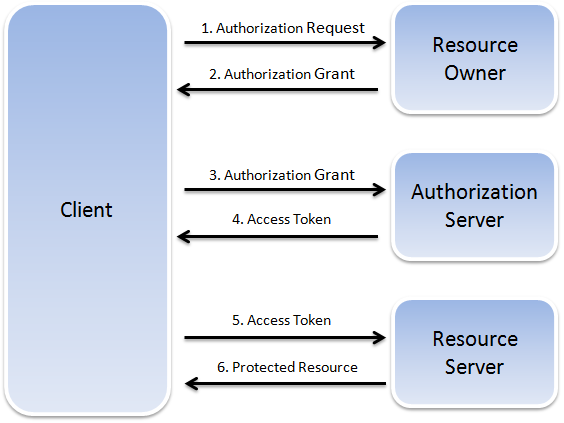
OAuth 2.0 Request for Comments (RFC) 6749 describes the interaction between the four roles as an abstract flow.
-
The client requests authorization from the resource owner, either directly or through the authorization server.
Note:
The RFC specifies that the authorization server is preferred.
-
The client receives an authorization grant, which is defined as the credential representing the resource owner's authorization.
-
The client requests an access token from the authorization server by authenticating with the server and presenting the authorization grant.
-
The authorization server issues the access token after authenticating the client and validating the authorization grant.
-
The client presents the access token to the resource server and requests the protected resource.
-
The resource server validates the access token and serves the request if validated.
The access token is a unique identifier issued by the server and used by the client to associate authenticated requests with the resource owner whose authorization is requested or has been obtained by the client.
The Oracle JET oj.OAuth plugin provides functions for the following tasks:
-
Getting access token credentials if initialized by client credentials.
-
Caching access token credentials.
-
Creating the header array with bearer token.
For details about using the oj.OAuth plugin, see Using oj.OAuth in Your Oracle JET Application. For additional information about OAuth 2.0, see http://tools.ietf.org/html/rfc6749.
Oracle JET Secure Response Headers
Oracle JET recommends the usage of HTTP response headers to securely host your JET web application. These response headers protect your web applications from cross scripting attacks (XSS) attacks, packet sniffing, and clickjacking.
You must configure these response headers on the server where the JET application is hosted. As the configuration of these response headers is dependent on the type of server, you must refer to the documentation of your server for configuration steps.
You must use the secure response headers to notify the user agent to only connect to a given site over HTTPS and load all resources over secure channels to control XSS attacks and packet sniffing. You can configure the response header in the server to specify the protocols that are allowed to be used; for example, a server can specify that all content must be loaded using HTTPS protocol.
It is highly recommended to host your JET application using the HTTPS protocol to reduce the cross scripting attacks or packet sniffing. Also some of the new browser features only work under HTTPS protocol. The below table lists some of the secure response headers along with the HTTPS column that indicates which of these headers are specific for HTTPS based configuration.
Table 15-1 Secure Response Header Options
| Option | Value | HTTPS Related | Description |
|---|---|---|---|
|
|
See Table 15-2, Content-Security-Policy Header Options. |
No |
Specifies fine-grained resource access. |
|
|
|
No |
Blocks a page when cross site scripting attempt is detected. NOTE:
|
|
|
|
No |
Cross-domain policy file is an XML document that grants a web client permission to handle data across domains. |
|
|
|
No |
Prevents clickjacking for browsers. This directive can only be set using an HTTP response header. To frame your content from the same origin, use NOTE:
|
|
|
|
No |
Ensures browser uses MIME type to determine the content type. Use of this directive with images requires the image format to match its specified MIME type. Use of this directive on JavasSript files requires the MIME type to be set to |
|
|
|
Yes |
Tells the browser to communicate only with the specified site (and any subdomains) over HTTPS and prevents the user from overriding an invalid or self-signed certificate. |
|
|
|
No |
Tells the browser to include referrer information on outbound link requests. |
|
|
|
Yes |
Prevents use of incorrect or fraudulent certificates. |
|
|
|
Yes |
Signals to the browser that compliance to the Certificate Transparency Policy should be enforced. |
Content Security Policy Headers
Content Security Policy (CSP) is delivered through an HTTP response header and controls the resources that a JET web application can use.
The CSP header provides a mechanism to restrict the locations from which JavaScript running in a browser can load the required resources, restrict the execution of JavaScript, and control situations in which a page can be framed. This can mitigate Cross Site Scripting (XSS) vulnerabilities as well as provide protection against clickjacking attacks.
You should enable CSP for browsers to help the server administrators reduce or eliminate the attacks by specifying the domains that the browser should consider to be valid sources for loading executable scripts, stylesheets, images, fonts, and so on. See the Browser Compatibility Matrix for the browser versions that support CSP.
Note:
Internet Explorer 11 supports only the sandbox attribute and uses x-content-security-policy header instead of the standard content-security-policy header.
Configuring CSP involves adding the Content-Security-Policy HTTP header to a web page and giving it values to control resources the user agent is allowed to load for that page. To add Content-Security-Policy HTTP header to a web page, configure your web server to return the Content-Security-Policy HTTP response header. For example, here is a basic CSP response header, where script-src directive specifies an executable script as the resource type and 'self' is a constant that specifies the current domain as the approved source that the browser may load script from:
Content-Security-Policy: script-src 'self'CSP has some of the following commonly used constants:
-
'none': Blocks the use of certain resource type. -
'self': Matches the current origin (but not subdomains). -
'unsafe-inline': Allows the use of inline JS and CSS. -
'unsafe-eval': Allows the use of mechanisms likeeval().
Alternatively, you can also use the HTML meta tags to configure CSP. For example:
<meta http-equiv="Content-Security-Policy" content="default-src 'self'; img-src https://*; frame-src 'none';">Note:
Some of the CSP directives do not work with the HTML meta tags, for example frame-ancestors.
The below table describes the out-of-box settings required by a JET web application to run in its most secure mode without changing the JET functionality. The JET web application may need to modify these settings for additional resource origins. The table lists the different response header directives that can be used while enabling CSP based on the two following scenarios:
-
Co-Hosted: When the JET and the Application source codes are hosted on the same server
-
Content Delivery Network (CDN): When the JET code is from the JET CDN and the Application code is from a different server
Table 15-2 Content-Security-Policy Header Options
| CSP Version | Header Options | Co-Hosted | CDN | Description |
|---|---|---|---|---|
|
CSP 1.0 |
|
|
|
Serves as a default setting that ensures resource loading is blocked if the resource type is not specified. All other settings need to be explicitly enabled for specific resource origins. |
|
CSP 1.0 |
|
|
|
Manages the REST and Web Sockets to be accessed. |
|
CSP 1.0 |
|
|
|
Specifies valid sources for fonts. |
|
CSP 1.0 |
|
|
|
Specifies valid sources for images. Allows JET inline images. |
|
CSP 1.0 |
|
|
|
Specifies valid sources for loading media using the |
|
CSP 1.0 |
|
|
|
Specifies valid sources for the |
|
CSP 1.0 |
|
|
|
Specifies valid sources for JavaScript. This directive is used for knockout expressions and JET function creation. |
|
CSP 1.0 |
|
|
|
Specifies valid sources for stylesheets. This directive is used to set styles from JavaScript. |
|
CSP 1.0 |
|
- |
- |
Runs the page as in a sandboxed iframe. |
|
CSP 2.0 |
|
- |
- |
This directive is used for form submits. Not applicable for JET. |
|
CSP 2.0 |
|
|
|
Specifies valid sources for nested browsing contexts loading using elements such as |
Note:
When default-src is set to none, you must explicitly enable all the other needed settings for specific resource origins.
The following example shows how to set up CSP if a website administrator wants to allow content from a trusted domain and all its subdomains:
Content-Security-Policy: default-src 'self' *.trusted.comThe following example shows how to set up CSP if a website administrator wants to allow users of a web application to include images from any origin in their own content, but to restrict audio or video media to trusted providers, and all scripts only to a specific server that hosts trusted code.
Content-Security-Policy: default-src 'self'; img-src *; media-src media1.com media2.com; script-src userscripts.example.com