Working with Oracle JET Translation Bundles
Oracle JET includes a translation bundle that translates strings generated by Oracle JET components into all supported languages. Add your own translation bundle by merging it with the Oracle JET bundle.
About Oracle JET Translation Bundles
Oracle JET includes a translation bundle that translates strings generated by Oracle JET components into all supported languages. You can add your own translation bundle following the same format used in Oracle JET.
The Oracle JET translation bundle follows a specified format for the content and directory layout but also allows some leniency regarding case and certain characters.
Translation Bundle Location
The RequireJS bootstrap file (usually main.js) contains the location of the Oracle JET translation bundle, which is named ojtranslations.js.
libs/oj/vxxx/resources/nls/ojtranslationsEach supported language is contained in a directory under the nls directory. The directory names use the following convention:
-
lowercase for the language sub-tag (
zh,sr, etc.) -
title case for the script sub-tag (
Hant,Latn, etc.) -
uppercase for the region sub-tag (
HK,BA, etc.)
The language, script, and region sub-tags are separated by hyphens (-). The following image shows a portion of the directory structure.
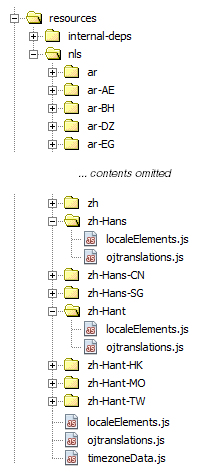
Top Level Module
The ojtranslations.js file contains the strings that Oracle JET translates and lists the languages that have translations. This is the top level module or root bundle. In the root bundle, the strings are in English and are the runtime default values when a translation isn’t available for the user’s preferred language.
Translation Bundle Format
Oracle JET expects the top level root bundle and translations to follow a specified format. The root bundle contains the Oracle JET strings with default translations and the list of locales that have translations. // indicates a comment.
define({
// root bundle
  root: {
    "oj-message":{
        fatal:"Fatal",
        error:"Error",
        warning:"Warning",
        info:"Info",
        confirmation:"Confirmation",
        "compact-type-summary":"{0}: {1}"
     },
     // ... contents omitted
  },

// supported locales.
  "fr-CA":1,
   ar:1,
   ro:1,
   "zh-Hant":1,
   nl:1,
   it:1,
   fr:1,
   //  ... contents omitted
   tr:1,fi:1
});
The strings are defined in nested JSON objects so that each string is referenced by a name with a prefix: oj-message.fatal, oj-message.error, etc.
The language translation resource bundles contain the Oracle JET string definitions with the translated strings. For example, the following code sample shows a portion of the French (Canada) translation resource bundle, contained in nls/fr-CA/ojtranslations.js.
define({
  "oj-message":{
     fatal:"Fatale",
     error:"Erreur",
     warning:"Avertissement",
     info:"Infos",
     confirmation:"Confirmation",
     "compact-type-summary":"{0}: {1}"
     },
    //  ... contents omitted
});
When there is no translation available for the user's dialect, the strings in the base language bundle will be displayed. If there are no translations for the user's preferred language, the root language bundle, English, will be displayed.
Named Message Tokens
Some messages may contain values that aren't known until run time. For example, in the message "User foo was not found in group bar", the foo user and bar group is determined at run time. In this case, you can define {username} and {groupname} as named message tokens as shown in the following code.
"MyUser":"User{username}was not found in group{groupname}."
At run time, the actual values are replaced into the message at the position of the tokens by calling oj.Translations.getTranslatedString() with the key of the message as the first argument and the parameters to be inserted into the translated pattern as the second argument.
var params = {'username': 'foo', 'groupname': 'bar'};
oj.Translations.getTranslatedString("MyKey", params);
Numeric Message Tokens
Alternatively, you can define numeric tokens instead of named tokens. For example, in the message "This item will be available in 5 days", the number 5 is determined at run time. In this case, you can define the message with a message token of {0} as shown in the following code.
"MyKey": "This item will be available in {0} days."
A message can have up to 10 numeric tokens. For example, the message "Sales order {0} has {1} items" contains two numeric tokens. When translated, the tokens can be reordered so that message token {1} appears before message token {0} in the translated string, if required by the target language grammar. The JavaScript code that calls getTranslatedString() remains the same no matter how the tokens are reordered in the translated string.
Tip:
Use named tokens instead of numeric tokens to improve readability and reuse.
Escape Characters in Resource Bundle Strings
The dollar sign, curly braces and square brackets require escaping if you want them to show up in the output. Add a dollar sign ($) before the characters as shown in the following table.
| Escaped Form | Output |
|---|---|
| $$ | $ |
| ${ | { |
| $} | } |
| $[ | [ |
| $] | ] |
For example, if you want your output to display [Date: {01/02/2015}, Time: {01:02 PM}, Cost: $38.99, Book Name: John's Diary], enter the following in your resource bundle string:
"productDetail": "$[Date: ${01/02/2015$}, Time: ${01:02 PM$}, Cost: $$38.99, Book Name: John's Diary$]"