Accessing the System MBean Browser from the Component Property Pages
You can also access the System MBean Browser from various menus in the Oracle SOA Suite component property pages. These shortcuts provide you with direct access to specific sections of the MBean tree, including the oracle.as.soainfra.config section of the Application Defined MBeans group. This provides you with quick access to many common properties of the SOA Infrastructure and service components.
To access the System MBean Browser from the component property pages:
- Select the appropriate component for which to manage System MBean Browser properties, then scroll down the page to access the short cut.
Select... Scroll Down and Click... See... Common Properties (for the SOA Infrastructure)
More SOA Infra Advanced Configuration Properties
BPEL Properties
More BPEL Configuration Properties
BPMN Properties
Note: This option is only displayed for selection if Oracle BPM Suite is installed.
More BPMN Configuration Properties
Mediator Properties
More Mediator Configuration Properties
Workflow Properties > Mailer tab
More Workflow Notification Configuration Properties
Workflow Properties > Task tab
More Workflow Task Service Configuration Properties
B2B Server Properties
More B2B Configuration Properties
Auto Purge
More Auto Purge Configuration Properties
Deleting Large Numbers of Instances with Oracle Enterprise Manager Fusion Middleware Control.
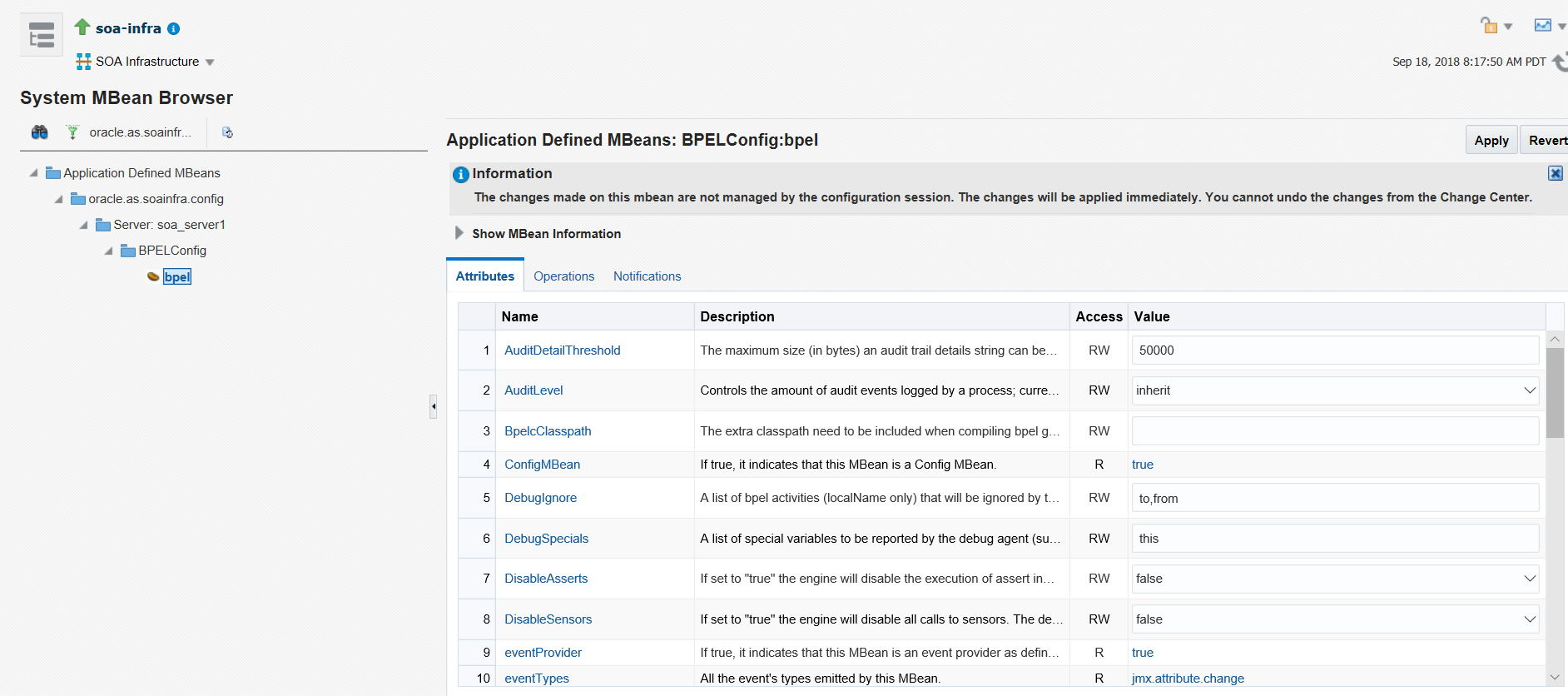
For example, if you select More BPEL Configuration Properties, you are automatically placed into the oracle.as.soainfra.config > Server: server_name > BPELConfig > bpel section of the System MBean Browser. Properties that you can configure are displayed on the right side of the page.