Navigating Through the SOA Infrastructure Home Page and Menu
You can navigate to Oracle SOA Suite and Oracle BPM Suite administration tasks through the SOA Infrastructure home page and menu. The SOA Infrastructure provides you with access to all deployed SOA composite applications, service engines, service components, business events, and other elements.
To navigate through the SOA Infrastructure home page and menu:
-
Click the Target Navigation icon near the top left of the screen.

The Target Navigation panel is displayed.
-
Expand SOA.

-
Click soa-infra (server_name).
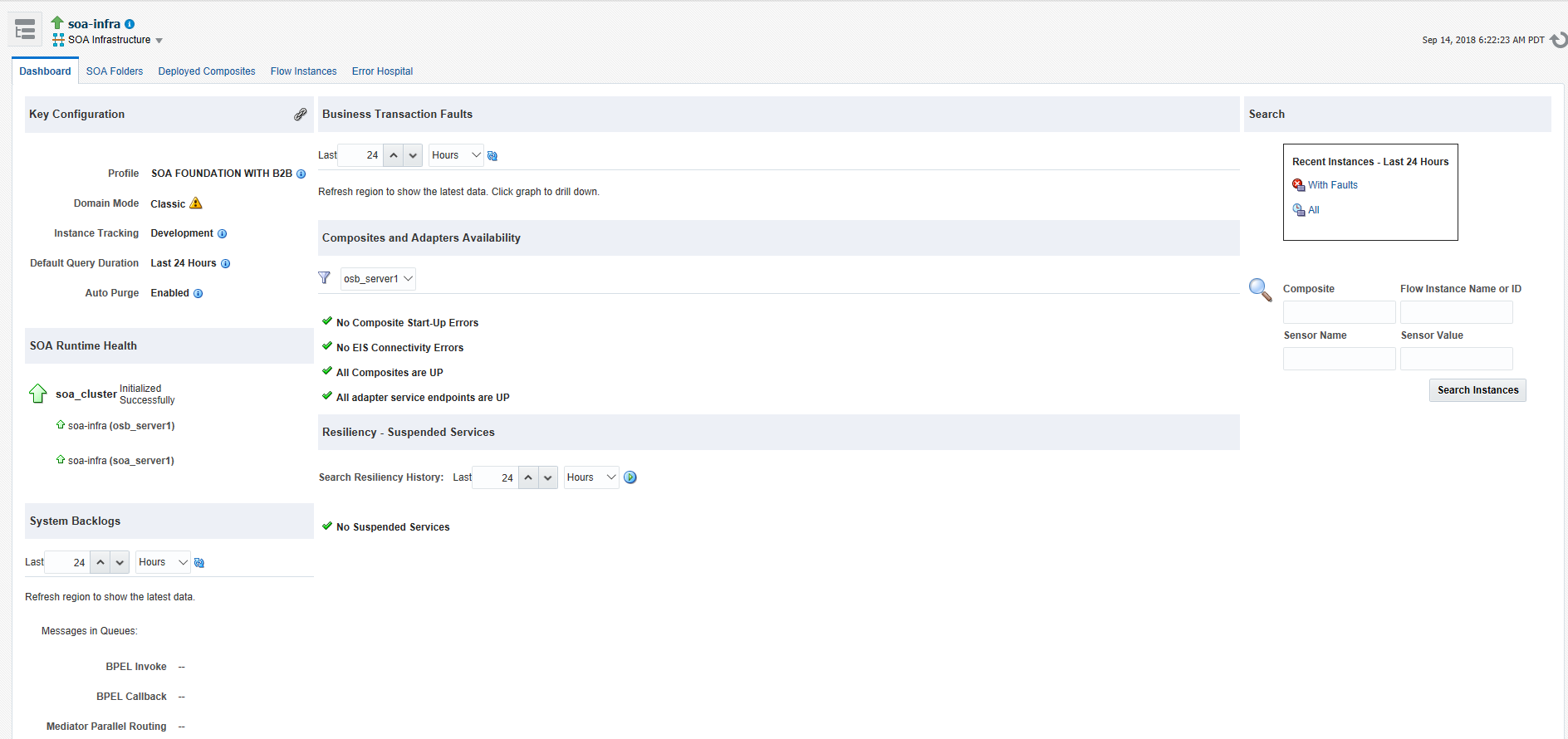
The Dashboard page of the SOA Infrastructure is displayed. This page includes:
-
Important configuration settings
-
Runtime health status
-
System backlogs
-
Business transaction faults
-
Composite and adapter endpoint availability
-
Error notification rule alerts
This page also provides search functionality to find business flow instances and bulk recovery job status. The bulk recovery job search is applicable when Oracle Enterprise Scheduler is deployed with Oracle SOA Suite.
-
-
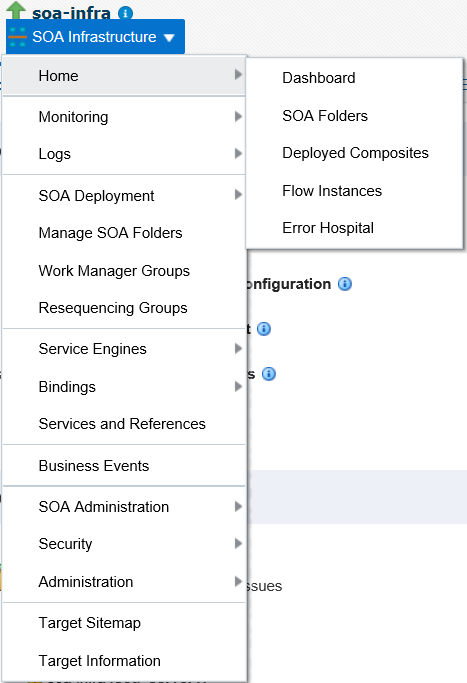
Note that the SOA Infrastructure menu appears below the soa-infra name at the top of the page.
Note:
Depending upon your current location, the context of this menu changes to provide you with the administrative options most relevant to your current location. For example, when you are in the following locations:
-
Within the pages of a SOA composite application, the SOA Composite menu is displayed.
-
On the home page of a specific SOA folder, the SOA Folder menu is displayed.
-
Within the pages of a specific SOA folder or SOA composite application, the SOA Infrastructure menu is still available. However, it moves to the top left corner of the page.
-
-
Select the SOA Infrastructure menu.
These administrative options enable you to perform the following tasks:
Option Description Home
Directly navigate to the selected tab of the SOA Infrastructure:
-
Dashboard: Monitor important configuration settings, runtime health status, system backlogs, business transaction faults, composite and adapter endpoint availability, and error notification rule alerts. You can also search for business flow instances and bulk recovery job search capabilities.
For more information, see Monitoring the Overall Status of the SOA Infrastructure or Individual SOA Folder.
-
SOA Folders: View all the folders in your SOA Infrastructure and the count of composites in each folder. You can also see the number of active and retired composites for each folder. You can navigate to the Dashboard tab or Deployed Composites tab of any folder.
-
Deployed Composites: Manage the state of all SOA composite applications in the SOA Infrastructure.
For more information, see Managing the State of All Applications at the SOA Infrastructure Level.
-
Flow Instances: View the list of business flow instances in the SOA Infrastructure. Business flows can consist of multiple SOA composite applications connected together in a flow.
For more information, see Tracking Business Flow Instances.
-
Error Hospital: Manage faults occurring within Oracle SOA Suite and view aggregated statistics associated with system-wide faults data.
For more information, see Recovering From Faults in the Error Hospital.
Monitoring
Displays the following details:
-
Performance Summary: A summary of performance statistics in the SOA infrastructure.
-
Request Processing: Details that show the breakup of time spent in handshaking requests between the binding components, service infrastructure, and service engines.
For more information, see Monitoring Message Delivery Processing Requests.
-
IWS Reports: Integration Workload Statistics (IWS) Reports provide SOA system-wide reports that can help you analyze utilizations, identify potential bottlenecks and backlogs, and perform top-down analysis of your integration system.
For more information, see Monitoring and Troubleshooting SOA-Wide Issues Using IWS Reports.
Logs
View and configure the logging levels for runtime loggers.
For more information, see Configuring Log Files and Setting Logging Levels for Troubleshooting.
SOA Deployment
Deploy, undeploy, or redeploy SOA composite applications.
For more information, see Deploying and Managing SOA Composite Applications.
Manage SOA Folders
Logically group your SOA Infrastructure into separate SOA folders in which you deploy your SOA composite applications. This helps you to logically group composites so that you can perform bulk lifecycle management tasks on large numbers of SOA composite applications.
For more information, see Introduction to SOA Folders and Managing SOA Folders and Work Manager Groups.
Work Manager Groups
Manage the work manager groups. A work manager group consists of work managers used by Oracle SOA Suite for each SOA folder. A work manager is an Oracle WebLogic Server entity that represents a logical thread pool. It is similar to a queue in which work items line up for processing.
For more information, see Managing Work Manager Groups.
Resequencing Groups
Access the Mediator Resequencing Groups page for finding all resequencing groups processed within a specified time period. Resequencing places unsynchronized Oracle Mediator messages back in the correct order.
For more information, see Monitoring Resequencing Groups.
Service Engines
Access monitoring and management tasks for the BPEL process, Oracle Mediator, Oracle BPMN (if installed), human workflow, and business rules service engines.
Bindings
Displays details about recently active document types and trading partners, and inbound and outbound endpoints for Oracle B2B.
For more information, see Monitoring the Oracle B2B Infrastructure.
Services and References
Displays message processing metrics for service and reference binding components in all SOA composite applications.
For more information, see Monitoring Service and Reference Binding Components in the SOA Infrastructure.
Business Events
Displays available business events and current event subscribers.
For more information, see Managing Business Events.
Error Notification Rules
Manage error notification rules. Rules are configuration definitions created for generating alerts during runtime. Alerts are triggered when a rule condition is met (for example, you define an alert to trigger if more than 10 faults occur within a 48 hour period).
Note: This option is available only if Oracle Enterprise Scheduler is deployed with Oracle Enterprise Manager Fusion Middleware Control.
For more information, see Creating Error Notification Rules.
Define Schedules
Define a schedule for submitting jobs. You select the defined schedule when you create an error notification rule. Schedules specify how often to trigger the scheduler (for example, invoke the scheduler every two minutes).
Note: This option is available only if Oracle Enterprise Scheduler is deployed with Oracle Enterprise Manager Fusion Middleware Control.
For more information, see Administering Oracle Enterprise Scheduler.
SOA Administration
Access the following configuration tasks for the SOA Infrastructure and each service engine:
-
Common Properties: For setting properties that impact the entire SOA Infrastructure, such as viewing and updating the configuration profile, setting the SOA Infrastructure audit level, enabling the payload validation of incoming messages, updating the default query duration, specifying the callback server and server URLs, enabling and disabling analytics and sensors, setting the Universal Description, Discovery and Integration (UDDI) registry properties, viewing the data source JNDI locations, setting the nonfatal connection retry count, and setting web service binding properties.
For more information, see Configuring SOA Infrastructure Properties.
-
BPEL Properties: For setting the audit trail size, maximum document size for a variable, payload validation for incoming and outgoing messages, audit trail level, and BPEL monitor and sensor disabling status.
For more information, see Configuring BPEL Process Service Engine Properties.
-
BPMN Properties: For setting the audit trail size, maximum document size for a variable, payload validation for incoming and outgoing messages, audit trail level, and BPMN monitor and sensor disabling status.
Note: This option is available only when Oracle BPM Suite is installed..
For more information, see Configuring BPMN Process Service Engine Properties.
-
Mediator Properties: For setting the audit level, metrics level, maximum number of parallel rows retrieved, parallel locker thread sleep, container ID refresh time, container ID lease timeout, and resequencer locker sleep, maximum groups locked, and worker threads.
For more information, see Configuring Oracle Mediator Service Engine Properties.
-
Workflow Properties: Displays the following tabs:
Mailer tab: For setting the workflow service notification mode and actionable email address value. For more information, see Configuring Human Workflow Notification Properties.
Task tab: For setting the actionable email account, setting the workflow service session timeout, adding the workflow custom class path URL, setting the dynamic and task escalation functions and parameters, setting the worklist application URL, setting the task assignee, setting the portal realm mapping, and adding the task auto release configuration priority.
For more information, see Configuring Human Workflow Task Service Properties.
-
B2B Server Properties: For enabling Dynamic Monitoring Service (DMS) metrics.
For more information, see Configuring Oracle B2B Server Properties.
-
Cross References: For selecting cross-reference values.
For more information, see Deleting Cross-Reference Values.
-
Token Configurations: For defining and managing global token variables. When you move a SOA composite application from one environment to another, some values require substitution in each configuration plan. To avoid substituting values in each plan, you can define global token variables for specific URIs in SOA composite applications.
For more information, see Managing Global Token Variables for Multiple SOA Composite Applications.
-
Auto Purge: For scheduling and executing purge jobs that automatically remove older flow instances, adapter reports, and fault alerts data from the database.
For more information, see Deleting Large Numbers of Instances with Oracle Enterprise Manager Fusion Middleware Control.
Note: This option is not available for selection if you are using the Java database included with the Oracle SOA Suite Quick Start installation option. For more information about this option, see Installing SOA Suite and Business Process Management Suite Quick Start for Developers.
Security
Displays the following selections:
-
Application Policies: For creating application policies that an application relies upon for controlling access to resources.
-
Application Roles: For creating application roles for applications.
For more information about managing application roles, see Securing Applications with Oracle Platform Security Services.
This option is available for all deployed Java EE applications, including the SOA Infrastructure (soa-infra) application. These options do not configure security policies for SOA composites.
For more information about attaching policies to composite applications, see Managing SOA Composite Application Policies.
Administration
Displays the following selections:
-
MDS Connections: For managing metadata service (MDS) connections.
-
TopLink Sessions: For managing cache for the Oracle TopLink persistence framework.
-
System MBean Browser: For advanced configuration of properties across applications and components.
For more information, see Navigating to the System MBean Browser and Administering Oracle Fusion Middleware for instructions on using the System Mean Browser.
In addition to configuring the System MBean Browser from Oracle Enterprise Manager Fusion Middleware Control, you also can invoke SOA configuration MBean operations with the WebLogic Scripting Tool (WLST). For information, see WLST Command Reference for SOA Suite.
Note: The System MBean Browser includes an MBean for Oracle BPMN, even if Oracle BPM Suite is not installed. If Oracle BPM Suite is not installed, this MBean cannot be used, and should be ignored. The presence of this MBean does not impact the runtime behavior of other Oracle SOA Suite components.
Target Information
Displays general details about the SOA Infrastructure, such as the Oracle Enterprise Manager Fusion Middleware Control version, Oracle home, and Oracle instance.
-