16 WebLogic JMS C API
Understand the requirements, design principles, security considerations and implementation guidelines needed to use the WebLogic JMS C API to create C clients that can access WebLogic JMS applications and resources.
What Is the WebLogic JMS C API?
The WebLogic JMS C API is an application program interface that enables you to create C client applications that can access WebLogic JMS applications and resources.
The C API uses the Java Native Interface (JNI) to access the client-side Java messaging classes. See the Java Native Interface Specification and the Figure 16-1.
The WebLogic JMS C API provides a handle-based interface modeled on the JMS 1.1 programming model. See JMS C API Reference for Oracle WebLogic Server for the available functions and supported operations.
Figure 16-1 WebLogic JMS C API Client Application Environment
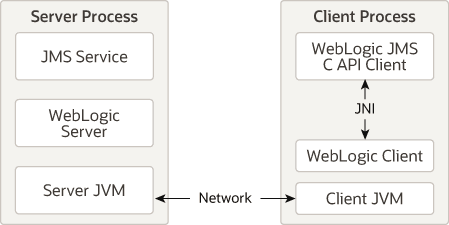
Description of "Figure 16-1 WebLogic JMS C API Client Application Environment"
System Requirements
Understand the system requirements needed to use WebLogic JMS C API in your environment.
-
A list of supported operating systems for the WebLogic JMS C API is available from the Oracle Fusion Middleware Supported System Configurations page. See Supported Configurations at What's New in Oracle WebLogic Server.
-
A supported JVM for your operating system.
-
An ANSI C compiler for your operating system.
-
One of the following WebLogic clients to connect your C client applications to your JMS applications:
-
The WebLogic Thin T3 Client jar (
wlthint3client.jar). See Developing a WebLogic Thin T3 Client in Developing Standalone Clients for Oracle WebLogic Server.
-
The WebLogic Install client (
weblogic.jarfile). See WebLogic Install Client in Developing Standalone Clients for Oracle WebLogic Server.
-
Design Principles
Understand the design principles for porting and developing applications for the WebLogic JMS C API.
Java Objects Map to Handles
The WebLogic JMS C API is handle-based to promote modular code implementation. This means that in your application you implement Java objects as handles in C code. The details of how a JMS object is implemented is hidden inside a handle. However, unlike in Java, when you are done with a handle, you must explicitly free it by calling the corresponding Close or Destroy methods. See Memory Allocation and Garbage Collection.
Thread Utilization
The C API follows the threading rules of the corresponding Java messaging objects. A JmsSession and its producers and consumers must be used according to the session's single-threaded programming model, including the restrictions on use while a message listener is running. A JmsConnection corresponds to the thread-safe jakarta.jms.Connection interface.
Synchronizing access does not transfer a thread's security subject or last-exception state. When operations run on another thread, establish the required security context on that thread and retrieve exception information on the thread where the failing call occurred. Observe the naming-context lifecycle requirements described in Understanding WebLogic JMS Security.
Exception Handling
Note:
The WebLogic JMS C API uses integer return codes.
Exceptions in the WebLogic JMS C API are local to a thread of execution. The WebLogic JMS C API has the following exception types:
-
JavaThrowablerepresents the classjava.lang.Throwable. -
JavaExceptionrepresents the classjava.lang.Exception. -
JmsExceptionrepresents the classjakarta.jms.JMSException. All standard subclasses ofJMSExceptionare determined by bits in the type descriptor of the exception. The type descriptor is returned with a call toJmsGetLastException.
Type Conversions
Java primitive types have fixed widths. Use the C types declared by the supplied JMS C API headers for the target platform. The following mappings require particular attention.
Character (char)
The JMS C API character read and write functions use C short values to carry Java char values, which represent 16-bit UTF-16 code units. Use the declarations in the supplied headers.
String
String converts to JmsString.
JmsString supports two representations, selected by stringType:
-
CSTRING: uniOrC.string points to a null-terminated string in JNI modified UTF-8. This encoding differs from standard UTF-8 for the null character and supplementary characters. See Modified UTF-8 Strings in the Java Native Interface Specification.
-
UNISTRING: uniOrC.uniString.data points to native-order 16-bit UTF-16 code units suitable for JNI jchar data. For input, uniOrC.uniString.length specifies the number of bytes, which is twice the number of code units. Do not supply a serialized big-endian byte stream unless it has first been converted to the native representation.
For input, set stringType and the corresponding data field before calling the API.
When the stringType element of JmsString is used as output, the caller has the option to let the API allocate enough space for output using malloc, or you can supply the space and have the system copy the returned string into the provided bytes. If the appropriate field in the union (either string or data) is NULL, then the API allocates enough space for the output using malloc. It is the callers responsibility to free this allocated space using free when the memory is no longer in use. If the appropriate field in the union (string or data) is not NULL, then the allocatedSize field of JmsString must contain the number of bytes available to be written.
If there is not enough space in the string to contain the entire output, then allocatedSize sets to the amount of space needed and the API called returns JMS_NEED_SPACE. The appropriate field in the JmsString (either string or data) contains as much data as could be stored up to the allocatedSize bytes. In this case, the NULL character may or may not have been written at the end of the C string data returned. Example:
For example, to allocate 100 bytes for the string output from a text message, you would set the data pointer and the allocatedSize field to 100. The JmsTextMessageGetText API returns JMS_NEED_SPACE with allocatedSize set to 200. Call realloc on the original string to reset the data pointer and call the function again. Now the call succeeds, and you are able to extract the string from the message handle. Alternatively, you can free the original buffer and allocate a new buffer of the correct size.
Memory Allocation and Garbage Collection
Release resources explicitly when they are no longer needed. Java garbage collection does not replace closing JMS resources. In the C API, release each native handle using its corresponding Close or Destroy function. Close functions invoke the associated Java JMS resource's close method and release the native handle. Destroy functions release the native handle and its Java references; do not assume that they invoke a Java close method. For example:
-
The
jakarta.jms.Sessionobject has aclosemethod so the WebLogic JMS C API has aJmsSessionClosefunction. -
The
jakarta.jms.ConnectionFactoryobject does not have aclosemethod so the WebLogic JMS C API has aJmsConnectionFactoryDestroyfunction.Note:
A handle that has been closed or destroyed should never be referenced again.
Closing Connections
JmsConnectionClose calls the underlying Java connection's close method, which closes its sessions, producers, and consumers. It releases the native connection handle, but does not free the separate native handles for those subordinate objects. Release every subordinate handle with its corresponding C API close function. A straightforward cleanup order is to close consumers and producers, then sessions, and finally the connection. Do not use a subordinate handle for messaging after its underlying resource has been closed, and do not reference a handle after its own close or destroy function has released it.
Helper Functions
The WebLogic JMS C API provides some helper functions that do not exist in WebLogic JMS. These helpers are explained fully in the JMS C API Reference for Oracle WebLogic Server. For example:
JmsMessageGetSubclass operates on a JmsMessage handle and returns an integer corresponding to the subclass of the message. In JMS, this could be accomplished using instanceof.
Security Considerations
A C client can supply a user name and password when creating its naming context.
Pass the credentials through the username and password arguments to JmsContextCreate. The C API supplies these values to the underlying initial context as javax.naming.Context.SECURITY_PRINCIPAL and javax.naming.Context.SECURITY_CREDENTIALS. Configure the identity with the required naming and JMS permissions. Authentication does not by itself authorize every messaging operation. Follow the thread-based subject and context-lifecycle guidance in Understanding WebLogic JMS Security.
Implementation Guidelines
Understand the limitations when you implement the WebLogic JMS C API.
-
It does not support WebLogic Server JMS extensions, including XML messages.
-
It does not support JMS Object messages.
-
It creates an error log if an error is detected in the client. This error log is named
ULOG.mmddyy(month/day/year). This log file is fully internationalized using theNLSPATH,LOCALE, andLANGenvironment variables of the client. -
Users who want to translate the message catalog can use the
gencatutility provided on Windows or thegencatutility of the host platform. If the generated catalog file is placed according to theNLSPATH,LOCALE, andLANGvariables, then the translated catalog will be used when writing messages to the log file. -
You can set the following environment variables in the client environment:
-
JMSDEBUG: Provides verbose debugging output from the client. -
JMSJVMOPTS: Provides extra arguments to the JVM loaded by the client. -
ULOGPFX: Configures the pathname and file prefix where the error log file is placed.
-
Client Packaging Requirements
You will need to include the JMS C API library and other files when you package the C application.
Include the following files along with a C application executable:
-
A supported JVM for your operating system.
-
If WebLogic Server is not installed on the machine that will run the application: the WebLogic JMS client jar(s) – usually the wlthint3client.jar. See Developing a WebLogic Thin T3 Client in Developing Standalone Clients for Oracle WebLogic Server.
-
If the executable dynamically links the JMS C library, package the library for its operating system and processor architecture from the matching WebLogic installation. The executable, native library and JVM must have compatible architectures. For example, the packaging paths under WL_HOME include server/native/linux/x86_64/libjmsc.so for Linux x86-64 and server/native/win/x64/jmsc.dll for Windows x64. These examples are installation paths, not a certification list. Use Supported Configurations to confirm availability for the target release and platform.
Workarounds for Client Failure Thread Detach Issue
A C program that uses the JMS C client library may fail when its implicitly embedded JVM fails.
The JMS client failure could be related to a known, intermittent race-condition that occurs only with certain JVM products. The likelihood of failure can change based on the JVM version and patch level, operating system, and hardware combination. Specifically, the JMS C-Client library implicitly attaches C-threads to the JVM, but fails to detach them when it is done with them. The suggested workarounds are as follows:
-
Before an application-created native thread exits, detach it from the JVM after its final JMS C API or JNI operation and after completing resource cleanup. Do not detach from a callback with Java methods still on its stack.
-
Do not allow a C thread that has previously called into the JMS C-API to exit before the entire process exits.
The following C helper is for an application-created native thread immediately before it exits. It checks the single-JVM assumption and returns a JNI status. The caller must check that status. A thread that is already detached is treated as successfully detached; no additional detach operation is performed. After successful detachment, the thread must not make further JMS C API or JNI calls or reuse a cached JNIEnv pointer. See Example 16-1.
Example 16-1 Sample C JNI Thread-Detach Helper
#include <jni.h>

/* Call only at the end of an application-created native thread's work. */
jint detach_before_thread_exit(void)
{
    JavaVM *vms[1];
    jsize count = 0;
    void *env = NULL;
    jint result = JNI_GetCreatedJavaVMs(vms, 1, &count);
    if (result != JNI_OK) {
        return result;
    }
    if (count != 1) {
        return JNI_ERR;
    }
    result = (*vms[0])->GetEnv(vms[0], &env, JNI_VERSION_1_2);
    if (result == JNI_EDETACHED) {
        return JNI_OK;
    }
    if (result != JNI_OK) {
        return result;
    }
    return (*vms[0])->DetachCurrentThread(vms[0]);
}
Compile this helper with the JNI headers for the selected JDK and platform. For example, in a Microsoft Visual C developer command prompt, with JAVA_HOME set to the JDK installation, compile detach.c using:
cl /W4 /c /I"%JAVA_HOME%\include" /I"%JAVA_HOME%\include\win32" detach.c
The /c option compiles the source to an object file; it does not link an executable. For an application that links directly to the JNI invocation API, link the object with the matching JDK's import library. If the selected Windows JDK supplies jvm.lib under its lib directory, add "%JAVA_HOME%\lib\jvm.lib" to the application's link inputs. Verify the library location and architecture for that JDK and follow the application's linkage model. Configure the runtime library search path for that JVM.