4 Understanding the Simplified API Programming Model
About JMS 2.0 Simplified API
The JMS 2.0 simplified API provides the same basic functionality as the JMS 1.1 API (classic API), but the new interfaces and several API changes make it easier to use.
The following interfaces provided by the simplified API were implemented in Oracle WebLogic Server 12.2.1 release:
-
ConnectionFactory: An administered object used to create aJMSContextthrough itscreateContextmethods in the simplified API, or aConnectionthrough itscreateConnectionmethods in the classic API. -
JMSContext: An active connection to a JMS provider and a single-threaded context used to send or receive messages. -
JMSProducer: An object created by aJMSContextto send messages to a queue or topic. -
JMSConsumer: An object created by aJMSContextto receive messages sent to a queue or topic.
Figure 4-1 shows how these objects fit together in a JMS client application.
Figure 4-1 Simplified API Programming Model
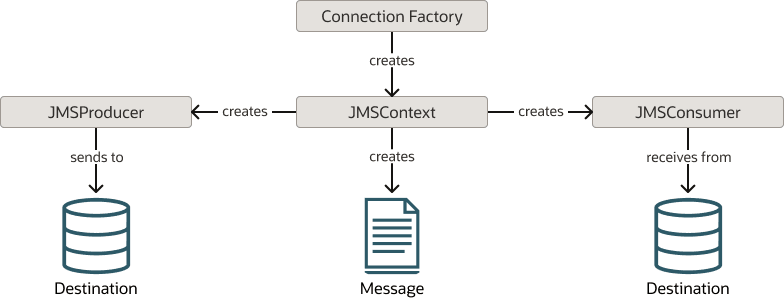
Description of "Figure 4-1 Simplified API Programming Model"
For more information, see the jakarta.jms package in the Jakarta Messaging 3.1 API.
New Interfaces in the Simplified JMS API
The JMS 2.0 simplified API consists of three new interfaces.
JMSContext
JMSContext is the main interface in the simplified API. It combines the connection and session functionality that the classic API exposes through separate Connection and Session objects. To send text without explicitly creating a TextMessage, use the JMSProducer.send(Destination, String) overload, which creates the text message for the supplied body. Use JMSContext.createTextMessage when the application needs a TextMessage object.
For more information, see the JMSContext interface in the Jakarta Messaging 3.1 API.
The WLJMSContext interface in the weblogic.jms.extensions package defines the fields and methods that are not supported by jakarta.jms.JMSContext. It provides the same extension features as WLConnection and WLSession. See the Javadoc for WLJMSContext in Java API Reference for Oracle WebLogic Server.
JMSProducer
To send messages in the simplified API, use a JMSProducer object. You can create a JMSProducer object by calling the createProducer method on a JMSContext object.
Note:
You do not need to save the JMSProducer object in a variable. It is recommended that you create this object when sending a message. For more information, see Sending Messages Using the Simplified JMS API.
For more information, see the JMSProducer interface in the Jakarta Messaging 3.1 API.
The WLJMSProducer interface in weblogic.jms.extensions provides WebLogic JMS extensions, including setUnitOfOrder and setRedeliveryLimit. To use these extensions, obtain a WebLogic JMS producer and cast it to WLJMSProducer. JMSProducer implementations supplied by other providers are not required to implement this interface. See the Javadoc for WLJMSProducer in Java API Reference for Oracle WebLogic Server.
JMSConsumer
The JMSConsumer object receives messages from a queue or topic. You can create a JMSConsumer object by passing a Queue or Topic object to one of the createConsumer methods on a JMSContext or by passing a Topic object to one of the createSharedConsumer or createDurableConsumer methods on a JMSContext object.
For more information, see the JMSConsumer interface in the Jakarta Messaging 3.1 API.
New Methods to Simplify Messaging in JMS 2.0
In addition to the methods for sending and receiving messages on JMSContext objects, JMS 2.0 introduces a few more methods to simplify the code.
Method to Extract the Body Directly from a Message
The getBody method provides an easy way to obtain the body from a message. This method applies to both the classic and simplified API.
The following statement assumes that message is a jakarta.jms.Message referring to a received BytesMessage. The enclosing method must catch or declare jakarta.jms.JMSException. If the statement is used in MessageListener.onMessage, catch JMSException inside the callback; onMessage cannot declare it.
byte[] bytes = message.getBody(byte[].class);
For more information, see the Message interface in the Jakarta Messaging 3.1 API.
Method to Receive a Message Body Directly
The receiveBody method can be used to receive any type of message except for StreamMessage and Message, as long as the class of the expected body is known in advance.
JMSConsumer consumer = ...
String body = consumer.receiveBody(String.class,1000);
For more information, see the JMSConsumer interface in the Jakarta Messaging 3.1 API.
Method to Create a Session
A new createSession method, that accepts a single parameter or no parameter, was added to the jakarta.jms.Connection. See Create a Session Using the createSession Method.