A Revised configWss.py
The ReliableEchoServiceImpl web service does not explicitly invoke any WebLogic Server API to handle the requirements imposed by any associated policy files, nor does this web service have to understand which, if any, security providers, tokens, or other such mechanisms are involved.
The script file configWss.py uses WLST to create and configure the default web service security configuration, default_wss, for the active security realm. (The default web service security configuration is used by all web services in the domain unless they have been explicitly programmed to use a different configuration.) Further, this script makes sure that x509 tokens are supported, creates the needed security providers, and so forth.
The configWss.py file is the same as that in EXAMPLES_HOME\wl_server\examples\src\examples\webservices\wsrm_security\configWss.py, with the changes shown in bold. The build.xml file provides the command input.
Note:
Long lines in this script have been formatted for readability.
Example A-1 configWss.py
:
#Create credential provider for SCT
cpName='default_sct_cp'
wtm=defaultWss.lookupWebserviceCredentialProvider(cpName)
if wtm == None:
  print 'creating new webservice credential provider : ' + cpName
  wtm = defaultWss.createWebserviceCredentialProvider(cpName)
 wtm.setClassName('weblogic.wsee.security.wssc.v13.sct.
    ServerSCCredentialProvider')
  wtm.setTokenType('sct')
  cpm = wtm.createConfigurationProperty('TokenLifeTime')
  cpm.setValue('43200000')
else:
  print 'found exsiting bean for: ' + cpName

#Create credential provider for DK
cpName='default_dk_cp'
wtm=defaultWss.lookupWebserviceCredentialProvider(cpName)
if wtm == None:
        wtm = defaultWss.createWebserviceCredentialProvider(cpName)
      wtm.setClassName('weblogic.wsee.security.wssc.v13.
           dk.DKCredentialProvider')
        wtm.setTokenType('dk')
        cpm = wtm.createConfigurationProperty('Label')
        cpm.setValue('WS-SecureConversationWS-SecureConversation')
        cpm = wtm.createConfigurationProperty('Length')
        cpm.setValue('16')
else:
  print 'found exsiting bean for: DK ' + cpName
:
Comparison of WebLogic Server and XACML Security Models
The WebLogic Server model for representing resources and policies follows the model of Jakarta EE deployment descriptors. This Jakarta EE model creates a hierarchy of resources in which roles and authorization policies at the top of the hierarchy protect resources that are lower in the hierarchy. (See Protecting a Hierarchy of Resources.) Policies lower in a hierarchy always override policies higher in the hierarchy. The higher levels of the resource hierarchy contain enterprise applications, Web applications, and EJBs. The lowest levels of the resource hierarchy contain EJB methods, HTTP methods on specific URL patterns, and MBean getters and setters.
The XACML model also recognizes a hierarchy of resources. Unlike the native WebLogic Server model, your XACML policies must specify how to interpret cases in which a resource is protected by its own policy and by a policy on the resource's parent or ancestor.
In addition, a XACML document typically distinguishes between a resource and the actions of a resource. For example, a XACML document defines a resource such as an EJB, and then defines an action within the EJB resource to represent a method in the EJB. The native WebLogic Server model considers an EJB and each EJB method to be resources. See Figure A-1.
Figure A-1 WebLogic Resource Hierarchy Includes Methods
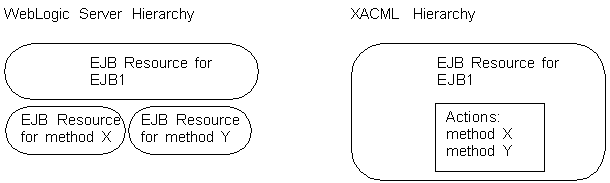
Description of "Figure A-1 WebLogic Resource Hierarchy Includes Methods"
While it is possible to describe an action such as an EJB method as a XACML resource, a more natural expression in XACML would define an EJB as a resource and an EJB method as an action within the resource.
Comparison of Terminology
The WebLogic Server terminology for describing resources and policies follows the model of Jakarta EE deployment descriptors. This Jakarta EE model uses the following terms to describe key concepts:
-
Role, which contains one or more conditions that describe which users or groups are in the role at any given time. A role expression is a collection of conditions and the name of a user or group whom the conditions add to the role. The collection of expressions is the role statement.
-
Policy, which contains one or more conditions that describe who can access a resource at any given time. A policy expression is a collection of conditions and the name of a user, group, or role whom the conditions allow access. The collection of expressions is the policy statement.
In XACML, a set of rules comprise a policy, and policies can be used to determine who is in a role or who can access a resource. In general, a XACML policy is equivalent to a role statement or policy statement in WebLogic Server.
Description of Data Types
Oracle implements support for all of the data types that are required by the XACML core specification. It supports additional, standard XML data types and provides a group of custom data types. This document uses the bea: prefix to indicate that a data type is a custom Oracle type.
For a description of all data types that the WebLogic XACML providers recognize, see com.bea.common.security.xacml.Type in Java API Reference for Oracle WebLogic Server.
Action Identifiers
XACML uses an Action element to identify an operation in a resource or a hierarchy of resources.
WebLogic Server supports all of the XACML Action identifiers, as described in the XACML 2.0 Core Specification, and adds support for an additional one that can appear anywhere that a standard XACML environment identifier can appear.
To identify operations in WebLogic Server resources (for example, to identify a specific EJB method), use action identifiers as described in Table A-1.
Note:
While it is possible to use a resource identifier to describe an operation such as an EJB method, a more natural expression in XACML would use an action identifier. See Comparison of WebLogic Server and XACML Security Models.
Table A-1 Action Identifiers
| To Identify... | Use This Identifier... |
|---|---|
|
An operation |
|
|
When the provider performs a security check |
The WebLogic Security SPI contains an optional feature that enables containers to specify when a provider performs a security check on a request:
You can use this See Note: Using a Direction object in a decision is optional for Authorization providers. The WebLogic Server XACML Authorization provider supports only the |
Table A-2 describes the value that you specify for the action-id identifier.
Table A-2 Value for the action-id Identifier
| If the operation is in this resource type... | Specify... |
|---|---|
|
Admin |
The name of an administrative activity that is protected by an Admin resource. For example, For a list of valid values, see the action parameter for the |
|
Application |
The name of the application as displayed in the . |
|
Control |
The name of a method in a Java control. Java controls are reusable components that you can create and use anywhere within a WebLogic Platform application. |
|
EJB |
The name of an EJB method. For example, |
|
JDBC |
The name of an administrative activity that is protected by a JDBC resource. For a list of valid values, see the |
|
JMS |
The name of an administrative activity that is protected by a JMS resource. For a list of valid values, see the |
|
JMX |
The name of an operation in a WebLogic Server MBean. For example, |
|
JNDI |
The name of an administrative activity that is protected by a JNDI resource. For a list of valid values, see the |
|
Server |
The name of a server life cycle activity that is protected by a Server resource. For example, For a list of valid values, see Server Resources. |
|
URL |
The name of an HTTP method. For example, |
|
Web Service |
The name of a Web Service method. For example, |
|
Work Context |
The name of an administrative activity that is protected by a Work Context resource. For a list of valid values, see the |
|
All others |
The following string: |
Examples
The following example uses an Action element to specify that the target is mymethod within the SimpleSoap Web Service.
Note:
When specifying values in the <AttributeValue> element, you must not include extraneous space characters. In particular:
-
Do not precede the first value with more than a single space character.
-
When specifying multiple values, do not separate each value by more than a single space character.
-
Make sure there are no space characters that follow the last value.
For example:
<AttributeValue datatype>value1, value2, value3</AttributeValue>
<Target>
<Resources>
<Resource>
<ResourceMatch
MatchId="urn:oasis:names:tc:xacml:1.0:function:string-equal">
<AttributeValue DataType="http://www.w3.org/2001/XMLSchema#string">type=<webservices>, application=webservicesJwsSimpleEar,contextPath=/jws_basic_simple, webService=SimpleSoapPort</AttributeValue>
<ResourceAttributeDesignator
AttributeId="urn:oasis:names:tc:xacml:2.0:resource:resource-ancestor"
DataType="http://www.w3.org/2001/XMLSchema#string"
MustBePresent="true"/>
</ResourceMatch>
</Resource>
</Resources>
<ActionMatch
MatchId="urn:oasis:names:tc:xacml:1.0:function:string-equal">
<AttributeValue DataType="http://www.w3.org/2001/XMLSchema#string">mymethod</AttributeValue>
<ActionAttributeDesignator
AttributeId="urn:oasis:names:tc:xacml:1.0:action:action-id"
DataType="http://www.w3.org/2001/XMLSchema#string"
MustBePresent="true"/>
</ActionMatch>
</Target> Updating the JWS File with @Policy and @Policies Annotations
Use the @Policy and @Policies annotations in your JWS file to specify that the web service has one or more policy files attached to it. You can use these annotations at either the class or method level.
Note:
If you specify a transport-level security policy for your web service, it must be at the class level.
In addition, the transport-level security policy must apply to both the inbound and outbound directions. That is, you cannot have HTTPS for inbound and HTTP for outbound.
See Loading a Policy From the CLASSPATH for an additional policy option.
The @Policies annotation simply groups two or more @Policy annotations together. Use the @Policies annotation if you want to attach two or more policy files to the class or method. If you want to attach just one policy file, you can use @Policy on its own.
The @Policy annotation specifies a single policy file, where it is located, whether the policy applies to the request or response SOAP message (or both), and whether to attach the policy file to the public WSDL of the service.
Examples
The following example uses an Environment element to match value of a WebLogic Server listen port. Such an element could create a policy that requires a request to come through listen port 9001:
<Environment>
   <EnvironmentMatch
      MatchId="urn:oasis:names:tc:xacml:1.0:function:double-equal">
      <EnvironmentAttributeDesignator
           AttributeId="urn:bea:xacml:2.0:environment:context:com.bea.cont
           extelement.channel.Port"
            DataType="http://www.w3.org/2001/XMLSchema#double"/>
      <AttributeValue DataType="http://www.w3.org/2001/XMLSchema#double">9001</AttributeValue>
   </EnvironmentMatch>
</Environment>
Policy and PolicySet Identifiers
A XACML Policy contains rules and is identified by its PolicyId. A PolicySet contains policies or policy sets and is identified by its PolicySetId. Both identifiers must be valid URI values. Within a PolicySet, use PolicyIdReference to include a Policy by ID and PolicySetIdReference to include a PolicySet by ID. WebLogic Server uses the corresponding ID as the key in the Authorization or Role Mapping provider's policy store.
WebLogic Server reserves URI values beginning with urn:bea: for its internal use. While you cannot create your own policies with URIs that begin with urn:bea:, you can use these values to include Oracle's policies in your policy sets.
Resource Identifiers
XACML uses a Resource element to represent data, a service, or a system component.
WebLogic Server supports all of the XACML Resource identifiers, as described in the XACML 2.0 Core Specification.
To identify a WebLogic Server resource, use resource identifiers as described in Table A-3. For information about WebLogic Server resources, see Resource Types You Can Secure with Policies.
Table A-3 WebLogic Server Resource Identifiers
| To identify a... | Use the following identifier... |
|---|---|
|
Resource |
|
|
Resource and its ancestors |
|
|
Parent of a resource |
|
|
Ancestor of a resource |
|
Example of Adding Security to a JAX-WS Web Service
This section provides a simple example of adding security to a JAX-WS web service. The example attaches four policies:
-
Wssp1.2-2007-SignBody.xml -
Wssp1.2-2007-EncryptBody.xml -
Wssp1.2-2007-Wss1.1-UsernameToken-Plain-EncryptedKey-Basic128.xml -
Wssp1.2-Wss1.0-UsernameToken-Plain-X509-Basic256.xml
The examples include extensive inline comments in the code.
**INTERNAL XREF ERROR** shows the web service code.
Note:
This web service implements attachToWsdl=false, and therefore the web service client needs to load a client-side version of the policy, as shown in **INTERNAL XREF ERROR**.
Example A-2 Web Service SignEncrypt.java
package signencrypt;

import java.io.File;

import weblogic.jws.Policies;
import weblogic.jws.Policy;
import weblogic.jws.security.WssConfiguration;

import jakarta.activation.DataHandler;
import jakarta.activation.FileDataSource;
import jakarta.jws.WebMethod;
import jakarta.jws.WebService;
import jakarta.xml.ws.BindingType;
import jakarta.xml.ws.soap.MTOM;

import com.sun.xml.ws.developer.SchemaValidation;

/**
 *
 * Webservice which accepts a SOAP Message which is Signed And
 *         Encrypted Uses the WS-Policy 1.2
 */


@WebService(name = "SignEncrypt", portName = "SignEncryptPort", serviceName =
"SignEncrypt", targetNamespace = "http://signencrypt")
@BindingType(value = "http://schemas.xmlsoap.org/wsdl/soap/http")
// Domain Level WebserviceSecurity Configuration
@WssConfiguration(value = "Basic-UNT")
@MTOM()
//@SchemaValidation

public class SignEncrypt {

  @Policies( {
  @Policy(uri = "policy:Wssp1.2-2007-SignBody.xml", attachToWsdl=false),
      @Policy(uri = "policy:Wssp1.2-2007-EncryptBody.xml", attachToWsdl=false),
    /*
     * WSS 1.1 X509 with symmetric binding and authentication with plain-text
     * Username Token which is encrypted and signed using the Symmetric key
     */
    /* Use Basic-UNT WssConfiguration */
      @Policy(uri = "policy:Wssp1.2-2007-Wssp1.2-2007-Wss1.1-UsernameToken-Plain-EncryptedKey-Basic128.xml",
attachToWsdl=false)
  /*
   * The client side public certificate and private key is not required in
   * this scenario. Username token with plain text password is sent in the
   * request for authentication, and signed and encrypted with the symmetric
   * key. The symmetric key is encrypted by the server's public key. The client
   * also signs and encrypts the request header elements and body with the
   * symmetric key. The server signs and encrypts the response body with the
   * symmetric key. Both request and response messages include the signed time
   * stamps. The encryption method is Basic128.
   */
  /* Use untx509webservicesecurity WssConfiguration */

  /*
   * @Policy(uri =
   * "policy:Wssp1.2-Wss1.0-UsernameToken-Plain-X509-Basic256.xml")
   */})
  @WebMethod()
  public String echoString(String input) {
    String result = "[SignEncrypt.echoString]: " + input;
    System.out.println(result);
    return result;
  }

   @WebMethod()
  public String echoStringWithoutSecurity(String input) {
    String result = "[SignEncrypt.echoString]: " + input;
    System.out.println(result);
    return result;
  }

  @WebMethod()
  public byte[] echoStringAsByteArray(String data) {
    System.out.println("echoByteArray data: " + data);
    byte[] output = data.getBytes();
    System.out.println("Output Length : " + output.length + " Output: " + output.toString());
    return data.getBytes();
  }

   @Policies( {
  @Policy(uri = "policy:Wssp1.2-2007-SignBody.xml", attachToWsdl=false),
      @Policy(uri = "policy:Wssp1.2-2007-EncryptBody.xml", attachToWsdl=false),
    /*
     * WSS 1.1 X509 with symmetric binding and authentication with plain-text
     * Username Token which is encrypted and signed using the Symmetric key
     */
    /* Use Basic-UNT WssConfiguration */
      @Policy(uri = "policy:Wssp1.2-2007-Wssp1.2-2007-Wss1.1-UsernameToken-Plain-EncryptedKey-Basic128.xml",
attachToWsdl=false)
  /*
   * The client side public certificate and private key is not required in
   * this scenario. Username token with plain text password is sent in the
   * request for authentication, and signed and encrypted with the symmetric
   * key. The symmetric key is encrypted by the server's public key. The client
   * also signs and encrypts the request header elements and body with the
   * symmetric key. The server signs and encrypts the response body with the
   * symmetric key. Both request and response messages include the signed time
   * stamps. The encryption method is Basic128.
   */
  /* Use untx509webservicesecurity WssConfiguration */

  /*
  * @Policy(uri =
  * "policy:Wssp1.2-Wss1.0-UsernameToken-Plain-X509-Basic256.xml")
  */})
 @WebMethod()
 public byte[] echoByteArrayWithSecurity(byte[] inputData) {
   System.out.println("echoByteArrayWithSecurity data: " + inputData.length + " bytes");
   return inputData;
 }

 @WebMethod()
 public byte[] echoByteArray(byte[] inputData) {
   System.out.println("echoByteArray data: " + inputData);
   return inputData;
 }

 @WebMethod()
 public DataHandler getDataHandler(String fileName) {

   DataHandler handler = null;
   try {
   File file = new File(fileName);
   System.out.println("file: " + file.getCanonicalPath() + ", " +  file.getPath());

   FileDataSource fileDataSource = new FileDataSource(file);
   handler = new DataHandler(fileDataSource);

   } catch(Exception e) {
     System.out.println("Error Creating Data Handelr:  " + e.getMessage());
   }

   return handler;

  }


  @WebMethod()
 @Policies( {
   @Policy(uri = "policy:Wssp1.2-2007-SignBody.xml", attachToWsdl=false),
   @Policy(uri = "policy:Wssp1.2-2007-EncryptBody.xml", attachToWsdl=false),
   /*
    * WSS 1.1 X509 with symmetric binding and authentication with plain-text
    * Username Token which is encrypted and signed using the Symmetric key
    */
   /* Use Basic-UNT WssConfiguration */
       @Policy(uri = "policy:Wssp1.2-2007-Wssp1.2-2007-Wss1.1-UsernameToken-Plain-EncryptedKey-Basic128.xml", attachToWsdl=false)
  /*
   * The client side public certificate and private key is not required in
   * this scenario. Username token with plain text password is sent in the
   * request for authentication, and signed and encrypted with the symmetric
   * key. The symmetric key is encrypted by the server's public key. The client
   * also signs and encrypts the request header elements and body with the
   * symmetric key. The server signs and encrypts the response body with the
   * symmetric key. Both request and response messages include the signed time
   * stamps. The encryption method is Basic128.
   */
 /* Use untx509webservicesecurity WssConfiguration */
  /*
  * @Policy(uri =
  * "policy:Wssp1.2-Wss1.0-UsernameToken-Plain-X509-Basic256.xml")
  */})
 public DataHandler getDataHandlerWithSecurity(String fileName) {

   DataHandler handler = null;
   try {
   File file = new File(fileName);
   System.out.println("file: " + file.getCanonicalPath() + ", " +  file.getPath());

   FileDataSource fileDataSource = new FileDataSource(file);
   handler = new DataHandler(fileDataSource);

   } catch(Exception e) {
     System.out.println("Error Creating Data Handelr:  " + e.getMessage());
   }

   return handler;

 }

}
As noted, the web service implements attachToWsdl=false, and therefore the web service client needs to load a client-side version of the policy. **INTERNAL XREF ERROR** shows an example of using the weblogic.jws.jaxws.ClientPolicyFeature class to load client-side policies.
The example includes extensive inline comments.
Example A-3 SOAClient.java
package signencrypt.client;
import weblogic.jws.jaxws.ClientPolicyFeature;
import weblogic.jws.jaxws.policy.InputStreamPolicySource;
import weblogic.security.SSL.TrustManager;
import weblogic.wsee.policy.runtime.BuiltinPolicyFinder;
import weblogic.wsee.security.bst.ClientBSTCredentialProvider;
import weblogic.wsee.security.bst.StubPropertyBSTCredProv;
import weblogic.wsee.security.unt.ClientUNTCredentialProvider;
import weblogic.wsee.security.util.CertUtils;
import weblogic.xml.crypto.wss.WSSecurityContext;
import weblogic.xml.crypto.wss.provider.CredentialProvider;

import soa.client.Bpelprocess1ClientEp;
import soa.client.BPELProcess1;

import java.io.BufferedInputStream;
import java.io.BufferedOutputStream;
import java.io.File;
import java.io.FileInputStream;
import java.io.FileNotFoundException;
import java.io.FileOutputStream;
import java.io.InputStream;
import java.io.OutputStream;
import java.net.URL;
import java.security.cert.X509Certificate;
import java.util.ArrayList;
import java.util.List;
import java.util.Map;

import jakarta.activation.DataHandler;
import jakarta.activation.FileDataSource;
import javax.xml.namespace.QName;
import jakarta.xml.ws.BindingProvider;
import jakarta.xml.ws.WebServiceFeature;
import jakarta.xml.ws.soap.MTOMFeature;

public class SOAClient {

  private final static boolean debug = true;

  private final static String endpointURL =
    "http://....com:8001/soa-infra/services/default/soa/bpelprocess1_client_ep";
  private final static String certsDir = "C:/webservices/server/keystores";

  private final static String serverKeyStoreName = "default-keystore.jks";
  private final static String serverKeyStorePass = "...";
  private final static String serverCertAlias = "alice";
  private final static String serverKeyPass = "...";

  private final static String username = "weblogic";
  private final static String password = "...";

  private final static String fileName =
    "C:/webservices/farallon/owsm-interop/mtom.JPG";

  private final static String outputFileName =
    "C:/webservices/farallon/owsm-interop/output.jpg";

  private final static String[] clientPolicyFileNames =
    {
      "./policy/Wssp1.2-2007-Wssp1.2-2007-Wss1.1-UsernameToken-Plain-EncryptedKey-Basic128.xml",
      "./policy/Wssp1.2-2007-SignBody.xml",
      "./policy/Wssp1.2-2007-EncryptBody.xml" };

  private BPELProcess1 port = null;

  /**
   * Create the Stub/Port and set the Stub/Port with Client Side Security Policy
   * Feature and MTOM Feature.
   * @throws Exception
   */

  private void createStubWithClientPolicy() throws Exception {

    URL url = new URL(endpointURL + "?WSDL");

    QName serviceName =
      new QName("http://xmlns.oracle.com/SOASecurity/soa/BPELProcess1",
        "bpelprocess1_client_ep");

    Bpelprocess1ClientEp service = new Bpelprocess1ClientEp(url, serviceName);

    QName operationName =
      new QName("http://xmlns.oracle.com/SOASecurity/soa/BPELProcess1", "process");

    ClientPolicyFeature policyFeature = new ClientPolicyFeature();

    // Set the Client Side Policy on the operation with QName <operationName>

policyFeature.setEffectivePolicyForOperation(operationName, new
InputStreamPolicySource(getPolicyInputStreamArray(clientPolicyFileNames)
));
    MTOMFeature mtomFeature = new MTOMFeature();

    WebServiceFeature[] features = { policyFeature, mtomFeature };
    // WebServiceFeature[] features = { mtomFeature };
    //WebServiceFeature[] features = {policyFeature};

    port = service.getBPELProcess1Pt(features);
  }

  /**
  * Setup the Client Port/Stub used to invoke the webservice with Security
  *
  * @throws Exception
  */
 private void setUp() throws Exception {
   createStubWithClientPolicy();
   /**
    * Get the Server Public Certificate to Encrypt the Symmetric Key or the
    * SOAP Message
    */
   /**
    * Get the Server Public Certificate to Verify the Signature of the
    * Symmetric Key or the SOAP Message
    */
    X509Certificate serverCert =
     (X509Certificate) CertUtils.getCertificate(
       certsDir + "/" + serverKeyStoreName, serverKeyStorePass,
       serverCertAlias, "JKS").get(0);
   List<CredentialProvider> credProviders =
     new ArrayList<CredentialProvider>();
   /*
    * Set up UserNameToken
    */
   credProviders.add(new ClientUNTCredentialProvider(username.getBytes(),
     password.getBytes()));
   Map<String, Object> rc = ((BindingProvider) port).getRequestContext();
    /*
    * For Wssp1.2-2007-Wssp1.2-2007-Wss1.1-UsernameToken-Plain-EncryptedKey-Basic128.xml
    * there is no need to specify the client side public certificate and
    * private key as this is a symmetric key use case. serverCert is used to
    * encrypt the Symmetric Key/Keys
    */
   rc.put(StubPropertyBSTCredProv.SERVER_ENCRYPT_CERT, serverCert);
   rc.put(WSSecurityContext.CREDENTIAL_PROVIDER_LIST, credProviders);
   rc.put(WSSecurityContext.TRUST_MANAGER, new TrustManager() {
     public boolean certificateCallback(X509Certificate[] chain,
       int validateErr) {
       // need to validate if the server cert can be trusted
       System.out.println("Validating Server Certificate");
       return true;
     }
   });

  }
 /**
  * Returns an array of InputStreams of the policy files
  *
  * @param policyNames
  * @return array of InputStreams of Policy's
  * @throws FileNotFoundException
  */
 private InputStream[] getPolicyInputStreamArray(String[] policyNames)
   throws FileNotFoundException {
   InputStream[] inpStreams = new InputStream[policyNames.length];
   for (int k = 0; k < policyNames.length; k++) {
     System.out.println("policy name: " + policyNames[k]);
     inpStreams[k] = getPolicyInputStream(policyNames[k]);
   }
   return inpStreams;
 }
  /**
  * Returns an InputStream of the policy file
  *
  * @param myPolicyName
  * @return
  * @throws FileNotFoundException
  */
 private InputStream getPolicyInputStream(String myPolicyName)
   throws FileNotFoundException {
   return new FileInputStream(myPolicyName);
 }
 /**
  * Invoke the webservice at endpointURL
  *
 (http://....:9003/soa-infra/services/default/soa/bpelprocess1_client_ep)
  *
  * @throws Exception
  */
 private void invokeProcess() throws Exception {
   InputStream inputstream = null;
   OutputStream outputstream = null;
   try {

     File file = new File(fileName);
     File outputFile = new File(outputFileName);

     inputstream = new BufferedInputStream(new FileInputStream(file));
     int bytesAvailable = -1;
     int counter = 0;
     int bytesRead = 0;
     int fileSize = (int) file.length();

     byte[] fileInBytes = new byte[fileSize];

     bytesRead = inputstream.read(fileInBytes);
     System.out.println("bytesRead: " + bytesRead + ", fileSize: " + fileSize + "
fileInBytes: " + fileInBytes.length);

     byte[] result = port.process(fileInBytes);
     /*byte[] input = "Hello".getBytes();
     System.out.println("input length : "+ input.length);

     byte[] result = port.process(input);*/
     if (!outputFile.exists()) {
       outputFile.createNewFile();
     }

     outputstream = new BufferedOutputStream(new FileOutputStream(outputFile));

     if (result != null) {
       System.out.println("Result Length: " + result.length);
     } else {
       System.out.println("result is null");
     }
     outputstream.write(result);

     // System.out.println(result);
   } catch (Exception e) {
     System.out.println("Error Creating Data Handler:  " + e.getMessage());
   } finally {

     if (inputstream != null) {
       inputstream.close();
     }

    if (outputstream != null) {
       outputstream.close();
     }
   }
 }
 public static void main(String[] args) {
   try {
     SOAClient client = new SOAClient();
     client.setUp();
     //client.createStubWithClientPolicy();
     client.invokeProcess();
   } catch (Exception e) {
     System.out.println("Error calling SOA Webservice: " + e.getMessage());
     if (debug) {
       e.printStackTrace();
     }
   }
 }
}
Subject Identifiers
XACML uses a Subject element to represent an actor whose attributes may be referenced by a predicate.
WebLogic Server supports all of the XACML Subject identifiers, as described in the XACML 2.0 Core Specification.
To identify a WebLogic Server user, group, or role as defined in a WebLogic Server realm, use subject identifiers as described Table A-4.
Table A-4 WebLogic Subject Identifiers
| To identify a... | Use the following identifier... |
|---|---|
|
User principal |
|
|
Group principal |
|
|
Role |
Note: WebLogic Server supports only a subset of the RBAC Profile specification, which is the specification that defines this attribute. |
|
Subject who has signed a SOAP document |
|
Examples
For an example of a XACML document that uses identifiers from Table A-4 to define a security role that can be used to protect access to a Web Service, see Example 7-2.
WebLogic Server Functions for XACML
The following sections describe the functions that the WebLogic Server XACML providers support in addition to the functions described in the XACML Core Specification:
Configuring STS URI for SAML: Standalone Client
When the STS is used for retrieving the SAML token, the STS is not co-located with the service and there is no default STS URI. You must configure the STS URI in this case.
Save the following complete class as SamlEndpoint.java. Before invoking an operation, call SamlEndpoint.configure((BindingProvider) port, stsEndpoint), where port is the generated JAX-WS port and stsEndpoint is the absolute HTTPS URI of the SAML STS. Compile with the WebLogic client libraries. Configure credentials and HTTPS trust separately. The method changes the request context; it does not request a token or invoke the service.
import java.net.URI;
import java.util.Map;
import jakarta.xml.ws.BindingProvider;
import weblogic.wsee.jaxrpc.WLStub;

public final class SamlEndpoint {
    private SamlEndpoint() {}

    // Call before invoking an operation on the generated JAX-WS port.
    public static void configure(BindingProvider port, URI stsEndpoint) {
        if (!"https".equalsIgnoreCase(stsEndpoint.getScheme())
                || stsEndpoint.getHost() == null) {
            throw new IllegalArgumentException("Provide an absolute HTTPS STS URI");
        }
        Map<String, Object> context = port.getRequestContext();
        context.put(WLStub.WST_STS_ENDPOINT_ON_SAML, stsEndpoint.toASCIIString());
    }
}
Examples
The following example is a Condition that uses urn:bea:xacml:2.0:function:character-equal to compare two bea:characters:
<Condition>
   <Apply FunctionId="urn:bea:xacml:2.0:function:character-equal">
     <AttributeValue DataType="urn:bea:xacml:2.0:data-type:character">Q</AttributeValue>
     <AttributeValue DataType="urn:bea:xacml:2.0:data-type:character">Q</AttributeValue>
   </Apply>
</Condition>
Secure Conversation Policies
The following predefined policies use the SHA-1 algorithm. Change them as described in this section to instead use SHA-256.
-
Wssp1.2-2007-Wssc1.3-Bootstrap-Https.xml -
Wssp1.2-2007-Wssc1.3-Bootstrap-Https-BasicAuth.xml -
Wssp1.2-2007-Wssc1.3-Bootstrap-Https-ClientCertReq.xml -
Wssp1.2-2007-Wssc1.3-Bootstrap-Https-UNT.xml -
Wssp1.2-2007-Wssc1.3-Bootstrap-Wss1.0.xml -
Wssp1.2-2007-Wssc1.3-Bootstrap-Wss1.1.xml -
Wssp1.2-2007-Wssc1.4-Bootstrap-Wss1.0-UsernameToken-Plain-X509-Basic256.xml -
Wssp1.2-2007-Wssc1.4-Bootstrap-Wss1.1-Saml2.0-Bearer.xml -
Wssp1.2-2007-Wssc1.4-Bootstrap-Wss1.1-UsernameToken-Plain-EncryptedKey.xml -
Wssp1.2-Wssc200502-Bootstrap-Wss1.1.xml
Example
The following policy uses the instance-method function to invoke the HttpServletRequest.getAuthType() method on requests that match a specific URL pattern. See jakarta.servlet.http.HttpServletRequest in the Jakarta Servlet API Specification . The WebLogic Server ContextHandler makes this HttpServletRequest object available to the Authorization and Role Mapping providers for all requests that come through the servlet container. Any policy for a URL resource can invoke this or other HttpServletRequest methods.
Example A-4 Policy That Invokes HttpServletRequest.getAuthType()
<Policy xmlns="urn:oasis:names:tc:xacml:2.0:policy:schema:os"
PolicyId="urn:sample:xacml:2.0:function:instance-method"
RuleCombiningAlgId="urn:oasis:names:tc:xacml:1.0:rule-combining-algorithm:
first-applicable">
<Description>function:instance-method</Description>
<Target>
<Resources>
<Resource>
<ResourceMatch
MatchId="urn:oasis:names:tc:xacml:1.0:function:string-equal">
<AttributeValue DataType="http://www.w3.org/2001/XMLSchema#string">type=<url>, application=MedRecEAR, contextPath=,uri=/docs/*</AttributeValue>
<ResourceAttributeDesignator
AttributeId="urn:oasis:names:tc:xacml:2.0:resource:
resource-ancestor-or-self"
DataType="http://www.w3.org/2001/XMLSchema#string"
MustBePresent="true"/>
</ResourceMatch>
</Resource>
</Resources>
</Target>
<!-- Declaring the instance-method function as a variable because this policy
invokes it multiple times.
-->
<VariableDefinition VariableId="authType">
<Apply FunctionId="urn:bea:xacml:2.0:function:instance-method">
<!-- Passing the HttpServletRequest object to the function, which the
BEA ContextHandler makes available to the security framework.
-->
<Apply FunctionId="urn:bea:xacml:2.0:function:object-one-and-only">
<EnvironmentAttributeDesignator
DataType="urn:bea:xacml:2.0:data-type:object"
AttributeId="urn:bea:xacml:2.0:environment:context:com.bea.
contextelement.servlet.HttpServletRequest" />
</Apply>
<!-- Passing "getAuthType()" as the name of the HttpServletRequest
method to invoke
-->
<AttributeValue DataType="http://www.w3.org/2001/XMLSchema#string">getAuthType</AttributeValue>
<!-- Because the getAuthType() method signature contains no parameters,
pass an empty bag of Class.
-->
<Apply FunctionId="urn:bea:xacml:2.0:function:class-bag" />
</Apply>
</VariableDefinition>
<!-- Creating a rule that allows access to the resource only if
the getAuthType() returns a non-null value and if the non-null
value is "CLIENT_CERT"
-->
<Rule RuleId="primary-rule" Effect="Permit">
<Condition>
<Apply FunctionId="urn:oasis:names:tc:xacml:1.0:function:and">
<Apply FunctionId="urn:oasis:names:tc:xacml:1.0:function:not">
<Apply FunctionId="urn:bea:xacml:2.0:function:object-is-null">
<VariableReference VariableId="authType" />
</Apply>
</Apply>
<Apply
FunctionId="urn:oasis:names:tc:xacml:1.0:function:string-equal">
<!-- Because the instance-method function returns a bea:Object,
this policy wraps the function in an object-to-string function,
which enables a comparison of the function output with another
string.
-->
<Apply FunctionId="urn:bea:xacml:2.0:function:object-to-string">
<VariableReference VariableId="authType" />
</Apply>
<!-- Declaring a String object to compare to the
HttpServletRequest.getAuthType() return value.
-->
<AttributeValue DataType="http://www.w3.org/2001/XMLSchema#string">CLIENT_CERT</AttributeValue>
</Apply>
</Apply>
</Condition>
</Rule>
<Rule RuleId="deny-rule" Effect="Deny" />
</Policy>Time/Date Conversions
Table A-5 lists the functions that Oracle provides to convert XACML times and dates to different data types.
Table A-5 WebLogic Server Time/Date Conversions
| Function | Description |
|---|---|
|
|
|
|
|
|
|
|
|
|
|
|
|
|
|
|
|
|
|
|
|
|
|
|
|
|
|
Arithmetic Conversions and Functions
Table A-6 lists the functions that Oracle provides to convert arithmetic values to different Input Types and to extend the basic set of arithmetic functions specified by XACML.
Table A-6 WebLogic Server Arithmetic Conversions and Functions
| Function | Description |
|---|---|
|
|
|
|
|
|
|
|
|
|
|
|
|
|
|
|
|
|
|
|
|
|
|
|
|
|
|
|
|
|
|
|
|
|
|
|
|
|
|
|
|
|
|
|
|
|
|
|
|
|
|
|
|
|
|
|
|
|
|
|
|
|
|
|
|
|
|
|
|
|
|
|
|
|
|
|
|
|
|
|
|
Object Type Conversions
WebLogic Server provides a collection of functions for converting XACML data into Java objects. The URI for each function in this collection is as follows:
urn:bea:xacml:2.0:function:type-to-object
where type is the name of a XACML data type. Table A-7 lists all data types and the Java object that the corresponding function returns.
For example, this function returns test as a java.lang.String object:
<Apply FunctionId="urn:bea:xacml:2.0:function:string-to-object">
  <AttributeValue DataType="http://www.w3.org/2001/XMLSchema#string">test</AttributeValue>
</Apply>
Table A-7 Data to Java Object Conversion
| When type equals... | The urn:bea:xacml:2.0:function:type-to-object function returns... |
|---|---|
|
character |
|
|
string |
|
|
boolean |
|
|
integer |
|
|
double |
|
|
float |
|
|
long |
|
|
decimal |
|
|
base64Binary |
|
|
hexBinary |
|
|
date |
|
|
time |
|
|
dateTime |
|
|
dayTimeDuration |
|
|
yearMonthDuration |
|
|
rfc822Name |
|
|
x500Name |
|
|
anyURI |
|
|
ipAddress |
|
|
dnsAddress |
|
Table A-8 lists the functions that Oracle provides to convert strings or Java objects to different data or object types. To pass objects that the container makes available to the current context, use the urn:bea:xacml:2.0:environment:context:key environment identifier to specify the bea:Object. See Chunk1028650589.html#GUID-1F3EE714-704E-4873-BA5E-AC4AF779176D.
Table A-8 WebLogic Server Object Conversions
| Function | Description |
|---|---|
|
|
|
|
|
|
|
|
|
|
|
|
Object Comparisons
Table A-9 lists the functions that Oracle provides to compare Java objects.
Table A-9 WebLogic Server Object Comparisons
| Function | Description |
|---|---|
|
|
|
|
|
|
|
|
|
|
|
|
|
|
|
|
|
|
|
|
|
|
|
|
String Comparisons and Manipulations
Table A-10 lists the functions that Oracle provides to compare Java objects.
Table A-10 WebLogic Server String Comparisons and Manipulations
| Function | Description |
|---|---|
|
|
|
|
|
This function takes two arguments of type
Comparisons are preformed without considering case. |
|
|
|
|
|
|
|
|
|
|
|
|
|
|
|
|
|
|
|
|
|