13 Understanding WebLogic Server Application Classloading
Java Classloading
Classloaders are a fundamental module of the Java language. A classloader is a part of the Java virtual machine (JVM) that loads classes into memory; a classloader is responsible for finding and loading class files at run time. Every successful Java programmer needs to understand classloaders and their behavior.
Java Classloader Hierarchy
The JDK has bootstrap, platform and system class loaders. The bootstrap loader loads core runtime classes, such as java.lang.String. The platform loader loads additional platform classes, and the system loader loads application-path classes. Not every java.* class is defined by the bootstrap loader. A loader’s parent is a delegation relationship between loader instances; it is separate from Java class inheritance. The extension-directory mechanism from JDK 8 was removed in JDK 9; do not install application libraries in JAVA_HOME/lib/ext or configure java.ext.dirs. JDK 21 ClassLoader
Note:
What Oracle refers to as a "system classpath classloader" is often referred to as the "application classloader" in contexts outside of WebLogic Server. When discussing classloaders in WebLogic Server, Oracle uses the term "system" to differentiate from classloaders related to Jakarta EE applications or libraries (which Oracle refers to as "application classloaders").
Loading a Class
Classloaders use a delegation model when loading a class. The classloader implementation first checks its cache to see if the requested class has already been loaded. This class verification improves performance in that its cached memory copy is used instead of repeated loading of a class from disk. If the class is not found in its cache, the current classloader asks its parent for the class. Only if the parent cannot load the class does the classloader attempt to load the class. If a class exists in both the parent and child classloaders, the parent version is loaded. This delegation model is followed to avoid multiple copies of the same form being loaded. Multiple copies of the same class can lead to a ClassCastException.
Classloaders ask their parent classloader to load a class before attempting to load the class themselves. Classloaders in WebLogic Server that are associated with Web applications can be configured to check locally first before asking their parent for the class. This allows Web applications to use their own versions of third-party classes, which might also be used as part of the WebLogic Server product. The prefer-web-inf-classes Element section discusses this in more detail.
prefer-web-inf-classes Element
The weblogic.xml Web application deployment descriptor contains a <prefer-web-inf-classes> element (a sub-element of the <container-descriptor> element). By default, this element is set to False. Setting this element to True subverts the classloader delegation model so that class definitions from the Web application are loaded in preference to class definitions in higher-level classloaders. This allows a Web application to use its own version of a third-party class, which might also be part of WebLogic Server. See weblogic.xml Deployment Descriptor Elements.
When using this feature, you must be careful not to mix instances created from the Web application's class definition with instances created from the server's definition. If such instances are mixed, a ClassCastException results.
Example 13-1 illustrates the prefer-web-inf-classes element, its description and default value.
Example 13-1 prefer-web-inf-classes Element
/**
* If true, classes located in the WEB-INF directory of a web-app will be
* loaded in preference to classes loaded in the application or system
* classloader.
* @default false
*/
boolean isPreferWebInfClasses();
void setPreferWebInfClasses(boolean b);
Changing Classes in a Running Program
WebLogic Server allows you to deploy newer versions of application modules such as EJBs while the server is running. This process is known as hot-deploy or hot-redeploy and is closely related to classloading.
Java classloaders do not have any standard mechanism to undeploy or unload a set of classes, nor can they load new versions of classes. In order to make updates to classes in a running virtual machine, the classloader that loaded the changed classes must be replaced with a new classloader. When a classloader is replaced, all classes that were loaded from that classloader (or any classloaders that are offspring of that classloader) must be reloaded. Any instances of these classes must be re-instantiated.
In WebLogic Server, each application has a hierarchy of classloaders that are offspring of the system classloader. These hierarchies allow applications or parts of applications to be individually reloaded without affecting the rest of the system. WebLogic Server Application Classloading discusses this topic.
Policy Class Loader and Historical Class Caching
The standard WebLogic startup scripts use the Policy Class Loader launcher unless USE_JVM_SYSTEM_LOADER=true selects the JVM system loader. This loader selection is distinct from the historical JDK 8 bulk class-cache feature. The CLASS_CACHE instructions for WebLogic Server 12.1.3 and the 12.2.1 upgrade discussion describe earlier releases; they do not configure AppCDS for this release. For the AppCDS procedure, see Class Caching With Application Class Data Sharing.
Class Caching With Application Class Data Sharing
The Application Class Data Sharing (AppCDS) is a class loader optimization that supports archive files of predefined, validated, and linked classes.
This implementation improves the startup time of Oracle WebLogic Server and allows multiple JVMs on the same machine to share memory pages, thereby reducing overall memory usage.
To use this feature, do the following:
- Generate Class List During WebLogic Server Trial
- Generate AppCDS Archive
- Run WebLogic Server With AppCDS Archive
Set DOMAIN_HOME to the actual domain root. Use the same JDK build and matching startup classpath to generate and use an archive. First start in training mode, exercise representative server/application activity, and shut the server down normally to complete the class list. Only then generate the archive and start with useArchive. Repeat training/archive generation after relevant JDK, WebLogic installation or classpath changes.
Generate Class List During WebLogic Server Trial
cd "$DOMAIN_HOME/bin"
export APPCDS_CLASS_LIST="$DOMAIN_HOME/WebLogic.classlist"
export APPCDS_ARCHIVE="$DOMAIN_HOME/WebLogic.jsa"
./startWebLogic.sh generateClassList
Exercise representative server/application activity, then shut the server down normally before the next step.
Generate AppCDS Archive
./generateArchive.sh
The two exported absolute paths can be changed consistently; generate the archive only after the training class list is complete.
Run WebLogic Server With AppCDS Archive
./startWebLogic.sh useArchive
generateClassList and useArchive select the JVM system loader instead of PCL. useArchive uses -Xshare:auto; inspect JVM startup diagnostics to determine whether the archive was used.
WebLogic Server Application Classloading
WebLogic Server classloading is centered on the concept of an application. An application is normally packaged in an Enterprise Archive (EAR) file containing application classes. WebLogic Server application classloading allows WebLogic Server to host multiple isolated applications within the same JVM.
Overview of WebLogic Server Application Classloading
WebLogic Server classloading is centered on the concept of an application. An application is normally packaged in an Enterprise Archive (EAR) file containing application classes. Everything within an EAR file is considered part of the same application. The following may be part of an EAR or can be loaded as standalone applications:
-
An EJB JAR file
-
A Web application WAR file
-
A resource adapter RAR file
Note:
See the following sections for more information:
-
For information on resource adapters and classloading, see About Resource Adapter Classes.
-
For information on overriding generic application files while classloading, see Generic File Loading Overrides in Deploying Applications to Oracle WebLogic Server.
-
If you deploy an EJB and a Web application separately, they are considered two applications. If they are deployed together within an EAR file, they are one application. You deploy modules together in an EAR file for them to be considered part of the same application.
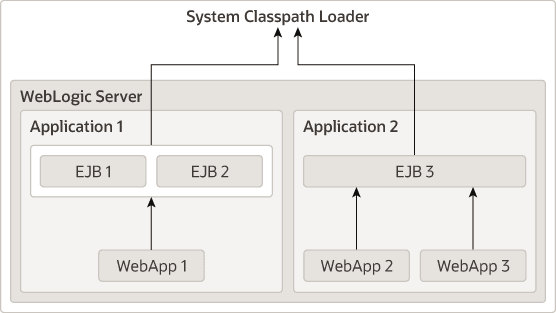
Every application receives its own classloader hierarchy; the parent of this hierarchy is the system classpath classloader. This isolates applications so that application A cannot see the classloaders or classes of application B. In hierarchy classloaders, no sibling or friend concepts exist. Application code only has visibility to classes loaded by the classloader associated with the application (or module) and classes that are loaded by classloaders that are ancestors of the application (or module) classloader. This allows WebLogic Server to host multiple isolated applications within the same JVM.
Application Classloader Hierarchy
WebLogic Server automatically creates a hierarchy of classloaders when an application is deployed. The root classloader in this hierarchy loads any EJB JAR files in the application. A child classloader is created for each Web application WAR file.
Because it is common for Web applications to call EJBs, the WebLogic Server application classloader architecture allows Jakarta Server Page (JSP) files and servlets to see the EJB interfaces in their parent classloader. This architecture also allows Web applications to be redeployed without redeploying the EJB tier. In practice, it is more common to change JSP files and servlets than to change the EJB tier.
The following graphic illustrates this WebLogic Server application classloading concept.
If your application includes servlets and JSPs that use EJBs:
-
Package the servlets and JSPs in a WAR file
-
Package the Jakarta Enterprise Beans (EJB) in an EJB JAR file
-
Package the WAR and JAR files in an EAR file
-
Deploy the EAR file
Deploying the WAR and EJB module in the same EAR gives them the standard application visibility described here. For a caller in a separate application, package the required client-view interfaces and dependent value types with the caller and use the bean’s supported remote client view. A home interface is required only when using the legacy EJB 2.x home/component view. Portable local-view access is guaranteed within the same application; do not assume that a separately deployed WAR can use a local view merely because both deployments run in one JVM. See Application Classloading and Pass-by-Value or Reference.
Note:
The Web application classloader contains all classes for the Web application except for the JSP class. The JSP class obtains its own classloader, which is a child of the Web application classloader. This allows JSPs to be individually reloaded.
Custom Module Classloader Hierarchies
You can create custom classloader hierarchies for an application allowing for better control over class visibility and reloadability. You achieve this by defining a classloader-structure element in the weblogic-application.xml deployment descriptor file.
The following diagram illustrates how classloaders are organized by default for WebLogic applications. An application level classloader exists where all EJB classes are loaded. For each Web module, there is a separate child classloader for the classes of that module.
For simplicity, JSP classloaders are not described in the following diagram.
Figure 13-2 Standard Classloader Hierarchy
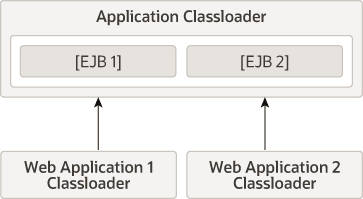
Description of "Figure 13-2 Standard Classloader Hierarchy"
This hierarchy is optimal for most applications, because it allows call-by-reference semantics when you invoke EJBs. It also allows Web modules to be independently reloaded without affecting other modules. Further, it allows code running in one of the Web modules to load classes from any of the EJB modules. This is convenient, as it can prevent a Web module from including the interfaces for EJBs that it uses. Note that some of those benefits are not strictly Jakarta EE-compliant.
The invocation benefits depend on the EJB client view and applicable call-by-reference rules; see Application Classloading and Pass-by-Value or Reference.
The ability to create custom module classloaders provides a mechanism to declare alternate classloader organizations that allow the following:
-
Reloading individual EJB modules independently
-
Reloading groups of modules together
-
Reversing the parent child relationship between specific Web modules and EJB modules
-
Namespace separation between EJB modules
Declaring the Classloader Hierarchy
You can declare the classloader hierarchy in the WebLogic-specific application deployment descriptor weblogic-application.xml.
In the current weblogic-application XML schema, classloader-structure contains zero or more module-ref elements followed by zero or more nested classloader-structure elements. Each module-ref contains one module-uri naming a module in the application.
The top-level element in weblogic-application.xml includes an optional classloader-structure element. If you do not specify this element, then the standard classloader is used. Also, if you do not include a particular module in the definition, it is assigned a classloader, as in the standard hierarchy. That is, EJB modules are associated with the application root classloader, and Web application modules have their own classloaders.
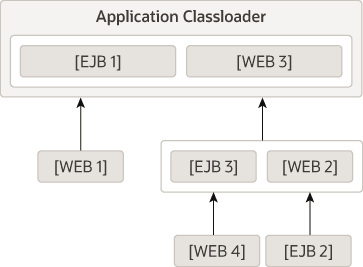
The classloader-structure element allows for the nesting of classloader-structure stanzas, so that you can describe an arbitrary hierarchy of classloaders. There is currently a limitation of three levels. The outermost entry indicates the application classloader. For any modules not listed, the standard hierarchy is assumed.
Note:
JSP classloaders are not included in this definition scheme. JSPs are always loaded into a classloader that is a child of the classloader associated with the Web module to which it belongs.
For more information on these descriptor elements, refer to Enterprise Application Deployment Descriptor Elements.
classloader-structure element in weblogic-application.xml):<classloader-structure>
<module-ref>
<module-uri>ejb1.jar</module-uri>
</module-ref>
<module-ref>
<module-uri>web3.war</module-uri>
</module-ref>
<classloader-structure>
<module-ref>
<module-uri>web1.war</module-uri>
</module-ref>
</classloader-structure>
<classloader-structure>
<module-ref>
<module-uri>ejb3.jar</module-uri>
</module-ref>
<module-ref>
<module-uri>web2.war</module-uri>
</module-ref>
<classloader-structure>
<module-ref>
<module-uri>web4.war</module-uri>
</module-ref>
</classloader-structure>
<classloader-structure>
<module-ref>
<module-uri>ejb2.jar</module-uri>
</module-ref>
</classloader-structure>
</classloader-structure>
</classloader-structure>
The organization of the nesting indicates the classloader hierarchy. The above stanza leads to a hierarchy shown in the following diagram.
User-Defined Classloader Restrictions
User-defined classloader restrictions give you better control over what is reloadable and provide inter-module class visibility. This feature is primarily for developers. It is useful for iterative development, but the reloading aspect of this feature is not recommended for production use, because it is possible to corrupt a running application if an update includes invalid elements. Custom classloader arrangements for namespace separation and class visibility are acceptable for production use. However, programmers should be aware that the Jakarta EE specifications say that applications should not depend on any given classloader organization.
Some classloader hierarchies can cause modules within an application to behave more like modules in two separate applications. For remote-view calls crossing isolated loader branches, copying preserves type isolation. A local-view invocation requires compatible visible types; a hierarchy change does not automatically convert it to a remote invocation.
There are some restrictions to creating user-defined module classloader hierarchies; these are discussed in the following sections.
Servlet Reloading Disabled
If you use a custom classloader hierarchy, servlet reloading is disabled for Web applications in that particular application.
Nesting Depth
Nesting is limited to three levels (including the application classloader). Deeper nestings lead to a deployment exception.
Interfaces
The standard WebLogic Server classloader hierarchy makes EJB interfaces available to all modules in the application. Thus other modules can invoke an EJB, even though they do not include the interface classes in their own module. This is possible because EJBs are always loaded into the root classloader and all other modules either share that classloader or have a classloader that is a child of that classloader.
With the custom classloader feature, you can configure a classloader hierarchy so that a callee's classes are not visible to the caller. In this case, the calling module must include the interface classes. This is the same requirement that exists when invoking on modules in a separate application.
Call-by-Value Semantics
Loader placement affects which type definitions callers and callees share. For remote-view calls between isolated branches, values must be adapted to the receiver’s class identity. Local-view calls require a valid shared type arrangement. See Application Classloading and Pass-by-Value or Reference for the invocation contract.
In-Flight Work
During this development-time module/class reloading, the loader switch is not atomic across all modules. In-flight operations can therefore encounter different class versions. Coordinate reloads of callers and callees and avoid using this mechanism to update production applications.
Individual EJB Classloader for Implementation Classes
Legacy EJB implementation-class redeployment can reload an implementation class without replacing the entire module when the supported descriptor model is used and enable-bean-class-redeploy is explicitly enabled in META-INF/weblogic-ejb-jar.xml. This deprecated feature is not supported for EJB 3.x applications. Use module/application redeployment for current EJB applications. A compatible legacy update must not require weblogic.appc recompilation; otherwise redeploy the application.
For the explicitly enabled supported legacy feature, the following illustration shows separate implementation loaders for Foo and Bar within one EJB module.
<weblogic-ejb-jar xmlns="http://xmlns.oracle.com/weblogic/weblogic-ejb-jar">
  <enable-bean-class-redeploy>true</enable-bean-class-redeploy>
</weblogic-ejb-jar>
enable-bean-class-redeploy descriptor reference
Figure 13-4 Legacy EJB Implementation-Class Reloading
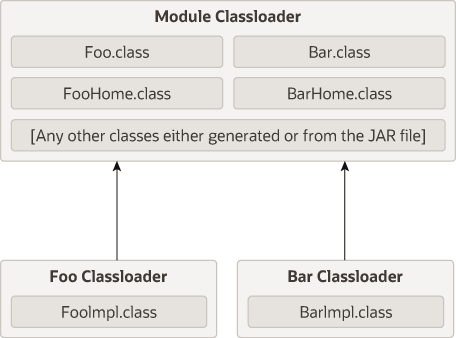
Description of "Figure 13-4 Legacy EJB Implementation-Class Reloading"
To perform a partial update of files relative to the root of the exploded application, use the following command line:
Run in an environment configured for WebLogic tools. Set WLS_ADMIN_URL to the configured t3s Administration Server endpoint, WLS_USER_CONFIG to the administrative user’s existing protected user-config file, and WLS_USER_KEY to its matching protected key file. Configure trust for that endpoint as required. The deployed exploded application is named myapp; sample module directories mywar, myejb and anotherejb are relative to its root, and myejb contains com/example/FooImpl.class. Replace those sample names with the actual relative paths.
Example 13-2 Performing a Partial File Update
java weblogic.Deployer -adminurl "$WLS_ADMIN_URL" \
  -userconfigfile "$WLS_USER_CONFIG" -userkeyfile "$WLS_USER_KEY" \
  -name myapp -redeploy myejb/com/example/FooImpl.class
After the -redeploy command, you provide a list of files relative to the root of the exploded application that you want to update. This might be the path to a specific element (as above) or a module (or any set of elements and modules). For example:
Example 13-3 Providing a List of Relative Files for Update
java weblogic.Deployer -adminurl "$WLS_ADMIN_URL" \
  -userconfigfile "$WLS_USER_CONFIG" -userkeyfile "$WLS_USER_KEY" \
  -name myapp -redeploy mywar myejb/com/example/FooImpl.class anotherejb
Given a set of files to be updated, the system tries to figure out the minimum set of things it needs to redeploy. For the supported, explicitly enabled legacy feature, a compatible implementation-only update can reload that implementation. If you specify the whole EJB (in the above example, anotherejb) or if you change and update the EJB home interface, the entire EJB module must be redeployed.
Depending on the classloader hierarchy, this redeployment may lead to other modules being redeployed. Specifically, if other modules share the EJB classloader or are loaded into a classloader that is a child to the EJB's classloader (as in the WebLogic Server standard classloader model) then those modules are also reloaded.
Application Classloading and Pass-by-Value or Reference
Java passes argument values, including reference values, by value. Passing an object reference does not itself copy the object. In EJB terminology, local-view calls share referenced objects, while remote-view calls use copying semantics. WebLogic can optimize eligible in-process remote calls, subject to client-view, class-identity and configuration requirements.
A local EJB view uses shared-object semantics for collocated clients. An eligible in-process remote invocation may avoid copying, but packaging modules in the same EAR is not by itself a guarantee that every remote call uses that optimization. The enable-call-by-reference setting defaults to false; the implementation may recognize safe immutable-only cases.
Application-private copies of a class defined by different loaders are different types. Types defined once by a common ancestor remain shared. Remote calls can preserve isolation by copying values into the receiver’s loading context; the invocation contract is described below.
Note:
Package cooperating modules together when they need the same application-visible types. Choose a local or remote client view deliberately; do not infer invocation semantics solely from loader placement.
Using a Filtering Classloader
Under default parent-first delegation, a system-visible definition of com.foo.Baz is found before an application-private definition with the same name. Selective application-package filtering can change that lookup for chosen third-party packages, as described below. A classpath JAR supplies candidate classes; placing it on the path does not eagerly load every class. Keep server and platform API definitions compatible across the application boundary.
The following sections define and describe how to use a filtering classloader:
What is a Filtering Classloader
The FilteringClassLoader provides a mechanism for you to configure deployment descriptors to explicitly specify that certain packages should always be loaded from the application, rather than being loaded by the system classloader. This allows you to use alternate versions of applications such as Xerces and Ant. Restrict overrides to application-owned or appropriate third-party implementation packages. Avoid filtering WebLogic server APIs, Jakarta EE APIs in jakarta.* or the Java SE APIs that remain in java.* and javax.*; a blanket namespace filter can break the shared API contracts.
The FilteringClassLoader sits between the application classloader and the system classloader. It is a child of the system classloader and the parent of the application classloader. The FilteringClassLoader intercepts the loadClass(String className) method and compares the className with a list of packages specified in weblogic-application.xml file. If the package matches the className, the FilteringClassLoader throws a ClassNotFoundException. This exception notifies the application classloader to load this class from the application.
Configuring a Filtering Classloader
To configure the FilteringClassLoader to specify that a certain package is loaded from an application, add a prefer-application-packages descriptor element to weblogic-application.xml which details the list of packages to be loaded from the application. The following example specifies that org.apache.log4j.* and antlr.* packages are loaded from the application, not the system classloader:
<prefer-application-packages>
  <package-name>org.apache.log4j.*</package-name>
  <package-name>antlr.*</package-name>
</prefer-application-packages>
The prefer-application-packages descriptor element can also be defined in weblogic.xml. See prefer-application-packages.
Replace com.example.thirdparty.* with the actual bundled implementation package.
<container-descriptor>
  <prefer-web-inf-classes>false</prefer-web-inf-classes>
  <prefer-application-packages>
    <package-name>com.example.thirdparty.*</package-name>
  </prefer-application-packages>
</container-descriptor>
For selective prefer-application-packages or prefer-application-resources in weblogic.xml, prefer-web-inf-classes must be false. Do not combine those selective settings with prefer-web-inf-classes=true.
You can specify that a certain package be loaded for a WAR file included within an EAR file by configuring the FilteringClassLoader in the weblogic.xml file of the WAR file.
For example, A.ear contains B.war. A.ear defines the FilteringClassLoader in weblogic-application.xml, and B.war defines a different FilteringClassLoader in weblogic.xml. When you deploy A.ear, B.war loads the package defined in the FilteringClassLoader in weblogic.xml. The WAR-level FilteringClassLoader has priority over the EAR-level FilteringClassLoader for this WAR file.
For aid in configuring filtering classloaders, see Using the Classloader Analysis Tool (CAT).
Resource Loading Order
The resource loading order is the order in which java.lang.ClassLoader methods getResource()and getResources() return resources. When filtering is enabled, this order is slightly different from the case when filtering is disabled. Filtering is enabled implies that there are one or more package patterns in the FilteringClassLoader. Without any filtering (default), the resources are collected in the top-down order of the classloader tree. For instance, if Web (1) requests resources, the resources are grouped in the following order: Sys (3), App (2) and Web(1). See Example 13-4.
Note:
The resources are returned in the default Java EE delegation model beneath the FilteringClassLoader. Only the resources from the parent of the FilteringClassLoader are appended to the end of the enumeration being returned.
Example 13-4 Using the System Classloader
These examples assume ordinary parent-first module loading and no explicit prefer-application-resources patterns. With no package filter, getResources returns System, App, Web. With the illustrated package filter, it returns App, Web, System. Explicit resource preferences can suppress the parent resources for matching names.
System (3)
   |
  App (2)
   |
  Web (1)
To be more explicit, given a resource META-INF/foo.xml which exists in all the classloaders, would return the following list of URLs:
META-INF/foo.xml - from the System ClassLoader (3)
META-INF/foo.xml - from the App ClassLoader (2)
META-INF/foo.xml - from the Web ClassLoader (1)
When filtering is enabled, the resources from the child of the FilteringClassLoader (an application classloader) down to the calling classloader are returned before the ones from the system classloader. In Example 13-5, if the same resource existed in all the classloaders (D), (B) and (A) one would get them in the following order if requested by the Web classloader:
META-INF/foo.xml - from the App ClassLoader (B)
META-INF/foo.xml - from the Web ClassLoader (A)
META-INF/foo.xml - from the System ClassLoader (D)
Example 13-5 Using a Filtering Classloading Implementation
System (D)
  |
  FilteringClassLoader (filterList := x.y.*) (C)
   |
  App (B)
   |
  Web (A)
If the application classloader requested the same resource, the following order would be obtained.
META-INF/foo.xml - from the App ClassLoader (B)
META-INF/foo.xml - from the System ClassLoader (D)
getResource(name) returns one matching resource URL, or null when none is found. In this illustrated hierarchy it returns the first resource in the shown order; getResourceAsStream(name) opens that resource as an InputStream.
Resolving Class References Between Modules and Applications
WebLogic Server deploys applications in separate classloaders to maintain independence and to facilitate dynamic redeployment and undeployment. Because of this, you need to package your application classes in such a way that each module has access to the classes it depends on.
Your applications may use many different Java classes, including Enterprise Beans, servlets and Jakarta Pages, utility classes, and third-party packages. In some cases, you may have to include a set of classes in more than one application or module. This section describes how WebLogic Server uses multiple classloaders so that you can stage your applications successfully.
For more information about analyzing and resolving classloading issues, see Using the Classloader Analysis Tool (CAT).
About Resource Adapter Classes
Resource-adapter visibility depends on deployment scope and configuration. A standalone adapter normally has its own loader. For an embedded adapter without a custom arrangement or global-class-access override, EnableEECompliantClassloadingForEmbeddedAdapters controls whether it uses the EAR application loader or an adapter-specific loader; its derived default is true for domains whose version is 12.2.1 or later. An explicit classloader-structure can supply the adapter loader. The adapter’s enable-global-access-to-classes option takes precedence over that custom structure. Package shared client API/value classes once at a common application-visible location when appropriate; do not duplicate the adapter implementation indiscriminately in APP-INF and module archives to work around an assumed isolation rule.
Packaging Shared Utility Classes
WebLogic Server provides a location within an EAR file where you can store shared utility classes. Place utility JAR files in the APP-INF/lib directory and individual classes in the APP-INF/classes directory. (Do not place JAR files in the /classes directory or classes in the /lib directory.) These classes are loaded into the root classloader for the application.
This feature obviates the need to place utility classes in the system classpath or place classes in an EJB JAR file (which depends on the standard WebLogic Server classloader hierarchy). Be aware that using this feature is subtly different from using the manifest Class-Path described in the following section. With this feature, class definitions are shared across the application. With manifest Class-Path, the classpath of the referencing module is simply extended, which means that separate copies of the classes exist for each module.
Manifest Class-Path
The Jakarta EE specification provides the manifest Class-Path entry
as a means for a module to specify that it requires an auxiliary JAR of classes. You
only need to use this manifest Class-Path entry if you have additional
supporting JAR files as part of your EJB JAR or WAR file. In such cases, when you create
the JAR or WAR file, you must include a manifest file with a Class-Path
element that references the required JAR files.
The following is a simple manifest file that references a utility.jar file:
Manifest-Version: 1.0 [CRLF]
Class-Path: utility.jar [CRLF]
In the first line of the manifest file, you must always include the
Manifest-Version attribute,
followed by a new line (CR | LF |CRLF) and then the
Class-Path attribute. More
information about the manifest format can be found at: https://docs.oracle.com/en/java/javase/17/docs/specs/jar/jar.html
The manifest Class-Path entries refer to other archives relative to the current archive in which these entries are defined. This structure allows multiple WAR files and EJB JAR files to share a common library JAR. For example, if a WAR file contains a manifest entry of y.jars, this entry should be next to the WAR file (not within it) as follows:
/<directory>/x.war
/<directory>/y.jars
The manifest file itself should be located in the archive at META-INF/MANIFEST.MF.
See http://docs.oracle.com/javase/tutorial/deployment/jar/manifestindex.html.
Using the Classloader Analysis Tool (CAT)
CAT is a web-based class analysis tool that simplifies filtering classloader configuration and aids you in analyzing classloading issues, such as detecting conflicts, debugging application classpaths and class conflicts, and proposes solutions to help you resolve them.
CAT is a standalone web application, distributed as a single WAR file,
wls-cat.war, exposing its features through a
web-based front end.
Use the CAT application supplied with the same WebLogic Server release as the target server. You can add it to the domain with ORACLE_HOME/wlserver/common/templates/wls/wls_cat.jar, or deploy the matching WL_HOME/server/lib/wls-cat.war as a web application to the server whose applications you need to inspect. The template installs the CAT_Application deployment; do not deploy a duplicate copy after applying it.
Note:
Run CAT on a JDK certified for this WebLogic Server release. These instructions do not establish compatibility of the current CAT WAR with earlier WebLogic releases.Opening the CAT Interface
CAT has a simple web GUI that displays all your currently running applications and modules.
To begin using CAT, open your browser to http://wls-host:port/wls-cat/ and then enter your console login credentials.
In the navigation pane, select the application or module that you want to analyze; a brief description of it is shown in the right-side pane. Use the right-side pane to perform actions and analyses on the selected application or module, such as:
-
Analyze classloading conflicts
-
View the system and application classloaders
-
Generate reports
How CAT Analyzes Classes
CAT analyzes classes loaded by the system classpath classloader and the WebLogic Server main application classloaders, defined here as the filtering, application, and module classloaders. You can perform analysis at the class, package, or JAR level. The results for each action you select can be shown in either a basic view or a detailed view.
Here are some of the tasks which you can perform using CAT:
-
Display basic information about applications and modules
-
Analyze classloading conflicts
-
Review proposed solutions
-
Get suggestions for configuring filtering classloaders
-
Display the classloader hierarchy and the entire classpath for each classloader
-
Search for a class (or a resource) on a classloader
Identifying Class References through Manifest Hierarchies
Applications can have multiple manifest references to classes that are not directly present in the application's classpath, but which are chained into the Classpath by manifest references. In some cases, application developers may not be aware that additional classes have been unknowingly pulled into the application's classpath from other JARs, which in turn have manifest references to other JARs.
cat4mf.ear
  +- ejb.jar
  +- web-mf-in-root.war
  +- lib
      +- applib.jar
  +- apputil_1.jar
  +- apputil_1_1.jar
  +- apputil_1_1_1.jar
  +- apputil_1_2.jar
  +- apputil_1_2_1.jar
  +- ejbutil_1.jar
  +- ejbutil_1_1.jar
  +- ejbutil_1_2.jar
  +- ejbutil_1_2_1.jar
  +- webutil_1.jar
  +- webutil_1_1.jar
  +- webutil_1_1_1.jar
  +- webutil_2.jar
  +- webutil_2_1.jar
The ejb.jar has a manifest reference to ejbutil_1.jar, which has references to both ejbutil_1_1.jar and ejbutil_1_2.jar, which has a further reference to ejbutil_1_2_1.jar, as follows:
  ejb.jar
     -> ejbutil_1.jar
            -> ejbutil_1_1.jar
            -> ejbutil_1_2.jar
                    -> ejbutil_1_2_1.jar
Using CAT to Display the Manifest References
Sharing Applications and Modules By Using Jakarta EE Libraries
Jakarta EE libraries provide an easy way to share one or more different types of Jakarta EE modules among multiple enterprise applications.
A Jakarta EE library is a single module or collection of modules that is registered with the Jakarta EE application container upon deployment. For more information, see Creating Shared Jakarta EE Libraries and Optional Packages.
Adding JARs to the Domain /lib Directory
WebLogic Server includes a lib subdirectory, located in the
domain directory, that you can use to add one or more JAR files, so that the JAR file classes
are available within a separate system level classloader to all Jakarta EE applications running
on WebLogic Server instances in the domain.
The JARS in the domain /lib directory will not be appended to the
system classpath. The classloader that gets created is a child of the system classloader.
Any classes that are in JARs in the domain /lib directory will only be
visible to Jakarta EE applications, such as EAR files. Classes in the system classpath
cannot access classes in the domain /lib directory.
The lib subdirectory is intended for JAR files that change
infrequently and are required by all or most applications deployed in the server. For
example, you might use the lib directory to store third-party utility
classes that are required by all Jakarta EE deployments in a domain. Third-party utility
classes will be made available because the domain /lib classloader will be
the parent of any Jakarta EE application.
The lib directory is not recommended as a general-purpose method for
sharing JAR files between one or two applications deployed in a domain, or for sharing JARs
that need to be updated periodically. If you update a JAR in the lib
directory, you must reboot all servers in the domain in order for applications to realize
the change. If you need to share a JAR file or Jakarta EE modules among several
applications, use the Jakarta EE libraries feature described in Creating
Shared Jakarta EE Libraries and Optional Packages.
To share JARs using the lib directory: