8 XML Application Scoping
This chapter includes the following sections:
Overview of Application Scoping
Application scoping refers to configuring resources for a particular enterprise application rather than for an entire WebLogic Server configuration. In the case of XML, these resources include parser, transformer, external entity, xpath, schema, xmlInput, xmlOutput, xmlEntity and external entity cache configuration. The main advantage of application scoping is that it isolates the resources for a given application to the application itself. Using application scoping, you can configure different parsers for different applications, store the DTDs for an application within the EAR file or exploded enterprise directory, and so on.
Another advantage of using application scoping is that by associating the resources with the EAR file, you can run this EAR file on another instance of WebLogic Server without having to configure the resources for that server.
To configure XML resources for a particular application, you add information to the weblogic-application.xml deployment descriptor file located in the META-INF directory of the EAR file or exploded enterprise application directory.
Note:
You use the WebLogic Remote Console to configure parser, transformer, and external entity resources for a WebLogic Server instance, as described in Administering WebLogic Server XML.The weblogic-application.xml File
The weblogic-application.xml file is the WebLogic Server-specific
deployment descriptor for an enterprise application. It contains configuration information
about the XML, JDBC, and EJB resources used by an enterprise application. The standard Jakarta
EE deployment descriptor is called application.xml.
The following sample configures an application-scoped entity mapping and uses the default XML provider selection. The parser-factory element is optional; omit it to use WebLogic Server’s default XML Registry/JAXP provider selection. Configure parser-factory only when the application requires a custom provider. Each configured value must name a public, concrete provider class with an accessible public no-argument constructor that is visible to the application class loader, is an implementation of the corresponding standard JAXP factory type, and is compatible with WebLogic Server. Do not configure JDK-internal com.sun.org.apache.*.internal implementation classes.
<weblogic-application>
  ...
  <xml>
    <entity-mapping>
      <entity-mapping-name>My Mapping</entity-mapping-name>
      <public-id>-//BEA Systems, Inc.//DTD for cars//EN</public-id>
      <system-id>http://www.bea.com/dtds/car.dtd</system-id>
      <entity-uri>dtds/car.dtd</entity-uri>
    </entity-mapping>
  </xml>
</weblogic-application>
The main element for configuring XML resources is <xml>. Figure 8-1 describes the sub-elements of the <xml> element; the sections following this figure describe each element.
Figure 8-1 Sub-Elements of the <xml> Element in weblogic-application.xml
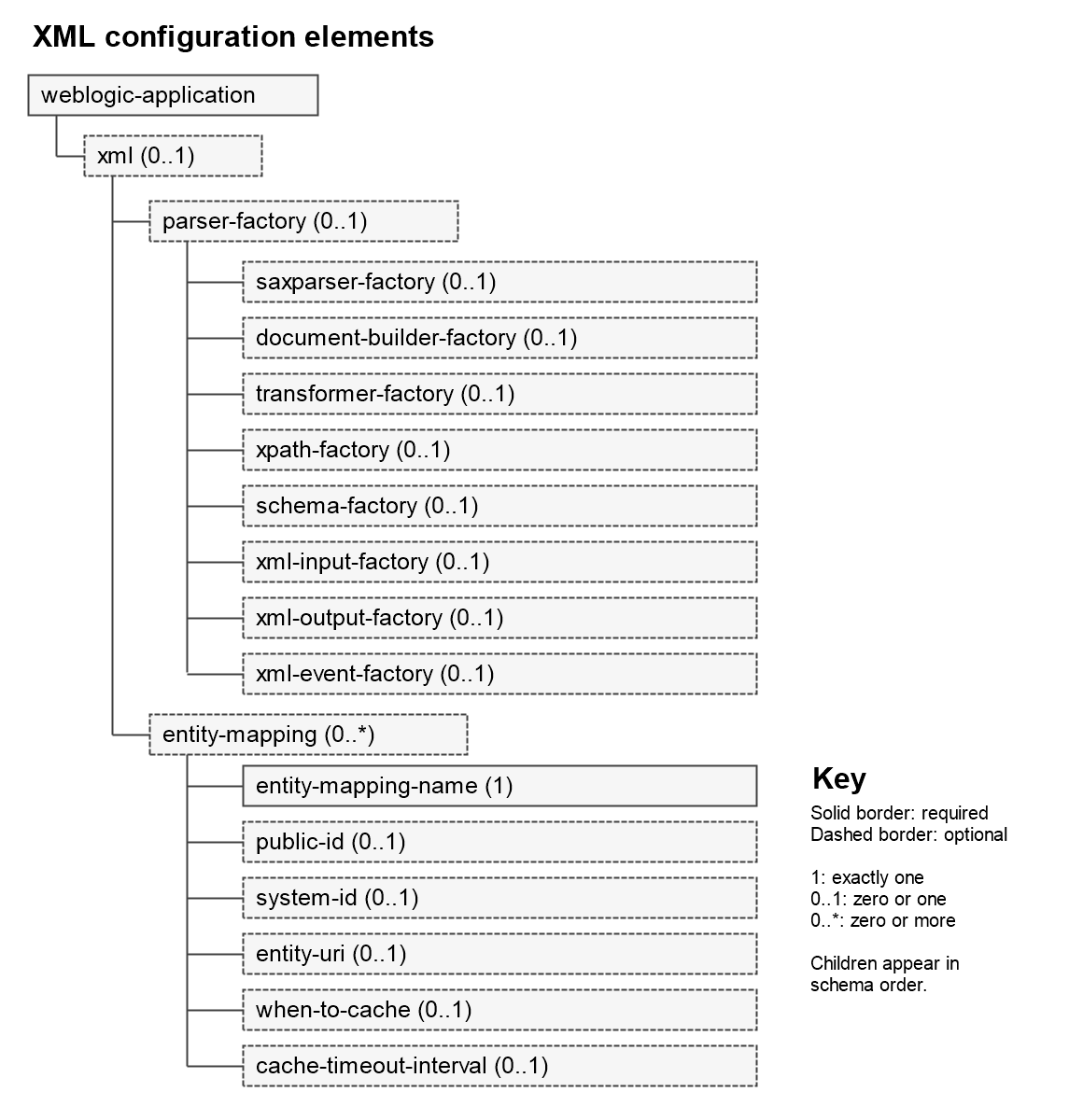
Description of "Figure 8-1 Sub-Elements of the <xml> Element in weblogic-application.xml"
xml
The main element for configuring XML resources, such as parsers, transformers, external entities, and the external entity cache for an enterprise application.
parser-factory
The parent element for specifying a particular parser or transformer for an enterprise application.
saxparser-factory
Element that specifies the factory class to be used for SAX style parsing in this application. If this element is not specified, the default SAX parser factory specified for the WebLogic Server instance is used.
document-builder-factory
Element that specifies the factory class to be used for DOM style parsing in this application. If this element is not specified, the default DOM parser factory specified for the WebLogic Server instance is used.
transformer-factory
Element that specifies the factory class to be used when transforming documents using the javax.xml.transform packages in this application. If this element is not specified, the default XSLT transformer factory specified for the WebLogic Server instance is used.
schema-factory
Element that enables applications deployed to WebLogic Server to configure and obtain a Schema object used to validate XML documents using schema. If this element is not specified, the default schema factory specified for the WebLogic Server instance is used.
xpath-factory
Element that enables applications deployed to WebLogic Server to configure and obtain a XPath object used to search XML elements. If this element is not specified, the default XPath factory specified for the WebLogic Server instance is used.
xml-input-factory
Element that enables applications deployed to WebLogic Server to configure and obtain a XMLEventReader/XMLStreamReader object used to read XML streams. If this element is not specified, the default XML input factory specified for the WebLogic Server instance is used.
xml-output-factory
Element that enables applications deployed to WebLogic Server to configure and obtain a XMLEventWriter/XMLStreamWriter object used to write XML streams. If this element is not specified, the default XML output factory specified for the WebLogic Server instance is used.
xml-event-factory
Element that enables applications deployed to WebLogic Server to configure and obtain a XMLEvent object used to parse or build XML streams. If this element is not specified, the XMLEvent factory specified for the WebLogic Server instance is used.
entity-mapping
The parent element for mapping an entity declaration in an XML file to a local copy of the entity, such as a DTD or Schema.
public-id
Element that specifies the public ID of the entity, such as:
-//BEA Systems, Inc.//DTD for cars//EN.
system-id
Element that specifies the system ID of the entity, such as:
http://www.bea.com/dtds/car.dtd
entity-uri
Element that specifies the path of the mapped entity relative to the application XML registry directory, lib/xml/registry, in the EAR archive or exploded enterprise application. For example, dtds/car.dtd resolves to lib/xml/registry/dtds/car.dtd.
when-to-cache
For an application-scoped entity mapping, use one of the following values:
-
cache-on-reference—WebLogic Server caches the external entity the first time it is resolved; -
cache-never—WebLogic Server does not cache the external entity.
The default is cache-on-reference. Do not use cache-at-initialization for an application-scoped mapping; in this release, application registry initialization does not preload the entry.
cache-timeout-interval
Element that specifies the number of seconds after which the cached external entity becomes stale, or out-of-date. If the cached copy has been in the cache for longer than this interval, WebLogic Server retrieves it again the next time the entity is requested, from the specified URL or path under the application XML registry directory, lib/xml/registry.
The default value for this field is 120 seconds.
Configuring a Parser or Transformer for an Enterprise Application
You can specify that an XML application use a parser or transformer different from the default parser or transformer configured for WebLogic Server by updating the weblogic-application.xml file of the EAR file or exploded directory that contains the XML application.
To configure a parser or transformer, other than the default, for an enterprise application, follow these steps:
Note:
The following factory types follow the same process detailed below: XPathFactory, SchemaFactory, XMLInputFactory, XMLOutputFactory and XMLEventFactory.
-
Use the
parser-factorysubelement ofxmlto configure application-specific factory classes. The values in the following syntax example are placeholders; replace each one with the fully qualified name of a public, concrete provider class with an accessible public no-argument constructor that is visible to the application class loader, is an implementation of the corresponding standard JAXP factory type, and is compatible with WebLogic Server. Do not use JDK-internalcom.sun.org.apache.*.internalimplementation classes.<parser-factory> <saxparser-factory>com.example.xml.CustomSAXParserFactory</saxparser-factory> <document-builder-factory>com.example.xml.CustomDocumentBuilderFactory</document-builder-factory> <transformer-factory>com.example.xml.CustomTransformerFactory</transformer-factory> </parser-factory>
The three values in this syntax example are placeholders, not provider classes supplied by WebLogic Server. Replace only the factory types that the application needs to override. Package the selected provider classes as described in the following steps.
-
If you want the parser or transformer classes to be local to the EAR archive, put the JAR file that contains the classes anywhere you want in the EAR file, then update the
Class-Pathvariable in theMETA-INF/MANIFEST.MFfile.For example, if you put the parser or transformer classes in a JAR file called
myparser.jarin the directorylib/xml, update theMANIFEST.MFfile as shown:Manifest-Version: 1.0 Created-By: 1.3.1_01 (Sun Microsystems Inc.) Class-Path: lib/xml/myparser.jar
-
If you want to store the parser or transformer classes in a location other than the EAR archive, be sure that you update the WebLogic Server CLASSPATH variable to include the full pathname of the JAR file that contains the classes.
Configuring an External Entity for an Enterprise Application
You can store a local copy of an external entity, such as a DTD, in the EAR archive or exploded directory rather than always retrieving it from the Web.
To configure an external entity for an enterprise application:
Configuring the External Entity Cache for an Enterprise Application
You can cache an external entity referenced by a URL when it is first referenced. You can also map an entity to a local path under the application XML registry directory, lib/xml/registry. Caching avoids repeated remote retrieval. After a cached entity exceeds its configured timeout, WebLogic Server attempts to retrieve it again the next time the entity is requested and caches the resulting copy.
Use the <when-to-cache> and <cache-timeout-interval> subelements of the <entity-mapping> element to configure external entity caching for an enterprise application, as shown in the following example:
<entity-mapping>
  <entity-mapping-name>My Mapping</entity-mapping-name>
  <public-id>-//BEA Systems, Inc.//DTD for cars//EN</public-id>
  <system-id>http://www.bea.com/dtds/car.dtd</system-id>
  <entity-uri>dtds/car.dtd</entity-uri>
  <when-to-cache>cache-on-reference</when-to-cache>
  <cache-timeout-interval>300</cache-timeout-interval>
</entity-mapping>
In the example, car.dtd is stored in lib/xml/registry/dtds under the EAR archive or exploded application. WebLogic Server caches the DTD when it is first referenced. After the cached copy exceeds 300 seconds, WebLogic Server attempts to retrieve the entity again the next time it is requested and caches the resulting copy.