1 Capture System Administration Overview
This chapter provides a general introduction to Oracle WebCenter Enterprise Capture system administration, including an introduction to Oracle WebCenter Enterprise Capture, workspaces, system administrator and user roles, and typical system administrator tasks.
This chapter includes the following sections:
1.1 About Oracle WebCenter Enterprise Capture and Workspaces
Oracle WebCenter Enterprise Capture provides scalable document capture focused on process-oriented imaging applications and image-enabling enterprise applications. With a web interface for centralized or distributed environments, Capture streamlines the capture process for paper and electronic documents. It is fully integrated with Oracle WebCenter Content: Imaging and Oracle WebCenter Content to provide organizations with one system to capture, store, manage, and retrieve their mission critical business content.
A Capture workspace represents a complete capture system, providing a centralized location for metadata definition, configuration profiles, batch and document data, and batch processor jobs for a particular environment. Workspace managers configure and manage workspaces they have been granted access to and control others’ access to the workspace.
Oracle WebCenter Enterprise Capture provides a central configuration console, called the Oracle WebCenter Enterprise Capture workspace console, in which workspace managers create and manage workspaces and their elements for use throughout Capture. For example, workspace managers create metadata fields, choice lists, and database lookups in the console, then use them in multiple areas in Capture, such as client profiles and processor jobs.
The Capture client is the end-user application that a knowledge worker or production user uses to create batches using document imaging scanners or document files imported from the user’s system. The client is also used to index documents (apply metadata values).
See Capture Workspaces Overview in Managing Oracle WebCenter Enterprise Capture.
1.2 About Capture Architecture
Figure 1-1 Oracle WebCenter Enterprise Capture Architecture Overview
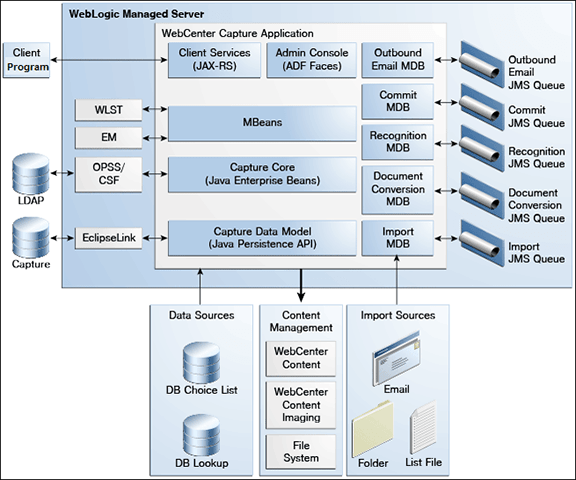
Description of “Figure 1-1 Oracle WebCenter Enterprise Capture Architecture Overview”
Oracle WebCenter Enterprise Capture application is a standard Java EE application that runs in the Oracle WebLogic Server managed server environment. Java Enterprise Beans (EJBs) represent the core system logic of the Capture application. Capture uses Oracle Platform Security Services (OPSS) to manage security for the application. The Oracle Credential Store Framework (CSF) is used to manage security credentials for external systems securely.
To configure and manage the Capture application, system administrators use Capture Managed Beans through Oracle Enterprise Manager and Weblogic WLST commands.
The Capture Workspace Console is an Oracle Application Development Framework (ADF) application which the Workspace Managers use to configure Capture elements within a workspace. See About the Capture Workspace Console in Managing Oracle WebCenter Enterprise Capture.
Capture uses Java API for RESTful Web Services (JAX-RS) to provide client services. The end-user uses the Client Program to scan or import documents into batches. Within a batch, end-users can organize pages into documents and index documents by applying metadata values. The Client Program uses RESTful web services to communicate with the WebLogic server. The Capture application uses MDB and JMS queues to run system and batch processing logic - import, document conversion, recognition, and commit. The Import Processor can automate ingestion of files from various sources such as an email inbox, from a folder on the network, or from a list file. Documents processed through Capture can be committed to WebCenter Content Server, WebCenter Content: Imaging, or to a file system. See Understanding Capture basics in Using Oracle WebCenter Enterprise Capture.
JavaScript Extension
Oracle WebCenter Enterprise Capture provides an extension library called JavaScript Extension that facilitates customization through a JavaScript, which is supported by the Capture client and processors. See Introduction to Developing Scripts with Oracle WebCenter Enterprise Capture in Developing Scripts for Oracle WebCenter Enterprise Capture.
1.3 About System Administrator and User Roles
Capture provides the following user and administrator roles, each with varying access and privileges:
-
System Administrators provide high level configuration, administration, and monitoring of the Capture environment. System administrators are typically responsible for the following tasks:
-
Installing Oracle WebCenter Enterprise Capture
-
Configuring Capture
-
Creating Capture users and groups
-
Assigning users from the LDAP domain to the various Capture application roles (CaptureUser, CaptureWorkspaceManager, and CaptureWorkspaceViewer)
-
Monitoring and troubleshooting Capture issues
-
-
Capture Workspace Managers have control of the workspaces they create and to those workspaces to which they have been granted access. They can add, edit, copy, and delete workspaces. See Managing Workspaces in Managing Oracle WebCenter Enterprise Capture. To access workspaces, the user must be assigned the CaptureWorkspaceManager role.
-
Capture Workspace Viewers have read-only access to workspaces to which they have been granted access. For example, support personnel might be granted this privilege in order to review workspace configurations such as client profiles and processor jobs for troubleshooting. Workspace viewers cannot make changes to workspaces. To have read-only access to workspaces, the user must be assigned the CaptureWorkspaceViewer role.
-
Capture Users have client access to workspaces to which they have been granted access. Users are further granted access to specific client profiles. See Getting started with Capture in Using Oracle WebCenter Enterprise Capture. Any user that needs access to the client needs to be assigned the CaptureUser role in Oracle Enterprise Manager.
-
Developers who write customization scripts for use in Capture components may either be granted the workspace manager role or they may provide scripts to workspace managers who load, reference, and test them in Capture components. See Introduction to Developing Scripts with Oracle WebCenter Enterprise Capture in Developing Scripts for Oracle WebCenter Enterprise Capture.
See Managing Users and Security for more information on how to create Capture users and assign roles to them.
1.4 System Administrator Tasks
The following provides a summary of the steps to initially configure and monitor an Oracle WebCenter Enterprise Capture system environment:
-
Install and perform initial configuration of Oracle WebCenter Enterprise Capture. See About Completing the Oracle WebCenter Enterprise Capture Configuration in Installing and Configuring Oracle WebCenter Content.
-
Use Enterprise Manager to make changes to system settings. See Managing Capture Settings in Enterprise Manager.
-
Use Enterprise Manager to assign LDAP users and groups to Capture application roles. See Assigning Capture Roles in Oracle Enterprise Manager.
-
Use the Oracle WebLogic Server Administration Console to manage data sources for database choice lists and database lookups. See Configuring JDBC Data Sources in Administering JDBC Data Sources for Oracle WebLogic Server.
-
-
Apply SSL security to the website. See About SSL.
-
Monitor the Capture environment and manage log and audit files. See Monitoring Capture.