Automate the Document Life Cycle
AI enhances the life cycle with:
- Post-archiving intelligence
- Digitization
- Transactional analysis
The variety of possible pipelines include:
- Document Understanding (DU) plus text LLM for scalable OCR and reasoning
- Multi-modal LLM for visual/complex layouts
- Comparison/consensus mode for higher assurance
This design is generic across industries, with spotlights for healthcare and financial services.
Architecture
This architecture illustrates the logical flow of document processing; from ingestion and storage to extraction and downstream integration. It shows how multiple Oracle Cloud Infrastructure (OCI) components, including OCI Document Understanding and OCI Generative AI services (text and vision LLMs), operate together in a unified orchestration.
The following diagram illustrates the logical flow.
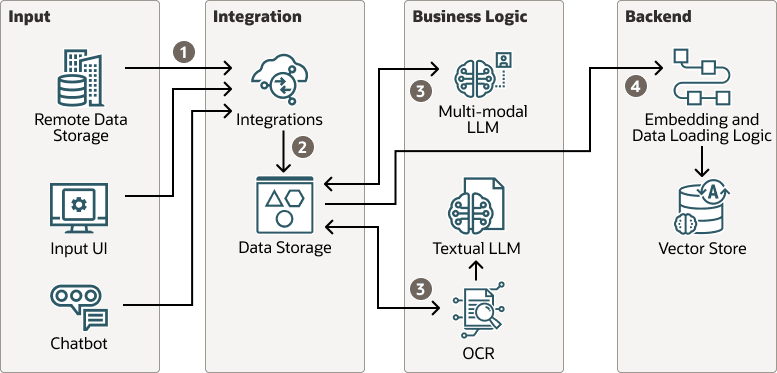
The conceptual components shown in the logical flow are:
- Remote Data Storage
- Represents the original source of documents, which could be an external repository, enterprise file system, or shared storage such as network drives, DMS, or cloud buckets.
- Documents can be fetched periodically or upon trigger for processing.
- Input UI
- A simple user-facing entry point for uploading or submitting documents.
- Can be a web form, internal portal, or application front-end built with Oracle Digital Assistant or similar tools.
- Chatbot (optional)
- Provides conversational access to the pipeline.
- Allows users to upload or query documents through natural language (for example, “Show me all invoices above $50 K”).
- Internally routes to the same ingestion layer as the Input UI.
- Integrations
- Acts as the orchestration and routing layer.
- Responsible for triggering the correct pipeline depending on the document type or business logic. For example, OCI Document Understanding plus an LLM for structured documents, vision LLM for image-heavy inputs.
- Handles error recovery, retries, metadata management, and downstream API calls to ERP, CRM, or data platforms.
- Data Storage
- Stores both raw and processed data.
- Typically implemented using OCI Object Storage for binaries and Oracle Autonomous AI Database for structured JSON outputs and audit logs.
- Enables traceability, re-processing, and analytics across the entire document lifecycle.
- Optical Character Recognition (OCR)
- Performs optical character recognition, layout detection, and extraction of key-value pairs, tables, and free text.
- Produces clean text that serves as input for text-based LLM reasoning.
- OCI Document Understanding is deterministic and schema-based, ensuring predictable extraction quality.
- Textual LLM (Cohere Command-A)
- Consumes OCI Document Understanding output and applies reasoning, normalization, and formatting.
- Handles summarization, classification, and contextual extraction that go beyond OCI Document Understanding’s fixed schema.
- Can clean noisy OCR outputs, unify field naming, and infer missing values based on context.
- Multimodal LLM (Llama 4 Maverick)
- Processes visual content and complex layouts that OCI Document Understanding and text-only models cannot fully interpret.
- Handles charts, handwriting, stamps, tables embedded as images, and multi-page continuity.
- In combined flows, its output is reconciled with OCI Document Understanding and textual LLM results to improve completeness and accuracy.
- Embedding and Data Loading Logic
- Converts extracted text and images into vector embeddings for semantic search and document retrieval.
- Supports downstream RAG workflows, allowing LLMs to ground responses in factual, document-specific data.
- Can be implemented using OCI Functions or custom ETL pipelines.
- Vector Store
- Stores embeddings for text and images.
- Enables quick retrieval of contextually similar content and supports generative Q&A over enterprise document sets.
- Common implementations include Qdrant, AI Vector Search in Autonomous AI Database, or other OCI-compatible stores.
This is the end-to-end flow depicted in the logical flow diagram:
- Document Ingestion
- Documents are either uploaded via the Input UI or retrieved from Remote Data Storage.
- The Integration layer logs metadata, validates file formats, and triggers the corresponding processing pipeline.
- Chatbot submissions use the same API routes as manual uploads.
- Storage and Preparation
- Files are persisted in OCI Object Storage.
- Metadata and status entries are written to Oracle Autonomous AI Database for audit and control.
- A workflow trigger (using OCI Functions or Oracle Integration) initiates the OCR/LLM sequence.
- Data Extraction and Enrichment
- OCI Document Understanding performs OCR and layout analysis, returning structured text.
- The Textual LLM (for example, Command-A) interprets this text, cleans it, and produces normalized outputs (JSON or Markdown).
- When the document contains complex visual elements, a text and image understanding AI such as Llama 4 Maverick analyzes the images to enrich or validate extraction results.
- Both outputs can be compared or merged through orchestration logic (confidence-based reconciliation).
- Integration and Knowledge Loading
- The final structured and contextualized data passes through an embedding step, transforming text or visual insights into vectors.
- The Embedding and Data Loading Logic component stores these vectors into a vector store, completing the RAG integration stage.
- Downstream applications such as analytics dashboards, search portals, or GenAI chatbots can now access the processed data for semantic retrieval and question-answering.
Optionally, you can add a human-in-the-loop (HITL) step between steps 3 and 4.
- At this stage, a HITL can be integrated in the flow based on a variety of criteria including confidence in answers, additional checks for data type, format, etc. This can prompt a user to approve or edit results as needed.
- Within any route chosen a HITL can be added to provide an additional layer of continuous learning allowing for the solution to adapt and grow with usage and improve efficacy
- Trigger HITL on: low confidence, schema violations, failed reconciliations, unseen vendor/layout, or regulator‑critical fields.
- Consider using a "graduation rule": that is, remove HITL after N consecutive clean passes for a given vendor/layout.
- Persist corrections; feed prompt refiners and validators; track vendor/layout fingerprints.
The following diagram shows an example implementation:
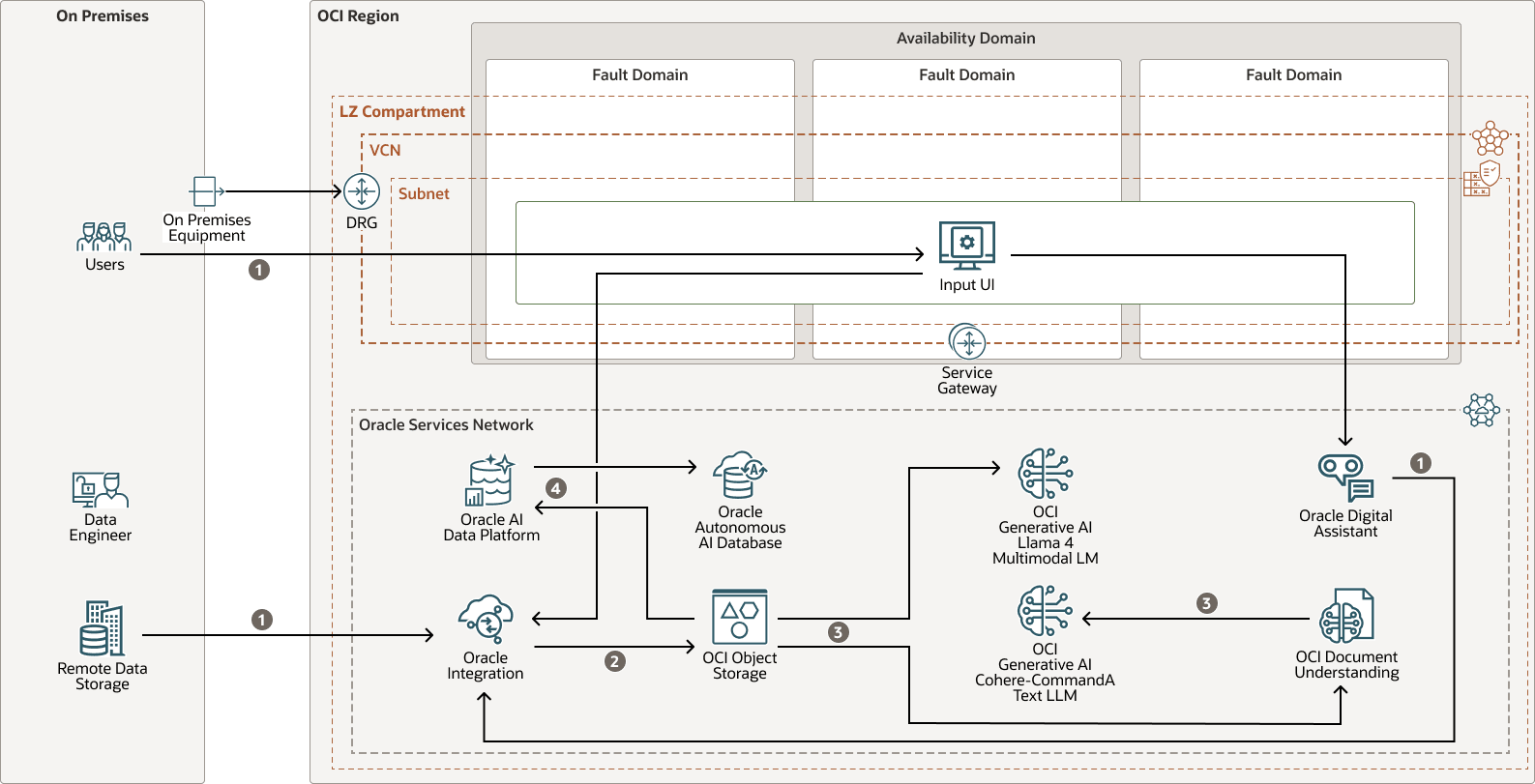
The architecture has the following components:
- OCI region
An OCI region is a localized geographic area that contains one or more data centers, hosting availability domains. Regions are independent of other regions, and vast distances can separate them (across countries or even continents).
- Compartment
Compartments are cross-regional logical partitions within an OCI tenancy. Use compartments to organize, control access, and set usage quotas for your Oracle Cloud resources. In a given compartment, you define policies that control access and set privileges for resources.
- Availability domain
Availability domains are standalone, independent data centers within a region. The physical resources in each availability domain are isolated from the resources in the other availability domains, which provides fault tolerance. Availability domains don’t share infrastructure such as power or cooling, or the internal availability domain network. So, a failure at one availability domain shouldn't affect the other availability domains in the region.
- Fault domain
A fault domain is a grouping of hardware and infrastructure within an availability domain. Each availability domain has three fault domains with independent power and hardware. When you distribute resources across multiple fault domains, your applications can tolerate physical server failure, system maintenance, and power failures inside a fault domain.
- OCI virtual cloud
network and subnet
A virtual cloud network (VCN) is a customizable, software-defined network that you set up in an OCI region. Like traditional data center networks, VCNs give you control over your network environment. A VCN can have multiple non-overlapping classless inter-domain routing (CIDR) blocks that you can change after you create the VCN. You can segment a VCN into subnets, which can be scoped to a region or to an availability domain. Each subnet consists of a contiguous range of addresses that don't overlap with the other subnets in the VCN. You can change the size of a subnet after creation. A subnet can be public or private.
- Dynamic routing gateway
(DRG)
The DRG is a virtual router that provides a path for private network traffic between VCNs in the same region, between a VCN and a network outside the region, such as a VCN in another OCI region, an on-premises network, or a network in another cloud provider.
- Service
gateway
A service gateway provides access from a VCN to other services, such as Oracle Cloud Infrastructure Object Storage. The traffic from the VCN to the Oracle service travels over the Oracle network fabric and does not traverse the internet.
- Oracle Services Network
The Oracle Services Network (OSN) is a conceptual network on OCI that is reserved for Oracle services. These services have public IP addresses that you can reach over the internet. Hosts outside Oracle Cloud can access the OSN privately by using Oracle Cloud Infrastructure FastConnect or VPN Connect. Hosts in your VCNs can access the OSN privately through a service gateway.
- Oracle Autonomous AI Database
Oracle Autonomous AI Database provides an easy-to-use, fully autonomous (self-governing) database that scales elastically and delivers fast query performance. As a service, it doesn't require database administration. You don't need to configure or manage any hardware, or install any software. It automatically handles provisioning, backing up, patching and upgrading, and growing or shrinking the database and is an elastic service. Develop scalable AI-powered apps with any data using built-in AI capabilities. Use your choice of large language model (LLM) and deploy in the cloud or your data center.
- Oracle AI Database 26ai
Oracle AI Database 26ai with AI Vector Search lets you query data by meaning rather than keywords. Vector representations (embeddings) capture the semantics of text, images, audio, and more so you can find similar content efficiently. Built-in SQL distance functions allow similarity searches using vectors. You can combine semantic similarity and other search criteria to ground large language models (RAG) for more accurate and relevant answers.
- OCI Document Understanding
Oracle Cloud Infrastructure Document Understanding is an AI service for performing deep-learning document analysis at scale. With provided prebuilt models, developers can easily build intelligent document processing into their applications without machine learning expertise.
- Oracle Digital Assistant
Oracle Digital Assistant is a platform that allows you to create and deploy digital assistants for your users. With Oracle Digital Assistant, you can create AI-driven interfaces (or chatbots) for business applications through text, chat, and voice interfaces. Each digital assistant has a collection of one or more specialized skills to help users complete a variety of tasks in natural language conversations. For example, an individual digital assistant might have skills that focus on specific types of tasks such as tracking inventory, submitting time cards, and creating expense reports.
- Oracle AI Data Platform
Oracle AI Data Platform is a unified platform that simplifies the cataloging, preparation, and analysis of data across your data estate. It brings together data, AI, analytics, and governance within a cohesive user experience enabling you to build secure, scalable AI-powered applications. Oracle AI Data Platform unifies Autonomous AI Lakehouse, Oracle Analytics Cloud, OCI Object Storage, OCI Generative AI and Fusion Data Intelligence.
Within this platform, Oracle AI Data Platform Workbench provides a dedicated development environment for you to design, orchestrate, and deploy data pipelines and models, set RBAC policies, and use open source technologies such as Spark to prepare, analyze, and enrich your data.
- OCI Generative AI
Oracle Cloud Infrastructure Generative AI is a fully-managed OCI service that provides a set of state-of-the-art, customizable, large language models (LLMs) that cover a wide range of use cases for text generation, summarization, semantic search, and more. Use the playground to try out the ready-to-use pretrained models, or create and host your own fine-tuned custom models based on your own data on dedicated AI clusters.
- Oracle Integration
Oracle Integration is a fully-managed, preconfigured environment that allows you to integrate cloud and on-premises applications, automate business processes, and develop visual applications. It uses an SFTP-compliant file server to store and retrieve files and allows you to exchange documents with business-to-business trading partners by using a portfolio of hundreds of adapters and recipes to connect with Oracle and third-party applications.
- OCI Object Storage
OCI Object Storage provides access to large amounts of structured and unstructured data of any content type, including database backups, analytic data, and rich content such as images and videos. You can safely and securely store data directly from applications or from within the cloud platform. You can scale storage without experiencing any degradation in performance or service reliability.
Use standard storage for "hot" storage that you need to access quickly, immediately, and frequently. Use archive storage for "cold" storage that you retain for long periods of time and seldom or rarely access.
Recommendations
- VCN
When you create a VCN, determine the number of CIDR blocks required and the size of each block based on the number of resources that you plan to attach to subnets in the VCN. Use CIDR blocks that are within the standard private IP address space.
Select CIDR blocks that don't overlap with any other network (in Oracle Cloud Infrastructure, your on-premises data center, or another cloud provider) to which you intend to set up private connections.
After you create a VCN, you can change, add, and remove its CIDR blocks.
When you design the subnets, consider your traffic flow and security requirements. Attach all the resources within a specific tier or role to the same subnet, which can serve as a security boundary.
- Network security groups (NSGs)
You can use NSGs to define a set of ingress and egress rules that apply to specific VNICs. We recommend using NSGs rather than security lists, because NSGs enable you to separate the VCN's subnet architecture from the security requirements of your application.
- Cloud Guard
Clone and customize the default recipes provided by Oracle to create custom detector and responder recipes. These recipes enable you to specify what type of security violations generate a warning and what actions are allowed to be performed on them. For example, you might want to detect OCI Object Storage buckets that have visibility set to public.
Apply Oracle Cloud Guard at the tenancy level to cover the broadest scope and to reduce the administrative burden of maintaining multiple configurations.
You can also use the Managed List feature to apply certain configurations to detectors.
- Security Zones
For resources that require maximum security, Oracle recommends that you use security zones. A security zone is a compartment associated with an Oracle-defined recipe of security policies that are based on best practices. For example, the resources in a security zone must not be accessible from the public internet and they must be encrypted using customer-managed keys. When you create and update resources in a security zone, OCI validates the operations against the policies in the recipe, and prevents operations that violate any of the policies.
Considerations
Consider the following implementations of the architecture for different stages in the document lifecycle:
Post-Archiving Intelligence:
- Batch ingest historical PDFs/images to OCI Object Storage.
- OCI Document Understanding routed to text LLM (default) for summarization, classification, and entity extraction.
- Route outputs to HITL review when model confidence falls below a defined threshold (for example, low extraction/classification confidence).
- Optional vision LLM for charts or visual cues.
- Store structured results (Autonomous AI Database/Parquet) routed to analytics and retrieval.
Digitization Acceleration:
- Scans routed to OCI Document Understanding OCR and layout.
- Text LLM normalizes fields, applies taxonomy, and tags metadata.
- Optional comparison with vision LLM for tables or handwriting.
- Route outputs to HITL review when model confidence falls below a defined threshold (for example, low extraction/classification confidence).
- Persist and index; enable search and downstream automation.
Transactional Analysis (Real-Time):
- New submission lands in OCI Object Storage via API or portal.
- OCI Document Understanding routed to a text LLM within latency SLOs; include fraud/anomaly and completeness checks.
- Cross-checks using Oracle Integration with ERP/OTM; gate approvals.
- HITL only on exceptions; the rest flows straight through.
Consider the following different bases for approaches that can be taken when addressing these issues, and additional pipeline strategies to employ:
- Default: OCI Document Understanding to text LLM (such as Command-A) for cleaning and extraction.
- Vision route: Llama 4 Maverick for visual-heavy or low OCI Document Understanding confidence.
- Comparison/Consensus (optional): run OCI Document Understanding with an LLM and OCI Vision; reconcile conflicts (priority rules and business validators).
- Multi-page / Multi-image policy:
- Up to 10 pages/images per Maverick call to preserve continuity.
- Use a sliding window (1–10, 6–15, …) with a rolling summary prompt to reduce tokens and keep context.
- Language handling: Route based on language prevalence and OCI Document Understanding support. Small minority languages routed to OCI Vision route or text-only fallback.
Explore More
Learn more about automating the document process with GenAI, OCI, and starting your cloud journey with Oracle.
Review these additional resources:
- Oracle offers several document processing with GenAI sample apps. Go to GitHub.
- Developer Coaching - Discovering Multi-modal models for Complex Documents on the Oracle Developers YouTube channel
- Oracle Cloud Infrastructure Documentation
- Well-architected framework for Oracle Cloud Infrastructure
- Oracle Cloud Cost Estimator
- Cloud Adoption Framework