Learn About Oracle Data Guard Fast-Start Failover
You get built-in high availability, performance, and scalability of Oracle Exadata Database Machine and Oracle Real Application Clusters (Oracle RAC), with low latency for Azure-based applications.
Extending the solution with a standby database in another availability zone or region provides data protection and disaster recovery for data center and regional outages.
Data Guard synchronously transports data to the standby database to ensure zero data loss. Fast-start failover allows the broker to automatically fail over the target standby database to the primary role without manual failover steps.
Observer sites monitor the fast-start failover environment. An observer is a separate client-side component that runs on a different Compute VM from the primary and standby databases and monitors primary database availability.
Fast-start failover provides faster failover with a configurable Recovery Time Objective (RTO), with either zero data loss in synchronous mode or a bounded Recovery Point Objective (RPO) in asynchronous mode.
In this solution playbook, you learn how to configure and deploy Data Guard and enable fast-start failover across Oracle AI Database@Azure availability zones by using Oracle Exadata Database Service on Exascale Infrastructure. The same solution applies to Oracle Exadata Database Service on Dedicated Infrastructure.
Before You Begin
Before you begin, ensure the following:
- The Exascale VM clusters are deployed in different Azure availability zones.
- Oracle AI Database 26ai is created in the primary availability zone.
- The network IP CIDR ranges for the primary and standby Exascale VM clusters don't overlap.
Review the following solutions:
Next, you must provision a compute VM in Azure to host the observer, preferably in a different availability zone than the primary and standby databases. The observer can run on a lightweight VM as it operates as an Oracle client connecting to the primary and standby databases.
Architecture
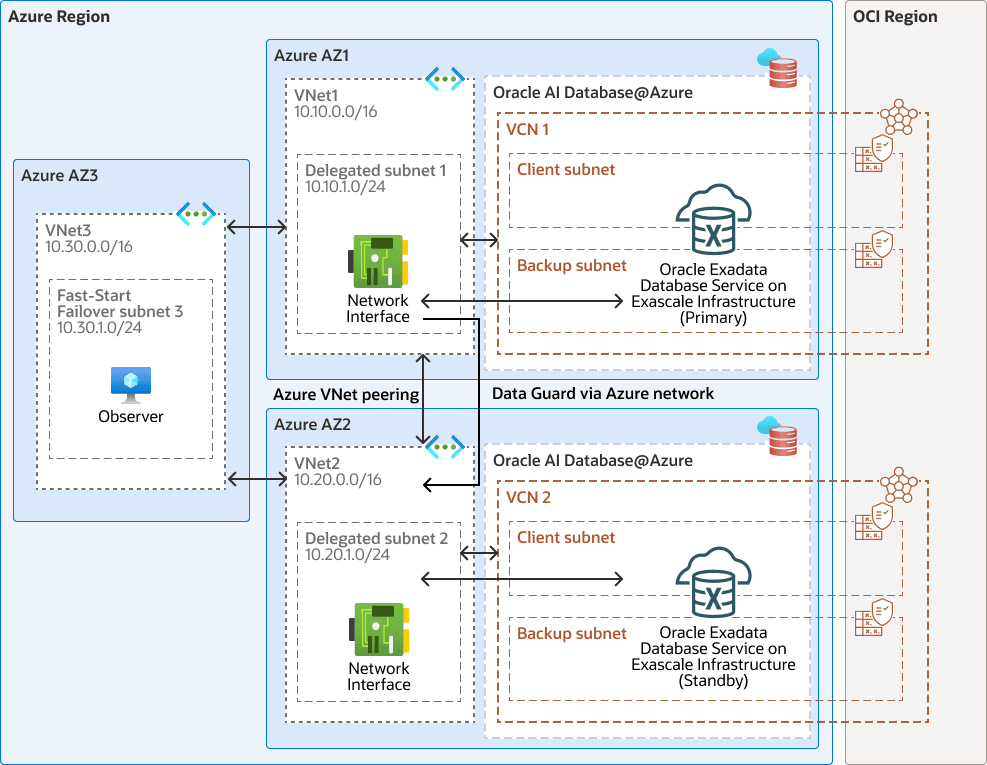
The following architecture shows a cross-zones Data Guard with the observer running in a different availability zone:
cross-zones-dg-oracledb-azure-oracle.zip
You can route Data Guard traffic through the Oracle Cloud Infrastructure (OCI) or Azure network. This architecture directs Data Guard network traffic through the Azure network to keep all data within the Azure platform. The VCNs on the OCI site are created after the Oracle Exadata Database Service on Exascale Infrastructure VM clusters on Oracle AI Database@Azure are created for the primary and standby databases.
In this architecture:
- The primary Exascale VM Cluster is deployed in the primary availability zone in
VNet1with CIDR10.10.0.0/16and delegated subnet CIDR10.10.1.0/24. - The standby Exascale VM Cluster is deployed in the standby availability zone
in
VNet2with CIDR10.20.0.0/16and delegated subnet CIDR10.20.1.0/24. - The observer is deployed in
VNet3with CIDR10.30.0.0/16and subnet CIDR10.30.1.0/24. VNet1is peered withVNet2to allow Data Guard traffic to flow between the primary and standby databases.VNet3is peered with bothVNet1andVNet2to enable the observer to connect to both databases.
This architecture has the following components:
- Azure region
An Azure region is a geographical area in which one or more physical Azure data centers, called availability zones, reside. Regions are independent of other regions, and vast distances can separate them (across countries or even continents).
Azure and OCI regions are localized geographic areas. For Oracle AI Database@Azure, an Azure region is connected to an OCI region, with availability zones (AZs) in Azure connected to availability domains (ADs) in OCI. Azure and OCI region pairs are selected to minimize distance and latency.
- Azure Availability Domain
Azure Availability Domain, or availability set, is a logical grouping of virtual machines.
- Azure Virtual Network and subnet
Azure Virtual Network (VNet) enables you to deploy Azure resources into a private, logically isolated network that you define. This network resembles a traditional on‑premises network, while benefiting from Azure's scalable, highly available cloud infrastructure. After you create a VNet, you can segment it into one or more subnets to organize and control network traffic for your workloads.
- Azure delegated subnet
A delegated subnet is a VNet subnet reserved and delegated to the Oracle AI Database@Azure service, allowing Oracle to deploy and manage the required database resources within your private network IP space.
- Azure Virtual Network Interface Card (VNIC)
The services in Azure data centers have physical network interface cards (NICs). Virtual machine instances communicate using virtual NICs (VNICs) associated with the physical NICs. Each instance has a primary VNIC that's automatically created and attached during launch and is available during the instance's lifetime.
- Microsoft Azure Compute VM
Azure Virtual Machines (VMs) provide on-demand, scalable compute resources that you can use like a physical server or desktop. Use VMs when you need full control over the operating system and software environment.
VMs remove the need to manage physical hardware, but you still configure, patch, and manage the software running on them. They support custom and legacy workloads.
- OCI region
An OCI region is a localized geographic area that contains one or more data centers, hosting availability domains. Regions are independent of other regions, and vast distances can separate them (across countries or even continents).
- Availability domain
Availability domains are standalone, independent data centers within a region. The physical resources in each availability domain are isolated from the resources in the other availability domains, which provides fault tolerance. Availability domains don’t share infrastructure such as power or cooling, or the internal availability domain network. So, a failure at one availability domain shouldn't affect the other availability domains in the region.
- OCI virtual cloud
network and subnet
A virtual cloud network (VCN) is a customizable, software-defined network that you set up in an OCI region. Like traditional data center networks, VCNs give you control over your network environment. A VCN can have multiple non-overlapping classless inter-domain routing (CIDR) blocks that you can change after you create the VCN. You can segment a VCN into subnets, which can be scoped to a region or to an availability domain. Each subnet consists of a contiguous range of addresses that don't overlap with the other subnets in the VCN. You can change the size of a subnet after creation. A subnet can be public or private.
- Network security group
(NSG)
NSGs act as virtual firewalls for your cloud resources. With the zero-trust security model of OCI you control the network traffic inside a VCN. An NSG consists of a set of ingress and egress security rules that apply to only a specified set of virtual network interface cards (VNICs) in a single VCN.
- Oracle Data Guard
Oracle Data Guard and Active Data Guard provide a comprehensive set of services that create, maintain, manage, and monitor one or more standby databases and that enable production Oracle databases to remain available without interruption. Oracle Data Guard maintains these standby databases as copies of the production database by using in-memory replication. If the production database becomes unavailable due to a planned or an unplanned outage, Oracle Data Guard can switch any standby database to the production role, minimizing the downtime associated with the outage. Oracle Active Data Guard provides the additional ability to offload read-mostly workloads to standby databases and also provides advanced data protection features.
- Oracle AI Database@Azure
Oracle AI Database@Azure is the Oracle Database service (Oracle Exadata Database Service on Dedicated Infrastructure and Oracle Autonomous AI Database Serverless) running on OCI, deployed in Microsoft Azure data centers. The service offers features and price parity with OCI. Purchase the service on Azure Marketplace.
Oracle AI Database@Azure integrates Oracle Exadata Database Service, Oracle Real Application Clusters (Oracle RAC), and Oracle Data Guard technologies into the Azure platform. Users manage the service on the Azure console and with Azure automation tools. The service is deployed in Azure Virtual Network (VNet) and integrated with the Azure identity and access management system. The OCI and Oracle AI Database generic metrics and audit logs are natively available in Azure. The service requires users to have an Azure subscription and an OCI tenancy.
Autonomous AI Database is built on Oracle Exadata infrastructure, is self-managing, self-securing, and self-repairing, helping eliminate manual database management and human errors. Autonomous AI Database enables development of scalable AI-powered apps with any data using built-in AI capabilities using your choice of large language model (LLM) and deployment location.
Both Oracle Exadata Database Service and Oracle Autonomous AI Database Serverless are easily provisioned through the native Azure Portal, enabling access to the broader Azure ecosystem.
Recommendations
Your requirements might differ from the architecture described here.
- Place the observer on a host at a separate third site. This ensures that if either the primary or standby site fails entirely, the observer remains active to coordinate the failover or monitor the remaining site.
- In case there is no third site available, place the observer at the primary site.
- Configure multiple observers on different servers for high availability. While only one observer can be the primary observer, additional observers serve as backup observers.
- Follow Oracle documentation for setting the values for Fast-Start Failover
configuration properties, like Fast-Start Failover properties,
such as
FastStartFailoverThreshold,FastStartFailoverLagLimit, andFastStartFailoverAutoReinstate. - Always run the Data Guard Broker observer using the same major release and patch level (including Release Update [RU]) as the Oracle AI Database homes within your Data Guard configuration. This combination receives the most thorough testing and minimizes operational risks. It also ensures that any fixes that affect both client-side (observer) and server-side (database) code are in place at any time. A difference of up to one major Long-Term Support release (LTS) between the Observer and the database is permitted, mainly to facilitate rolling upgrades and minimize downtime. For example, the observer at 26ai with Database at 19c during upgrade procedures or vice versa.
Considerations
- Never place the observer on the same site as the standby database. If the standby site goes down, the primary will also shut down because it cannot communicate with the observer, leading to a complete outage
- The observer can run on a lightweight VM. However, network connection stability to the primary and standby database is critical to ensure proper operations and avoid unnecessary failovers.
- Configure Data Guard maximum availability mode to ensure zero data loss. If you are more concerned about the performance of the primary database than a minimal loss of data, consider enabling fast-start failover when the configuration protection mode is set to maximum performance.
-
The failover time is dependent upon whether the target standby database has applied all of the redo data it has received from the primary database. Fast-start failover is faster when you take steps to optimize recovery so that the application of redo data to the standby database is kept up to date with the primary database's rate of redo application. See the Performance Considerations for Fast-Start Failover section in the Data Guard, Broker Concepts documentation.
- Failover time depends on redo apply state at the standby database.
About Required Services and Roles
This solution requires the following services and roles:
- Oracle Exadata Database Service on Exascale Infrastructure
- Oracle Cloud Infrastructure Networking
These are the roles needed for each service.
| Service Name: Role | Required to... |
|---|---|
OCI Database: manage database-family |
Create a Data Guard standby database |
OCI Networking: manage vcn-family |
Manage the Network Security Group in OCI |
See Oracle Products, Solutions, and Services to get what you need.