Learn how Equinix automates business processes with Oracle Integration RPA
This reference architecture illustrates how you can use integrations in Oracle Integration, the business automation platform on OCI, to orchestrate API calls, RPA, and database interactions.
Two production-oriented use cases are provided:
- Use case 1: Customer Credit Recommendations (EXT-016) in Oracle Receivables
Features the migration from traditional RPA to Oracle Integration RPA
- Use case 2: Payment Batch Automation in Oracle Payables
Features a new Oracle Integration RPA implementation with a Visual Builder-driven configuration.
The architecture provides the following advantages:
- Reduces reliance on traditional RPA platforms by using Oracle Integration as a complete business automation platform for both API and UI automation.
- Automates repetitive, rule-based finance work in Oracle Fusion Cloud Service where APIs alone don't cover the required UI action.
- Creates a reusable hybrid automation pattern that combines API-based integration, UI robot execution, reporting, and state persistence.
- Improves operational resilience with dynamic selectors, structured robot input and output payloads, centralized error handling, and Oracle Integration observability.
- Improves operational efficiency by auto-scaling compute resources in a pool environment.
Before You Begin
- Oracle Integration 3 is provisioned as the Enterprise or Healthcare edition in a region where RPA is available. See Explore More for links to additional information.
- Fusion Cloud Service ERP includes the relevant Receivables and Payables modules, ESS jobs, BI Publisher reports, and REST API access.
- An Oracle Cloud Infrastructure (OCI) tenancy is available for automatic robot environment scaling, including compartments, OCI Identity and Access Management (IAM) policies, virtual cloud network (VCN) and subnet configuration, custom images, instance configurations, and instance pools.
- The implementation team creates dedicated service accounts in Oracle Fusion Cloud Service for robot execution.
- Autonomous AI Transaction Processing (ATP) and Oracle REST Data Services (ORDS) are available when the architecture requires persistent record-level status and REST access to stored automation state.
- Visual Builder is available for payment batch configuration dashboards and template mappings if the payment batch use case remains in scope.
- The implementation team must validate application automation permissions, throttling limits, and Oracle SaaS performance constraints before production deployment.
About Oracle Cloud Services
| Cloud Service | Role |
|---|---|
| Oracle Integration 3 | Orchestrates integrations, invokes RPA robots, manages connections, implements parent-child batching, and monitors execution. |
| Oracle Fusion Cloud Enterprise Resource Planning | System of record for Receivables Credit Reviews and Payables Payment Process Requests. |
| Oracle Enterprise Scheduler Service | Schedules or triggers Oracle Integration integrations with business parameters such as region or reprocess flags. |
| Oracle BI Publisher | Generates extract and status reports used by Oracle Integration for case folders, payment registers, and validation. |
| Oracle Autonomous AI Transaction Processing | Stores record-level status and supports validation packages for the credit recommendation flow. |
| Oracle Visual Builder | Hosts payment batch schedule, template, and configuration dashboards consumed by Oracle Integration. |
| OCI Compute instance pools | Provide autoscaled robot agent infrastructure through custom images and instance configurations. |
| OCI Identity and Access Management, OCI Monitoring, OCI Logging, and OCI Notifications | Secure and observe robot runtime infrastructure, integrations, and operational events. |
Architecture
The target architecture is a hybrid automation pattern. Oracle Integration handles scheduling, data extraction, orchestration, API calls, error handling, status polling, and notifications. RPA robots perform UI actions that are not exposed through APIs. OCI instance pools provide elastic robot runtime capacity, while Oracle Fusion Cloud Enterprise Resource Planning (ERP) remains the business system of record.
The following diagram shows the hybrid automation pattern:
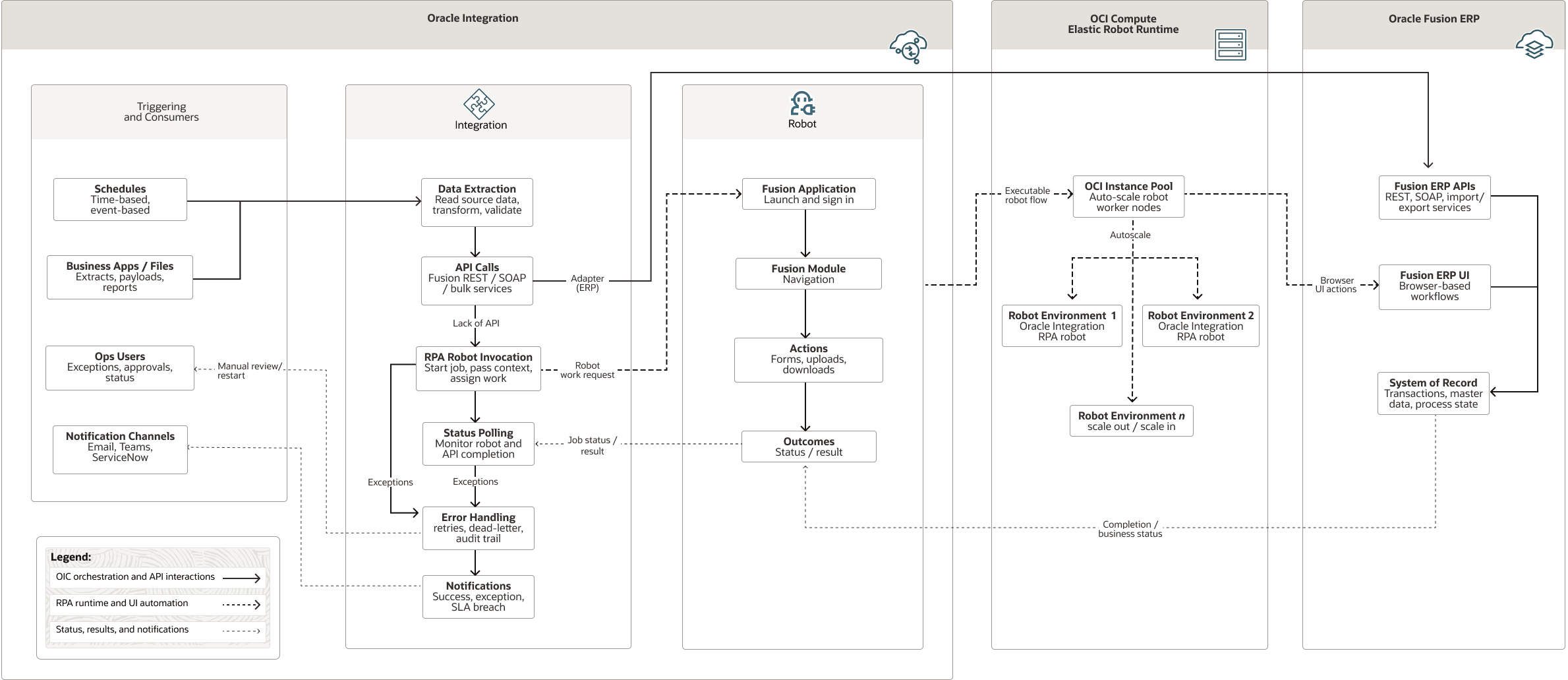
Description of the illustration hybrid-automation-pattern.png
hybrid-automation-pattern-oracle.zip#GUID-37FF80D9-B5F2-4652-8070-6A2D97C71C7E
The architecture includes these components:
- Oracle Integration
Oracle Integration is a fully-managed, preconfigured environment that allows you to integrate cloud and on-premises applications, automate business processes, and develop visual applications. It uses an SFTP-compliant file server to store and retrieve files and allows you to exchange documents with business-to-business trading partners by using a portfolio of hundreds of adapters and recipes to connect with Oracle and third-party applications.
- Instance
configuration
An instance configuration is a template that defines the settings to use when creating compute instances, including details such as the base image, shape, and metadata. You can also specify the associated resources for the instance, such as block volume attachments and the network configuration.
- Instance
pool
An instance pool is a group of instances within a region that are created from the same instance configuration and managed as a group.
Common platform flow
Oracle Integration orchestrates finance automation by receiving schedules and parameters, extracting data, invoking robots and APIs, persisting status, polling results, and sending notifications. Robots perform UI actions that aren't available through APIs. Robot environments use OCI instance pools and instance configurations to scale runtime capacity.
Use case 1: Customer credit recommendations (EXT-016) in Oracle Receivables
The use case automates customer credit recommendation updates in Oracle Receivables. Oracle Integration coordinates the report extract, robot execution, status tracking, exception handling, and notifications. The flow uses Visual Builder configuration, Oracle Fusion Cloud Service REST APIs, BI Publisher reporting, and persistent automation state.
| Process | Process Flow |
|---|---|
| Business problem | Finance analysts must review credit case folders, enter credit limits and classifications, close eligible folders, and reassign cases when processing fails. Manual processing increases processing time and the risk of errors at scale. |
| Main flow | An Enterprise Scheduler Service (ESS) job starts Oracle Integration, a BI Publisher case-folder extract, an Autonomous AI Transaction Processing (ATP) database insert, database validation, child Oracle Integration loop, the first robot updates Receivables, status checks, and notifications. |
| Robot actions | Log in, navigate to Receivables Credit Reviews, search each case folder, reassign the analyst to the service user when required, open recommendations, enter the credit limit and classification, save, and report the output status. |
| Error handling | The system logs failed case folders and sends an email to the assigned analyst. A secondary robot can reassign failed cases to the original analyst. Oracle Integration can create ServiceNow incidents when the customer uses IT service management (ITSM) integration. |
| Data and state | An ATP table such as CASEFOLDER_DETAILS stores record-level status. BI Publisher status reports can verify ORA_CLOSED or a similar closure status. |
The following table defines the business rules for credit recommendation automation.
| Rule | Condition | Action |
|---|---|---|
| Government or direct debit customers | Account classification is Gov or DD. | Close the case automatically as Low Risk without robot execution. |
| Low credit score | Total score is less than 20. | Don't close the case automatically. Route the case to an analyst for manual review. |
| Moderate score | Total score is 21 through 50. | Classify as Moderate Risk. |
| High score | Total score is greater than 50. | Classify as Low Risk. |
| Null validation | Missing email, currency, limit, or classification. | The database package blocks the record and logs the error. |
Use case 2: Payment batch automation in Oracle Payables
The use case automates Oracle Fusion Payables payment batch submission. Oracle Visual Builder hosts configuration templates that drive Oracle Integration. Oracle Integration orchestrates a multistep workflow that creates payment batches, validates status, runs reports, validates invoices, removes rejected invoices, formats batches, resumes payments through API calls, and sends exception notifications.
| Process | Process Flow |
|---|---|
| Business problem | Payment batches must be submitted and validated before payment cutoff windows. Manual processing across payment templates and regions increases operational risk. |
| Main flow | Oracle Visual Builder templates and an ESS region parameter start Oracle Integration freeze checks and template filtering, followed by robot and API actions in Oracle Payables, reports, exception routing, and output storage. |
| Robot actions | Create the payment process request, validate pending installments, remove rejected invoices when business rules require it, and format and submit the batch. |
| API actions | Oracle Fusion Cloud Service REST APIs, such as paymentProcessRequests GET and PATCH operations, for status checks, resume actions, and report operations. |
| Data and configuration | Oracle Visual Builder schedule templates, template mappings, and configuration templates determine eligible batches, currencies, thresholds, and exception actions. |
The following table defines the rules that determine payment-batch exception and termination actions.
| Rule | Condition | Action |
|---|---|---|
| Excluded currency | The API response currency matches an excluded currency in template mapping. | Send a business-exception notification immediately. |
| Single Payment GT (USD) | The aggregate USD payment exceeds the configured single-payment greater-than threshold. | Raise an exception or remove the invoice based on configured action. |
| Cross Currency GT | The payment currency differs from the batch currency, and the USD amount exceeds the configured threshold. | Raise an exception or remove the invoice based on configured action. |
| Batch currency zzz | The template uses zzz as the all-currency marker. | In the payment selection criteria, select All for currencies. |
| Zero selected invoices | The selected invoice count is 0 after validation. | Do not download the report. End the batch for the template. |
The following table compares the two finance automation use cases shown in this reference architecture.
| Dimension | Use case-1: Credit recommendations | Use case-2: Payment batch |
|---|---|---|
| Module | Oracle Receivables Credit Reviews | Oracle Payables Payment Process Requests |
| Trigger | ESS job (on demand) | ESS job (region parameter, scheduled) |
| Prerequisite configuration | BI Publisher report extract from Oracle Receivables tables | Oracle Visual Builder-hosted schedule, template, and configuration dashboards |
| Number of robots | Two robots (update and analyst reassignment) | Three robot actions (create batch, remove invoices, and format) |
| API usage | Limited (BI Publisher status query) | Extensive (payment process request GET and PATCH operations, report APIs, and resume API) |
| Data storage | ATP table (CASEFOLDER_DETAILS) | Oracle Visual Builder template mappings and SharePoint reports |
| Error handling | Error logging, ServiceNow, and email to each analyst | Business exception email and terminated batch alert |
| Business rules | Credit score thresholds and classification | Currency exclusions and single-payment and cross-currency thresholds |
| Migration source | Traditional robotic process automation (RPA) tool | New Oracle Integration 3 RPA implementation |
Considerations
Security and identity
- Use dedicated robot service accounts with least-privilege Oracle Fusion Cloud Service permissions and auditable ownership.
- Store credentials in Oracle Integration connections or robot connections. Don't hard code credentials in robot steps or integration payloads.
- Define scoped IAM policies for the RPA automatic scaling compartment to enable the Oracle RPA service to manage instance pools, instances, instance configurations, images, and required network resources.
- Use HTTPS for service calls and confirm the authentication approach for Oracle Fusion Cloud Service REST APIs, Autonomous AI Transaction Processing (ATP) and Oracle REST Data Services (ORDS) endpoints, BI Publisher, Oracle Visual Builder, email, and IT service management (ITSM) systems.
Networking and runtime environment
- Create a dedicated compartment, virtual cloud network (VCN), subnet, route table, and internet or service connectivity model for robot agent virtual machines (VMs).
- Choose Windows or Oracle Linux robot agent images based on browser and application requirements. Confirm remote access requirements before opening Remote Desktop Protocol (RDP) or Secure Shell (SSH) ingress.
- Include Java Development Kit (JDK), browser, Python prerequisites, and robot agent startup scripts in custom images so scale-out instances are available after startup.
- Validate every custom image before creating the instance pool. Failed image setup can prevent robot environments from registering with the Oracle Integration robot environment pool.
Availability, scaling, and cost
- Define minimum and maximum robot instances based on business criticality, payment cutoff windows, and allowed Oracle Fusion Cloud Service workload concurrency.
- Set utilization thresholds, cooldown periods, and window periods to avoid overscaling or repeated scaling. The source material suggests examples such as 50 percent scale-in and 80 to 120 percent scale-out depending on workload tolerance.
- Compare robot runtime with trigger frequency. A robot that runs longer than its invocation interval creates backlog unless enough environments are available.
- Use automatic scaling to reduce idle VM costs compared with fixed traditional RPA runtime pools, while preserving baseline capacity for time-sensitive finance runs.
Operations and observability
- Use Oracle Integration observability to monitor robot environments, integrations, agent connectivity, failures, and backlogs.
- Implement global fault handlers that capture payload context, error codes, execution metadata, and affected business records.
- Return structured robot output payloads so Oracle Integration can determine success, retry, status polling, exception routing, and summary notifications.
- Route operational failures to email and, when configured, ServiceNow or the customer's ITSM platform.
User interface resilience and testing
- Use dynamic selectors based on stable business values from the input payload, such as case folder number, instead of generated Oracle Fusion Cloud Service component IDs.
- Use multiple selectors and self-healing features, but validate them in user acceptance testing (UAT) before quarterly Oracle Fusion Cloud Service updates or major UI changes.
- Test robots on the same clean runtime environment used in production, not only on the recorder computer.
- Run end-to-end tests across Oracle Integration, robots, Oracle Fusion Cloud Service screens, API calls, reports, database state, and notifications.
Acknowledgments
- Equinix Team:
- Ajay Narayan: Senior Manager IT, Digital Corporate functions
- Abhishek Aithal: Senior Software Engineer, Digital Corporate functions
- Lakshmi Reddy Kishtipati: Senior Software Engineer, Digital Corporate functions
- Oracle Team:
Sandhya Lakshmi Gopalan: Principal Product Manager, Oracle Integration RPA
- Melissa Hubbell: Senior Manager, Oracle Integration User Assistance
- Anupama Pundpal: Principal User Assistance Developer
- Robert Lies: Lead Principal User Assistance Developer