About Performance Results
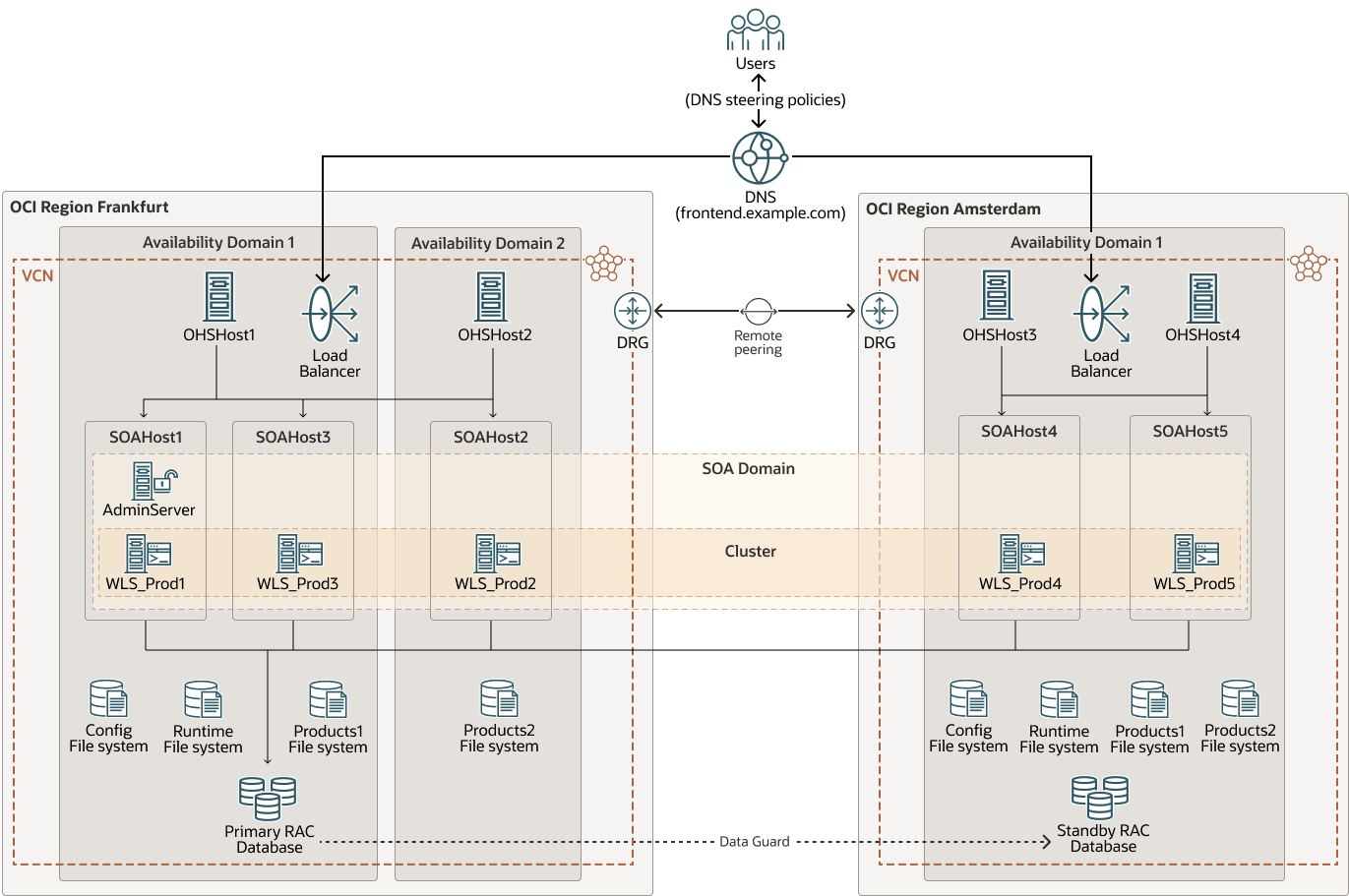
The system used for the tests is a Oracle Fusion Middleware (FMW) stretched cluster configured across the Frankfurt and Amsterdam Oracle Cloud Infrastructure (OCI) regions.
The WebLogic domain consists of 5 nodes distributed across different locations to enable performance comparisons of various topologies: servers running in the same availability domain as the database, servers in the same region but in different availability domains, and servers located in a different region.
These stress tests were performed using the SOA Fusion Order Demo (FOD) as a sample SOA application. The FOD demo was modified to insert Java Message Service (JMS) messages in a Uniform Distributed Destination (UDD) destination when an order completes. This example is very database-intensive and uses multiple SOA adapters such as the File Adapter and JMS Adapter. It also involves different SOA components such Mediator, Business Process Execution Language (BPEL), rules engine, and multiple WebLogic features.
The following diagram shows the FMW stretched cluster environment used for the tests:
fmw-stretched-performance-env-oracle.zip
The real latency values between the networks in this environment were:
| Between Hosts | Avgerage Latency (RTT in ms) |
|---|---|
| In the same availability domain | 0.3 |
| In the same region but in a different availability domain | 0.6 |
| In different regions (Frankfurt and Amsterdam) | 6.5 |
Review Stress Tests
Some of the tested configurations were:
- Stressing the cluster with two nodes up, applying different latencies between the servers and between one of the servers to the database.
- Stress testing individual servers, each with different latencies to the database.
- Running tests with both servers collocated with the database (local only) and with both servers located remotely from the database (remote only).
- Stressing the cluster with two nodes active in each region.
For each configuration, different workloads were tested. All the workload requests are first sent to the front end, where they are distributed (through the global load balancing, then the local load balancers, and then the web servers) among the Oracle WebLogic Server instances. The workload category (low, medium, high) depends on the number of active nodes in each setup and is constrained by the database's concurrency limits. For example, 80 concurrent virtual users would be considered a low workload for WebLogic servers if there are four nodes running, but a high workload if only one node is active. However, from the database's perspective, the workload remains the same. For simplicity, the workloads used are as follows:
- Low workloads (20 concurrent virtual users per WebLogic server, with a maximum of 40 total concurrent virtual users in the system)
- Medium workloads (40-60 concurrent virtual users per WebLogic server, with a maximum of 120 total concurrent virtual users in the system)
- High workloads (80 concurrent virtual users per WebLogic server, with a maximum of 160 total concurrent virtual users in the system )
Based on the stress test results, these are the conclusions:
- Overall cluster performance
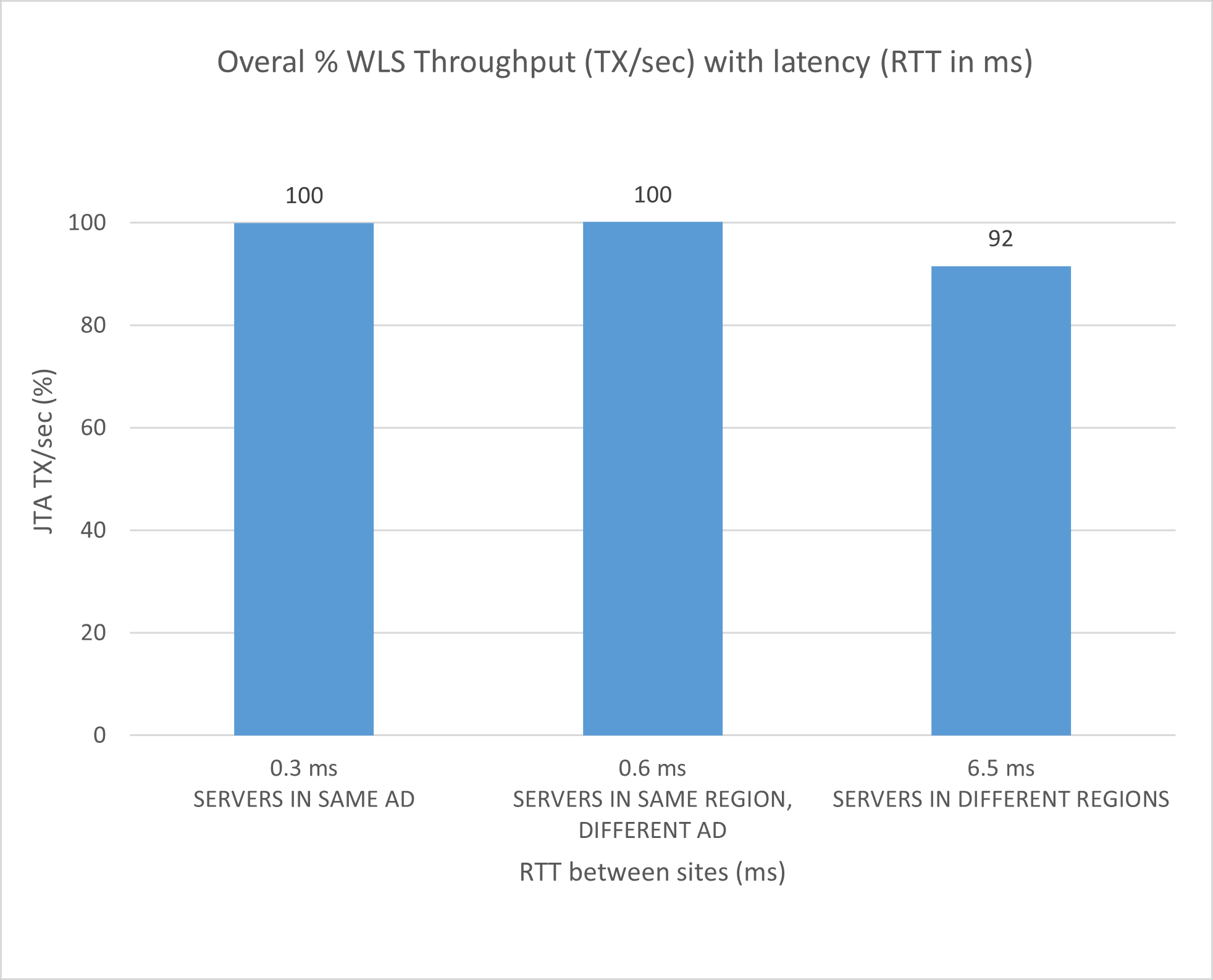
The overall cluster performance (in terms of WebLogic throughput, transactions per second (TX/sec)) for a cluster with 2 servers:
- When both servers are in the same Availability Domain (AD) (taken as reference): 100%
- When each server is in a different ADs: ~100%
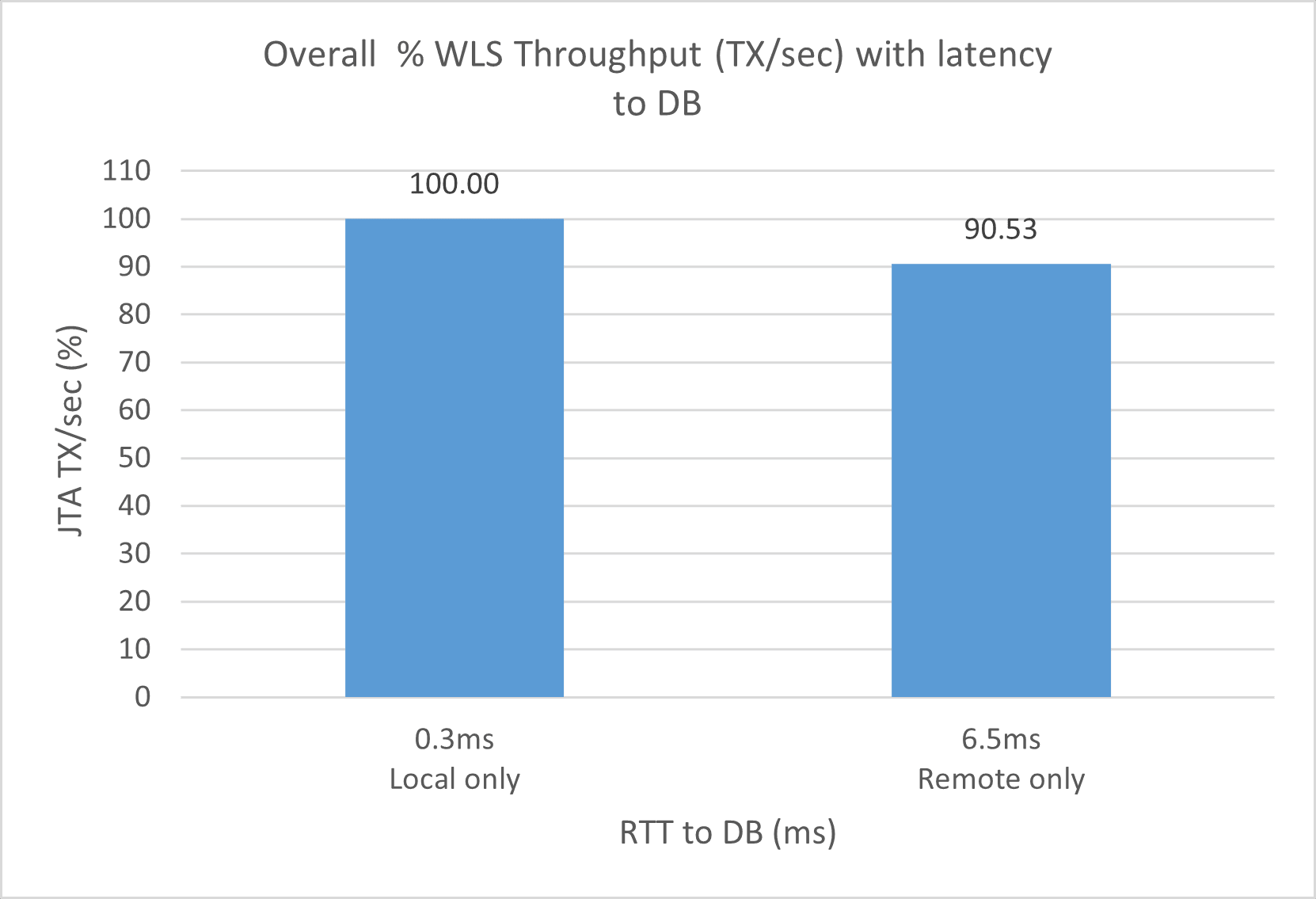
- When one server is in a different region (6.5ms round-trip time (RTT)): 90-95%
- When both servers are in a different region than the DB (6.5ms RTT): 85-95%
- Per-server performance
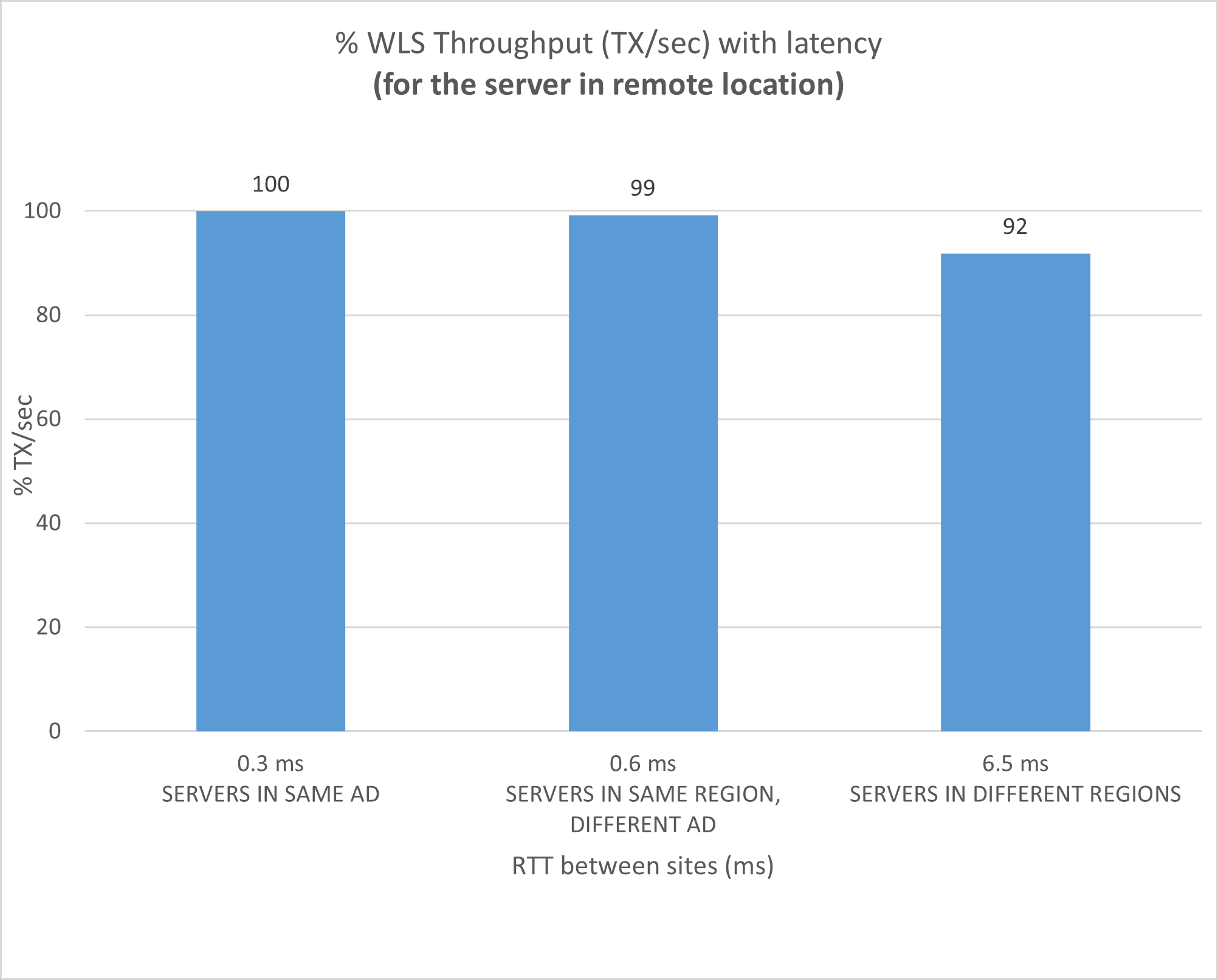
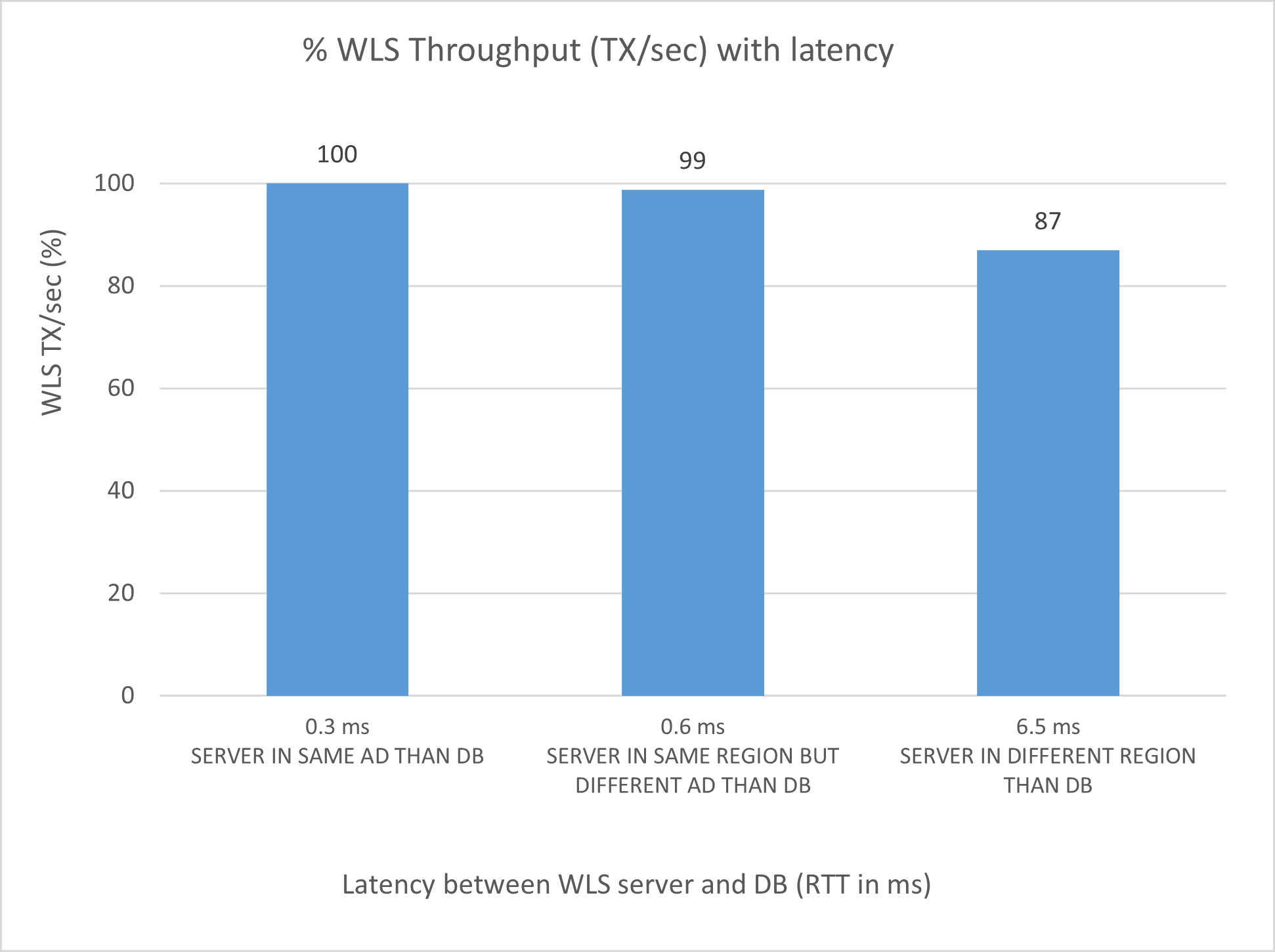
The per-server performance (in terms of WebLogic throughput, TX/sec):
- For the server in the same AD as DB (taken as reference): 100%
- For the server in the other AD: 98-99%
- For the server in the other region: 85-90%
- Number of active data source connections
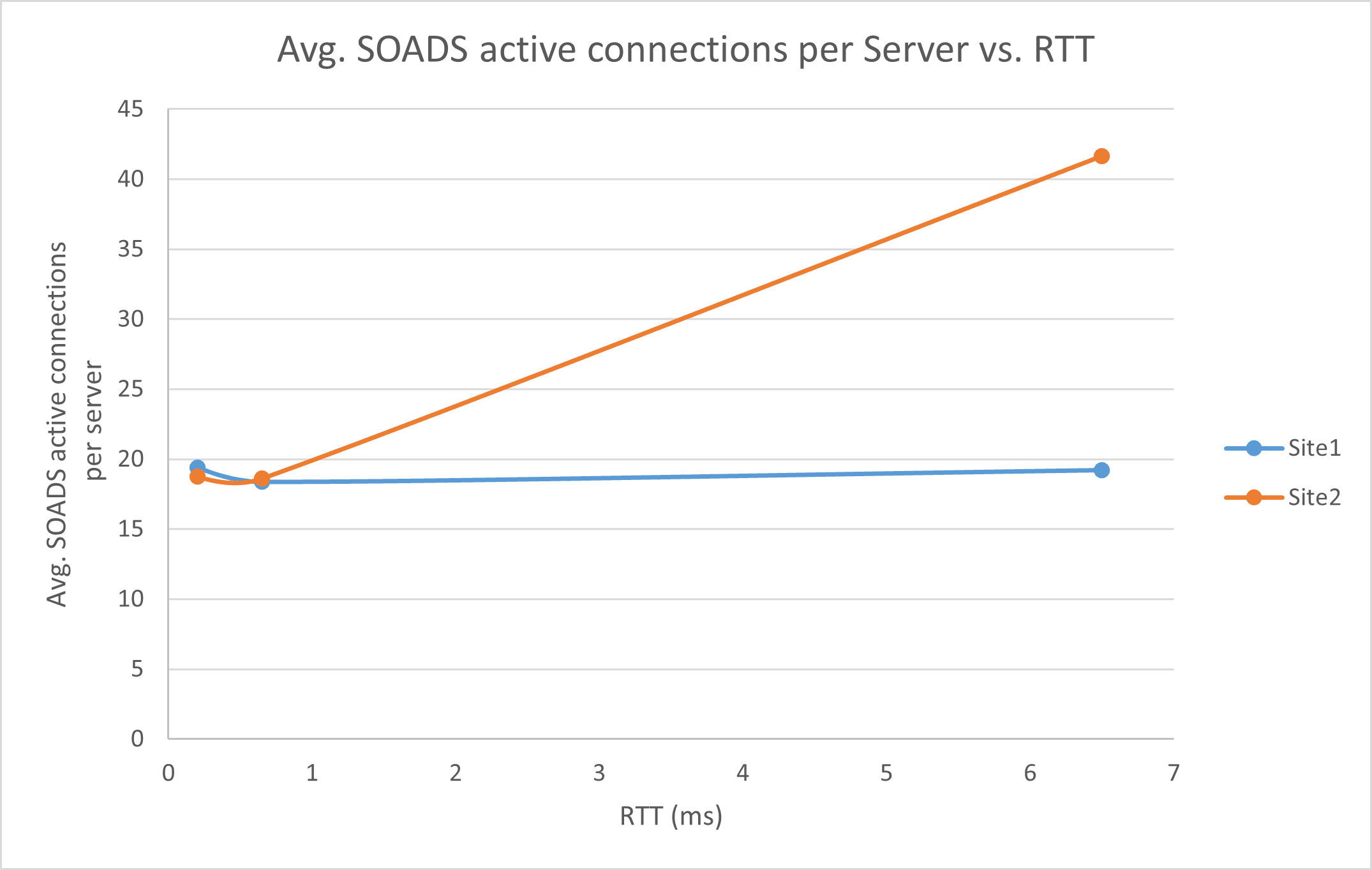
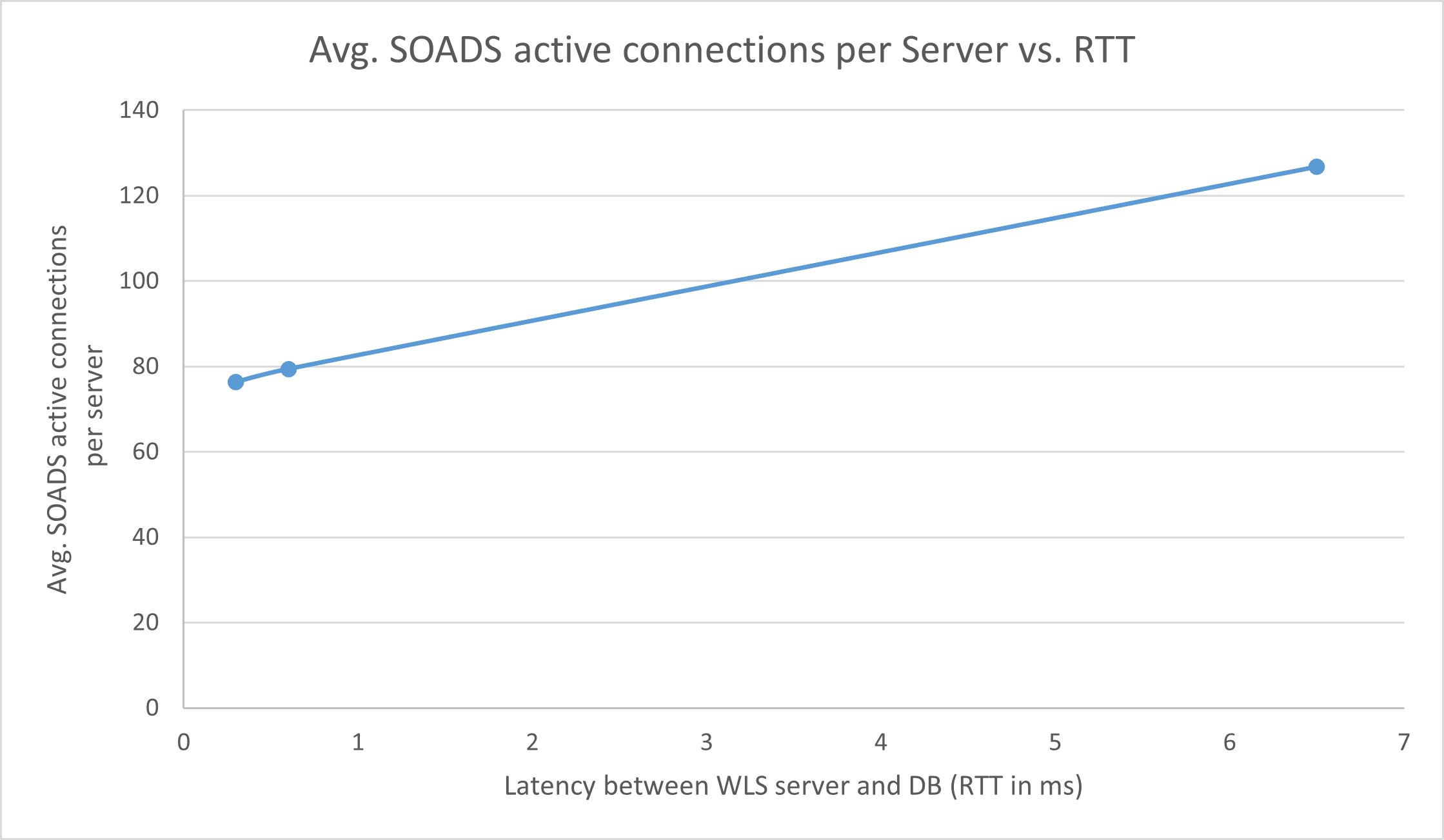
The number of active data source connections increases with higher latency to the database. Although it depends on the workload, the server in region 2 shows up to 2x active connections than the server collocated with the Database. Consider this for a correct sizing of the WebLogic data sources and database sessions.
- JTA transactions
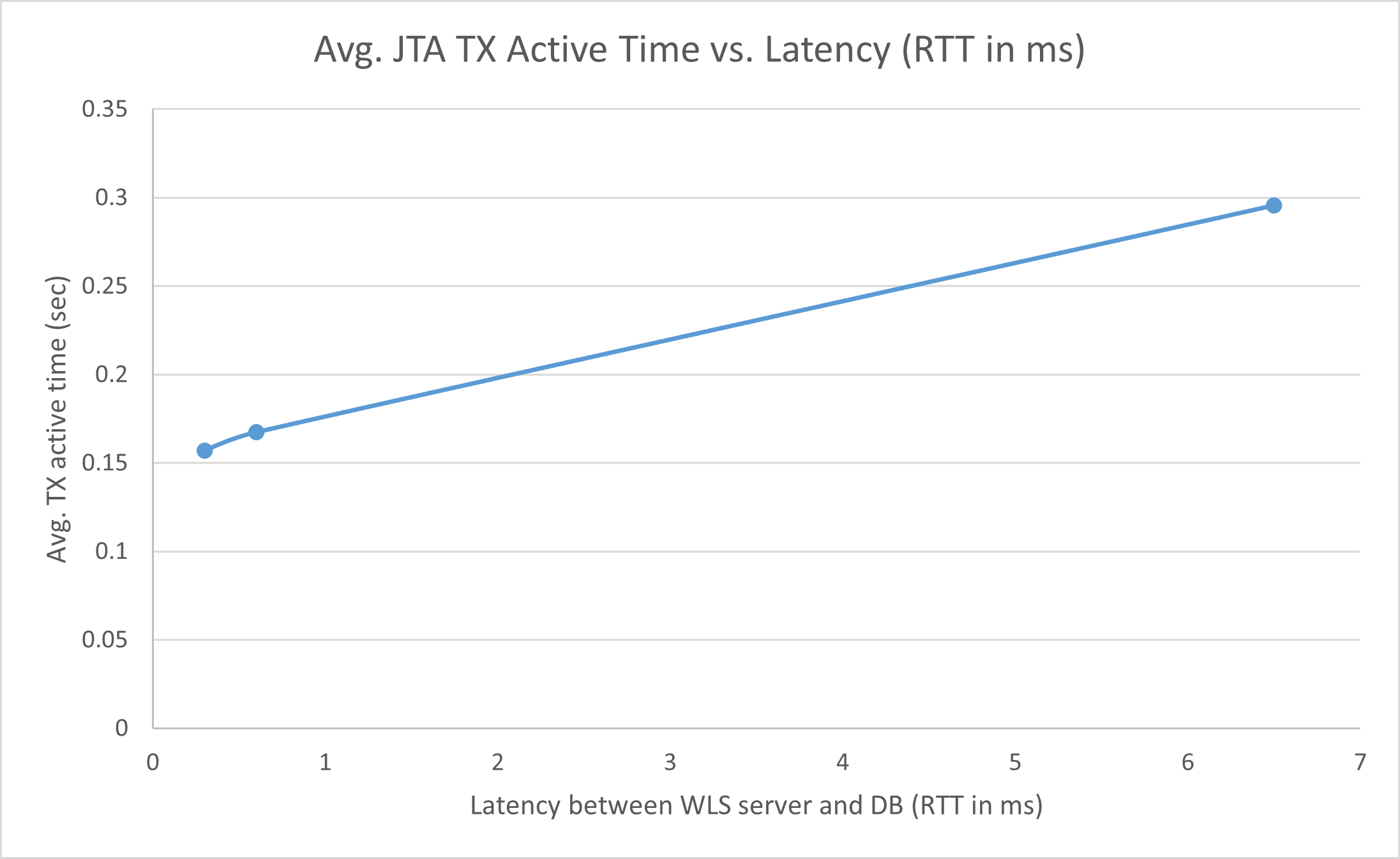
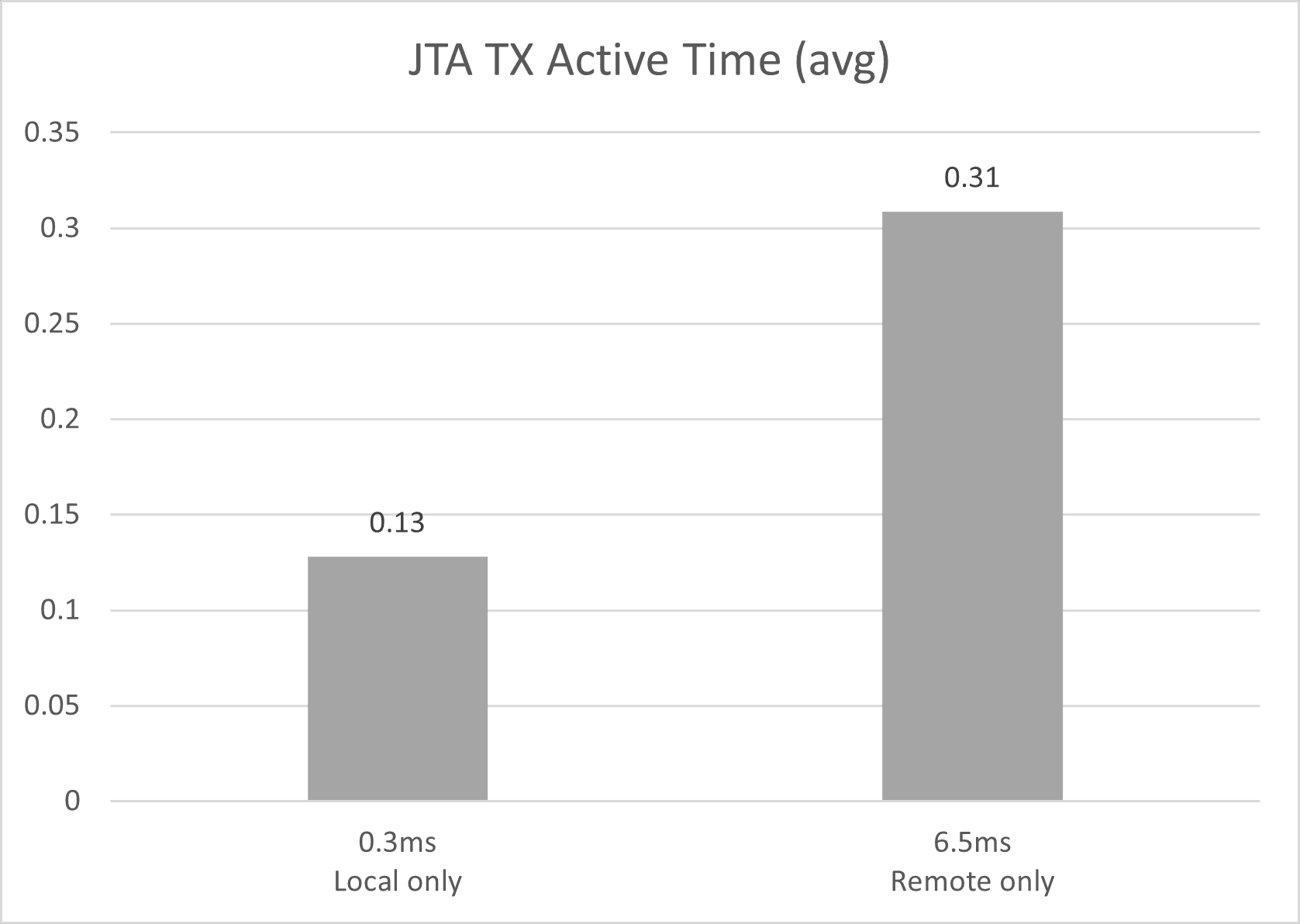
The JTA transactions remain active for longer periods in servers with higher latency to the database. Transactions that remain active for longer periods are more likely to be affected by failures. Therefore, it becomes particularly important in these systems that transaction logs use JDBC persistent stores. For server failures, service migration should take place, and recovery will happen automatically.
- Cross-region latency
For a cross-region latency of 6.5ms RTT, and implementing best practices provided by this document for the FMW Stretched clusters:
- There is low performance degradation using a stretched cluster (~10%).
- There is a similar performance degradation for a cluster with one server in each region and a cluster with both servers in the remote region. This is because the intra-cluster communication is also impacted by the latency.
- Cross-AD latency
The cross-AD latency (0.6ms) doesn’t have a significant impact on the overall performance of a SOA FOD system.
Note:
With all of the above in mind, and with the performance penalties observed in many tests, Oracle does not support Oracle Fusion Middleware stretched clusters that exceed 10 milliseconds of latency (RTT) between the sites. Systems may operate without issues, but the transaction times will increase considerably. Latencies beyond 10 milliseconds (RTT) will also cause problems in the Oracle Coherence cluster used for deployment and JT, web services, or application timeouts. This makes the solutions presented in this playbook suitable primarily for sites or regions with low latency between them.
When stressing a cluster with 2 nodes, the following chart shows the overall performance of the cluster, depending on where the servers are located. The reference (100%) is when both servers run in the same AD as the database.
When stressing a cluster with 2 nodes, the following chart shows the performance for the server that is not collocated with the database (it is in the other AD or in a remote region) compared to the performance of the server that is collocated with the database:
When stressing a cluster with 2 nodes, these charts show the number of active data source connections (average) for each server. One server is always collocated with the database (site1), and the other server is at different latency values from the database (site2):
When stressing a single server with different database latencies, the following performance results are observed, compared to a server that is co-located with the database, under medium to high load. The reference (100%) is when the server is in the same AD as the database.
When stressing a single server with different latencies to the database, this is the active data source connections under medium to high stress:
When stressing a single server with different latencies to the database, the following image shows the average JTA active time for different latencies to the database:
When comparing the performance of a cluster with both servers in the same region as the database (local only) vs. a cluster with both servers in a different region than the database (remote only), the following performance results are observed. The reference (100%) is the local-only cluster.
The following figure shows the average JTA TX active time for a cluster with both servers running in the same region as the database (local only) and a cluster running both servers in a different region than the database (remote only).
Review Start Times
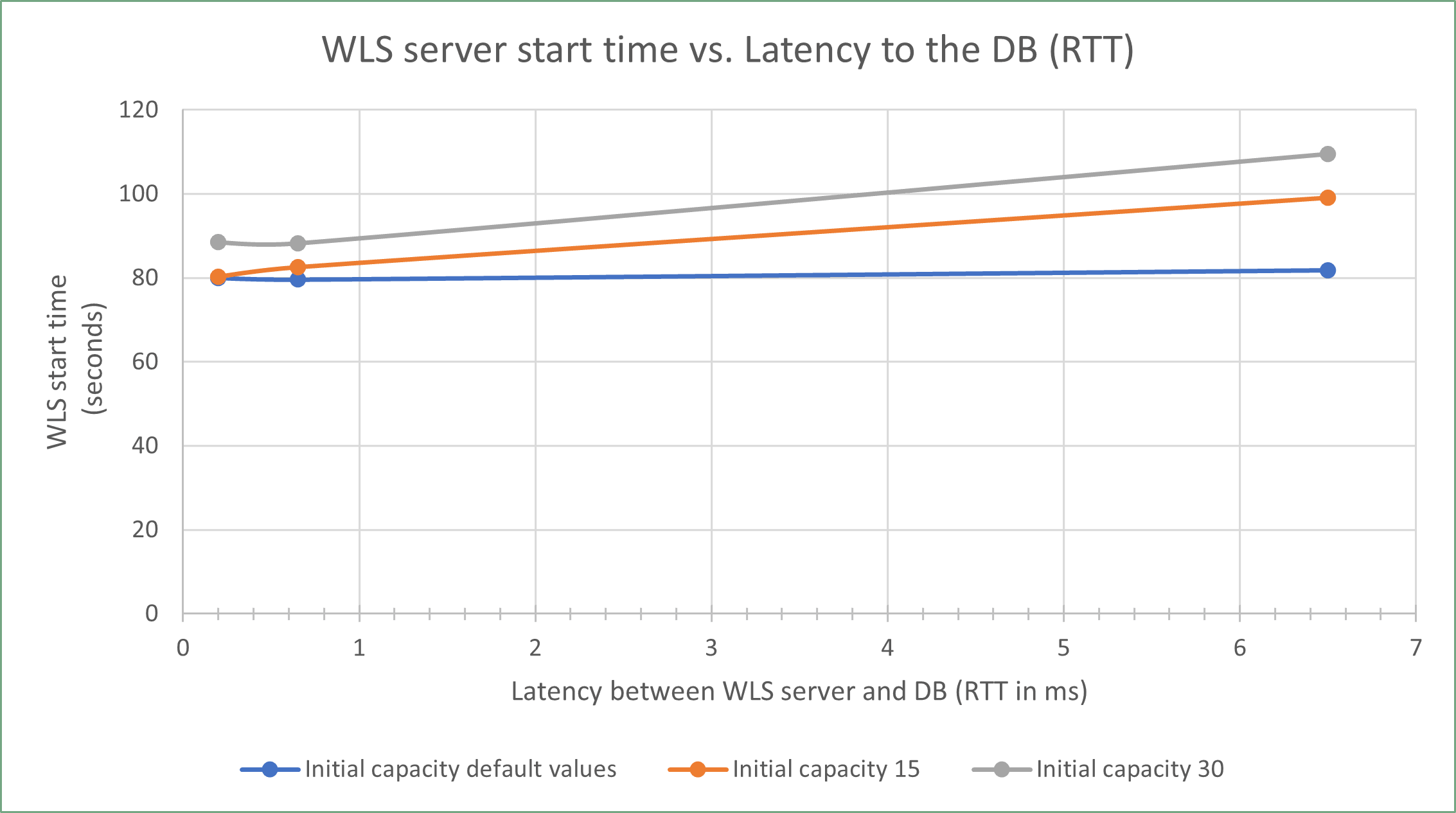
Different delays are expected according to the initial capacity settings in the data sources. By default, most Oracle Fusion Middleware (FMW) data sources use a zero initial capacity for their connection pool. However, to reduce the response time of the system during normal runtime operation, it may be beneficial to increase the initial pool capacity. However, in a stretched cluster, those servers that reside remotely to the Database, will show increased latency on their start as higher initial pool capacity is used.
A balanced decision is required between optimizing response times during normal operation and minimizing the start time to determine the ideal initial capacity settings. Since the initial capacity is configured at the data source (connection pool) level, these settings influence the startup time for all servers within the cluster (the ones local to the database and the ones that are remote to it).
The following graph shows the WebLogic server start times as the latency to the database grows, for different initial size values in all the data sources (11 data sources in total):
Review JMS Service Migration Times
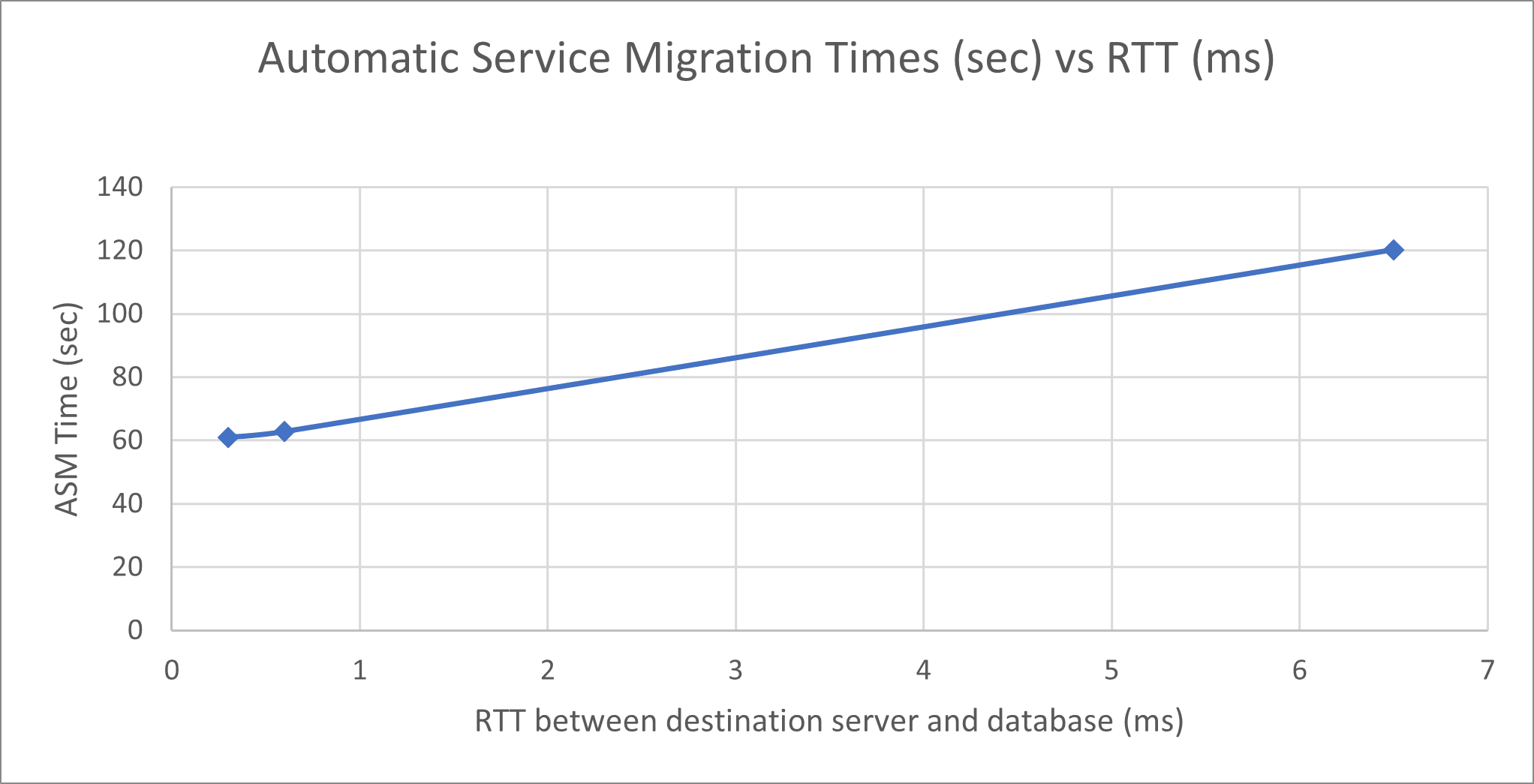
However, the time taken for a service migration operation from region 1 to region 2 can increase due to the latency to the database. This increase is caused by the time spent recovering the messages in the other server, because they are read from the persistent store in the database in the other region.
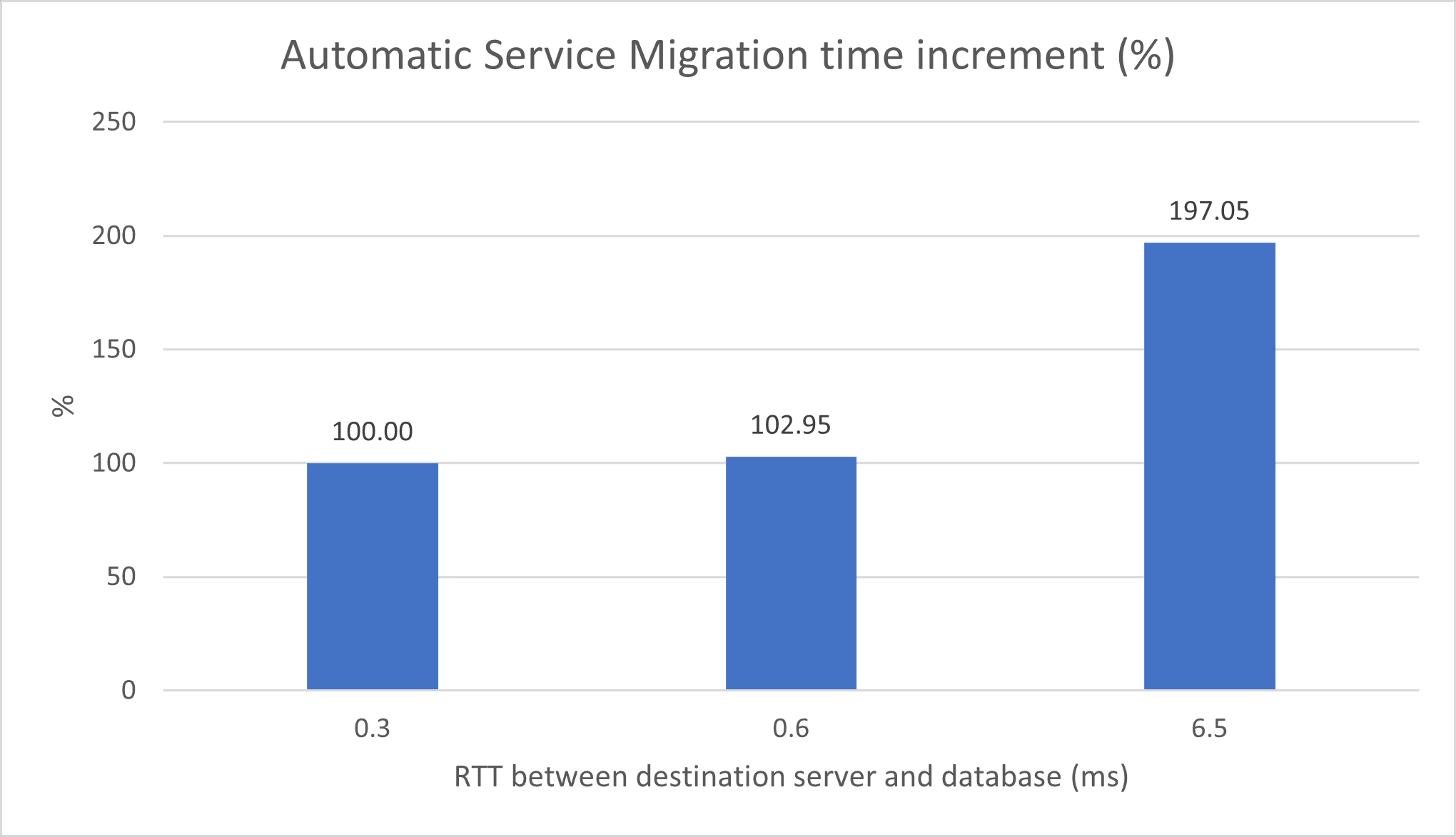
The increment is higher if the persistent stores have a large number of pending messages. For JMS messages with a size of 2.7 KB each, the following image shows the JMS service migration times when one of the persistent stores has a high number of pending messages (around 8000), and the service migrates from a server collocated with the database to another server, for different latencies between the destination server and the database:
The following image shows the service migration time increment (%) with a high number of pending messages (around 8000) for different latencies between the destination server and the database. The reference (100%) is when the service migrates to a server that is in the same Availability Domain (AD) as the database.
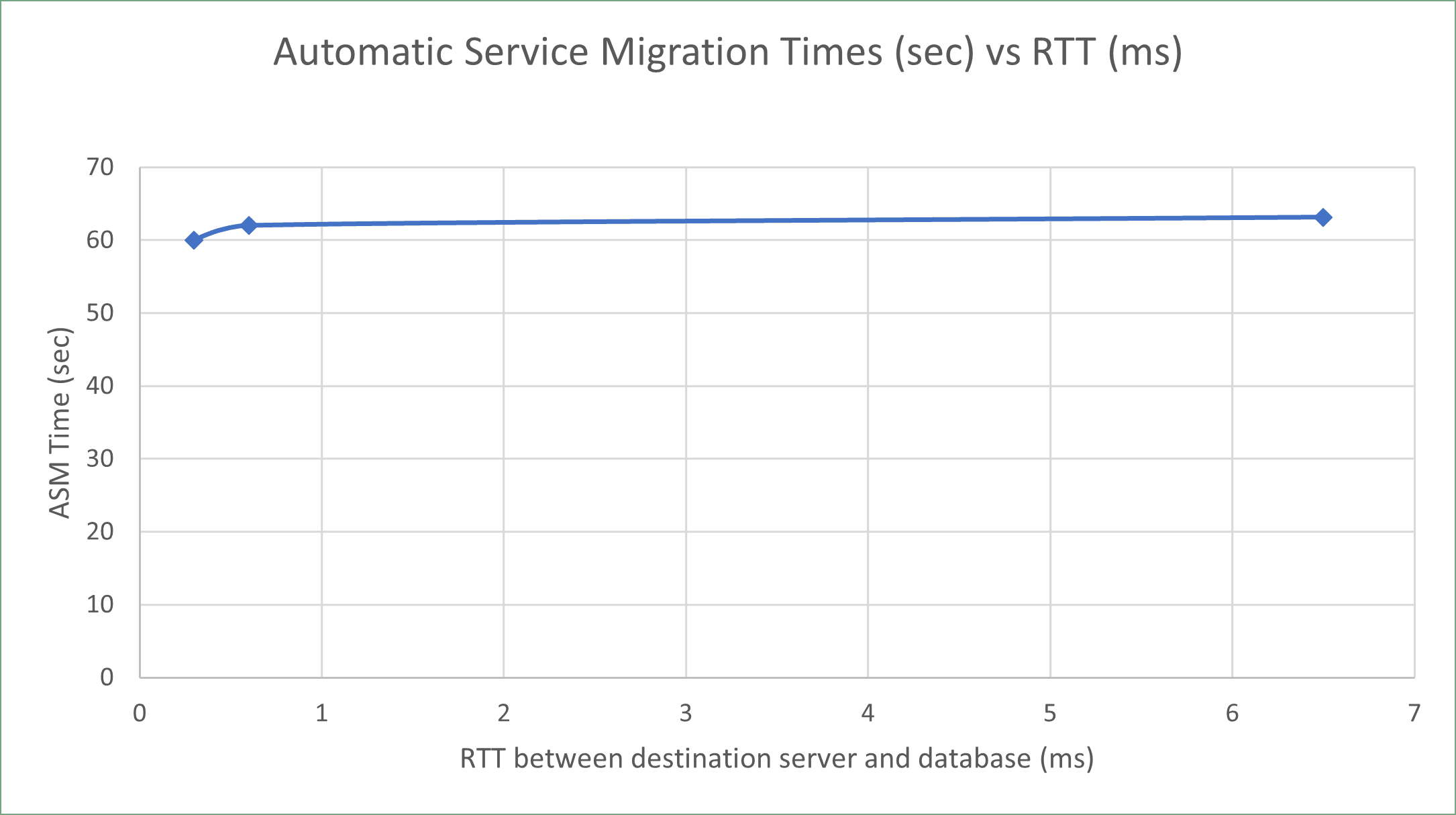
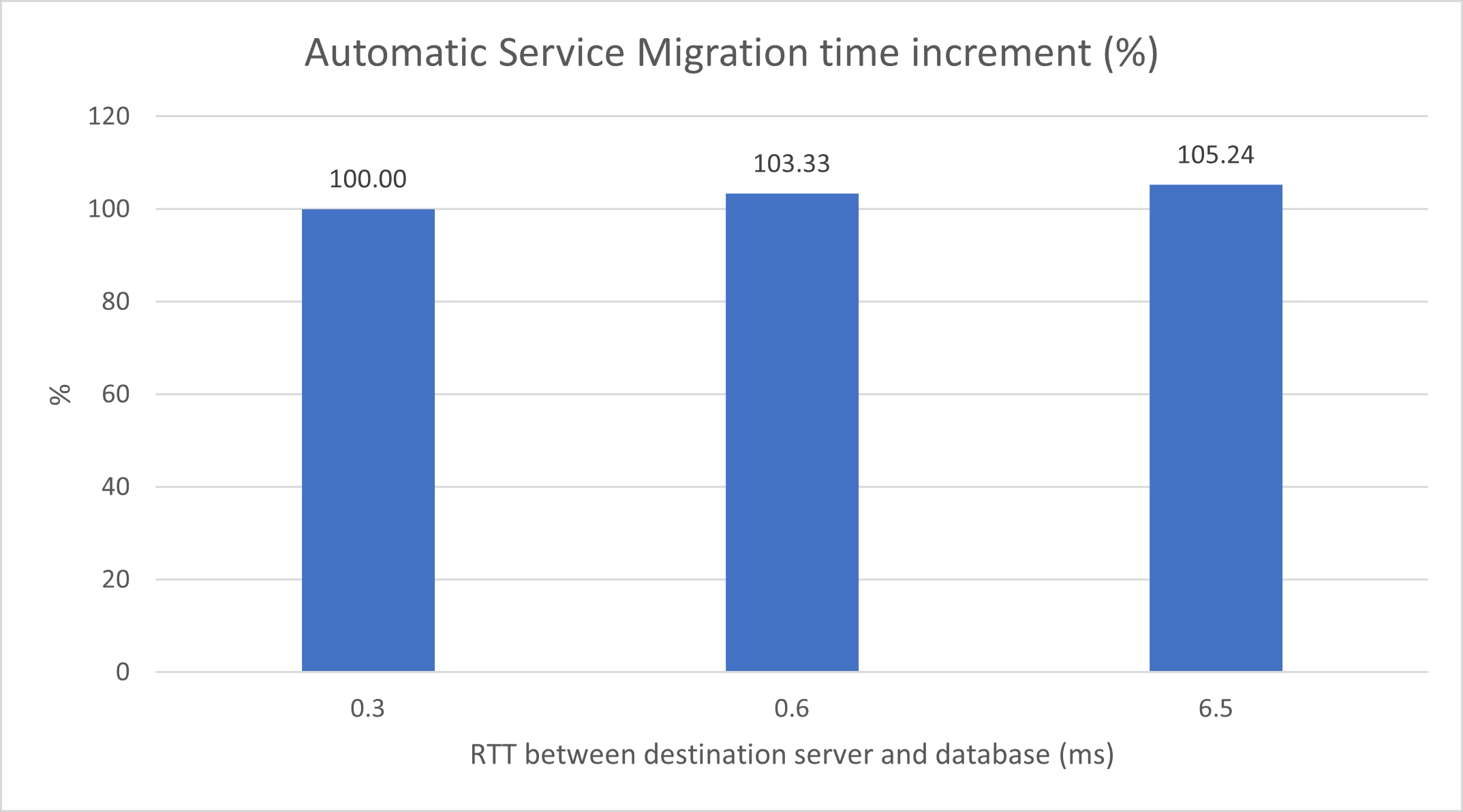
The following image shows the migration times for the same case but with a low number of pending messages (around 50) for different latencies between the destination server and the database.
The following image shows the JMS service migration time increment (%) with a low number of pending messages (around 50) for different latencies between the destination server and the database. The reference (100%) is when the service migrates to a server that is in the same AD as the database.
Review SOA Composite Deployment Times
When deploying a composite (deploying its first version or updating to a newer version), the composite may be deployed earlier to servers in region 1 than to the servers in region 2, although it will not be formally activated until it is available in all members of the cluster.
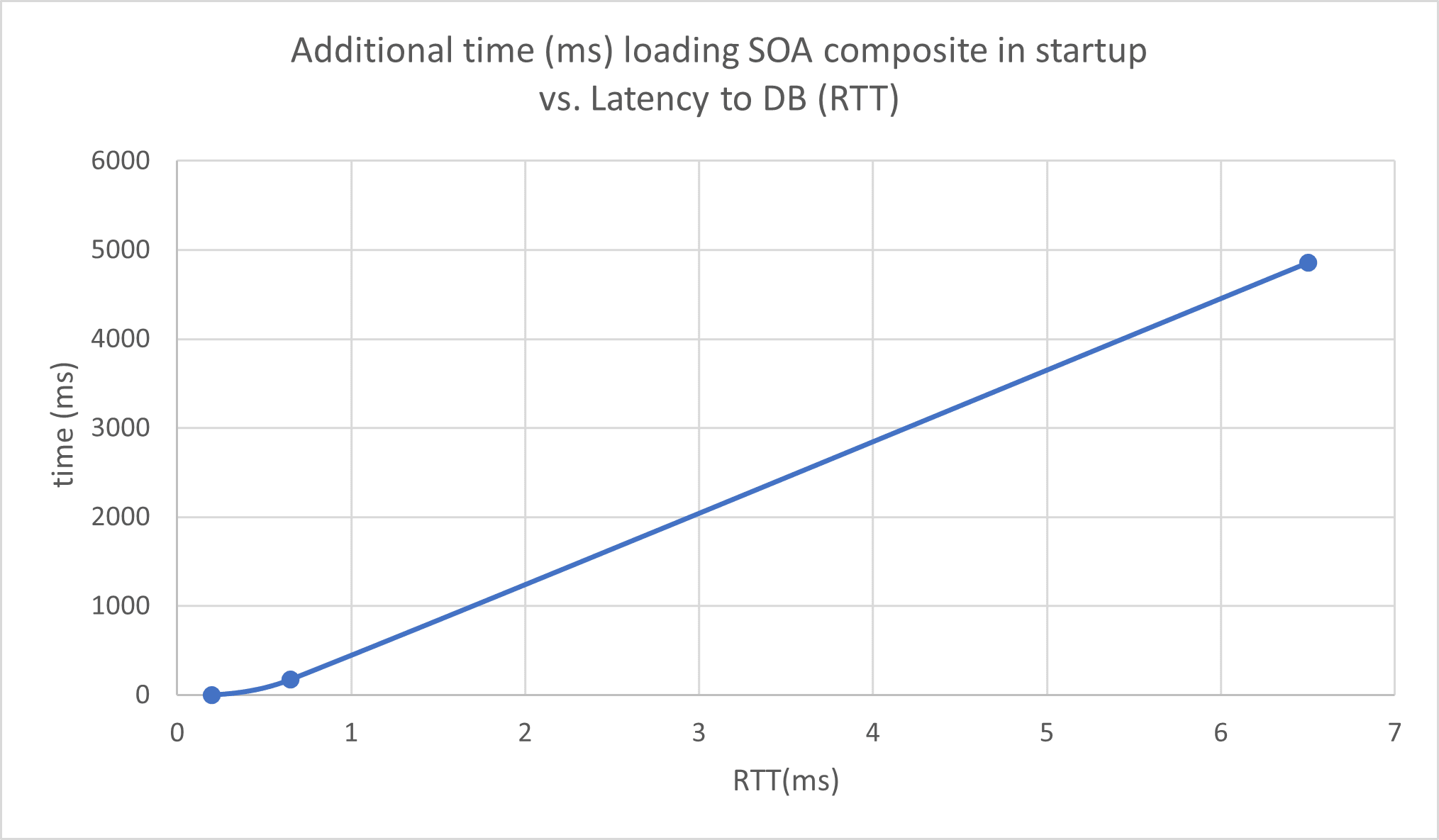
The following image shows the increase in time taken to load a composite in a server during the server startup, with latency to the database as compared to the time taken to load it in a server that resides in the same Availability Domain (AD) as the database. The composite size is 365 KB.
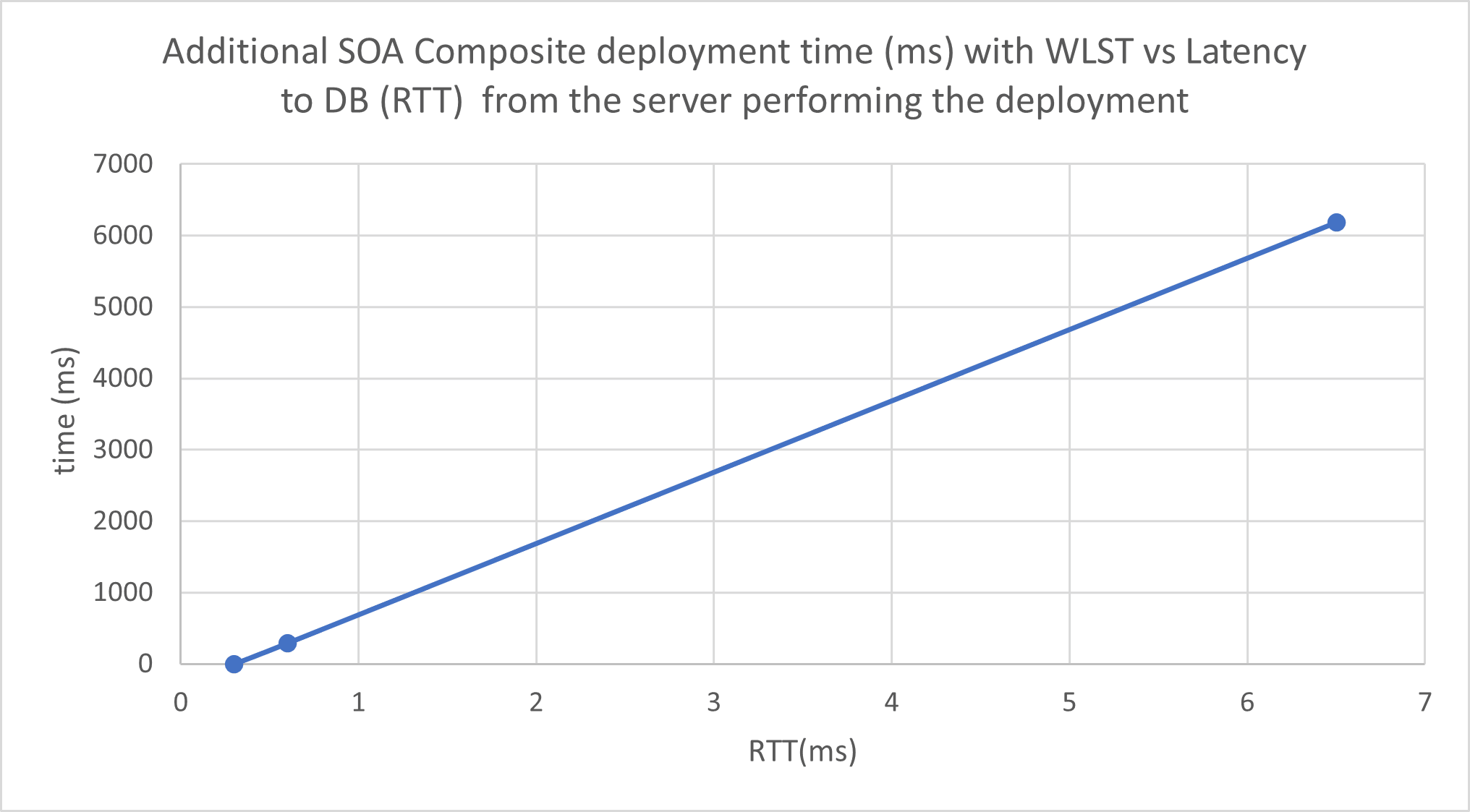
The following image shows the increase in time taken to deploy a composite with the Oracle WebLogic Scripting Tool (WLST) commands, for different latencies from the server that performs the deploy to the database.
Review Traffic Between Sites
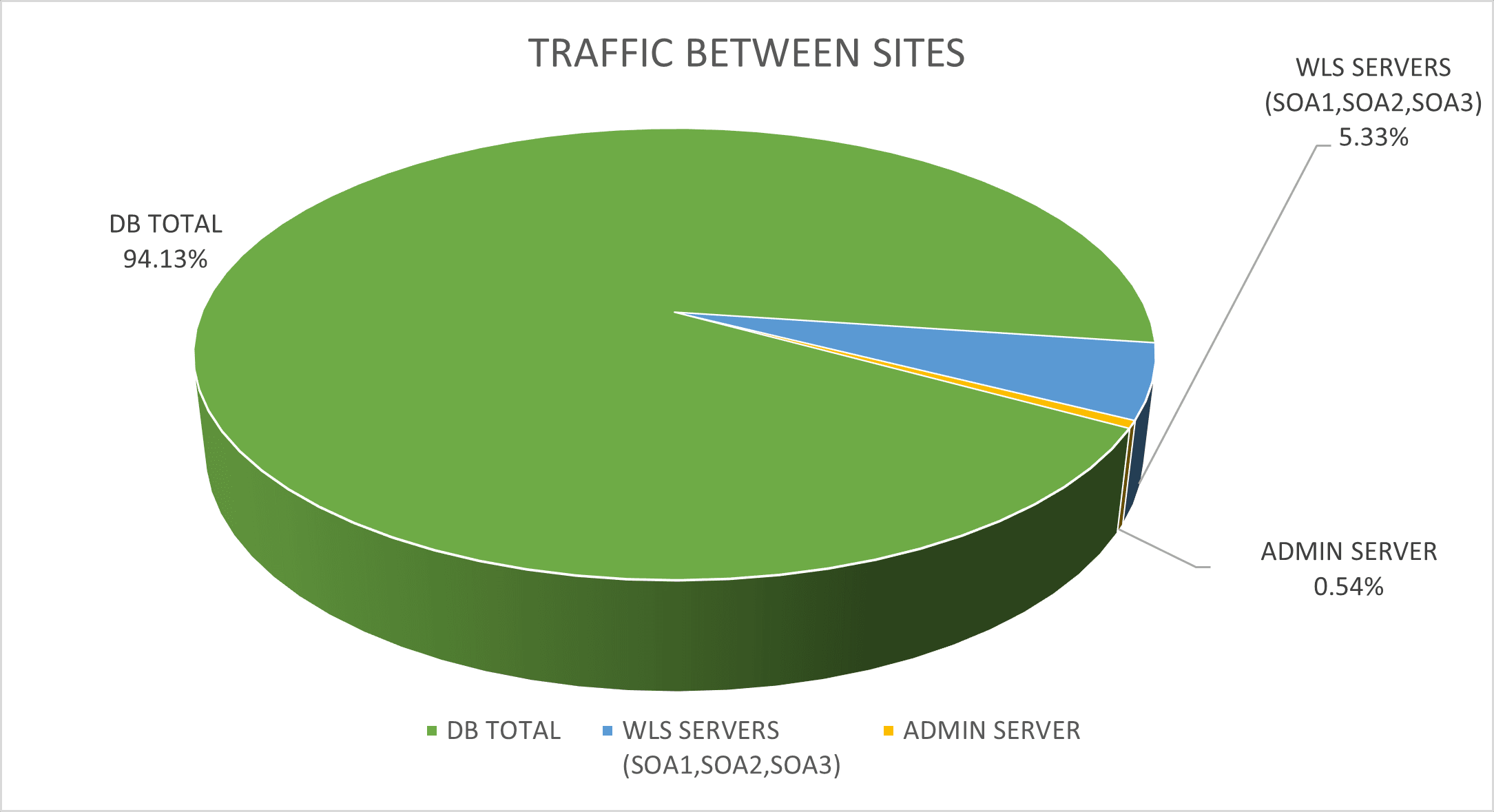
This isolation, however, is non-deterministic (for example, there is room for failover scenarios where a Java Message Service (JMS) invocation could take place across the two sites). That said, for a typical application, most of the traffic takes place between the Oracle WebLogic Server instances and the database. This will be the key to the performance of the Oracle Fusion Middleware (FMW) stretched clusters topology. This image shows the percentage of traffic between a WebLogic server in region 2 and the different addresses in region 1 during a stress test. Notice that more than 90% of the traffic happens between the server and the database, which is located in region 1.
To capture the amount of traffic per IP between the sites, you can use the iftop tool. For example:
sudo iftop -i ens3 -F <remote_site_CIDR> -n -t -s 900The following image shows the percentage of traffic between a WebLogic server in region 2 and the different addresses in region 1 during a stress test.