Set Up FMW Stretched Clusters
Providing OCI infrastructure-specific steps better reflects the configuration and changes required for a Oracle Fusion Middleware stretched cluster implementation. However, all the considerations and steps provided can be extrapolated to on-premises systems that are using other load balancers, network, hardware, and storage infrastructure. Refer to your vendor-specific details in each case, using the OCI examples provided in this book as a reference.
Set Up Regions
In Oracle Cloud Infrastructure (OCI), you can implement it across OCI regions that have low latency between them. The maximum inter-region latency supported is 10 ms round-trip time (RTT). You can check the latency between regions in the OCI Console by selecting Networking, then Network Command Center, and then Inter-region latency.
Considering the latency values, you can deploy this model between regions such as Frankfurt and Amsterdam, which have 6-7 ms RTT. However, you cannot deploy this model between locations such as Ashburn and Phoenix, because the latency between these regions exceeds 50 ms RTT.
Example of regions pairs with inter-region latency lower than 10 ms RTT:
-
Amsterdam (AMS) - Paris (CDG)
-
Amsterdam (AMS) - Newport (CWL)
-
Amsterdam (AMS) - Frankfurt (FRA)
-
Amsterdam (AMS) - London (LHR)
-
Paris (CDG) - Frankfurt (FRA)
-
Paris (CDG) - London (LHR)
-
Paris (CDG) - Newport (CWL)
-
Marseille (MRS) - Milan (LIN)
-
Zurich (ZHR) - Frankfurt (FRA)
-
Zurich (ZHR) - Milan (LIN)
-
Osaka (KIX) - Tokyo (NRT)
-
Singapore (SIN) - Batan (HSG)
-
Sao Paulo (GRU) - Vinhedo (VCP)
-
Singapore (SIN) - Singapore 2 (XSP)
-
Batan (HSG) - Singapore 2 (XSP)
-
Seoul (ICN) - Chuncheon (YNY)
-
Toronto (YYZ) - Montreal (YUL)
Regarding the bandwidth, there isn't a guaranteed bandwidth between OCI Regions, and OCI doesn't offer a specific OCI bandwidth measurement tool. For precise bandwidth measurements, use tools like iPerf. The tested bandwidth between Frankfurt and Amsterdam is around 2–2.5 gigabits per second (Gbps).
You can also implement this model between availability domains (ADs) that are in the same region. Deploying the Oracle WebLogic Server servers across ADs is, in fact, the standard behavior in platform as a service (PaaS) services like Oracle SOA Suite on Marketplace and Oracle WebLogic Server for OCI stacks. However, implementing this model across ADs instead of across regions is not really a disaster protection solution, because it doesn’t protect against events that impact an entire region.
Tip:
To create the subnets, rules, compute instances, shared storage, and load balancers required for a FMW deployment in each site, you can use the WLS-HYDR framework (refer to the “Create infrastructure” procedure).Set Up the Network
The following networking features are needed for the setup:
- A VCN and tiered subnets in each region.
- A remote peering connection between the VCNs, with dynamic routing gateways (DRGs).
- The appropriate route rules to route the traffic between the sites. In Region 1, the route tables should include a route to the Region 2 VCN CIDR via the dynamic routing gateway. Likewise, Region 2 route tables should include a route to the Region 1 VCN CIDR through the dynamic routing gateway.
- The network security rules to allow the following communication for the
stretched cluster:
- Open the WebLogic Server and Node Manager ports between the mid-tier subnets of region 1 and region 2. If Coherence is used, allow TCP and UDP traffic for the Coherence’s ports as well.
- Allow traffic to the database listener and Oracle Cloud Infrastructure Notifications (ONS) ports in both regions from the mid-tier subnets of region 1 and region 2.
- By default, there is no need for cross-region communication between OHS and WebLogic servers. WebLogic Server ports in the mid-tier subnet should only be accessible from OHS servers within the same region. However, cross-region communication may be required in exceptional circumstances, such as if all web servers in a region fail. Further details are provided in the Managing Failures section.
- All of the host names used by the system (WebLogic listen addresses, and the primary and standby database SCAN and VIP addresses) must be resolvable from both sites. By default, in OCI, the host names can only be resolved within each VCN. To allow region 1 names to be resolved in region 2, create a private DNS view in region 2 for the region 1 domain and add the relevant names and IP addresses. Repeat this process in region 1 to resolve names from region 2.
- At each site, the system’s front-end name (such as
frontend.example.com) should point to the IP address of the local load balancer. To
achieve this, add the front-end name to a private DNS view in each region or to the
/etc/hostsfile of the mid-tier hosts. This ensures that any callbacks from a WebLogic server to the front-end are directed to the local region.
Set Up the Database
It is important to use RAC within each region because local high availability is a key requirement. Configuring cross-availability domain (AD) or cross-region protection is only effective if there is already reliable protection against local failures within a single region. If local high availability, such as that provided by RAC, is not implemented, then adding protection across multiple ADs or regions does not address the risk of failures within the local environment.
To keep the application connected and receive Oracle Notification Service notifications in the event of RAC database node or instance failures, ensure your application connects to the pluggable database (PDB) using a Cluster Ready Services (CRS) database service. The same CRS service must exist in primary and standby. Example commands to create a service to connect to the PDB:
srvctl add service -db $ORACLE_UNQNAME -service pdbservice.example.com -preferred ORCL1,ORCL2 -pdb pdb1
srvctl modify service -db $ORACLE_UNQNAME -service pdbservice.example.com -rlbgoal SERVICE_TIME -clbgoal SHORT
Set Up Shared Storage
Multiple compute instances can mount and access the same file system simultaneously over the network file system (NFS) protocol.
The Oracle Fusion Middleware (FMW) stretched cluster model in OCI uses OCI File Storage systems in each region for the shared file systems (for example, for shared configuration or for shared runtime data). The OCI File Storage provides high availability within the region: it internally uses redundant storage across multiple fault domains within an availability domain. However, OCI File Storage can’t be accessed across regions. Hence, the shared storage is local to the region.
Use local backups and file system replicas between regions to provide a recoverable copy of the artifacts.
Set Up the Middle Tier
The middle-tier compute nodes are distributed across the two regions, with half of the nodes located in region 1 and the other half in region 2. The provisioning and installation process is the same as when creating a single WebLogic domain. To implement the high availability features (such as Java Message Service (JMS) and Java Transaction API (JTA) service migration, Administration Server failover, automatic crash detection with Node Manager, and so on) use the best practices recommended in the FMW Enterprise Deployment Guides referenced in the Explore More section.
You can either create the domain and configure it with all managed servers from the start or you can scale out an existing domain that runs in a single region by adding nodes in the other region.
Note:
The Oracle Fusion Middleware (FMW) stretched cluster model can apply to domains created using platform as a service (PaaS) services such as Oracle WebLogic Server for OCI and Oracle SOA Suite on Marketplace stacks. The provisioning and scale-out features of these PaaS services support only a single region by default; so you need to manually scale out the cluster to add nodes in another region. Refer to the procedures for scaling out a WLS cluster for the required steps to perform this operation. Note that these PaaS services do not include a web tier and do not implement certain high-availability best practices, such as Administration Server failover. Therefore, some of the recommendations in this document may not apply to these environments.These are the most relevant aspects to implement in the WebLogic configuration when using the FMW stretched cluster model:
- Use database persistent stores
Oracle supports stretch clusters that use database persistent stores for Oracle WebLogic Server transaction logs and JMS. Storing the transaction logs and persistent data in the database takes advantage of the database’s built-in replication and high availability features, such as Oracle Real Application Clusters (Oracle RAC) and Oracle Data Guard. With JMS, transaction logs (TLOGs), and metadata in a Data Guard protected database, the cross-site synchronization is simplified and consistency at application level is guaranteed. This also means the middle-tier no longer needs shared storage for these artifacts (although it still needs it for Administration Server failover, deployment plans, and some adapters such as File Adapter).
Using TLOGs and JMS in the database has a penalty, however, on the system’s performance. This penalty is increased when one of the middle tiers needs to cross-communicate with the database on the other site. From a performance perspective, a shared storage that is local to each site would have better performance, but this introduces complexity and limitations to guarantee zero data loss between regions and application consistency.
- Shared file system artifacts local to each region
As indicated in the Oracle Fusion Middleware Enterprise Deployment Guides, the Administration Server domain directory (
ASERVER_HOME) should reside on shared storage, separated from the managed server’s domain folder (MSERVER_HOME). This, along with using a virtual hostname for the Administration Server listen address, allows the Administration Server to fail over to another host, either within the same or in a different region.Other artifacts residing in shared file systems are the Oracle home installations (binaries), the deployment plans, and file adapter directories (runtime folder).
In an FMW stretched cluster topology, each region utilizes its own local shared storage. Consequently, the second region maintains its own redundant binaries (ensuring at least two binary installations per site for high availability) and its own shared directories for shared configuration, deployment plans, runtime files, and more. All these artifacts must use identical paths across both regions to ensure consistency and seamless failover.
- Use an affinity-based algorithm for the WebLogic clusterTo minimize cross-site traffic, use local affinity for Java Naming and Directory Interface (JNDI) context factory resolution. To set the Default Load Algorithm of the WebLogic Cluster to an affinity-based algorithm:
- Go to the Edit Tree in the WebLogic Remote Console.
- Go to Environment, select Clusters and select the cluster.
- In the General tab, set the Default Load Algorithm of the WebLogic Cluster to round-robin affinity (the default is round-robin) or to any “affinity-based” algorithm.
The Cluster Address is not required to be set with the explicit list of all the servers in the cluster. When it is empty, the Cluster Address value is generated automatically. Just make sure that the property Number of Servers In Cluster Address, which limits the number of servers to be listed when generating the cluster address automatically, has a value high enough to include all the servers in the cluster.
- Use Automatic Service Migration configuration
Oracle recommends configuring Automatic Service Migration along with Java Database Connectivity (JDBC) persistent stores for enterprise deployment topologies. In an FMW stretched cluster topology, Automatic Service Migration is possible within and also across regions, as long as the JMS and TLOGs data is accessible from both sites. When using JDBC persistent stores, no special considerations are required for configuring ASM in a stretched cluster.
The time taken for a service migration operation from region 1 to region 2 can increase when there is high latency between sites. This increase is caused by the time spent recovering the messages in the other server, because they are read from the persistent store in the database in the other region. This latency increases with the number of pending messages in the persistent stores. However, the penalty becomes relevant only with very high latencies or with large numbers of pending messages. Refer to the "Review Performance Data" section for details on expected behaviors.
- Front end hostname and resolution
When configuring the front-end host for your WebLogic cluster, specify the virtual hostname that clients use to access the system, as in any standard deployment. The clients should resolve this virtual hostname to an external address balanced between the OCI Load Balancer instances in Region 1 and Region 2. See "About Global Load Balancing".
To ensure that WebLogic servers in each region route internal calls only to their respective local OCI Load Balancer, configure the servers to resolve the front end hostname to the IP address of the OCI Load Balancer within their region. This can be achieved by adding an entry to the
/etc/hostsfile on each WebLogic server host or by adding them to a DNS private view in each region:For servers in Region 1:
[IP address of Region 1 OCI Load Balancer] [frontend hostname]For servers in Region 2:
[IP address of Region 2 OCI Load Balancer] [frontend hostname]This configuration ensures that internal communications from WebLogic servers are directed to the appropriate regional load balancer, optimizing routing and performance.
Set Up WebLogic Data Sources
Use GridLink data sources with a dual connection string in all the WebLogic data sources (for the Oracle Fusion Middleware (FMW) metadata, database persistent stores, leasing tables, DB Adapter, etc.) to automate database failover. They should reconnect automatically when there is a failure or shutdown in one of the nodes of the Oracle Real Application Clusters (Oracle RAC), but also when there is a complete switchover of the database to the other region. To achieve this, apply these recommendations:
- Use GridLink Data Sources
GridLink datasources leverage Oracle Notification Service (ONS) to quickly detect and respond to database node failures or network interruptions, improving application availability and resilience. They automatically distribute the database connections based on real-time workload information, optimizing performance and resource usage across all RAC nodes. The changes in the database topology (such as adding or removing RAC nodes) are automatically recognized and handled, reducing administrative overhead and minimizing downtime.
You don’t need to manually specify the ONS host and port in the GridLink data source configuration. The ONS list is automatically provided by the database to the driver, which retrieves the ONS information for both primary and standby databases, facilitating connections to both.
- Use a TNS alias
In the connection string of the data sources, use a TNS alias that points to an entry in the
tnsnames.orafile, which includes both primary and standby SCAN addresses. The recommended connect string format is as follows, with one description and two address lists, one per RAC database:PDB = (DESCRIPTION= (CONNECT_TIMEOUT=15)(RETRY_COUNT=5)(RETRY_DELAY=5)(TRANSPORT_CONNECT_TIMEOUT=3) (ADDRESS_LIST= (LOAD_BALANCE=on) (ADDRESS=(PROTOCOL=TCP)(HOST=primdb-scan.dbsubnet.region1vcn.oraclevcn.com)(PORT=1521)) ) (ADDRESS_LIST= (LOAD_BALANCE=on) (ADDRESS=(PROTOCOL=TCP)(HOST=stbydb-scan.dbsubnet.region2vcn.oraclevcn.com)(PORT=1521)) ) (CONNECT_DATA=(SERVICE_NAME=pdbservice.example.com)) )For more details about how to configure the TNS alias in the data sources and FMW config files, see Using TNS Alias in Connect Strings in the Enterprise Deployment Guide for Oracle SOA Suite.
- Use Test Connections on Reserve option
Make sure that the Test Connections on Reserve option is enabled for all data sources. This is especially important for data sources used to access persistent stores, because persistent stores are critical in the overall state of WebLogic servers. This flag enables the WebLogic Server to test a connection before giving it to the application.
For Test Table Name, use the default value SQL ISVALID. This is a fast and efficient test, as it performs a lightweight validation to determine if the database connection is still active, without requiring access to a specific physical table.
- Tune the initial capacity
When a WebLogic server starts, a considerable amount of time is dedicated to creating the initial connections for the data source pools. Different delays are expected according to the initial capacity settings in the data sources. By default, most FMW data sources use a zero initial capacity for their connection pool. However, to reduce the response time of the system during normal runtime operation, it may be beneficial to increase the initial pool capacity.
Because the initial capacity is configured at the data source (connection pool) level, these settings influence the start-up time for all servers within the cluster (the ones local to the database and the ones that are remote to it). In a FMW stretched cluster, those servers that reside remotely from the Database will show increased latency on their start as higher initial pool capacity is used (see "Review Start Times"). Therefor, a balanced decision is required between optimizing response times during normal operation and minimizing the start time to determine the ideal initial capacity settings. - Tune the maximum capacity
The number of active data source connections increases with higher latency to the database. In the tests conducted, the servers in the remote region show up to 2x active connections than the server collocated with the database (see "Review Stress Tests"). Monitor the usage in your application and consider this for a correct sizing of the WebLogic data sources and database sessions.
Set Up Web Servers
To reduce the traffic across regions, don’t use a dynamic server list
configuration in the Oracle WebLogic Server routing sections. Instead, configure a static list of the servers, setting the parameter
DynamicServerList to OFF. This has the caveat of slower
failure detection: when a WebLogic server crashes, the HTTP server takes more time to detect
the failure than with a dynamic list. Additionally, it requires updates in the configuration
if new servers are added. However, it does improve the system’s performance.
The following excerpts from the mod_wl_ohs.conf files in the Oracle HTTP Server provide an example of the required configuration for routing to the soa-infra web
application.
In region 1:
<Location /soa-infra>
    WLSRequest ON
    WebLogicCluster region1_server1.example.com:7004,region1_server2.example.com:7004
    DynamicServerList OFF
</Location>
In region 2:
<Location /soa-infra>
    WLSRequest ON
    WebLogicCluster region2_server1.example.com:7004,region2_server2.example.com:7004
    DynamicServerList OFF
</Location>
Set Up Load Balancers
Configure the listener in both regions with the same SSL certificate on each load balancer. Set up the back-end servers so that the load balancer in region 1 includes the Oracle HTTP Server (OHS) instances from region 1 (if the system doesn't use web servers, the backed servers are the WebLogic servers from region 1), and the load balancer in region 2 includes the OHS servers from region 2 (if the system doesn’t use web servers, the back-end servers are the WebLogic servers from region 2).
Configure health checks to determine the availability of the back end
servers, using a URL that accurately reflects the application's status. This prevents
traffic from being routed to a server where Oracle WebLogic Server is running but the application itself is unavailable, which can happen if the health
check only targets the root context (/). However, avoid using resource-intensive health
checks, as frequent heavy checks could overload the backed servers. For example, for Oracle SOA, the recommended health check URL is /soa-infra/services/isSoaServerReady
.
About Global Load Balancing
In on-premises implementations, this is traditionally implemented with a global load balancer, which is responsible for the smart routing, usually based on the origin’s IP addresses. This global load balancer is typically located in one of the sites, with a backup in the other site for failover.
In Oracle Cloud Infrastructure (OCI), there isn’t a dedicated global load balancer service. You can, however, achieve global load balancing functionality by using traffic management policies.
Use OCI Traffic Management Steering Policies as a Global Load Balancer
The traffic management steering policies serve intelligent responses to domain name system (DNS) queries, meaning different answers might be served for the query depending on the logic defined in the policy. There are various policy types:
- Load balancer policy
Load Balancer policies distribute traffic across many endpoints. Endpoints can be assigned equal weights to distribute traffic evenly across the endpoints or custom weights can be assigned for ratio load balancing. Oracle Cloud Infrastructure Health Checks monitors and on-demand probes are leveraged to evaluate the health of the endpoint. If an endpoint is unhealthy, DNS traffic is automatically distributed to the other endpoints.
- Failover policy
Failover policies let you prioritize the order in which you want answers served in a policy (for example, primary and secondary). OCI Health Checks monitors and on-demand probes are leveraged to evaluate the health of answers in the policy. If the primary answer is unhealthy, DNS traffic is automatically steered to the secondary answer.
- Geolocation steering policy
Geolocation steering policies distribute DNS traffic to different endpoints based on the location of the end user. Customers can define geographic regions composed of originating continent, countries, or states/provinces (North America) and define a separate endpoint or set of endpoints for each region.
- ASN steering policy
ASN steering policies enable you to steer DNS traffic based on autonomous system numbers (ASN). DNS queries originating from a specific ASN or set of ASNs can be steered to a specified endpoint.
- IP prefix steering policy
IP Prefix steering policies enable customers to steer DNS traffic based on the IP Prefix of the originating query.
Choose the policy that best fits your needs. The most suitable options for an stretched cluster deployment are the geolocation steering policy and the IP prefix steering policy. The failover policy is suitable for services that run only in one of the sites, such as the WebLogic Remote Console.
Regardless of the type of policy, you must define an OCI Health Checks to verify the availability of the site. This avoids the traffic reaching a site where the servers are stopped or the application is not available. Make sure you allow incoming traffic from the vantage points that perform the health check to the OCI Load Balancer ports that you are checking.
The following diagram shows global load balancing with OCI traffic management steering policies.
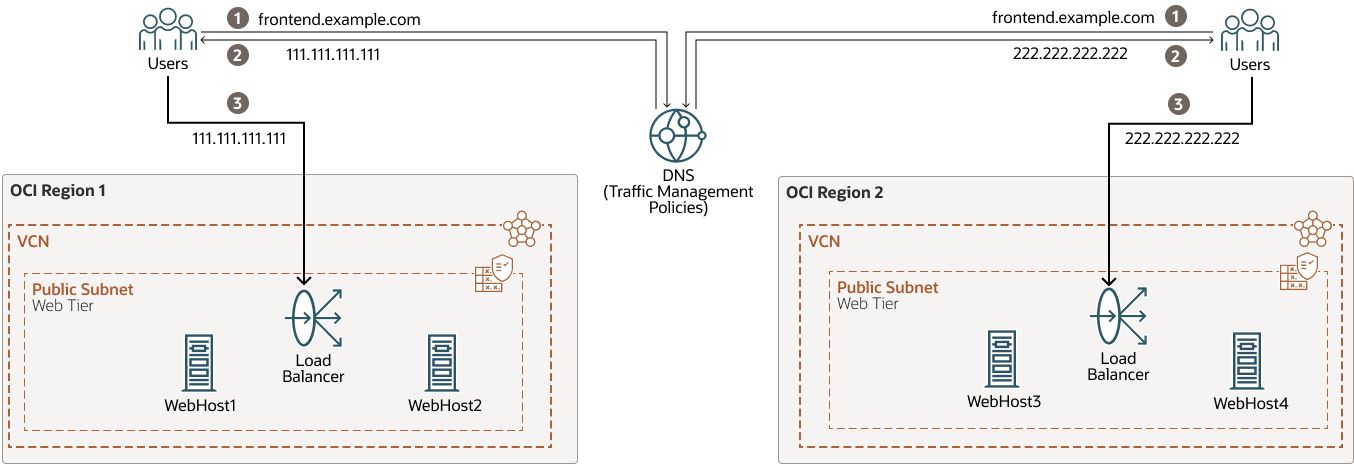
global-load-balancer-steering-policies-oracle.zip
When using the OCI traffic management steering policies to emulate a global load balancer:
- Failover reaction time
The response time to a site failure depends on both the health check intervals (which determine how quickly a site is marked as unavailable) and the DNS record’s time to live value (TTL). Even after a site is flagged as unavailable and traffic is directed to another location, clients will not receive the updated IP address until the previous DNS TTL expires in their local cache. To minimize failover delays, it is recommended to set a low policy TTL value.
- Session persistence limitation
Because the load balancing with these policies relies on DNS response values, there is no built-in mechanism for session persistence. As a result, when using a random or simple load balancer policy, the DNS answer provided to clients may change at any time, potentially impacting application sessions that require persistence. If your application requires persistent sessions, ensure that all possible client locations are explicitly defined within geolocation-based rules, and avoid using random or load balancer steering algorithms.
The following is an example configuration of the OCI traffic management steering policies for an Oracle Fusion Middleware (FMW) stretched cluster system deployed in Frankfurt and Amsterdam regions, with three front ends: one for Oracle SOA, one for OSB, and another for the WebLogic Remote Console. The IP of the load balancer (LBR) in Frankfurt is 111.111.111.111, and the IP of the LBR in Amsterdam is 222.222.222.222. In this example, the steering policies define the following rules:
-
For SOA and OSB front ends, the clients from Germany, Europe, Asia, and South America locations will get from DNS the IP of the Frankfurt load balancer as the primary answer.
-
For the SOA and OSB front ends, the clients from the Netherlands, Africa, Oceania, and the North America location will get from DNS the IP of the Amsterdam load balancer as the primary answer.
-
For any other clients (which are not expected, since all the regions are included in the geolocation rules), the DNS will return a default answer so that they will be redirected to Frankfurt.
-
OCI health checks are defined for each front end, so if primary is marked as unavailable, traffic is steered to the alternative IP record.
-
The WebLogic Remote Console front end uses a failover model. The DNS returns the IP of the Frankfurt load balancer for all the clients. When the health check fails in Frankfurt, the DNS returns the IP of the Amsterdam load balancer.
These are the OCI traffic management steering policies defined:
-
A geolocation steering policy for accessing the SOA front end.
Configuration item Example Values Policy Name
strecthed_cluster_steering_policy-SOA
Template
Geolocation steering
Policy TTL
60s
Answer Pool1 (Frankfurt_Pool)
Name: Frankfurt_LBR_IP
Type: A
RDATA: 111.111.111.111
Answer Pool 2 (Amsterdam_Pool)
Name: Amsterdam_LBR_IP
Type: A
RDATA: 222.222.222.222
Geolocation Steering Rule 1
Geolocation: Germany, Europe, Asia, South America
Pool priority 1: Frankfurt_Pool
Pool priority 2: Amsterdam_Pool
Geolocation Steering Rule 2
Geolocation: Netherlands, Africa, Oceania, North America
Pool priority 1: Amsterdam_Pool
Pool priority 2: Frankfurt_Pool
Global Catch-all
Answer Pool1 (Frankfurt_Pool)
Attach health check
Request Type: HTTP
Health check:
SOA_IS_ALIVE(HTTPS)Attached Domains
soafrontend.example.com
-
A geolocation steering policy for accessing the OSB front end.
Configuration item Example Values Policy Name
strecthed_cluster_steering_policy-OSB
Template
Geolocation steering
Policy TTL
60s
Answer Pool 1(Frankfurt_Pool)
Name: Frankfurt_LBR_IP
Type: A
RDATA: 111.111.111.111
Answer Pool 2 (Amsterdam_Pool)
Name: Amsterdam_LBR_IP
Type: A
RDATA: 222.222.222.222
Geolocation Steering Rule 1
Geolocation: Germany, Europe, Asia, South America
Pool priority 1: Frankfurt_Pool
Pool priority 2: Amsterdam_Pool
Geolocation Steering Rule 2
Geolocation: Netherlands, Africa, Oceania, North America
Pool priority 1: Amsterdam_Pool
Pool priority 2: Frankfurt_Pool
Global Catch-all
Answer Pool1 (Frankfurt_Pool)
Attach health check
Request Type: HTTP
Health check:
OSB_IS_ALIVE(HTTPS)Attached Domains
osbfrontend.example.com
-
A failover policy is used for accessing the WebLogic Remote Console. During normal operation, the Administration server runs only in one of the sites (Frankfurt in this case). Only in case of a site failure, it is started in the other site. Hence, the access to the WebLogic Remote Console and EM is controlled by a failover policy.
Configuration item Example Values Policy Name
strecthed_cluster_steering_policy-ADMIN
Template
Failover
Policy TTL
60s
Answer Pool1 (Frankfurt_Pool)
Name: Frankfurt_LBR_IP
Type: A
RDATA: 111.111.111.111
Answer Pool 2 (Amsterdam_Pool)
Name: Amsterdam_LBR_IP
Type: A
RDATA: 222.222.222.222
Pool Priority 1
Frankfurt_Pool
Pool Priority 2
Amsterdam_Pool
Attach health check
Request Type: HTTP
Health check:
EM_IS_ALIVE(HTTPS)Attached Domains
admin.example.com
This is the configuration of OCI Health Checks used by each DNS steering policy:
-
Health check for the SOA front end. SOA provides a simple page to verify the SOA status, in the path
/soa-infra/services/isSoaServerReady. Hence, this health check performs a HEAD request with HTTPS to that path to verify if the SOA application is available. Thehostheader is necessary to specify the front end name you want to test (in this example,soafrontend.example.com) when using named virtual hosts on the web servers and load balancers.Configuration item Example Values Health check name
SOA_IS_ALIVE
Targets
111.111.111.111 (Frankfurt LBR IP)
222.222.222.222 (Amsterdam LBR IP)
Vantage points
Microsoft Azure North Europe
Google East US
Type
HTTP
Protocol
HTTPS
Port
443
Path
/soa-infra/services/isSoaServerReadyHeaders
Host: soafrontend.example.com:443
Method
HEAD
Interval
30 seconds
Timeout
10 seconds
-
Health check for OSB front end. OSB does not implement a health URL for its services. Some of the URLs normally used to verify the OSB’s status (such as
/sbinspection.wsil) require authentication, and OCI Health Checks doesn't support theauthorizationheader. Hence, to verify the status of the OSB, deploy a simple custom REST proxy service. This OCI Health Checks performs a HEAD request to such an endpoint over HTTPS. Thehostheader is necessary to specify the front end name you want to test (in this example,osbfrontend.example.com) when using named virtual hosts on the web servers and load balancers.Configuration item Example Values Health check name
OSB_IS_ALIVE
Targets
111.111.111.111 (Frankfurt LBR IP)
222.222.222.222 (Amsterdam LBR IP)
Vantage points
Microsoft Azure North Europe
Google East US
Type
HTTP
Protocol
HTTPS
Port
443
Path
/
default/isOSBReadySampleHeaders
Host: osbfrontend.example.com:443
Method
HEAD
Interval
30 seconds
Timeout
10 seconds
-
Health check for WebLogic Remote Console front end
EM_IS_ALIVE.OCI Health Checks performs a HEAD request with HTTPS to the path
/em/faces/targetauth/emasLoginto verify the status of the FMW Control Console.Configuration item Example Values Health check name
SOA_IS_ALIVE
Targets
111.111.111.111 (Frankfurt LBR IP)
222.222.222.222 (Amsterdam LBR IP)
Vantage points
Microsoft Azure North Europe
Google East US
Type
HTTP
Protocol
HTTPS
Port
443
Path
/em/faces/targetauth/emasLoginHeaders
Host: admin.example.com:445
Method
HEAD
Interval
30 seconds
Timeout
10 seconds
Use a Third-Party Global Load Balancer
It will be responsible for performing smart routing of the requests between the local load balancers.
The GLBR is a load balancer configured to be accessible as an address by users of all the sites and external locations. The device provides a virtual server which is mapped to a domain name system (DNS) name that is accessible to any client, regardless of the site they will be connecting to.
The GLBR directs traffic to either site based on configured criteria and rules. These criteria can be based on the client’s IP, for example. This should be used to create a persistence profile that allows the GLBR to map users to the same site upon initial and subsequent requests. The GLBR maintains a pool that consists of the addresses of all the local load balancers. In the event of failure of one of the sites, users are automatically redirected to the surviving active site.
In each site, a local load balancer receives the request from the GLBR and directs requests to the appropriate HTTP server. To eliminate undesired routings, the GLBR is also configured with specific rules that route callbacks only to the LBR that is local to the servers that generated them. For example, this is useful for internal consumers of Oracle SOA services. These GLBR rules can be summarized as follows:
-
If requests come from site1 (for example, requests originated from the WebLogic servers in site 1), the GLBR routes to the LBR in site1.
-
If requests come from site2 (for example, requests originated from the WebLogic servers in site 2), the GLBR routes to the LBR in site2.
-
If requests come from any other address (client invocations), the GLBR load balances the connections to both LBRs.
-
Additional routing rules may be defined in the GLBR to route specific clients to specific sites (for example, the two sites may provide different response times based on the hardware resources in each case).
Set Up Other Resources
The configuration details for these external resources are out of the scope of this document. It is required, however, that these resources are consistent in both regions to provide a uniform behavior.
For example, in Oracle SOA, the asynchronous callbacks may rehydrate instances that were initiated in a different region. Similarly, in the case of automatic recovery, any Oracle WebLogic Server can assume the role of cluster master and perform recovery operations in either region. To ensure these processes work seamlessly and provide consistent behavior, the same external resources must be accessible from both regions.