Multi-Tenant Application Deployment Model on OCI
About Tenancies
It’s important not to confuse OCI Tenancy with the concept of a tenant in a SaaS application.
OCI Tenancy: This is the account you receive when you sign up for OCI services. It represents your root account and serves as the secure, isolated partition where you organize and manage your OCI resources.
A tenant (in a SaaS context): Suppose an ISV builds a SaaS platform on OCI. When the ISV provisions their own customers into the platform, each of those customers is considered a tenant. A tenant in this sense represents a customer organization, and each tenant can have multiple users associated with it.
In short, an OCI Tenancy refers to the OCI account itself, while a tenant refers to an organization (like a SaaS customer) that uses an application hosted on OCI by another entity, such as an ISV.
Architecture
This architecture represents a multi-tenant application deployment model on OCI, at a high level.
The following diagram illustrates this reference architecture:
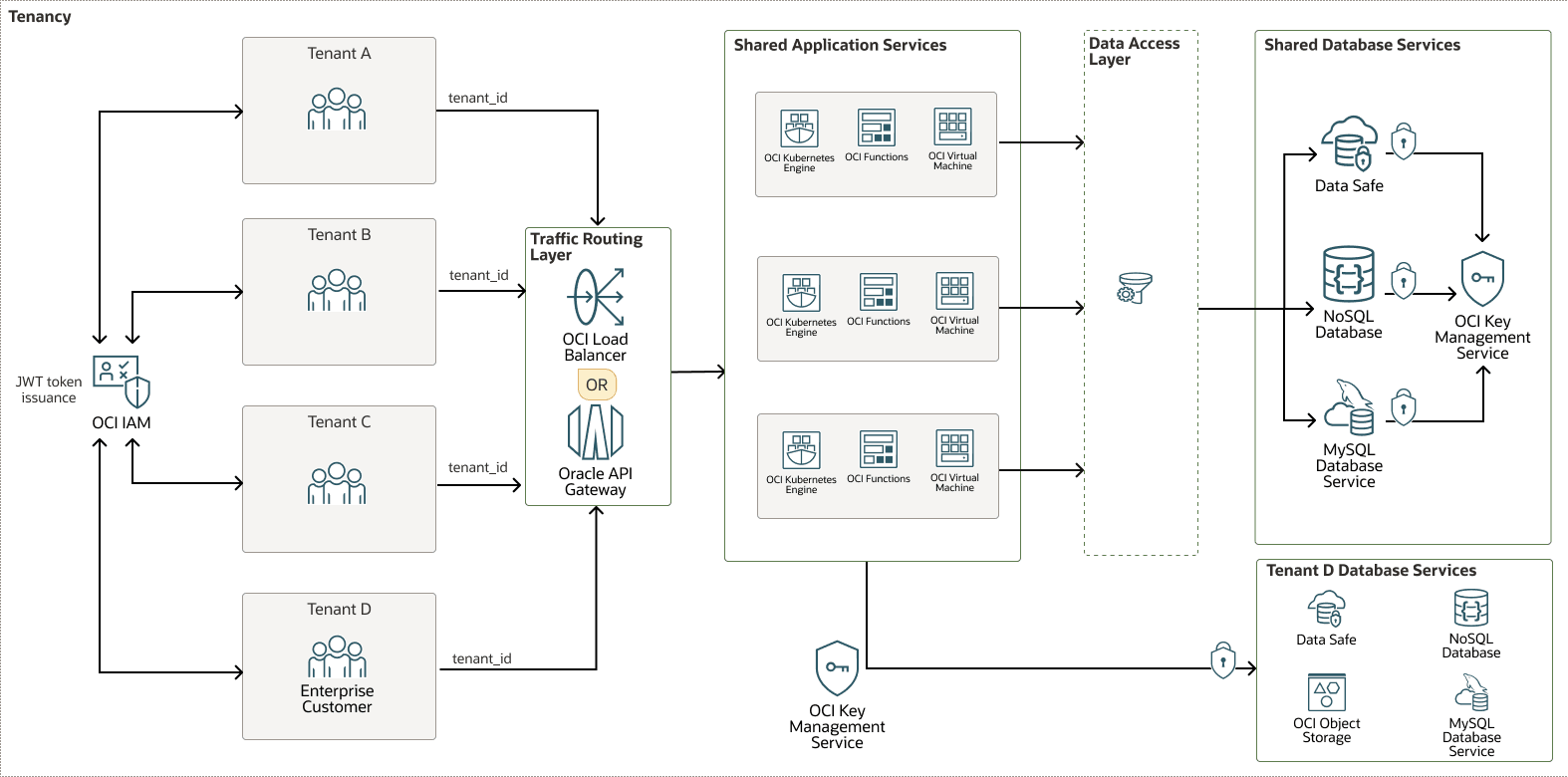
multi-tenant-app-oci-oracle.zip
This flexible architecture is organized into three layers:
| Layer | Purpose | Key Action |
|---|---|---|
| Initial Authentication (OCI IAM) | Verify global identity | Issue JSON Web Token (JWT) after credential validation |
| Authentication Middleware | Verify per-request identity | Extract tenant and user context from JWT |
| Data Access Layer or ORM Hooks | Enforce data isolation | Automatically filter all queries by tenant_id |
Each layer is described below:
Initial Authentication and Tenant Context Establishment
- Authentication Service: The user logs in, typically by using a tenant-specific URL (for example mycompany.app.com) or by selecting a tenant during login.
- OCI Identity and Access Management (OCI IAM) as the Identity Provider: OCI IAM (specifically, a dedicated Identity Domain) validates the user's credentials. Crucially, it confirms the user is not only valid but is also a member of the specific tenant group (for example, mycompany-users) they are trying to access.
- JWT Issuance: Upon successful authentication, the OCI IAM Identity Domain issues a signed JSON Web Token (JWT). This token includes the following critical claims:
- sub: The user's unique identifier.
- groups: An array of OCIDs for the IAM groups the user belongs to. This is the key to identifying the tenant.
- A custom claim such as
tenant_idortenant_namecan be added by using custom attributes in OCI IAM. (Optional)
Authentication Middleware – "Who" layer
The backend must be designed to extract and propagate the tenant context securely. This architecture supports using either OCI API Gateway or OCI Load Balancer to perform per-request authentication and tenant context propagation.
- OCI API Gateway: This is the recommended entry point. It can perform JWT validation itself, offloading this responsibility from your application code. You configure it to validate the signature against the JWKS endpoint of your OCI IAM Identity Domain.
- OCI Load Balancer: Can handle SSL termination and routing but would pass the JWT to the authentication middleware for validation.
Action: OCI API Gateway validates the JWT's signature and expiry. If invalid, it rejects the request immediately. If valid, it forwards the request to the upstream service, often passing the validated token or extracted claims in headers (for example, X-USER-ID, X-TENANT-ID).
If you are using OCI Load Balancer instead of OCI API Gateway, the first component of your application backend must be authentication middleware.
Action: Extract the JWT from the Authorization: Bearer <token> header, verify its signature using OCI IAM's public keys, decode the claims, and inject the user_id and tenant_id (derived from the groups claim) into the request context for all subsequent layers to use.
Data Access Layer or Object-Relational Mapper (ORM) Hook – "What" Layer
This layer automatically injects the tenant ID into every SQL query.
- Example: A call to
getAllInvoices()is transformed intoSELECT * FROM invoices WHERE tenant_id = :tenant_id. - Enforcement: This is best enforced by a centralized data access layer or an ORM (such as Hibernate) hook or "tenant-aware" connection pool to avoid human error.
- ORM Hooks: The mechanism that enables true implicit tenant isolation by intercepting and modifying database operations at the application framework level.
Tenant Data Isolation Strategies:
This architecture supports two options for isolating and protecting your tenants' data:
Option 1: Application Level
ORM Hooks/Scopes: Frameworks such as Hibernate (Java), Django ORM (Python), or Eloquent (PHP) allow you to define global scopes that automatically add the tenant filter to all queries for a specific model.
or
Option 2: Database Level
You can use a discriminator column, a separate schema per tenant, or a separate database per tenant:
- Discriminator Column (Most Common):
A
tenant_idcolumn is added to every tenant-specific table or document.The application's Data Access Layer (DAL) or ORM is responsible for automatically appending the
WHERE tenant_id = ?clause to every query. This is achieved through:- Repository Pattern: All database access flows through a central class or set of classes. This repository automatically adds the tenant filter to every SELECT, INSERT, UPDATE, and DELETE operation based on the
tenant_idin the current request context. - Connection Context: For some SQL databases (such as Oracle HeatWave MySQL), the application can set a session variable (for example,
SET @tenant_id = 'mycompany123';) and then use it in views or stored procedures. However, the application layer is still responsible for setting this value per connection.
- Repository Pattern: All database access flows through a central class or set of classes. This repository automatically adds the tenant filter to every SELECT, INSERT, UPDATE, and DELETE operation based on the
- Schema Per Tenant:
Each tenant has a dedicated database schema within the same database instance.
The application logic, based on the tenant ID, must switch the database connection's current schema.
- Connection Pool Per Tenant: Maintain a separate connection pool for each tenant, where each connection is pre-configured to use the tenant's schema (for example,
USE tenant_mycompany;). - Dynamic Connection Switching: Use a connection pool that sets the schema on checkout based on the current tenant_id (for example, using a
SET search_path TO tenant_mycompany;command for PostgreSQL).
- Connection Pool Per Tenant: Maintain a separate connection pool for each tenant, where each connection is pre-configured to use the tenant's schema (for example,
- Database Per Tenant:
Each tenant has its own physically separate database instance with Bring Your Own Keys Encryption for Enterprises.
The application needs a tenant data lookup service to map a
tenant_idto the correct database connection string.- The application holds connection pools to multiple databases.
- The DAL uses the tenant ID from the request context to get the correct connection from the pool and execute the query on the dedicated tenant database.
This option has advantages and disadvantages:
- Pros: Maximum isolation, security, and performance. Tenants can even be on different database versions or engine types.
- Cons: Highest operational overhead, cost, and complexity. Database migrations and patches must be run on every tenant database.
This architecture implements the following components:
- Tenancy
A tenancy is a secure and isolated partition that Oracle sets up within Oracle Cloud when you sign up for OCI. You can create, organize, and administer your resources on OCI within your tenancy. A tenancy is synonymous with a company or organization. Usually, a company will have a single tenancy and reflect its organizational structure within that tenancy. A single tenancy is usually associated with a single subscription, and a single subscription usually only has one tenancy.
- OCI Identity and Access Management
Oracle Cloud Infrastructure Identity and Access Management (IAM) provides user access control for OCI and Oracle Cloud Applications. The IAM API and the user interface enable you to manage identity domains and the resources within them. Each OCI IAM identity domain represents a standalone identity and access management solution or a different user population.
- Load balancer
Oracle Cloud Infrastructure Load Balancer provides automated traffic distribution from a single entry point to multiple servers.
- OCI API Gateway
Oracle Cloud Infrastructure API Gateway enables you to publish APIs with private endpoints that are accessible from within your network, and which you can expose to the public internet if required. The endpoints support API validation, request and response transformation, CORS, authentication and authorization, and request limiting.
- Oracle Key Management Cloud
Service
OCI Key Management Service The Oracle Cloud Infrastructure (OCI) Key Management Service (KMS) is a cloud-based service that provides centralized management and control of encryption keys for data stored in OCI. OCI KMS is customer-managed encryption and offers OCI Vault (both Virtual Vault and Private Vault), OCI Dedicated KMS, and OCI External KMS services.
- OCI Compute
With Oracle Cloud Infrastructure Compute, you can provision and manage compute hosts in the cloud. You can launch compute instances with shapes that meet your resource requirements for CPU, memory, network bandwidth, and storage. After creating a compute instance, you can access it securely, restart it, attach and detach volumes, and terminate it when you no longer need it.
- OCI Functions
Oracle Cloud Infrastructure Functions is a fully-managed, multitenant, highly scalable, on-demand, Functions-as-a-Service (FaaS) platform. It is powered by the Fn Project open source engine. OCI Functions enables you to deploy your code, and either call it directly or trigger it in response to events. OCI Functions uses Docker containers hosted in Oracle Cloud Infrastructure Registry.
- OCI Kubernetes Engine
Oracle Cloud Infrastructure Kubernetes Engine (OCI Kubernetes Engine or OKE) is a fully-managed, scalable, and highly available service that you can use to deploy your containerized applications to the cloud. You specify the compute resources that your applications require, and OKE provisions them on OCI in an existing tenancy. OKE uses Kubernetes to automate the deployment, scaling, and management of containerized applications across clusters of hosts.
- Oracle HeatWave MySQL
Oracle MySQL Database Service is a fully-managed database service that lets developers quickly develop and deploy secure, cloud-native applications using the world’s most popular open source database. Oracle HeatWave MySQL is a new, integrated, high-performance, in-memory query accelerator for Oracle MySQL Database Service that accelerates MySQL performance for analytics and transactional queries.
- Oracle NoSQL Database Cloud
Service
Oracle NoSQL Database Cloud Service makes it easy for developers to build applications using document, fixed schema, and key-value database models, delivering predictable single-digit millisecond response times with data replication for high availability. The service offers active-active regional replication, ACID transactions, serverless scaling, comprehensive security, and low pay-per-use pricing for both on-demand and provisioned capacity modes, including 100% compatibility with on-premises Oracle NoSQL Database.
- OCI Object Storage
OCI Object Storage provides access to large amounts of structured and unstructured data of any content type, including database backups, analytic data, and rich content such as images and videos. You can safely and securely store data directly from applications or from within the cloud platform. You can scale storage without experiencing any degradation in performance or service reliability.
Use standard storage for "hot" storage that you need to access quickly, immediately, and frequently. Use archive storage for "cold" storage that you retain for long periods of time and seldom or rarely access.
- Oracle Autonomous Database Serverless
Oracle Autonomous Database Serverless is an Oracle Autonomous Database. You have a fully elastic database where Oracle autonomously operates all aspects of the database lifecycle from database placement to backup and updates.
- Transparent
Data Encryption
Transparent Data Encryption (TDE) transparently encrypts data at rest in an Oracle AI Database. TDE is fully integrated with Oracle AI Database and can encrypt entire database backups (RMAN), Data Pump exports, entire application tablespaces, or specific sensitive columns. Encrypted data remains encrypted in the database, whether it is in tablespace storage files, temporary tablespaces, undo tablespaces, or other files such as redo logs. This prevents unauthorized attempts to access database data without impacting how applications access the data using SQL.
Recommendations
- VCN
When you create a VCN, determine the number of CIDR blocks required and the size of each block based on the number of resources that you plan to attach to subnets in the VCN. Use CIDR blocks that are within the standard private IP address space.
Select CIDR blocks that don't overlap with any other network (in Oracle Cloud Infrastructure, your on-premises data center, or another cloud provider) to which you intend to set up private connections.
After you create a VCN, you can change, add, and remove its CIDR blocks.
When you design the subnets, consider your traffic flow and security requirements. Attach all the resources within a specific tier or role to the same subnet, which can serve as a security boundary.
- Security lists
Use security lists to define ingress and egress rules that apply to the entire subnet.
- Network security groups (NSGs)
You can use NSGs to define a set of ingress and egress rules that apply to specific VNICs. We recommend using NSGs rather than security lists, because NSGs enable you to separate the VCN's subnet architecture from the security requirements of your application.
- Cloud Guard
Clone and customize the default recipes provided by Oracle to create custom detector and responder recipes. These recipes enable you to specify what type of security violations generate a warning and what actions are allowed to be performed on them. For example, you might want to detect OCI Object Storage buckets that have visibility set to public.
Apply Oracle Cloud Guard at the tenancy level to cover the broadest scope and to reduce the administrative burden of maintaining multiple configurations.
You can also use the Managed List feature to apply certain configurations to detectors.
- Security Zones
For resources that require maximum security, Oracle recommends that you use security zones. A security zone is a compartment associated with an Oracle-defined recipe of security policies that are based on best practices. For example, the resources in a security zone must not be accessible from the public internet and they must be encrypted using customer-managed keys. When you create and update resources in a security zone, OCI validates the operations against the policies in the recipe, and prevents operations that violate any of the policies.
Considerations
When deploying this architecture, consider these options.
- Performance:
- Set tenant-based rate limiting on APIs
- Use Kubernetes resource quotas per namespace in OKE to limit pods, CPU, and memory per tenant
- Leverage dedicated node pools for high-demand tenants
- Set a per-tenant pool size on the Database connection
- Security:
- OCI IAM groups control which tenant a user can access. This is enforced by the JWT.
- Enable Oracle Cloud Guard to detect misconfigurations
- Cost:
Evaluate based on your business needs whether you need table level, schema level, or a dedicated database for enterprise level customers. For example:
- Tier 1: Standard (Discriminator Column): Tenants share the same tables/schema.
- Tier 2: Premium (Schema per Tenant): Tenants get a dedicated schema within the same database.
- Tier 3: Enterprise (Database per Tenant): Tenants get a dedicated database instance.
- Patching and application updates
In a single-instance, multi-tenant SaaS architecture, you cannot patch one tenant without patching them all. All your customers share the same application codebase, runtime, and infrastructure. This reality creates a significant challenge: how do you roll out updates safely, efficiently, and without causing disruptive downtime for your entire user base? The answer lies in modern DevOps deployment strategies designed specifically for this purpose: use zero-downtime deployment strategies to allow for seamless transitions between versions without forcing users offline.
- Blue–Green Deployment: This involves maintaining two identical production environments: one "Blue" (running the current version) and one "Green" (running the new version). After deploying and testing the new version in Green, you seamlessly switch all traffic from Blue to Green. If anything goes wrong, you instantly switch back, making rollback a non-event. The old Blue environment is then decommissioned.
- Canary Deployment: This strategy reduces risk by performing a gradual rollout. The new version is deployed to a small, controlled subset of users (the "canaries"). You monitor this group closely for errors or performance issues. If the metrics look good, you gradually roll out the update to more users until everyone is on the new version.
You notify users of a mandatory upgrade window (for example, "If no upgrade date is specified, the upgrade will automatically take place at 12:00 on Sunday, mm/dd/yyyy"). After the window, you terminate sessions for the old version and redirect all traffic to the new version. The old application code is then completely shut down.
- Database considerations
You cannot switch the database schema at the exact moment you switch the application version. Most SaaS companies avoid this by using:
- Backward-compatible database schema changes
- Feature flags/toggles
- Tenant metadata-based version control
This allows new code to operate safely against old schema versions during the rollout, enabling zero-downtime migrations and instant rollback.
Explore More
Learn more about multi-tenant application deployment.
Review these additional resources:
- Set up the infrastructure to host multiple single-tenant SaaS applications
- Oracle Private Cloud Appliance Writing Policies to Access Resources Across Tenancies
- Cross-tenancy access: AssumeRole in OCI (blog)
- Oracle Multitenant
- Oracle Cloud Infrastructure Documentation
- Well-architected framework for Oracle Cloud Infrastructure
- Cloud Adoption Framework