Provision private connectivity from Oracle Integration to Oracle AI Database@Azure
No traffic traverses the public internet, a customer VPN, or a customer-managed cross-cloud interconnect. The entire path remains in the privately managed Oracle and Microsoft Azure networks.
Although the database runs on Oracle-operated Exadata infrastructure in a Microsoft Azure data center, it appears in your OCI tenancy as a native OCI resource that is fronted by an Oracle-managed VCN in an OCI region. Therefore, connecting Oracle Integration to the database is a standard intra-OCI networking pattern, rather than a cross-cloud networking challenge.
When you provision Oracle AI Database@Azure, you create a delegated subnet in an Azure Virtual Network, and Oracle provisions the associated OCI VCN and managed service-network components that span the Microsoft Azure child site and paired OCI region. The Exadata VM cluster uses private client and backup network addressing. The client subnet supports application-to-database traffic, and the backup subnet supports Oracle-managed backup operations. Because the architecture spans delegated-subnet and OCI network components, its routing, DNS, and security configuration must respect both ownership boundaries.
Database backup traffic is separate from the application-to-database path. Oracle Database Autonomous Recovery Service is the recommended automatic-backup destination for the Exadata database. It uses the database backup network and a registered Recovery Service subnet to transfer backups privately. By default, protected-database backups are stored in OCI. To retain backups in Azure, enable the Store backups in the same cloud provider as the database option in the database protection policy.
Oracle Integration is an Oracle-managed PaaS service that reaches targets over public endpoints by default. Enabling a private endpoint establishes a private connection into a subnet of a VCN that you own. From that point, reaching the database uses the same OCI routing, security, and DNS building blocks used to connect to any private database in OCI.
Architecture
The following diagram shows the same-region topology.
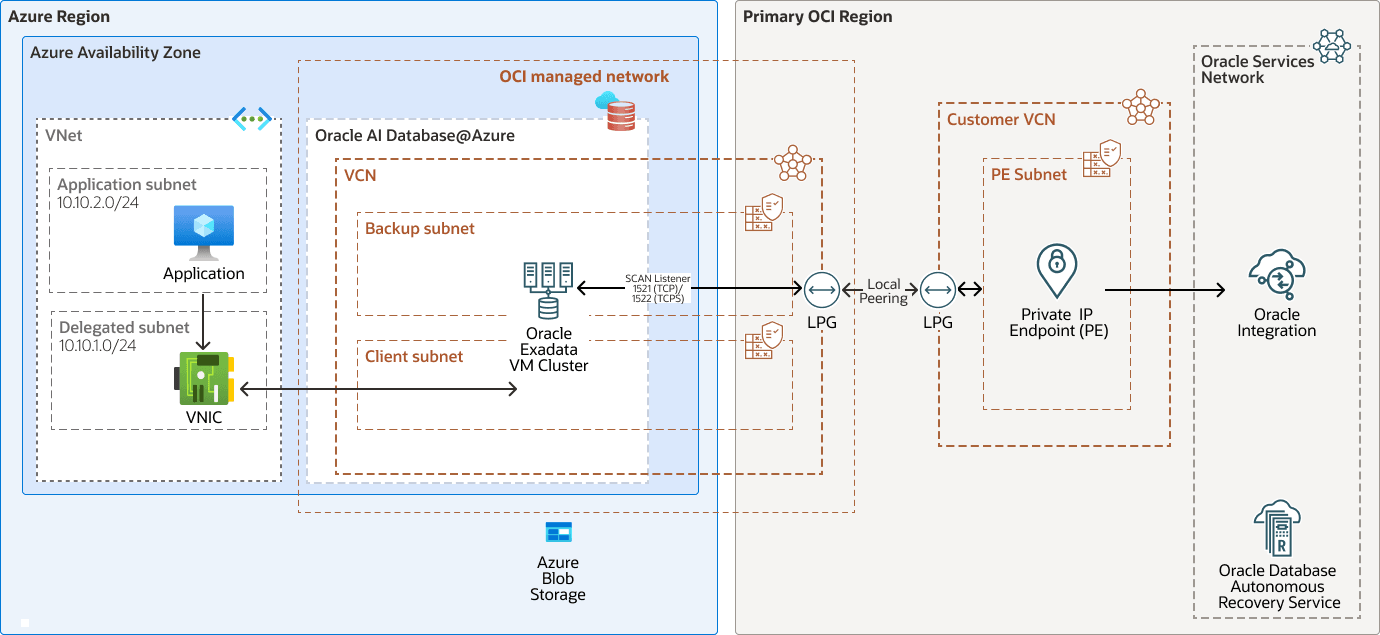
Description of the illustration same-region-connectivity-oi-od-azure.png
same-region-connectivity-oi-od-azure-oracle.zip#GUID-A0B4776E-BBF4-43F8-BBB5-CE6F073DCD6F
- An integration invokes an Oracle AI Database adapter connection that uses the Oracle Integration private endpoint.
- The private endpoint has a private IP address in the private endpoint subnet of the customer VCN.
- Local peering gateways route traffic between the customer VCN and the Oracle AI Database@Azure client subnet entirely over Oracle's private network.
- The connection reaches the SCAN listener on port 1521, or port 1522 for TCPS. The listener directs the session to an Oracle Real Application Clusters (Oracle RAC) node on the Exadata VM cluster, providing instance and node-level failover during maintenance.
The following diagram shows the cross-region topology.
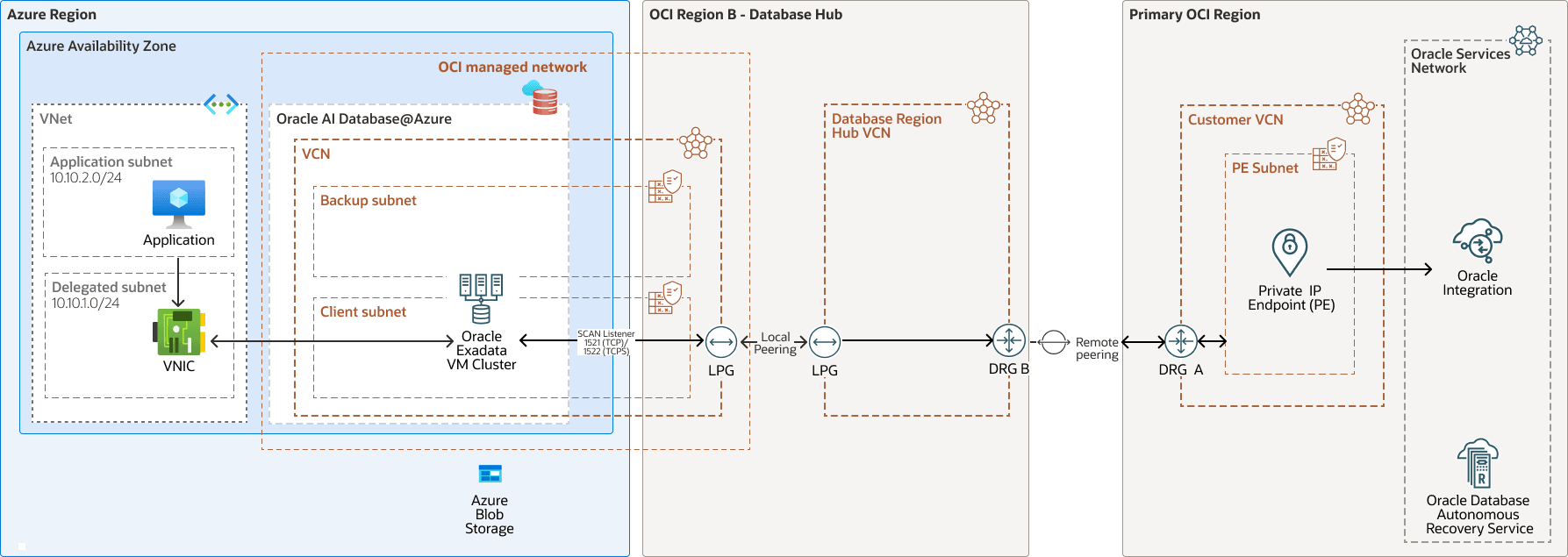
Description of the illustration cross-region-connectivity-oi-od-azure.png
cross-region-connectivity-oi-od-azure-oracle.zip#GUID-3837E26D-EA4A-4A03-BD72-C4E831AEAE4A
- The customer-managed VCN attaches to DRG-A and uses a route rule for the Oracle AI Database@Azure client subnet.
- DRG-A connects to DRG-B through a remote peering connection, keeping inter-region traffic on Oracle's private network.
- DRG-B routes traffic through a database-region hub VCN, whose local peering gateway connects to the Azure Virtual Network (VNet) associated with Oracle AI Database@Azure through the service-supported local peering configuration.
- The connection reaches the same SCAN listener and RAC cluster as in the same-region topology.
Applications in the Azure application subnet connect to the database by using the SCAN FQDN. Traffic flows privately through the VNet to the delegated subnet, where service-managed VNICs present the Exadata VM cluster.
Backup traffic is separate from the application-to-database path. The cluster uses its backup network and a registered Recovery Service subnet to connect to Oracle Database Autonomous Recovery Service. The protection policy stores backups in OCI by default, or in Azure Blob Storage when you enable the same-cloud storage option.
This architecture has the following components:
- Dynamic routing gateway
(DRG)
The DRG is a virtual router that provides a path for private network traffic between VCNs in the same region, between a VCN and a network outside the region, such as a VCN in another OCI region, an on-premises network, or a network in another cloud provider.
- Local
peering
Local peering allows two VCNs within the same OCI region to communicate directly using private IP addresses. This communication does not traverse the internet or your on-premises network. Local peering is enabled by a Local Peering Gateway (LPG), which serves as the connection point between VCNs. Configure an LPG in each VCN and establish a peering relationship to allow instances, load balancers, and other resources in one VCN to securely access resources in another VCN within the same region.
- Network security group
(NSG)
NSGs act as virtual firewalls for your cloud resources. With the zero-trust security model of OCI you control the network traffic inside a VCN. An NSG consists of a set of ingress and egress security rules that apply to only a specified set of virtual network interface cards (VNICs) in a single VCN.
- Oracle Services Network
The Oracle Services Network (OSN) is a conceptual network on OCI that is reserved for Oracle services. These services have public IP addresses that you can reach over the internet. Hosts outside Oracle Cloud can access the OSN privately by using Oracle Cloud Infrastructure FastConnect or VPN Connect. Hosts in your VCNs can access the OSN privately through a service gateway.
- OCI region
An OCI region is a localized geographic area that contains one or more data centers, hosting availability domains. Regions are independent of other regions, and vast distances can separate them (across countries or even continents).
- Azure region
An Azure region is a geographical area in which one or more physical Azure data centers, called availability zones, reside. Regions are independent of other regions, and vast distances can separate them (across countries or even continents).
Azure and OCI regions are localized geographic areas. For Oracle AI Database@Azure, an Azure region is connected to an OCI region, with availability zones (AZs) in Azure connected to availability domains (ADs) in OCI. Azure and OCI region pairs are selected to minimize distance and latency.
- Remote
peering
Remote peering enables private communication between resources in different VCNs, which can be located in the same or different OCI regions. Each VCN uses its own Dynamic Routing Gateway (DRG) for remote peering. The DRGs securely route traffic between the VCNs over OCI's private backbone, allowing resources to communicate using private IP addresses without routing traffic over the internet or through on-premises networks. Remote peering removes the need for internet gateways or public IP addresses for instances that need to connect across regions.
- Route table
Virtual route tables contain rules to route traffic from subnets to destinations outside a VCN, typically through gateways.
- Security list
For each subnet, you can create security rules that specify the source, destination, and type of traffic that is allowed in and out of the subnet.
- OCI virtual cloud
network and subnet
A virtual cloud network (VCN) is a customizable, software-defined network that you set up in an OCI region. Like traditional data center networks, VCNs give you control over your network environment. A VCN can have multiple non-overlapping classless inter-domain routing (CIDR) blocks that you can change after you create the VCN. You can segment a VCN into subnets, which can be scoped to a region or to an availability domain. Each subnet consists of a contiguous range of addresses that don't overlap with the other subnets in the VCN. You can change the size of a subnet after creation. A subnet can be public or private.
- Oracle Exadata Database
Service
enables you to leverage the power of Exadata in the cloud. Oracle Exadata Database Service delivers proven Oracle AI Database capabilities on purpose-built, optimized Oracle Exadata infrastructure in the public cloud. Built-in cloud automation, elastic resource scaling, security, and fast performance for all Oracle AI Database workloads helps you simplify management and reduce costs.
- Oracle Integration
Oracle Integration is a fully-managed, preconfigured environment that allows you to integrate cloud and on-premises applications, automate business processes, and develop visual applications. It uses an SFTP-compliant file server to store and retrieve files and allows you to exchange documents with business-to-business trading partners by using a portfolio of hundreds of adapters and recipes to connect with Oracle and third-party applications.
- Oracle Database Autonomous
Recovery Service
Oracle Database Autonomous Recovery Service is a fully managed service designed to protect Oracle AI Databases from data loss and cyber threats. It offers faster backups with reduced database overhead, reliable recovery with validated backups, and real-time protection enabling recovery to within less than a second of an outage or ransomware attack. This service provides a centralized data protection dashboard and is recommended for backing up Oracle AI Databases with high resiliency.
- Oracle AI Database@Azure
Oracle AI Database@Azure is the Oracle Database service (Oracle Exadata Database Service on Dedicated Infrastructure and Oracle Autonomous AI Database Serverless) running on OCI, deployed in Microsoft Azure data centers. The service offers features and price parity with OCI. Purchase the service on Azure Marketplace.
Oracle AI Database@Azure integrates Oracle Exadata Database Service, Oracle Real Application Clusters (Oracle RAC), and Oracle Data Guard technologies into the Azure platform. Users manage the service on the Azure console and with Azure automation tools. The service is deployed in Azure Virtual Network (VNet) and integrated with the Azure identity and access management system. The OCI and Oracle AI Database generic metrics and audit logs are natively available in Azure. The service requires users to have an Azure subscription and an OCI tenancy.
Autonomous AI Database is built on Oracle Exadata infrastructure, is self-managing, self-securing, and self-repairing, helping eliminate manual database management and human errors. Autonomous AI Database enables development of scalable AI-powered apps with any data using built-in AI capabilities using your choice of large language model (LLM) and deployment location.
Both Oracle Exadata Database Service and Oracle Autonomous AI Database Serverless are easily provisioned through the native Azure Portal, enabling access to the broader Azure ecosystem.
- Azure availability zone
Azure availability zones are physically separate locations within an Azure region, designed to ensure high availability and resiliency by providing independent power, cooling, and networking.
- Azure Virtual Network and subnet
Azure Virtual Network (VNet) enables you to deploy Azure resources into a private, logically isolated network that you define. This network resembles a traditional on‑premises network, while benefiting from Azure's scalable, highly available cloud infrastructure. After you create a VNet, you can segment it into one or more subnets to organize and control network traffic for your workloads.
- VNIC
The servers in OCI data centers have physical network interface cards (NICs). When you create an instance on one of these servers, the instance communicates using Networking service virtual NICs (VNICs) associated with the physical NICs. A virtual network interface card (VNIC) enables an instance to connect to a VCN and determines how the instance connects with endpoints inside and outside the VCN. Each VNIC resides in a subnet in a VCN.
- Azure Blob Storage
Azure Blob Storage is Microsoft’s cloud object storage service for large volumes of unstructured data. It organizes data as blobs in containers within a storage account and supports backup, disaster recovery, archiving, and analytics workloads.
Recommendations
- Customer-managed VCN and private endpoint subnet: Provision a VCN and private subnet that you manage to host the Oracle Integration private endpoint. Reserve a small subnet, such as a
/28, for private endpoints. Use regional subnets and group resources with the same role in the same subnet so that the subnet can serve as a security boundary. - Route tables and security rules: Route traffic for the Oracle AI Database@Azure client subnet through the applicable local peering gateway or DRG. Configure the return path to the private endpoint subnet through the supported database network configuration. Use narrowly scoped network security groups and don't use
0.0.0.0/0rules on the database data path. - Prefer TCPS: Use TCPS on port 1522 to encrypt traffic to the SCAN listener, even on a private path.
- DNS resolution: Configure the customer VCN DNS resolver so that the database SCAN FQDN resolves to the expected private addresses through the approved database DNS design, such as a private DNS zone, private view, or conditional forwarding. Validate name resolution and connectivity from the private endpoint path before go-live.
- Non-overlapping CIDRs: Don't overlap the CIDR ranges of the customer VCN, cross-region hub VCNs, and database client and backup networks. Overlapping ranges can't be peered and require readdressing to resolve. Govern address allocation centrally.
- High availability: Place Oracle Integration in the same OCI region as the database anchor region to use local peering. Otherwise, plan DRG remote peering. Distribute application-tier resources across availability domains and fault domains where applicable.
- Restrict instance access: A private endpoint secures outbound traffic only. Restrict inbound access to the Oracle Integration instance with an allowlist of permitted IP addresses, CIDR blocks, and VCNs.
- Backup destination and protection policy: Use Oracle Database Autonomous Recovery Service for automatic backups. Select a protection policy that meets retention and immutability requirements. Keep the default OCI backup location, or enable same-cloud storage when Azure-resident backups are required.
Considerations
- Private endpoint lifecycle: A private endpoint is one per Oracle Integration instance and can't be modified after creation. To change its VCN or subnet, delete and recreate it.
- Adapter support: Private endpoints work only with supported adapters. Use a supported adapter, such as the Oracle Database or Oracle ATP adapter, and confirm private endpoint support for the target.
- Security in transit: Use TCPS on port 1522 and configure the connection with the database wallet or certificate.
- Security at rest: Exadata databases use Transparent Data Encryption. Master keys are Oracle-managed by default and can be customer-managed in Oracle Cloud Infrastructure Vault. Consider using the vault for database passwords and other connection secrets.
- IAM and least privilege: Use OCI IAM policies to control creation and deletion of the instance, private endpoint, VCN, and peering resources. Use a least-privilege database schema or user. If the database is secured by Zero Trust Packet Routing (ZPR), the instance must have the appropriate ZPR security attributes and use a private endpoint.
- Local peering gateway limits and scale: A VCN has a limited number of local peering gateways (the default limit is 10). Pairwise peering isn't suitable for large-scale connectivity. Use DRG-based hub-and-spoke routing when the instance must access multiple database deployments.
- Scalability and cost: Size Oracle Integration message packs for expected load and resize them as demand changes. Select appropriately sized supporting resources.
- Monitoring and alerts: Monitor connectivity and throughput and configure alerts so you can respond to issues and scale proactively.
Deploy
To deploy private connectivity, follow these steps:
Outbound Oracle Integration calls use the private path to the database SCAN listener and RAC nodes.