ノート:
- このチュートリアルでは、Oracle Cloudへのアクセスが必要です。無料アカウントにサインアップするには、Oracle Cloud Infrastructure Free Tierの開始を参照してください。
- Oracle Cloud Infrastructureの資格証明、テナンシおよびコンパートメントの値の例を使用します。ラボを完了するときは、これらの値をクラウド環境に固有の値に置き換えてください。
OCI通知を使用したAIDPワークフロー・ジョブおよびカスタム・シナリオの通知の構成
はじめに
このチュートリアルでは、OCI通知およびイベント・サービスを使用してAIDPワークフロー・ジョブの通知を構成する方法について説明します。また、AIDPノートブックでPythonプログラムを使用してカスタム通知ロジックを実装する方法についても学習します。
OCI Notificationsサービスは、パブリッシュ/サブスクライブ・モデルを使用して、メッセージを確実かつ安全に配信します。
目的
このチュートリアルを終了すると、次のことができるようになります。
- OCI通知トピックおよびサブスクリプションの作成
- AIDPワークフロー・ジョブ・ステータスのイベント・ルールの構成
- ジョブの失敗に関する電子メール通知の受信
- Pythonを使用したカスタム通知ロジックの実装
- プログラムによる通知のトリガー
前提条件
- OCIコンソールへのアクセス
- ワークフロー・ジョブを含むAIDPワークスペース
- 通知およびイベントを作成する権限
- Python SDKを使用するためのOCI構成設定
タスク1: 通知トピックおよびサブスクリプションの作成
- OCIコンソールにログインしてください。
- 「開発者サービス」→「通知」に移動します。
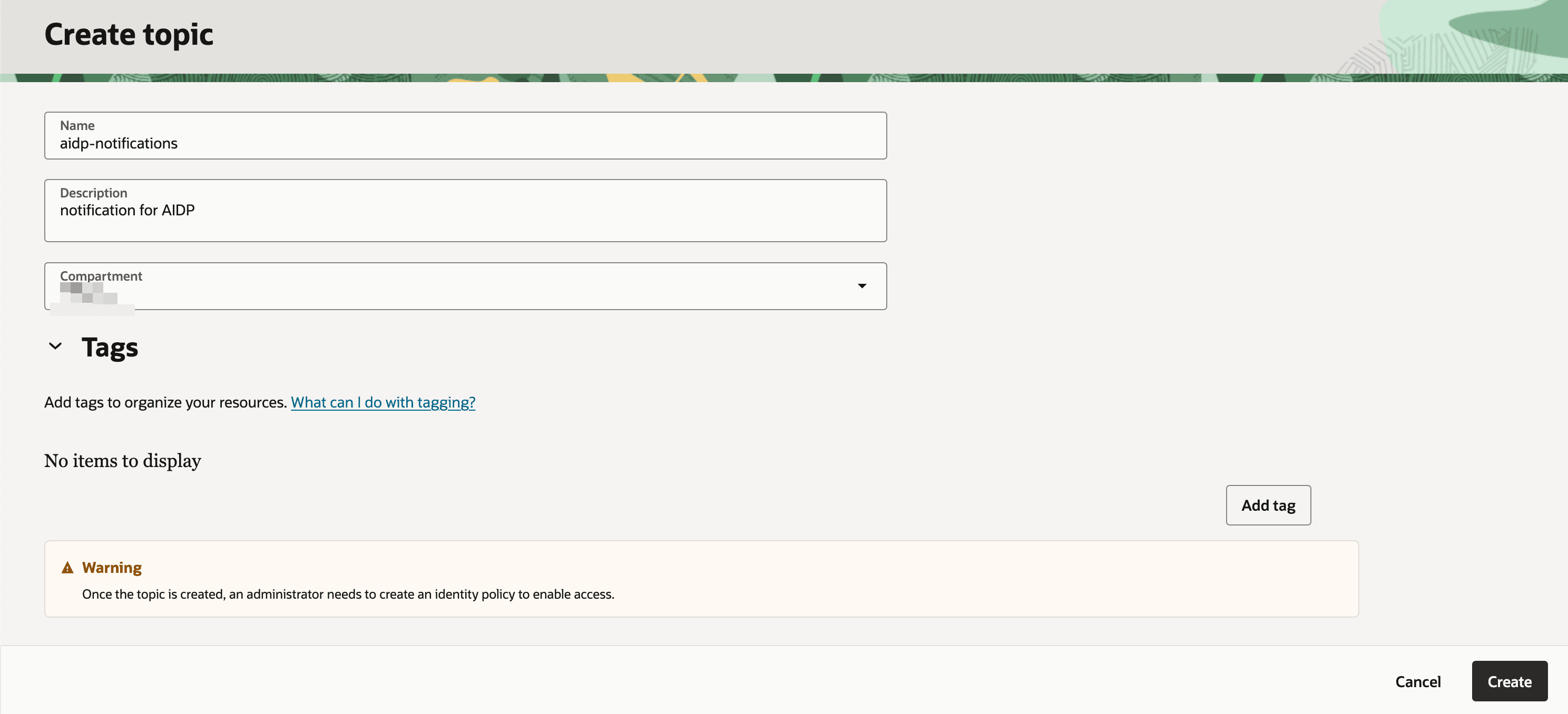
- 「トピックの作成」をクリックし、次を指定します:
- 名前
- 説明
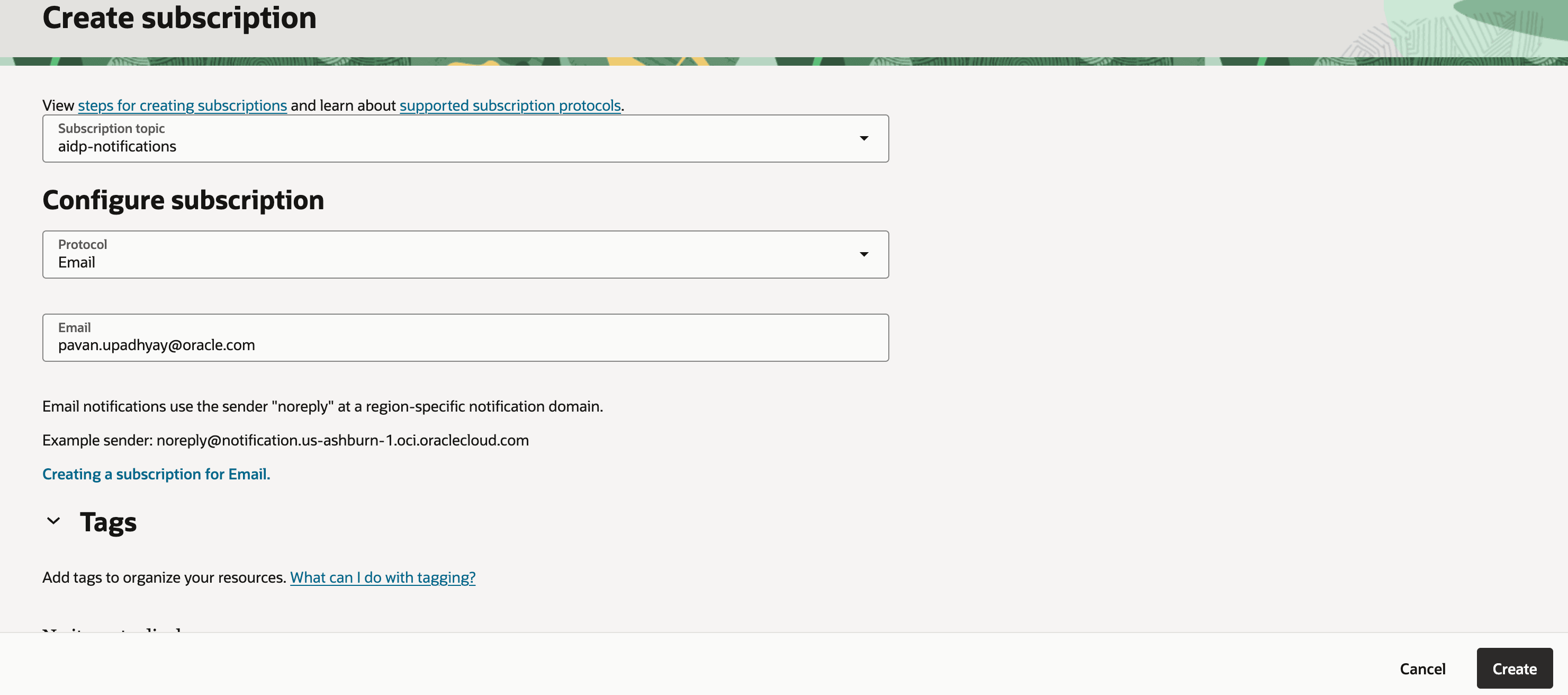
- 購読を作成:
- プロトコル: 電子メール
- Eメール: Eメール・アドレス
-
電子メールを確認し、サブスクリプションを確認します。
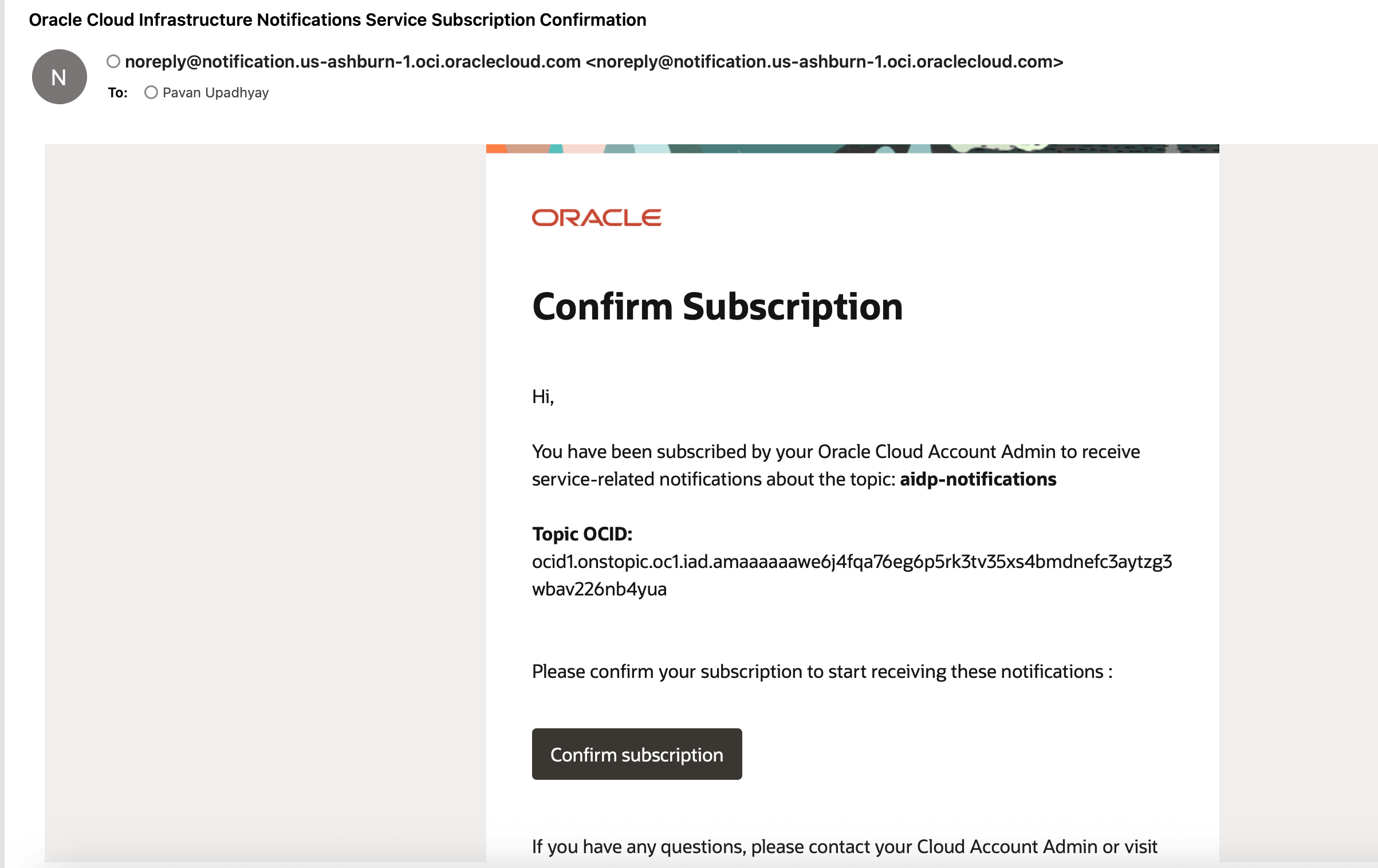
ノート:確認後、サブスクリプション・ステータスが「保留」から「アクティブ」に変わります。
タスク2: AIDPワークフローのイベント・ルールの構成
- 「監視および管理」 → 「イベント・サービス」 → 「ルール」に移動します。
- 「ルールの作成」をクリックします。
- 次の項目を構成します。
- サービス: インテリジェント・データ・レイク
- イベント・タイプ: ジョブの実行- 終了
- 属性名1 : jobKey
- 属性値1: ヘルプ・ワークフローIDの保持
- 属性名2 : jobStatus
- 属性値2: 失敗
- アクションの設定:
- 以前に作成された通知トピックの選択
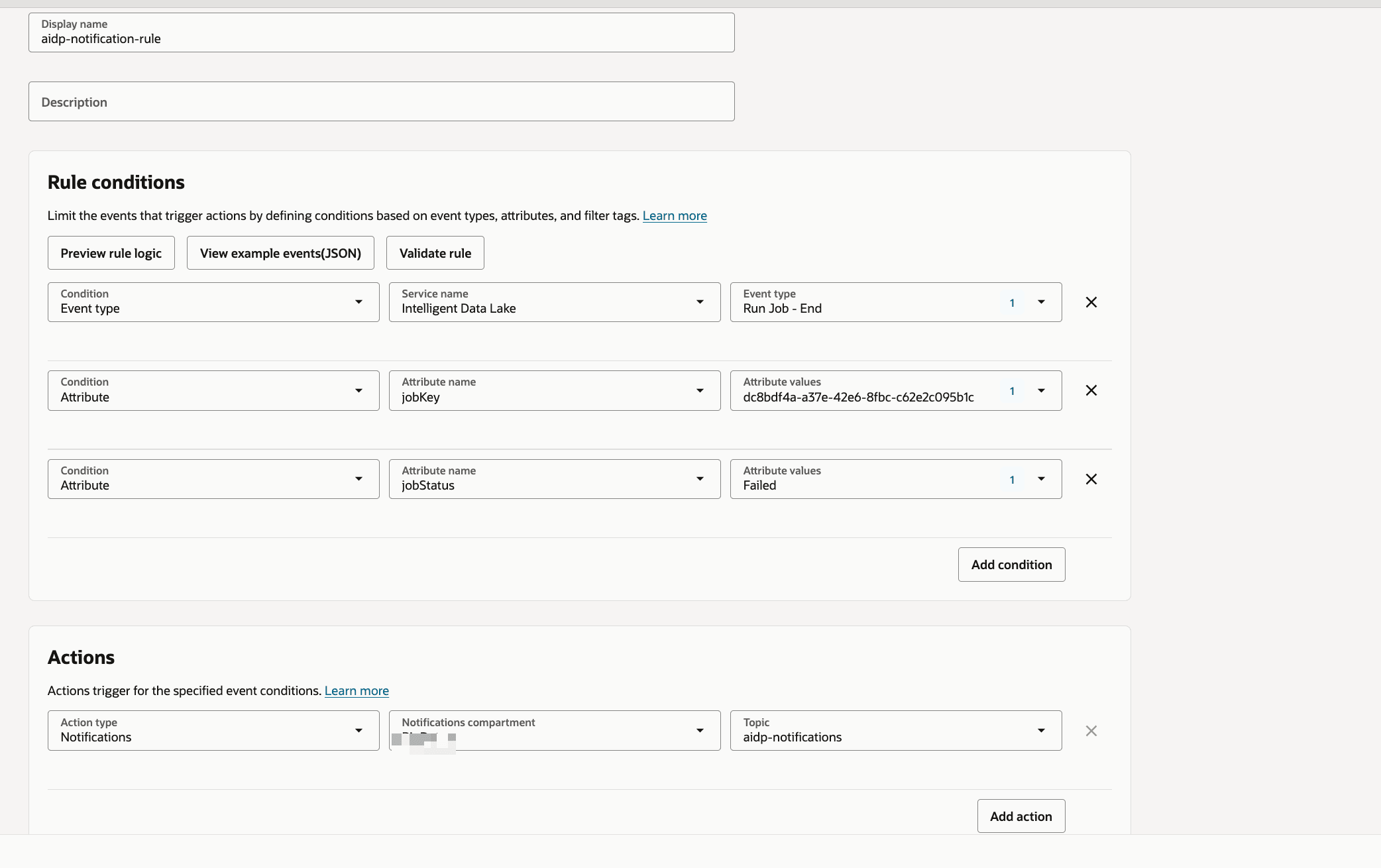
ヒント:「成功」や「実行中」などの他のステータスのルールをカスタマイズできます。
タスク3: 電子メール通知の検証
- ワークフロー・ジョブをトリガーまたは実行します。
- 必要に応じて、障害シナリオを強制的に実行します。
-
電子メールの受信ボックスを確認します。
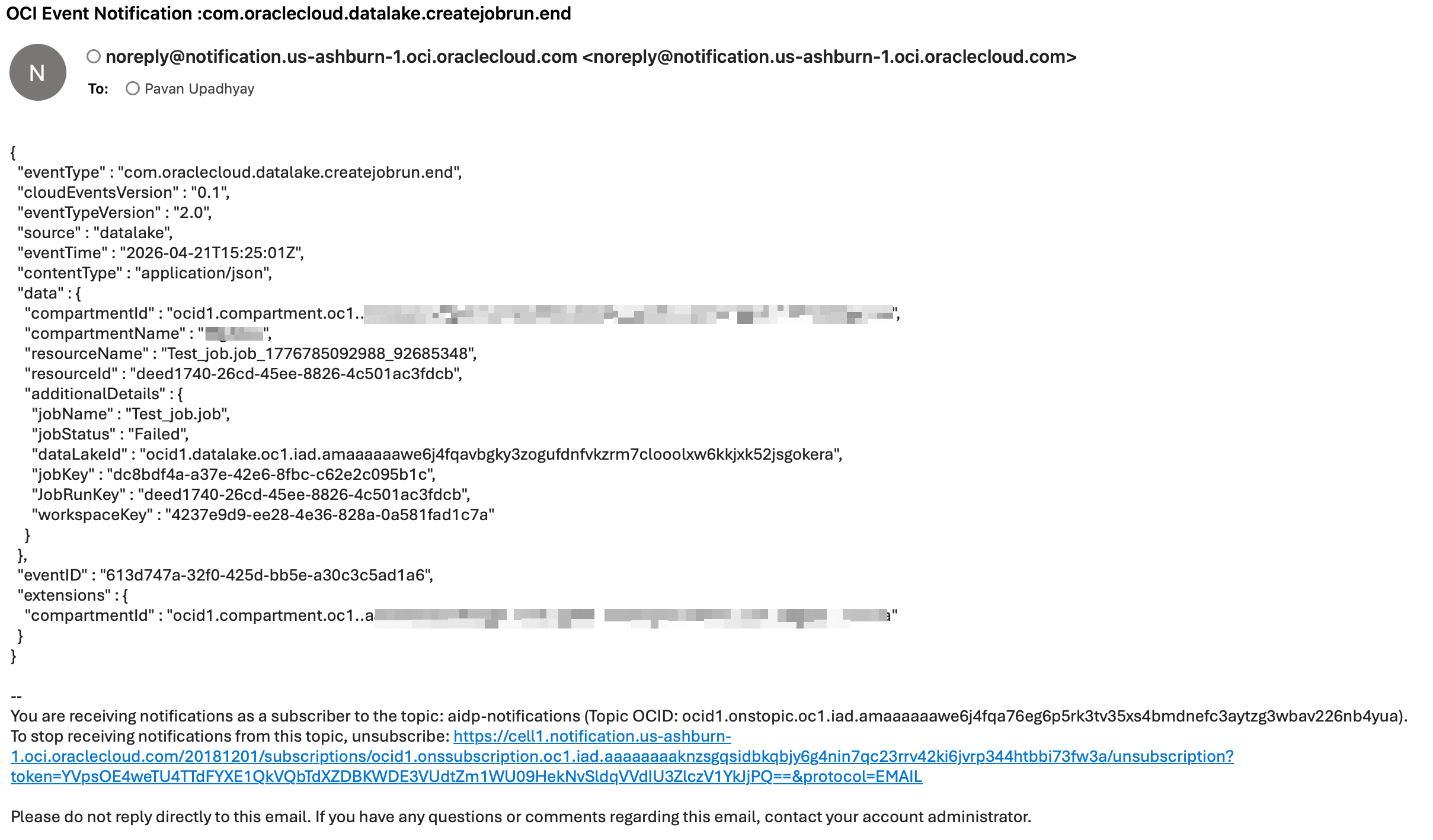
ノート:通知には、ジョブ名やステータスなどのジョブ詳細が含まれます。
タスク4: Pythonを使用したカスタム通知の実装
次に、OCI SDKを使用して通知を送信するためのサンプルPythonプログラムを示します。
import oci
from oci.ons.models import MessageDetails

config = oci.config.from_file("~/.oci/config", "DEFAULT")
client = oci.ons.NotificationDataPlaneClient(config)

topic_id = "<your_topic_ocid>"

message_details = MessageDetails(
    title="Test Notification",
    body="Hello from AIDP!"
)

response = client.publish_message(
    topic_id=topic_id,
    message_details=message_details
)

print("Message sent:", response.data.message_id)
タスク5: 拡張カスタム通知クラス
import oci
import logging
import time
from typing import List, Optional, Dict

logger = logging.getLogger("OCI_Notifier")
logger.setLevel(logging.INFO)

handler = logging.StreamHandler()
formatter = logging.Formatter(
    "%(asctime)s - %(name)s - %(levelname)s - %(message)s"
)
handler.setFormatter(formatter)
logger.addHandler(handler)

class OCINotifier:
    def __init__(
        self,
        topic_id: str,
        config_file: str = "~/.oci/config",
        profile: str = "DEFAULT",
        max_retries: int = 3,
        retry_delay: int = 2,
    ):
        """
        Initialize OCI Notification client

        Args:
            topic_id: OCI Notification Topic OCID
            config_file: Path to OCI config
            profile: Config profile name
            max_retries: Retry attempts
            retry_delay: Delay between retries (seconds)
        """
        self.topic_id = topic_id
        self.max_retries = max_retries
        self.retry_delay = retry_delay

        try:
            self.config = oci.config.from_file(config_file, profile)
            self.client = oci.ons.NotificationDataPlaneClient(self.config)
            logger.info("OCI Notifier initialized successfully")
        except Exception as e:
            logger.error(f"Failed to initialize OCI client: {e}")
            raise


    def send(
        self,
        title: str,
        message: str,
        metadata: Optional[Dict] = None,
    ) -> bool:
        """
        Send notification message

        Args:
            title: Notification subject
            message: Notification body
            metadata: Optional metadata dictionary

        Returns:
            bool: True if success, False otherwise
        """

        payload = {
            "title": title,
            "body": message,
        }

        if metadata:
            payload["metadata"] = metadata

        for attempt in range(1, self.max_retries + 1):
            try:
                response = self.client.publish_message(
                    self.topic_id,
                    payload
                )
                logger.info(
                    f"Notification sent successfully | "
                    f"Message ID: {response.data.message_id}"
                )
                return True

            except Exception as e:
                logger.error(
                    f"Attempt {attempt} failed: {str(e)}"
                )
                if attempt < self.max_retries:
                    time.sleep(self.retry_delay)
                else:
                    logger.error("Max retries reached. Notification failed.")
                    return False


def notify_success(notifier: OCINotifier, job_name: str):
    notifier.send(
        title=f"{job_name} SUCCESS",
        message=f"Job '{job_name}' completed successfully."
    )


def notify_failure(notifier: OCINotifier, job_name: str, error: str):
    notifier.send(
        title=f"{job_name} FAILED",
        message=f"Job '{job_name}' failed.\nError: {error}"
    )
タスク6: AIDPノートブックからのカスタム通知のコール
ワークフローまたはノートブック内で通知ロジックを起動できます。
from notifier import notify_failure

notify_failure(notifier, "SampleJob", "Error details here")
トラブルシューティングとヒント
ヒント: OCI構成ファイル・パスが正しいことを確認してください。
ノート:トピックOCIDおよびサブスクリプション・ステータスを確認します。
ヒント:信頼性のために、カスタム通知で再試行を使用します。
次のステップ
- SlackまたはHTTPSサブスクリプションの追加
- 成功イベントの通知の拡張
- 監視ダッシュボードとの統合
謝辞
- 著者 - Pavan Upadhyay (Principal Cloud Engineer)、Saket Bihari (Principal Cloud Engineer)
その他の学習リソース
docs.oracle.com/learnの他のラボを調べるか、Oracle Learning YouTubeチャンネルで無料のラーニングコンテンツにアクセスしてください。また、Oracle Learning Explorerになるには、education.oracle.com/learning-explorerにアクセスしてください。
製品ドキュメントについては、Oracle Help Centerを参照してください。
Configure Notifications for AIDP Workflow Jobs and Custom Scenarios Using OCI Notifications
G56829-01