ノート:
- このチュートリアルではOracle Cloudへのアクセスが必要です。無料アカウントにサインアップするには、Oracle Cloud Infrastructure Free Tierの開始を参照してください。
- Oracle Cloud Infrastructure資格証明、テナンシおよびコンパートメントの値の例を使用します。演習を完了する場合は、これらの値をクラウド環境に固有の値に置き換えてください。
OCI ComputeインスタンスのOCIスタック・モニタリング・デプロイメントの自動化
イントロダクション
スタック・モニタリングは、OCIテナンシの下にデプロイされたインフラストラクチャの可観測性と管理の下で、Oracle Cloud Infrastructure (OCI)のコンピュート・インスタンスをモニタリングするために提供されるサービスの1つです。スタック・モニタリングでは、各ディスクのストレージだけでなく、コンピュート・インスタンスにアタッチされた各ボリュームに作成されたファイルシステムも許可されます。ストレージ、スタック監視に加えて、可用性、CPU、メモリーおよびディスク・アクティビティ+コンピュート・インスタンスのページングのメトリックが提供されます。
前のチュートリアル: スタック・モニタリングを使用したVMディスク使用率の管理では、OCIスタック・モニタリング・サービスを使用してコンピュート・インスタンスのストレージ・ファイルシステムの監視について説明しました。OCIスタック・モニタリング・サービスでは、インスタンスごとにMonitoringエージェントを手動で有効化し、JSONファイルを使用して単一インスタンスに対して検出ジョブを実行しました。
ただし、実際の本番環境の場合、数千台のマシンが存在し、OCI ComputeインスタンスのOCIスタック・モニタリングのデプロイメントを自動化できます。
目標
カスタム・スクリプトを使用して、Stack Monitoringのインストールおよびデプロイメントの完全なプロセスを自動化します。
前提条件
- このチュートリアルにあるソリューションをすでに実装している場合は、ステップ2から5をスキップできます。
- ユーザーには、このチュートリアルに記載されているIAM権限が必要です。
- 必要なポリシーを持つ管理エージェント用の動的グループは、このチュートリアルの説明に従って作成する必要があります。
- ユーザーは、スクリプトがデプロイされるマシンにOCI CLIバージョン3.16以上がインストールされている必要があります。
- このソリューションはシェル・スクリプトで構成されているため、Linux/Unixシェル互換マシンでホストする必要があります。
タスク1: ソリューションのデプロイ
Linuxベースのデバイスに別のディレクトリを作成して、ソリューションをインストールします。OCIでソリューションをデプロイする詳細なステップは、次のとおりです。
-
モニタリング・エージェントをインストールするためのスクリプトをデプロイします。
-
次のコマンドを使用して、ディレクトリに
agent-enable.shという名前の新しいファイルを作成します。vi agent-enable.sh -
次のコード・スニペットをコピーして、agent-enable.shファイルに貼り付けます。ファイルで行われた変更を保存して終了します。
#************************************************************************ # # Licensed under the Apache License, Version 2.0 (the “License”); # you may not use this file except in compliance with the License. # You may obtain a copy of the License at # # http://www.apache.org/licenses/LICENSE-2.0 # # Unless required by applicable law or agreed to in writing, software # distributed under the License is distributed on an “AS IS” BASIS, # WITHOUT WARRANTIES OR CONDITIONS OF ANY KIND, either express or implied. # See the License for the specific language governing permissions and # limitations under the License. # #************************************************************************ # Available at: https://github.com/dbarj/oci-scripts # Created on: Oct/2022 by Maninder Singh Flora and Akarsha Itigi # Version 2.0 #************************************************************************ #!/bin/bash DATE=$(date +'%m-%d-%Y-%T') Help() { # Display Help echo "This script will enable the Monitoring agent on the OCI Compute Instances by taking input of a Compartment-id or an Instance-id." echo echo "Syntax: sh <script-name> [-h|i|c]" echo "options:" echo "h Print this Help." echo "i Takes Instance-id as input and enables agent for that particular compute instance only." echo "c Takes Compartment-id as input and enables agent for all the compute instances in that compartment." echo } Allinstance() { LOG_FILE=$INPUT_ID-$DATE STR=$INPUT_ID MATCH1=$(echo $INPUT_ID | awk -F"." {'print $2'} | tr -d " ") MATCH2="compartment" INPUT_LENGTH=${#STR} LENGTH=83 if [ $MATCH1 = $MATCH2 ] && [ $INPUT_LENGTH = $LENGTH ] then touch /tmp/monitoring_agent/monitoring_agent_logs/agent_enable_logs/$LOG_FILE.log for INSTANCE_ID in $(oci compute instance list --compartment-id $INPUT_ID | grep ocid1.instance | awk -F":" {print'$2'} | awk -F"," {print'$1'} | tr -d "\"" | tr -d " "); do echo " " INSTANCE_NAME=$(oci compute instance get --instance-id "$INSTANCE_ID" | grep -i display-name | awk -F":" {print'$2'} | awk -F"," {print'$1'} | tr -d "\"" | tr -d " ") echo "$DATE Enabling Monitoring Agent for $INSTANCE_NAME ..." echo "$DATE Enabling Monitoring Agent for $INSTANCE_NAME ..." >> /tmp/monitoring_agent/monitoring_agent_logs/agent_enable_logs/$LOG_FILE.log oci compute instance update --instance-id "$INSTANCE_ID" --from-json file:///tmp/monitoring_agent/monitoring_agent_templates/agent_enable.json --force >> /tmp/monitoring_agent/monitoring_agent_logs/agent_enable_logs/$LOG_FILE.log echo "$DATE Enabled Monitoring Agent for $INSTANCE_NAME" >> /tmp/monitoring_agent/monitoring_agent_logs/agent_enable_logs/$LOG_FILE.log echo "$DATE Enabled Monitoring Agent for $INSTANCE_NAME" done else echo "[ERORR] : Invalid Compartment-id" fi } Instance() { LOG_FILE=$INPUT_ID-$DATE STR=$INPUT_ID MATCH1=$(echo $INPUT_ID | awk -F"." {'print $2'} | tr -d " ") MATCH2="instance" INPUT_LENGTH=${#STR} LENGTH=83 if [ $MATCH1 = $MATCH2 ] && [ $INPUT_LENGTH = $LENGTH ] then touch /tmp/monitoring_agent/monitoring_agent_logs/agent_enable_logs/$LOG_FILE.log echo " " INSTANCE_NAME=$(oci compute instance get --instance-id "$INPUT_ID" | grep -i display-name | awk -F":" {print'$2'} | awk -F"," {print'$1'} | tr -d "\"" | tr -d " ") echo "$DATE Enabling Monitoring Agent for $INSTANCE_NAME ..." echo "$DATE Enabling Monitoring Agent for $INSTANCE_NAME ..." >> /tmp/monitoring_agent/monitoring_agent_logs/agent_enable_logs/$LOG_FILE.log oci compute instance update --instance-id "$INPUT_ID" --from-json file:///tmp/monitoring_agent/monitoring_agent_templates/agent_enable.json --force >> /tmp/monitoring_agent/monitoring_agent_logs/agent_enable_logs/$LOG_FILE.log echo "$DATE Enabled Monitoring Agent for $INSTANCE_NAME" >> /tmp/monitoring_agent/monitoring_agent_logs/agent_enable_logs/$LOG_FILE.log echo "$DATE Enabled Monitoring Agent for $INSTANCE_NAME" else echo "[ERORR] : Invalid Instance-id" fi } # Get the options while getopts " hi:c: " option; do case $option in h) # display Help Help exit;; i) # Enter Instance-id INPUT_ID=$OPTARG Instance exit;; c) # Enter Compartment-id INPUT_ID=$OPTARG Allinstance exit;; \?) # Invalid option echo "[Error] : Invalid option" echo "Please check the valid options using ./<script-name> -h" exit;; esac done -
次のコマンドを使用して、ファイルに実行権限を付与します。
chmod +x agent-enable.sh -
次のコマンドを使用して、同じディレクトリに
agent_enable.jsonという名前の別のファイルを作成します。vi agent_enable.json -
次のコード・スニペットをコピーして、
agent_enable.jsonファイルに貼り付けます。ファイルで行われた変更を保存して終了します。{ "agent-config": { "are-all-plugins-disabled": false, "is-management-disabled": false, "is-monitoring-disabled": false, "plugins-config": [ { "desired-state": "ENABLED", "name": "Management Agent" } ] } }
-
-
OCIスタック・モニタリング検出ジョブを実行するためのスクリプトをデプロイします。
-
次のコマンドを使用して、ディレクトリに
discovery-job.shという名前の新しいファイルを作成します。vi discovery-job.sh -
次のコード・スニペットをコピーして、
discovery-job.shファイルに貼り付けます。ファイルで行われた変更を保存して終了します。#************************************************************************ # # Licensed under the Apache License, Version 2.0 (the “License”); # you may not use this file except in compliance with the License. # You may obtain a copy of the License at # # http://www.apache.org/licenses/LICENSE-2.0 # # Unless required by applicable law or agreed to in writing, software # distributed under the License is distributed on an “AS IS” BASIS, # WITHOUT WARRANTIES OR CONDITIONS OF ANY KIND, either express or implied. # See the License for the specific language governing permissions and # limitations under the License. # #************************************************************************ # Available at: https://github.com/dbarj/oci-scripts # Created on: Oct/2022 by Maninder Singh Flora and Akarsha Itigi # Version 1 #************************************************************************ #!/bin/bash DATE=$(date +'%m-%d-%Y-%T') Help() { # Display Help echo "This script will run Stack-Monitoring Discovery-job on the OCI Compute Instances by taking input of a Compartment-id or an Instance-id." echo echo "Syntax: sh <script-name> [-h|i|c]" echo "options:" echo "h Print this Help." echo "i Takes Instance-id as input and enables agent for that particular compute instance only." echo "c Takes Compartment-id as input and enables agent for all the compute instances in that compartment." echo } Allinstance() { LOG_FILE=$INPUT_ID-$DATE STR=$INPUT_ID MATCH1=$(echo $INPUT_ID | awk -F"." {'print $2'} | tr -d " ") MATCH2="compartment" INPUT_LENGTH=${#STR} LENGTH=83 if [ $MATCH1 = $MATCH2 ] && [ $INPUT_LENGTH = $LENGTH ] then touch /tmp/monitoring_agent/monitoring_agent_logs/stack_monitoring_discovery_job_logs/$LOG_FILE.log for AGENT_ID in $(oci management-agent agent list --compartment-id $INPUT_ID | grep "CreatedBy" | awk -F":" {print'$2'} | awk -F"," {print'$1'} | tr -d "\"" | tr -d " "); do echo " " INSTANCE_ID=$(oci management-agent agent get --agent-id $AGENT_ID | grep -i ocid1.instance | awk -F":" {print'$2'} | awk -F"," {print'$1'} | tr -d "\"" | tr -d " ") INSTANCE_IP=$(oci compute instance list-vnics --instance-id $INSTANCE_ID | grep -i private-ip | awk -F":" {print'$2'} | awk -F"," {print'$1'} | tr -d "\"" | tr -d " " | head -n 1) INSTANCE_NAME=$(oci compute instance get --instance-id "$INSTANCE_ID" | grep -i display-name | awk -F":" {print'$2'} | awk -F"," {print'$1'} | tr -d "\"" | tr -d " ") cp /tmp/monitoring_agent/monitoring_agent_templates/discovery_job_template.json /tmp/monitoring_agent/monitoring_agent_templates/discovery_job_template1.json sed -i s/COMPARTMENT_ID/$INPUT_ID/ /tmp/monitoring_agent/monitoring_agent_templates/discovery_job_template1.json sed -i s/AGENT_ID/$AGENT_ID/ /tmp/monitoring_agent/monitoring_agent_templates/discovery_job_template1.json sed -i s/INSTANCE_IP/$INSTANCE_IP/ /tmp/monitoring_agent/monitoring_agent_templates/discovery_job_template1.json echo "$DATE Running Stack-Monitoring Discovery-job for $INSTANCE_NAME ($INSTANCE_IP)..." echo "$DATE Running Stack-Monitoring Discovery-job for $INSTANCE_NAME ($INSTANCE_IP)..." >> /tmp/monitoring_agent/monitoring_agent_logs/stack_monitoring_discovery_job_logs/$LOG_FILE.log oci stack-monitoring discovery-job create --compartment-id "$INPUT_ID" --from-json file:///tmp/monitoring_agent/monitoring_agent_templates/discovery_job_template1.json >> /tmp/monitoring_agent/monitoring_agent_logs/stack_monitoring_discovery_job_logs/$LOG_FILE.log echo "$DATE Stack-Monitoring Discovery-job created for $INSTANCE_NAME ($INSTANCE_IP)" >> /tmp/monitoring_agent/monitoring_agent_logs/stack_monitoring_discovery_job_logs/$LOG_FILE.log echo "$DATE Stack-Monitoring Discovery-job created for $INSTANCE_NAME ($INSTANCE_IP)" done else echo "[ERORR] : Invalid Compartment-id" fi } Instance() { LOG_FILE=$INPUT_ID-$DATE STR=$INPUT_ID MATCH1=$(echo $INPUT_ID | awk -F"." {'print $2'} | tr -d " ") MATCH2="instance" INPUT_LENGTH=${#STR} LENGTH=83 if [ $MATCH1 = $MATCH2 ] && [ $INPUT_LENGTH = $LENGTH ] then touch /tmp/monitoring_agent/monitoring_agent_logs/stack_monitoring_discovery_job_logs/$LOG_FILE.log echo " " INSTANCE_NAME=$(oci compute instance get --instance-id "$INPUT_ID" | grep -i display-name | awk -F":" {print'$2'} | awk -F"," {print'$1'} | tr -d "\"" | tr -d " ") INSTANCE_IP=$(oci compute instance list-vnics --instance-id $INPUT_ID | grep -i private-ip | awk -F":" {print'$2'} | awk -F"," {print'$1'} | tr -d "\"" | tr -d " " | head -n 1) COMPARTMENT_ID=$(oci compute instance get --instance-id "$INPUT_ID" | grep -i compartment | awk -F":" {print'$2'} | awk -F"," {print'$1'} | tr -d "\"" | tr -d " ") AGENT_ID=$(oci management-agent agent list --compartment-id $COMPARTMENT_ID --host-id $INPUT_ID | grep "CreatedBy" | awk -F":" {print'$2'} | awk -F"," {print'$1'} | tr -d "\"" | tr -d " ") cp /tmp/monitoring_agent/monitoring_agent_templates/discovery_job_template.json /tmp/monitoring_agent/monitoring_agent_templates/discovery_job_template1.json sed -i s/COMPARTMENT_ID/$COMPARTMENT_ID/ /tmp/monitoring_agent/monitoring_agent_templates/discovery_job_template1.json sed -i s/AGENT_ID/$AGENT_ID/ /tmp/monitoring_agent/monitoring_agent_templates/discovery_job_template1.json sed -i s/INSTANCE_IP/$INSTANCE_IP/ /tmp/monitoring_agent/monitoring_agent_templates/discovery_job_template1.json echo "$DATE Running Stack-Monitoring Discovery-job for $INSTANCE_NAME ($INSTANCE_IP)..." echo "$DATE Running Stack-Monitoring Discovery-job for $INSTANCE_NAME ($INSTANCE_IP)..." >> /tmp/monitoring_agent/monitoring_agent_logs/stack_monitoring_discovery_job_logs/$LOG_FILE.log oci stack-monitoring discovery-job create --compartment-id "$COMPARTMENT_ID" --from-json file:///tmp/monitoring_agent/monitoring_agent_templates/discovery_job_template1.json >> /tmp/monitoring_agent/monitoring_agent_logs/stack_monitoring_discovery_job_logs/$LOG_FILE.log echo "$DATE Stack-Monitoring Discovery-job created for $INSTANCE_NAME ($INSTANCE_IP)" >> /tmp/monitoring_agent/monitoring_agent_logs/stack_monitoring_discovery_job_logs/$LOG_FILE.log echo "$DATE Stack-Monitoring Discovery-job created for $INSTANCE_NAME ($INSTANCE_IP)" else echo "[ERORR] : Invalid Instance-id" fi } # Get the options while getopts " hi:c: " option; do case $option in h) # display Help Help exit;; i) # Enter Instance-id INPUT_ID=$OPTARG Instance exit;; c) # Enter Compartment-id INPUT_ID=$OPTARG Allinstance exit;; \?) # Invalid option echo "[Error] : Invalid option" echo "Please check the valid options using ./<script-name> -h" exit;; esac done -
コマンドを使用して、ファイルに実行権限を付与します。
chmod +x discovery-job.sh -
コマンドを使用して、同じディレクトリに
discovery_job_template.jsonという名前の別のファイルを作成します。vi discovery_job_template.json -
次のコード・スニペットをコピーして、
discovery_job_template.jsonファイルに貼り付けます。ファイルで行われた変更を保存して終了します。{ "discoveryType": "ADD", "discoveryClient": "host-discovery", "compartmentId": "COMPARTMENT_ID", "discoveryDetails": { "agentId": "AGENT_ID", "resourceType": "HOST", "resourceName": "INSTANCE_IP", "properties": { "propertiesMap": {} } } } -
コマンドを使用して、同じディレクトリにdiscovery_job_template1.jsonという名前の別のファイルを作成します。
vi discovery_job_template1.json -
次のコード・スニペットをコピーして、
discovery_job_template1.jsonファイルに貼り付けます。ファイルで行われた変更を保存して終了します。{ "discoveryType": "ADD", "discoveryClient": "host-discovery", "compartmentId": "ocid1.compartment.oc1..aaaaaaaapi7c22bjp3zcuiywo2nabufke2lktkfhbf2ehqfclomnjc3vqh3q", "discoveryDetails": { "agentId": "ocid1.managementagent.oc1.iad.amaaaaaawe6j4fqa4f5q5pj3izevwffdpe63dvykmqzub2xakevch3a7xgtq", "resourceType": "HOST", "resourceName": "10.0.0.53", "properties": { "propertiesMap": {} } } }
-
-
インストール・スクリプトをデプロイして設定を完了します。
-
コマンドを使用して、ディレクトリに
installation.shという名前の新しいファイルを作成します。vi installation.sh -
フォローイン・コード・スニペットをコピーし、
installation.shファイルに貼り付けます。ファイルで行われた変更を保存して終了します。#!/bin/bash mkdir Monitoring-Agent-Scripts mkdir /tmp/monitoring_agent mkdir /tmp/monitoring_agent/monitoring_agent_logs mkdir /tmp/monitoring_agent/monitoring_agent_templates mkdir /tmp/monitoring_agent/monitoring_agent_logs/agent_enable_logs/ mkdir /tmp/monitoring_agent/monitoring_agent_logs/stack_monitoring_discovery_job_logs cp agent_enable.json /tmp/monitoring_agent/monitoring_agent_templates/agent_enable.json cp discovery_job_template.json /tmp/monitoring_agent/monitoring_agent_templates/discovery_job_template.json cp discovery_job_template1.json /tmp/monitoring_agent/monitoring_agent_templates/discovery_job_template1.json cp discovery-job.sh Monitoring-Agent-Scripts/discovery-job.sh cp agent-enable.sh Monitoring-Agent-Scripts/agent-enable.sh chmod +x Monitoring-Agent-Scripts/discovery-job.sh chmod +x Monitoring-Agent-Scripts/agent-enable.sh rm -f agent_enable.json rm -f discovery_job_template.json rm -f discovery_job_template1.json rm -f discovery-job.sh rm -f agent-enable.sh rm -f installation.sh -
コマンドを使用して、ファイルに実行権限を付与します。
chmod +x agent-enable.sh
-
-
デプロイメントを完了します。これで、必要なすべてのアクセス権を持つ必要なファイルがすべて取得されました。
-
設定を完了するには、次のコマンドを同じディレクトリで実行します。
sh installation.sh -
これにより、JSONテンプレートが適切な場所にコピーされ、エージェント・インストールおよびスタック・モニタリング・ジョブ実行を格納するログ・ファイルが作成されます。
-
前述のすべてのテンプレートおよびJSONファイルは、それぞれ
/tmp/monitoring_agent/monitoring_agent_templatesおよび/tmp/monitoring_agent/monitoring_agent_logsの場所にコピーされます。
ノート: 現在のディレクトリには、
Monitoring-Agent-Scriptsという名前のディレクトリが1つ表示されます。このディレクトリには、エージェントをインストールして検出ジョブを実行する2つのスクリプトがあります。 -
タスク2: ソリューションの実行
スクリプトをデバイスにデプロイした後、スクリプトを実行してエージェントをインストールし、スタック・モニタリングの検出ジョブを実行できます。Monitoring-Agent-Scriptsディレクトリに移動し、次のステップに従います。
-
コンピュート・インスタンスでモニタリング・エージェントを実行します。
-
単一のコンピュート・インスタンスのMonitoring-Agentをインストールするには、'-i'オプションを指定して次のスクリプトを実行する必要があります。
sh agent-enable.sh -i <oci_compute_instance_ocid> -
Monitoring Agentをコンパートメント内のすべてのコンピュート・インスタンスにインストールするには、'-c'オプションを指定してスクリプトを実行する必要があります。
sh agent-enable.sh -c <compartment_ocid> -
次のようにスクリプトとともに'-h'オプションを使用して、構文およびオプションの詳細を確認できます。
sh agent-enable.sh -h -
前述のスクリプト(1)または(2)がコンピュート・インスタンスに対して正常に実行されたら、「Oracle Cloud Agent」タブのコンピュート・インスタンスの詳細ページで同じステータスを確認できます。
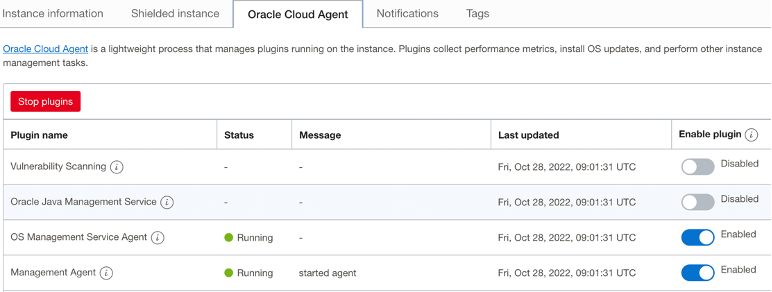
ノート:管理エージェントが実行中の状態で表示されたら、後続のステップに進みます。これは、管理エージェントがインスタンスで実行されていない場合、後続のステップでエラーが発生するためです。
-
-
OCIスタック・モニタリング検出ジョブを実行します。
-
管理エージェントがコンピュート・インスタンスに対して実行されると、次のスクリプトを'-i'オプションを指定して実行して、OCIスタック・モニタリング検出ジョブを実行できます。
sh discovery-job.sh -i <oci_compute_instance_ocid> -
特定のコンパートメント内のすべてのコンピュート・インスタンスに対してOCIスタック・モニタリング検出ジョブを実行するには、'-c'オプションを指定してスクリプトを実行する必要があります。
sh discovery-job.sh -c <compartment_ocid> -
次のようにスクリプトとともに'-h'オプションを使用して、構文および前述のオプションの詳細を確認できます。
sh discovery-job.sh -h -
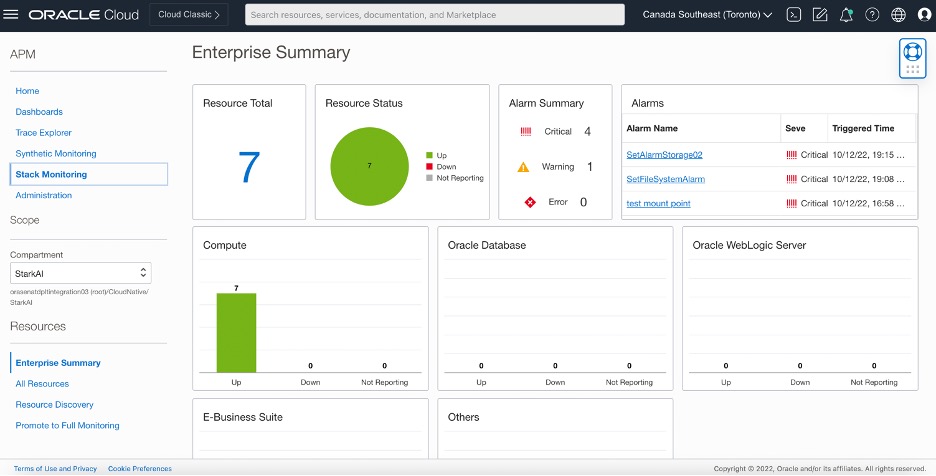
前述のスクリプト(1)または(2)が完了するまでに最大5分から10分かかる場合があります。OCIポータルにログインし、「ホーム」メニューの「監視および管理」、「スタック・モニタリング」にナビゲートします。「スタック・モニタリング」ページで使用可能なスタック・モニタリングと完全なダッシュボードを表示できます。プロモーション後、コンピュート・インスタンスのリソース・タイプはホストになります。
-
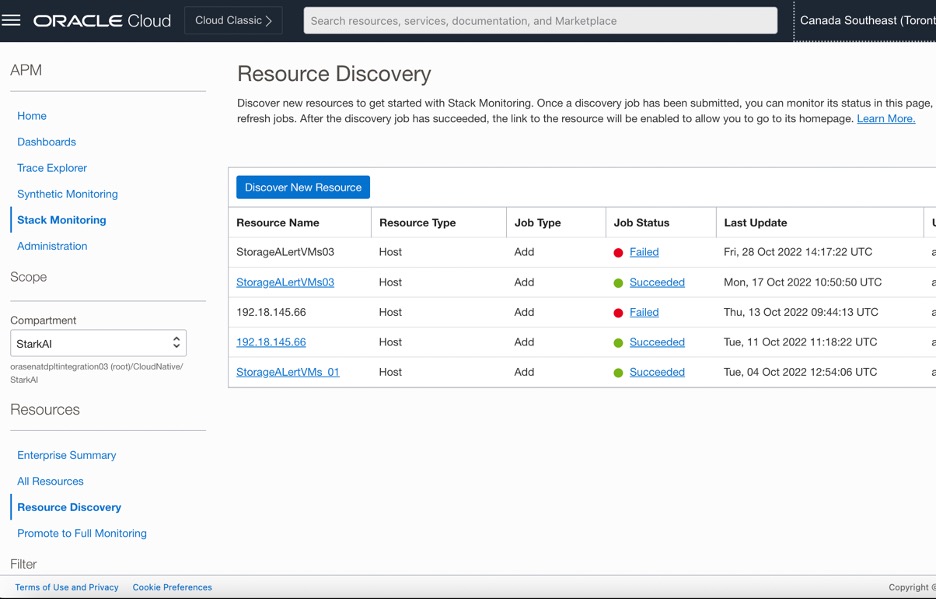
「リソース検出」の「プロモーション・ジョブ」のステータスを確認し、リソースの検出が成功したことを確認します。
-
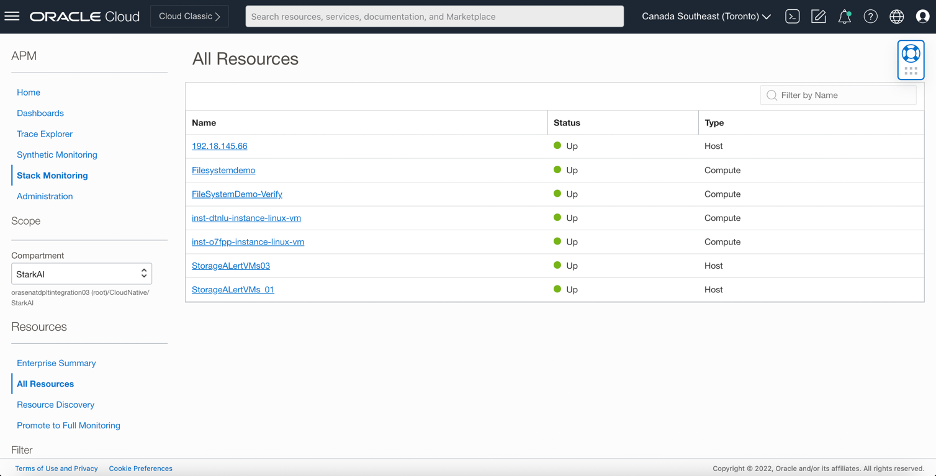
スタック・モニタリング・ダッシュボードで、リソース・ブロックを選択すると、モニタリングを有効にしたコンピュート・インスタンスおよびホストのリストが表示されます。
-
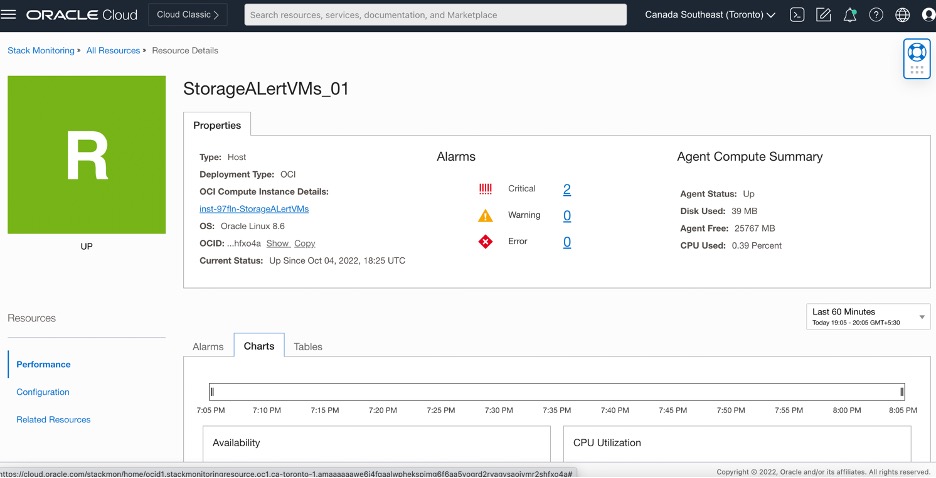
リストから目的のホストを選択すると、その特定のホストについて表示されるメトリックおよび表の詳細ビューが表示されます。
-
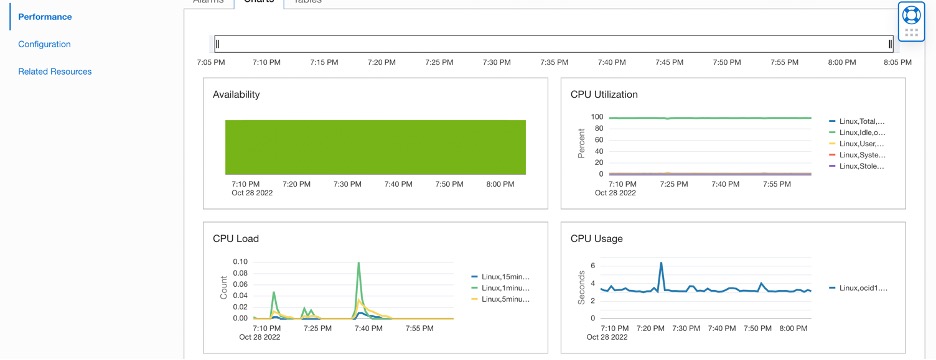
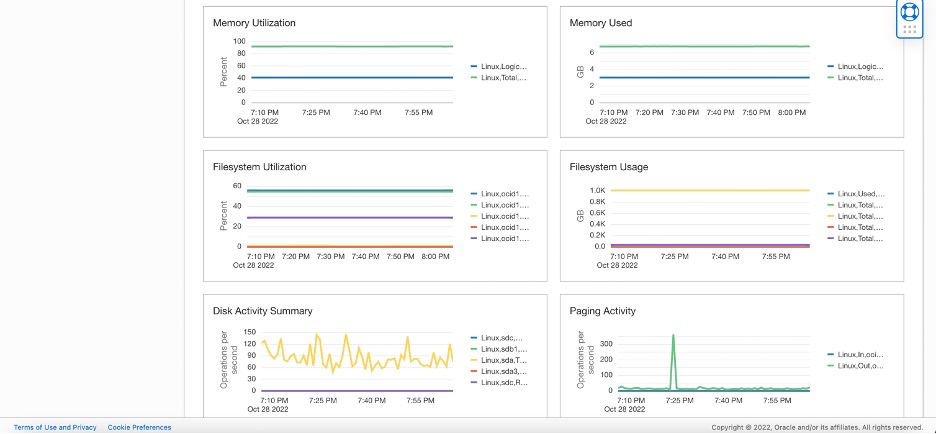
ホスト情報およびメトリックは、「リソース詳細」ページにチャートおよび表として表示されます。
-
「Filesystem Used (GB)」および「Filesystem Utilization (%)」を選択して、ホストに存在するストレージに関するより具体的な情報を取得できます。表ビューには、表スタイル/書式のすべてのメトリックが表示されます。
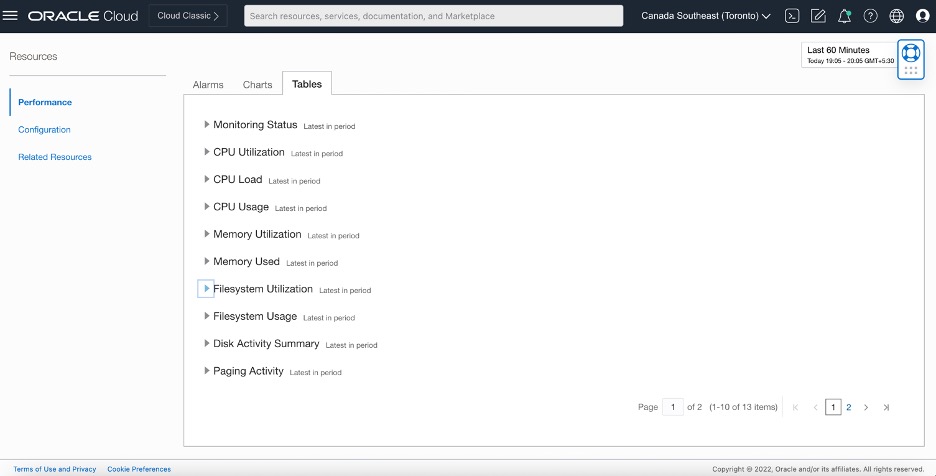
-
インスタンスの特定の情報を選択すると、GBのパーセンテージとストレージの両方に表示されます。ホスト・マシンに表示される各ファイルシステムは、マウント・ポイントを表形式で表します。
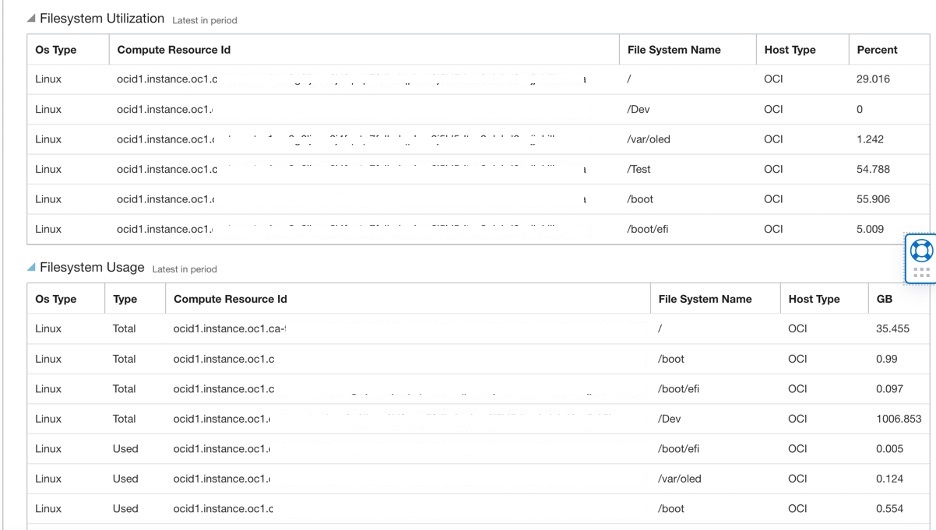
-
-
関連リンク
謝辞
- 著者 - Maninder Flora (クラウド・アーキテクト)、Akarsha I K (クラウド・アーキテクト)
その他の学習リソース
docs.oracle.com/learnで他のラボをご覧いただくか、Oracle Learning YouTubeチャネルでより無料のラーニング・コンテンツにアクセスしてください。また、education.oracle.com/learning-explorerにアクセスして、Oracle Learning Explorerになります。
製品ドキュメントについては、Oracle Help Centerを参照してください。
Automate OCI Stack Monitoring deployment for OCI Compute Instances
F76829-01
January 2023
Copyright © 2023, Oracle and/or its affiliates.