ノート:
- このチュートリアルでは、Oracle Cloudへのアクセスが必要です。無料アカウントにサインアップするには、Oracle Cloud Infrastructure Free Tierの開始を参照してください。
- Oracle Cloud Infrastructureの資格証明、テナンシおよびコンパートメントに例の値を使用します。演習を完了するときは、これらの値をクラウド環境に固有の値に置き換えます。
コールド・スタンバイ・トポロジ用のOCI CLIを使用したフル・スタック・ディザスタ・リカバリの自動化
イントロダクション
Oracle Cloud Infrastructure Full Stack Disaster Recovery (Full Stack DR)は、フルスタック・クラウド・アプリケーションのすべてのレイヤー(インフラストラクチャ、データベース、アプリケーションなど)に対して、完全に自動化された包括的なディザスタ・リカバリ・オーケストレーション・ソリューションを提供します。Full Stack DRを使用すると、OCIリージョン全体または同じリージョン内の複数の可用性ドメインにわたってフル・スタック・アプリケーションをリカバリできます。
Oracle Cloud Infrastructureコマンドライン・インタフェース(OCI CLI)は、Oracle Cloud Infrastructure (OCI)のタスクを実行するために、単独で使用することもOracle Cloudコンソールと一緒に使用できる、フットプリントの小さいツールです。コマンドライン・インタフェース(CLI)には、Oracle Cloudコンソールと同じコア機能と追加のコマンドがあります。スクリプトの実行など、これらの機能の一部。
CLIは、OCI SDK for Python上に構築され、Mac、WindowsまたはLinux上で実行されます。PythonコードがOracle Cloud Infrastructure APIをコールして、様々なサービスのために実装された機能を提供します。これらは、HTTPSリクエストおよびレスポンスを使用するREST APIです。
目的
コールド・スタンバイ・ディザスタ・リカバリ・トポロジのOCIコマンドライン・インタフェース(CLI)を使用して、フル・スタック・ディザスタ・リカバリのステップを自動化します。
-
プライマリおよびスタンバイ・リージョンにディザスタ・リカバリ(DR)保護グループを作成します。
-
DR保護グループの関連付け。
-
プライマリDR保護グループにメンバーを追加します。
-
スタンバイ・リージョンにスイッチオーバー計画を作成します。
-
ユーザー定義のプラン・グループでスイッチオーバー・プランをカスタマイズします。
-
スタンバイ・リージョンのスイッチオーバー計画の事前チェックを実行します。
-
スタンバイ・リージョンでスイッチオーバー計画を実行します。
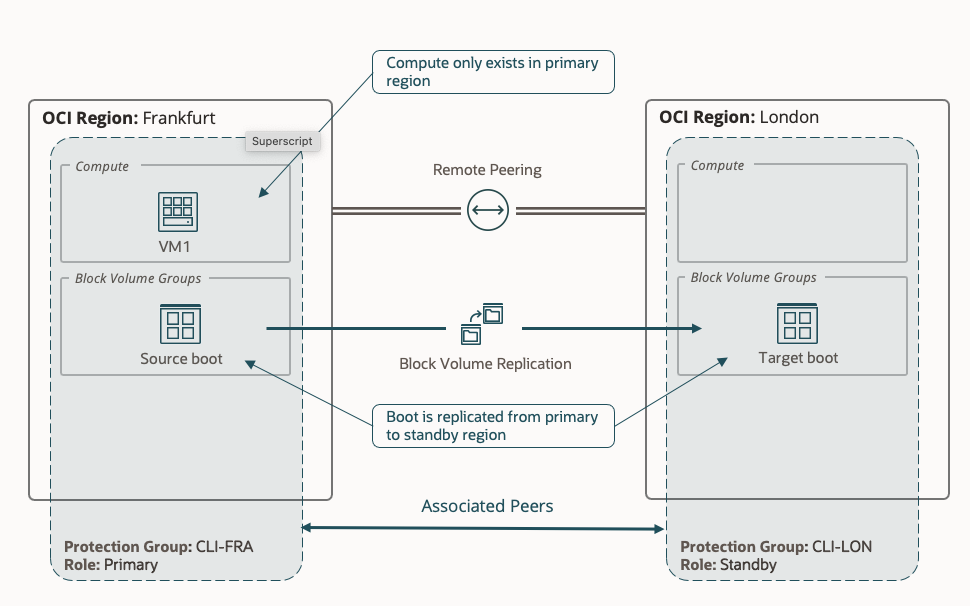
ノート: この例では、プライマリ・リージョンとしてFRANKFURTを使用し、スタンバイ・リージョンとしてLONDONを使用します。
デプロイメント・アーキテクチャ
前提条件
-
OCI CLIをインストールします。
-
管理者権限またはフル・スタック・ディザスタ・リカバリに必要なOCI Identity and Access Managementポリシーを構成します。詳細は、フル・スタック・ディザスタ・リカバリを使用するためのOCI IAMポリシーの構成およびフル・スタック・ディザスタ・リカバリのポリシーを参照してください。
-
ディザスタ・リカバリ操作ログを格納するために、プライマリ・リージョンおよびスタンバイ・リージョンにOracle Object Storageバケットを作成します(オブジェクト・ストレージを参照)。
-
プライマリ・リージョン(フランクフルト)にOCI Compute VMを作成します。詳細は、OCIコンピュートの作成を参照してください。
-
OCIコンピュート・インスタンスでのコマンドの実行。詳細は、OCIコンピュート・インスタンスでのコマンドの実行を参照してください。
-
Oracle Cloud Infrastructure Full Stack Disaster Recoveryを使用して実行コマンドを使用してカスタム・スクリプトを呼び出します。詳細は、フル・スタックDRを使用したOCI実行コマンドを参照してください。
実装
このチュートリアルでは、次のリソースをすでに作成しています。
| リソース | プライマリ・リージョン- フランクフルト |
|---|---|
| オブジェクト・ストレージ・バケット | FSDR_storage_primary_test |
| コンパートメント | sathish.mahadev |
| ネームスペース | frrudica1wgd |
| インスタンスmemberId | ocid1.インスタンス....................... |
| sourceVnicId | ocid1.vnic.oc1…………………… |
| リソース | スタンディ・リージョン- ロンドン |
|---|---|
| オブジェクト・ストレージ・バケット | FSDR_storage_secondary_test |
| コンパートメント | sathish.mahadev |
| ネームスペース | frrudica1wgd |
タスク1: プライマリおよびスタンバイ・リージョンでのDR保護グループの作成
-
ご使用のプラットフォームに基づいてOCI CLIをインストールしたと想定しています。OCI Linux VMにOCI CLIをインストールしました。OCI資格証明およびプロファイルを設定して、フランクフルト・リージョンに接続します。
-
次に、DR保護グループを作成するための構文を示します。
使用方法:
oci disaster-recovery dr-protection-group create [OPTIONS]必須パラメータ:
--compartment-id, -c [text]
--display-name [text]
--log-location [complex type]
これは複合型で、その値は有効なJSONである必要があります。
-
次の内容のJSONファイルを作成し、
log-location.JSONという名前を付けます。ファイルを優先場所に保存します。ファイルはOCI Linux VMの現在の作業ディレクトリに格納されています。{ "bucket": "FSDR_storage_primary_test", "namespace": "frrudica1wgd" } -
次のコマンドを使用して、フランクフルト・リージョンにDR保護グループを作成します。
oci disaster-recovery dr-protection-group create --compartment-id ocid1.compartment.oc1............ --display-name CLI_FSDR_Primary_test --log-location file://log-location.json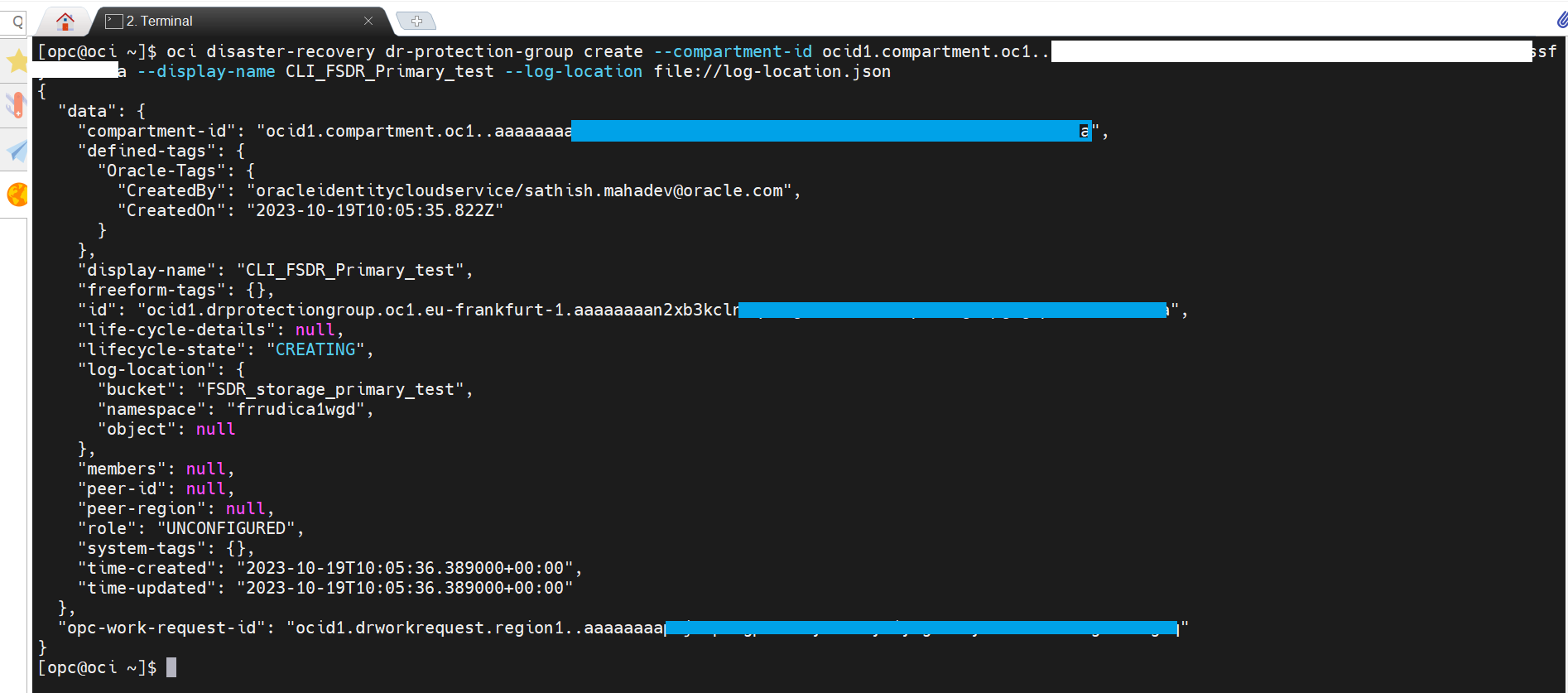
-
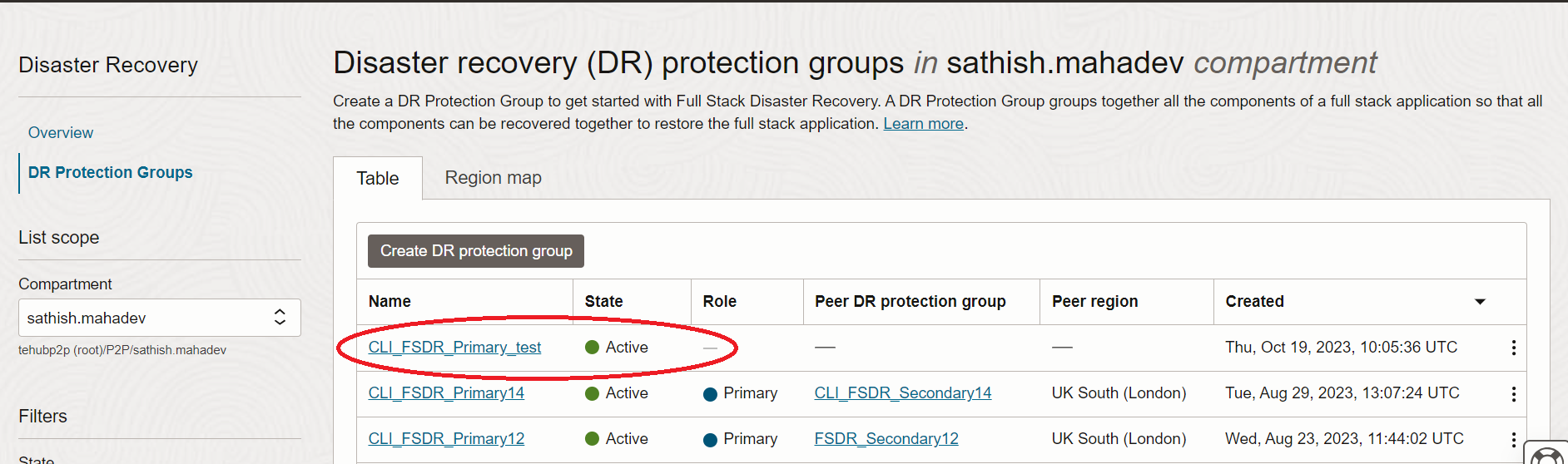
プライマリ・リージョン(フランクフルト)でDR保護グループの詳細を確認し、「ハンバーガー」メニューをクリックして、「移行とディザスタ・リカバリ」、「ディザスタ・リカバリ」および「ディザスタ・リカバリ保護グループ」に移動します。DR保護グループのステータスは「アクティブ」である必要があります。
-
OCI資格証明およびプロファイルを設定して、ロンドン・リージョンに接続します。次の内容のJSONファイルを作成し、
log-sec-location.JSONという名前を付けます。ファイルを優先場所に保存します。ファイルはOCI Linux VMの現在の作業ディレクトリに格納されています。{ "bucket": "FSDR_storage_secondary_test", "namespace": "frrudica1wgd" } -
次のコマンドを使用して、ロンドン・リージョンにDR保護グループを作成します。
oci disaster-recovery dr-protection-group create --compartment-id ocid1.compartment.oc1............ --display-name CLI_FSDR_Secondry_test --log-location file://log-sec-location.json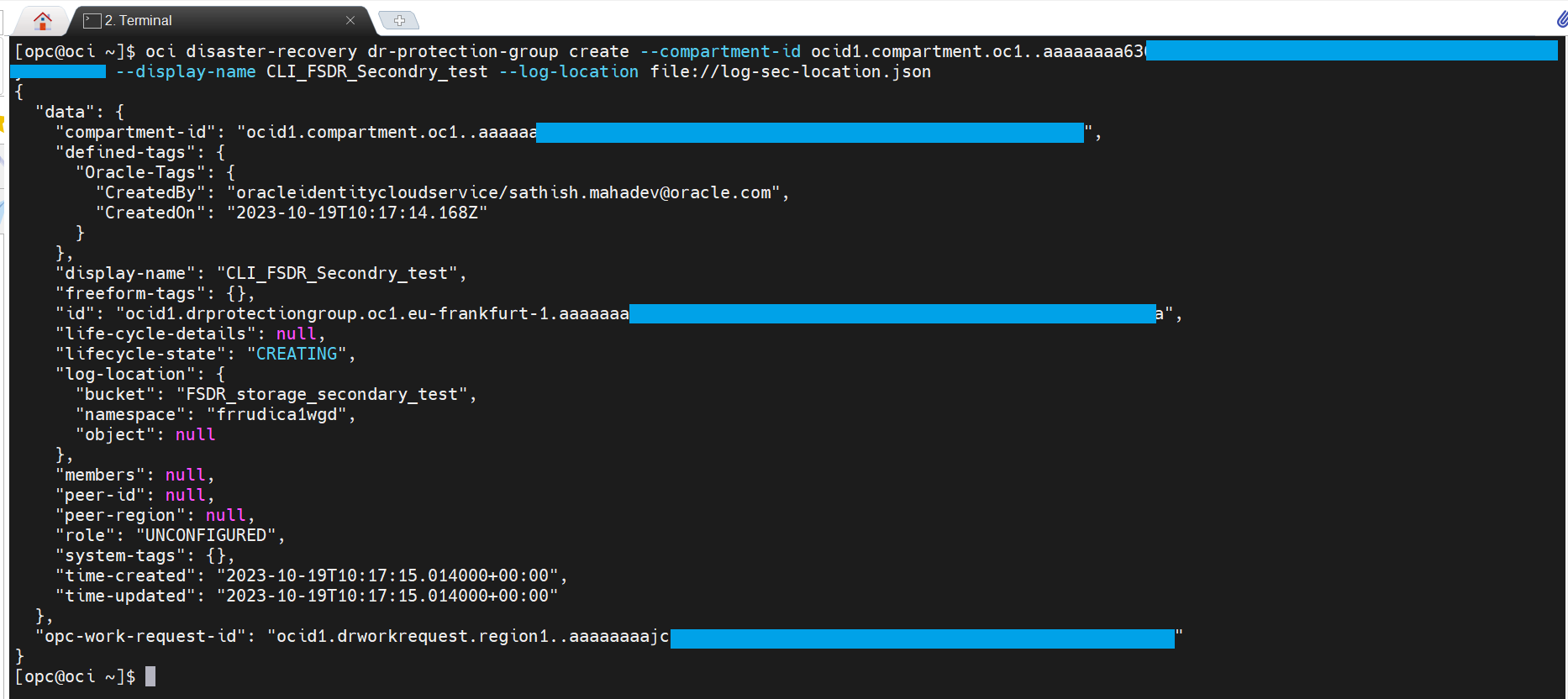
-
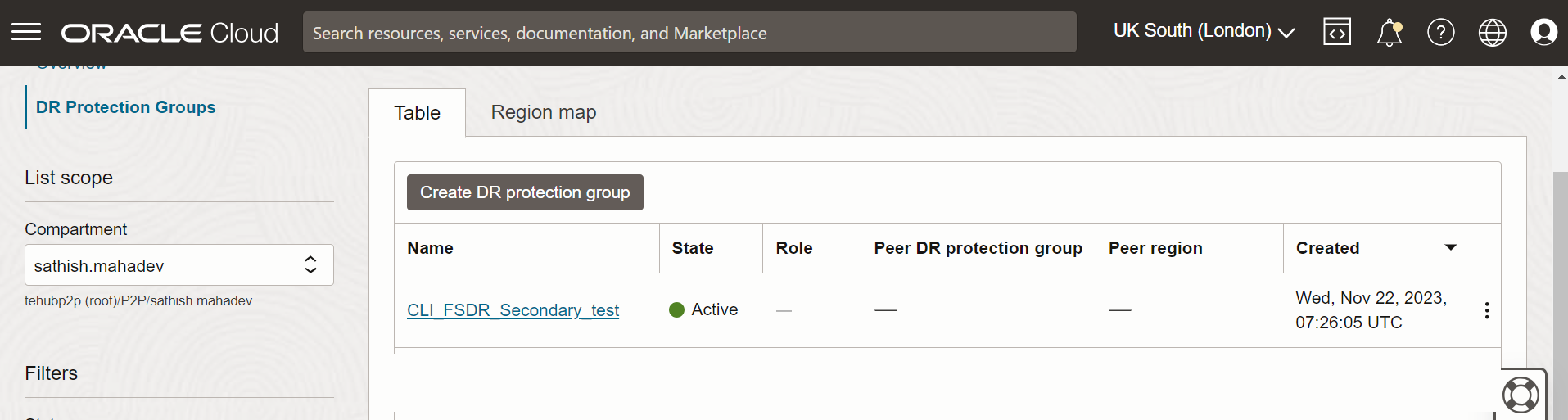
スタンバイ・リージョン(ロンドン)でDR保護グループの詳細を確認し、「ハンバーガー」メニューをクリックして、「移行とディザスタ・リカバリ」、「ディザスタ・リカバリ」、「ディザスタ・リカバリ保護グループ」に移動します。DR保護グループのステータスは「アクティブ」である必要があります。
タスク2: DR保護グループの関連付け
-
DR保護グループを関連付ける構文を次に示します。
使用方法:
oci disaster-recovery dr-protection-group associate [OPTIONS]必須パラメータ:
--dr-protection-group-id [text] --role [text] --peer-id [text] --peer-region [text] -
次の内容のJSONファイルを作成し、
AssociateDrProtection.JSONという名前を付けます。ファイルを優先場所に保存します。ファイルはOCI Linux VMの現在の作業ディレクトリに格納されています。{ "peerRegion": "uk-london-1", "peerId": "ocid1.drprotectiongroup.oc1.uk................................", "role": "PRIMARY" } -
次のコマンドを使用して、2つのリージョン間のアソシエーションを作成します。
oci disaster-recovery dr-protection-group associate --dr-protection-group-id ocid1.drprotectiongroup.oc1............ --from-json file://AssociateDrProtection.json
-
プライマリ・リージョン:
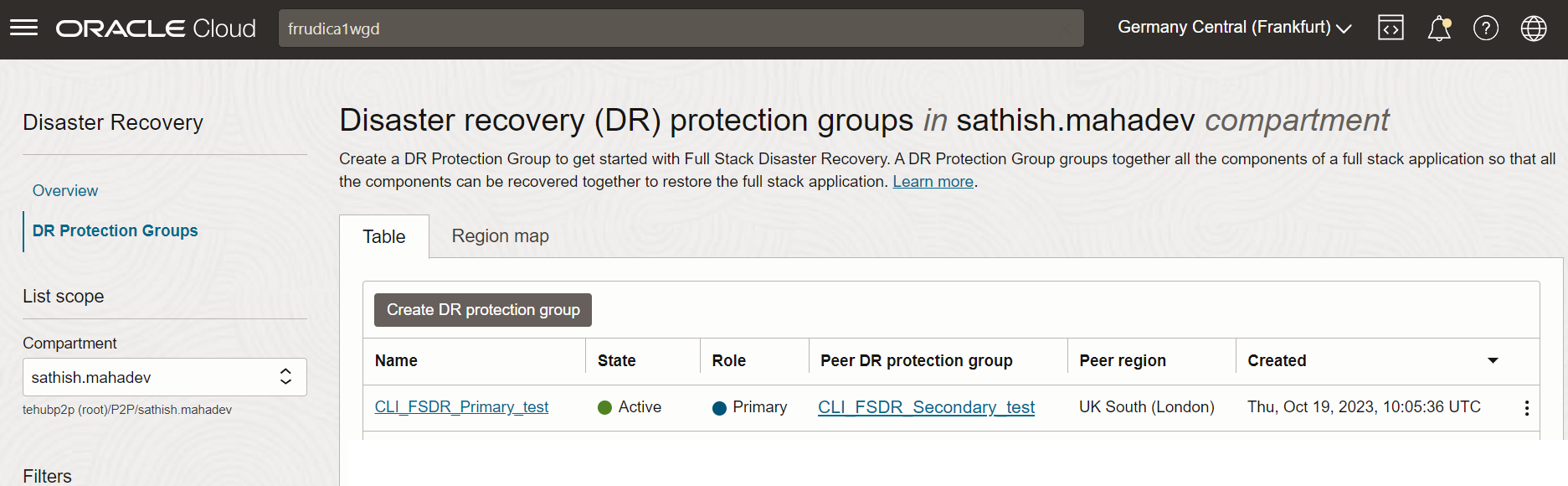
プライマリ・リージョン(フランクフルト)の2つのリージョン間のアソシエーションを確認し、「ハンバーガー」メニューをクリックして、「移行とディザスタ・リカバリ」、「ディザスタ・リカバリ保護グループ」に移動します。DR保護グループのステータスは「アクティブ」である必要があります。
-
スタンバイ・リージョン:
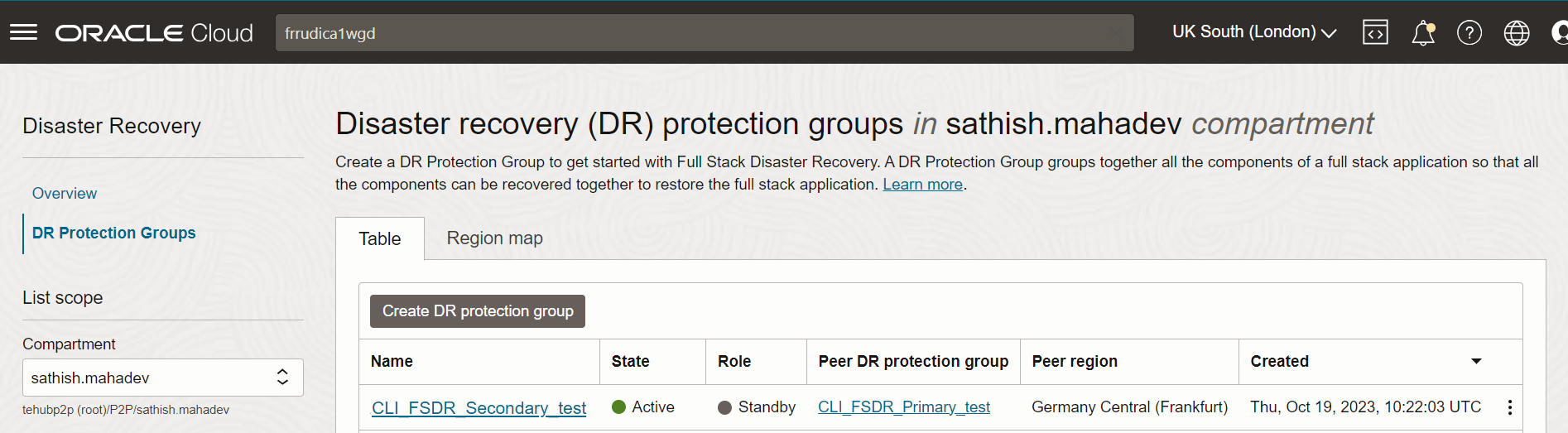
スタンバイ・リージョン(フランクフルト)の2つのリージョン間のアソシエーションを検証し、「ハンバーガー」メニューをクリックして、「移行とディザスタ・リカバリ」、「ディザスタ・リカバリ保護グループ」に移動します。DR保護グループのステータスは「アクティブ」である必要があります。
-
タスク3: DR保護グループへのメンバーの追加
前提条件
-
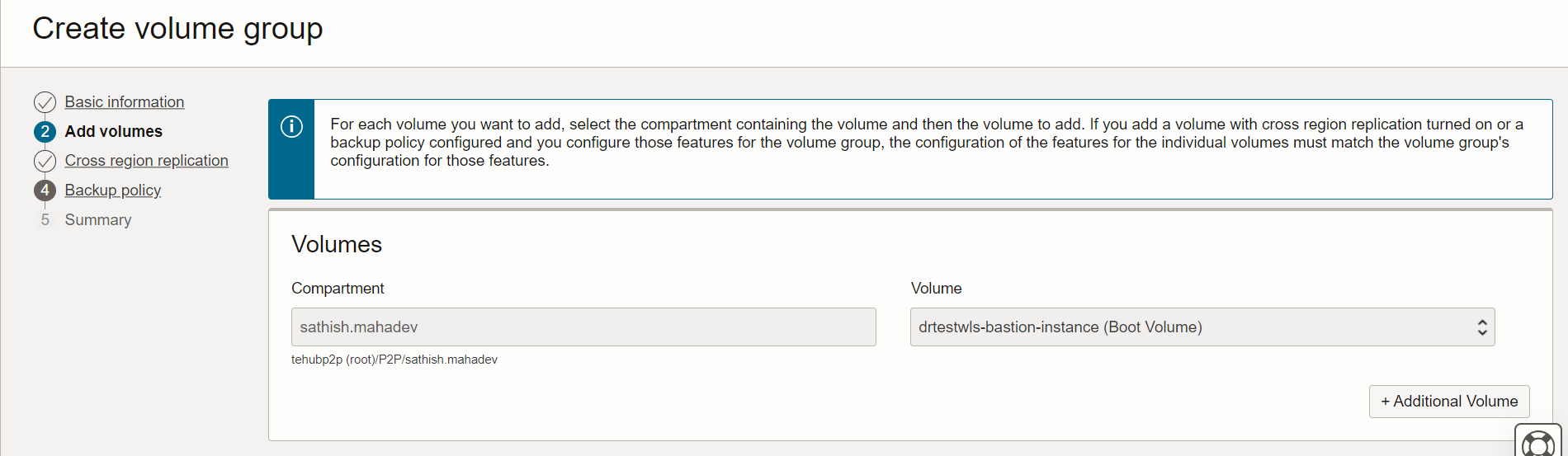
新規ボリューム・グループ
fsdr_volume_group_testを作成します。プライマリ・リージョン(フランクフルト)で新しいボリューム・グループ詳細を作成し、「ハンバーガー」メニューをクリックして、「ストレージ」、「ボリューム・グループおよびボリュームの作成グループ」に移動します。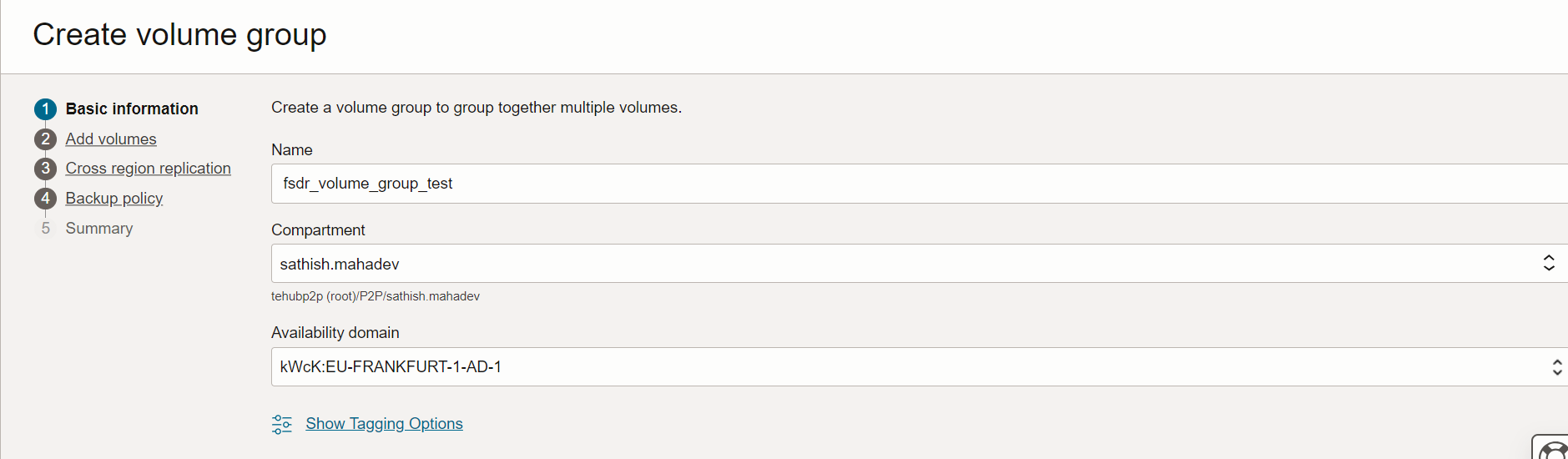
-
コンピュート・インスタンスのブート・ボリュームおよびブロック・ボリュームを選択します。この場合、コンピュート・インスタンスのブート・ボリュームしかありません。
-
クロス・リージョン・レプリケーションおよびターゲット・リージョンを有効にします。
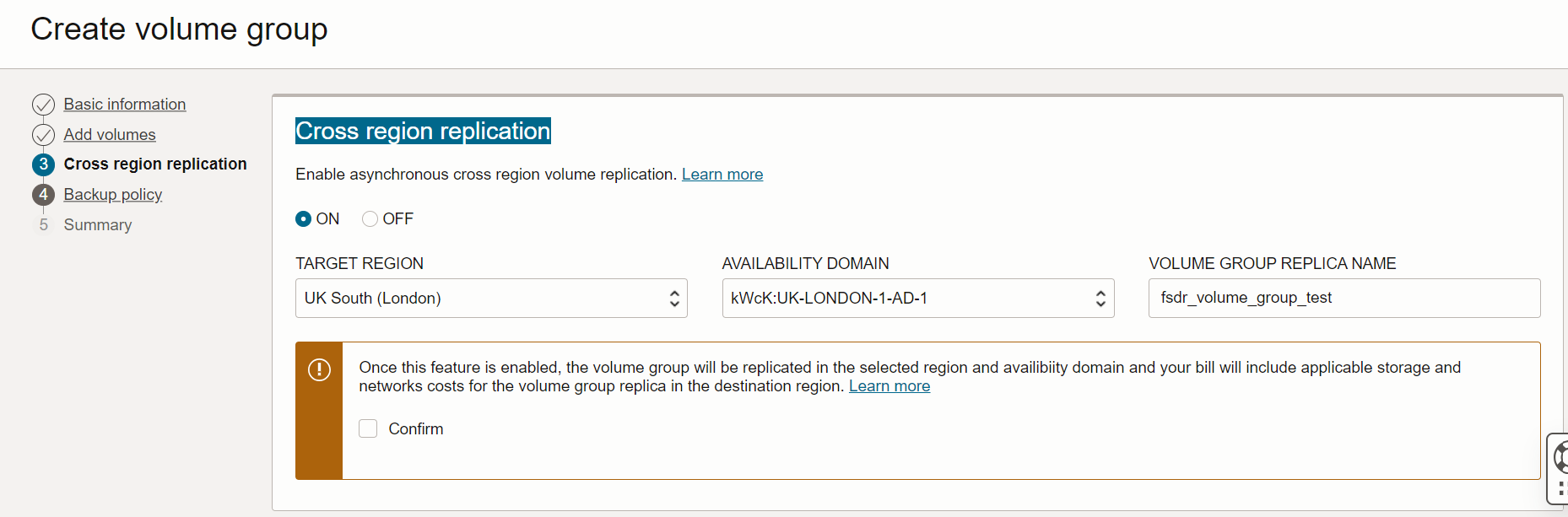
あるリージョンから別のリージョンへのリソースの移動に必要な詳細 インスタンスOCID ocid1.インスタンス............. ソースVNIC ID ocid1.vnic.oc1…………. 宛先のコンパートメントID ocid1.compartment.oc1………….. ボリューム・グループOCID ocid1.volumegroup.oc1………….
-
次に、DR保護グループにメンバーを追加する構文を示します。
使用方法:
oci disaster-recovery dr-protection-group update [OPTIONS]必須パラメータ:
--dr-protection-group-id [text] --members -
次の内容のJSONファイルを作成し、
instance_members.JSONという名前を付けます。ファイルを優先場所に保存します。ファイルはOCI Linux VMの現在の作業ディレクトリに格納されています。インスタンスの移動に関する拡張オプションがある場合は、必要なプロパティを追加します。DR保護グループにメンバー(コンピュートおよびボリューム・グループ)を追加するJSONファイル。
{ "displayName": "CLI_FSDR_Primary", "members": [ { "memberId": "ocid1.instance.oc1....................................", "memberType": "COMPUTE_INSTANCE", "isMovable": true, "vnicMapping": [ { "sourceVnicId": "ocid1.vnic.oc1................................", "destinationSubnetId": "ocid1.subnet.oc1........................" } ], "destinationCompartmentId": "ocid1.compartment.oc1...................." }, { "memberId": "ocid1.volumegroup.oc1...................................", "memberType": "VOLUME_GROUP" }], "logLocation": { "bucket": "FSDR_storage_primary", "namespace": "frrudixxxxx" } } -
次のコマンドを使用して、DRPGにメンバーを追加します。
oci disaster-recovery dr-protection-group update --dr-protection-group-id ocid1.drprotectiongroup.oc1..................................... --from-json file://instance_members.json --force --debug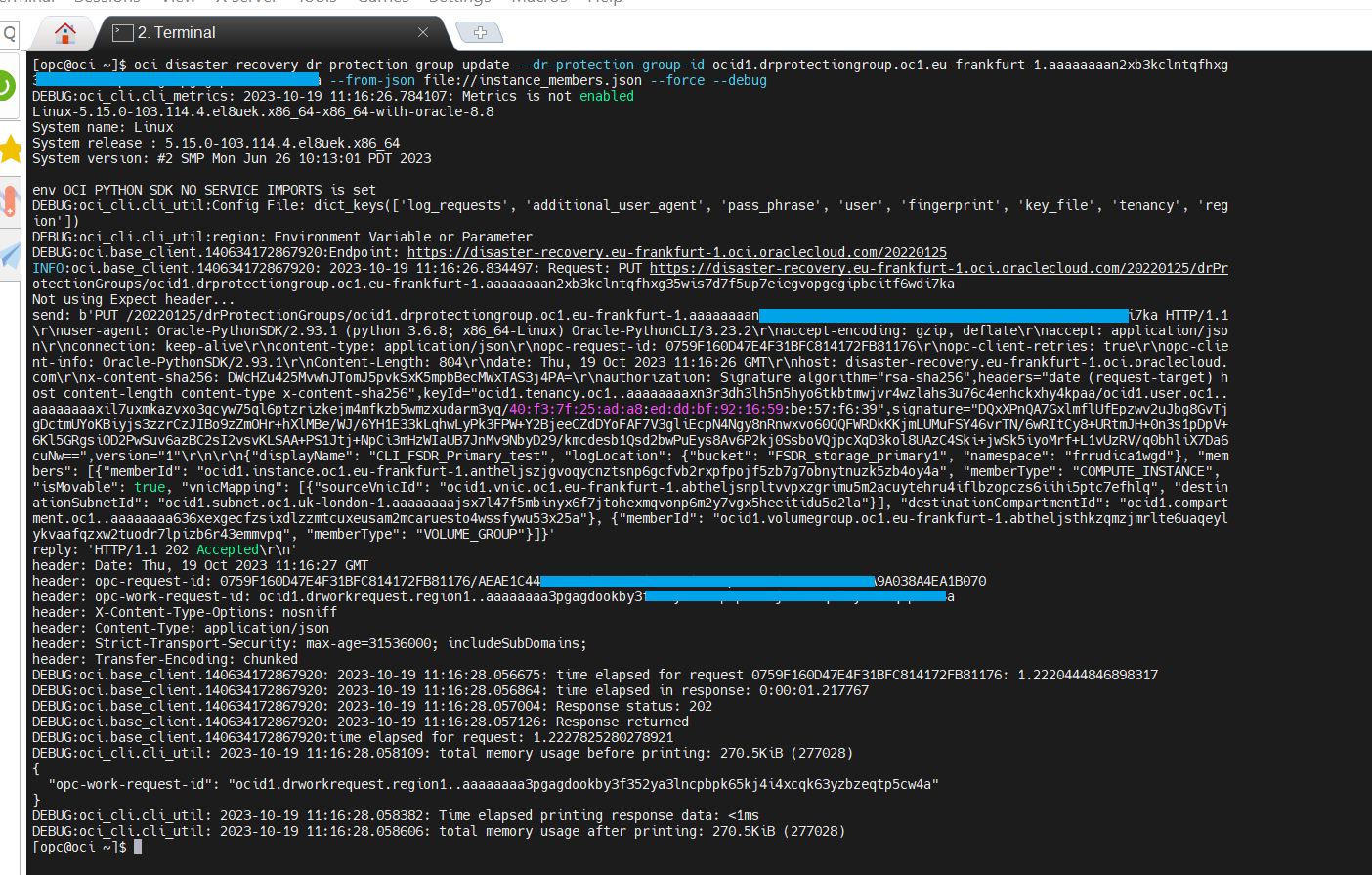
-
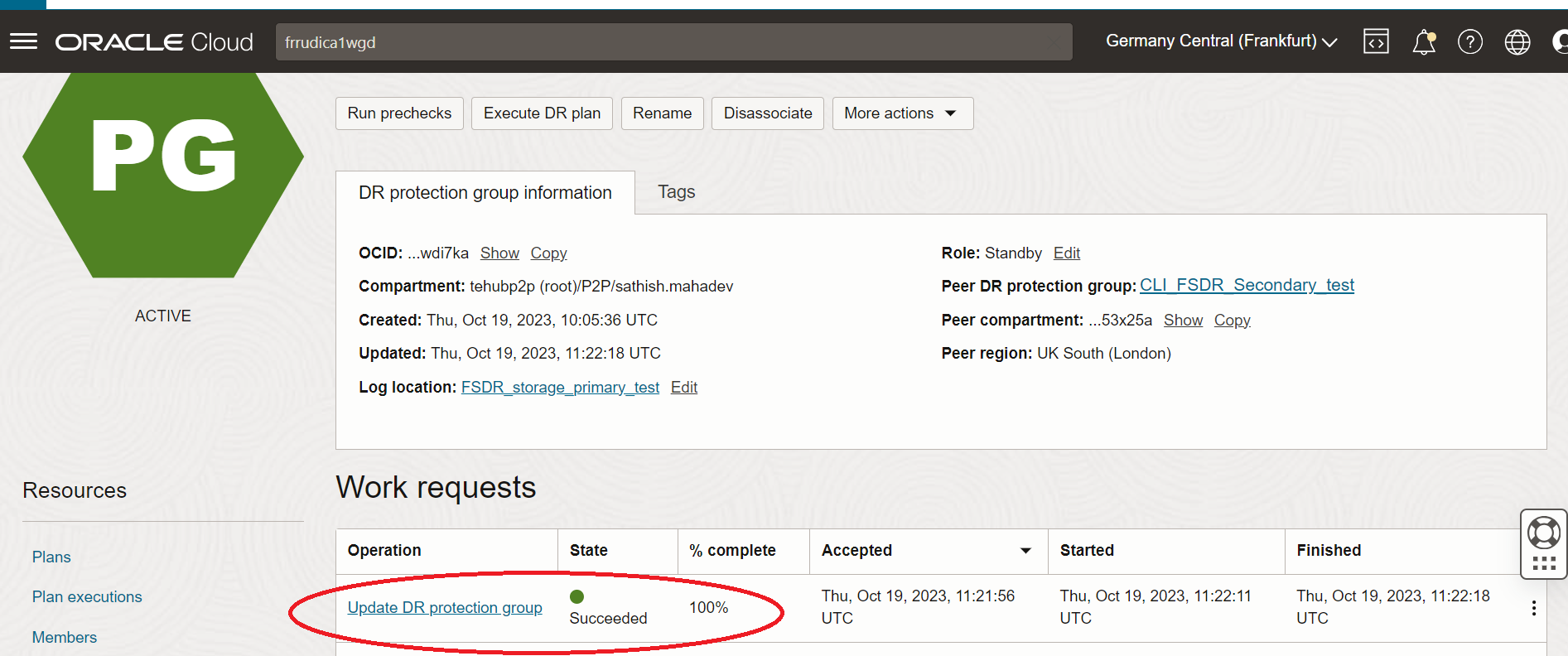
プライマリ・リージョン(フランクフルト)でDRPG作業リクエスト・ステータスの更新を確認し、「ハンバーガー」メニューをクリックして、「移行とディザスタ・リカバリ」、「ディザスタ・リカバリ保護グループ」に移動し、CLI_FSDR_Primary_testを選択して「作業リクエスト」をクリックします。
-
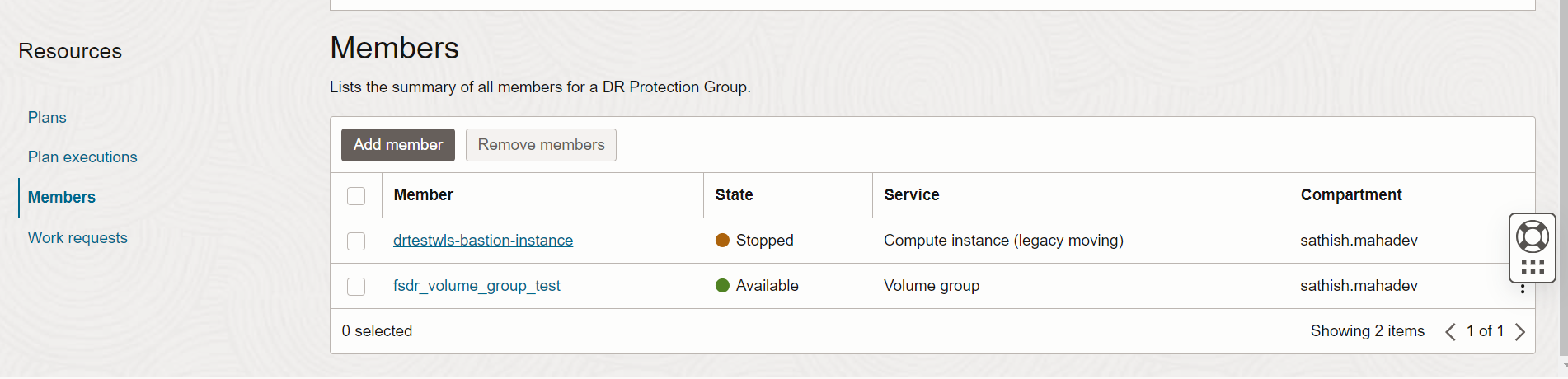
プライマリ・リージョン(フランクフルト)DRPGでコンピュートおよびボリューム・グループ・リソースが正常に追加されたことを確認し、「ハンバーガー」メニューをクリックして、「移行およびディザスタ・リカバリ」、「ディザスタ・リカバリ保護グループ」に移動し、CLI_FSDR_Primary_testを選択して「メンバー」をクリックします。
タスク4: スタンバイ・リージョンでのスイッチオーバー計画の作成
-
スイッチオーバー計画を作成するための構文を次に示します。
使用方法:
oci disaster-recovery dr-plan create [OPTIONS]必須パラメータ:
--dr-protection-group-id [text] --display-name [text] --type [text] -
次の内容のJSONファイルを作成し、
CreateDrPlan.JSONという名前を付けます。ファイルを優先場所に保存します。ファイルはOCI Linux VMの現在の作業ディレクトリに格納されています。{ "drProtectionGroupId": "ocid1.drprotectiongroup...........................", "displayName": "My_OCI_DR_Plan", "type": "SWITCHOVER" } -
次のコマンドを使用して、スイッチオーバー計画を作成します。
oci disaster-recovery dr-plan create --dr-protection-group-id ocid1.drprotectiongroup.oc1..................................... --from-json file://CreateDrPlan.json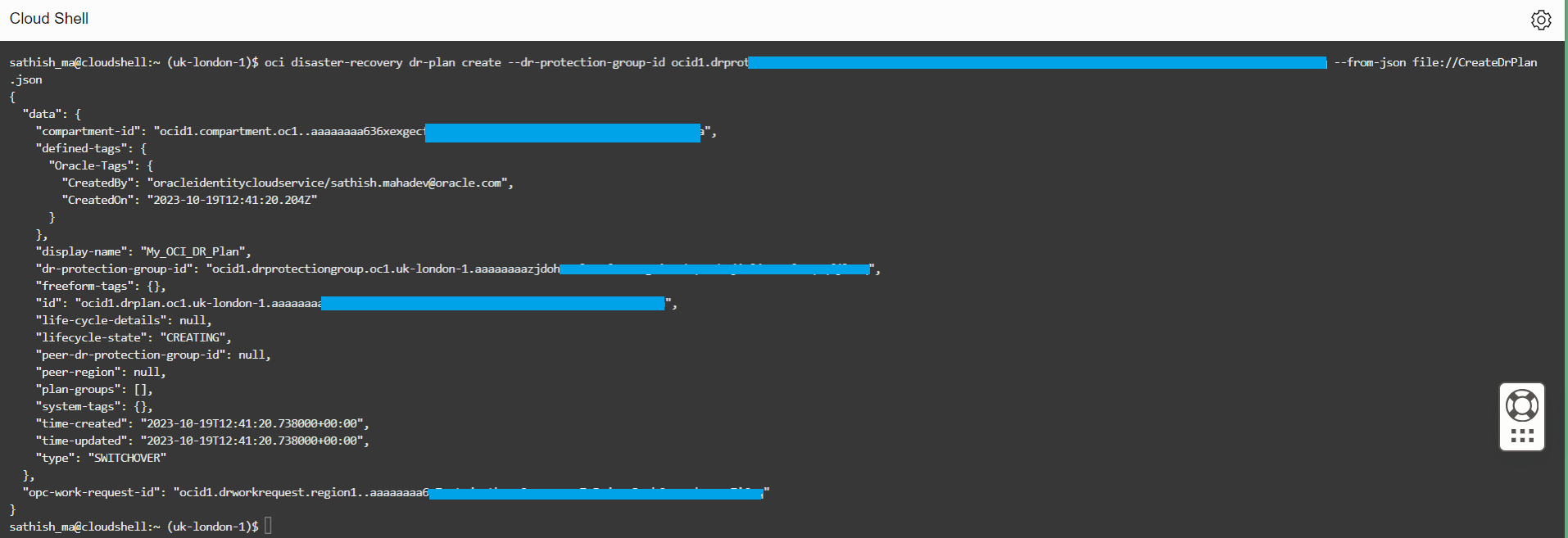
-
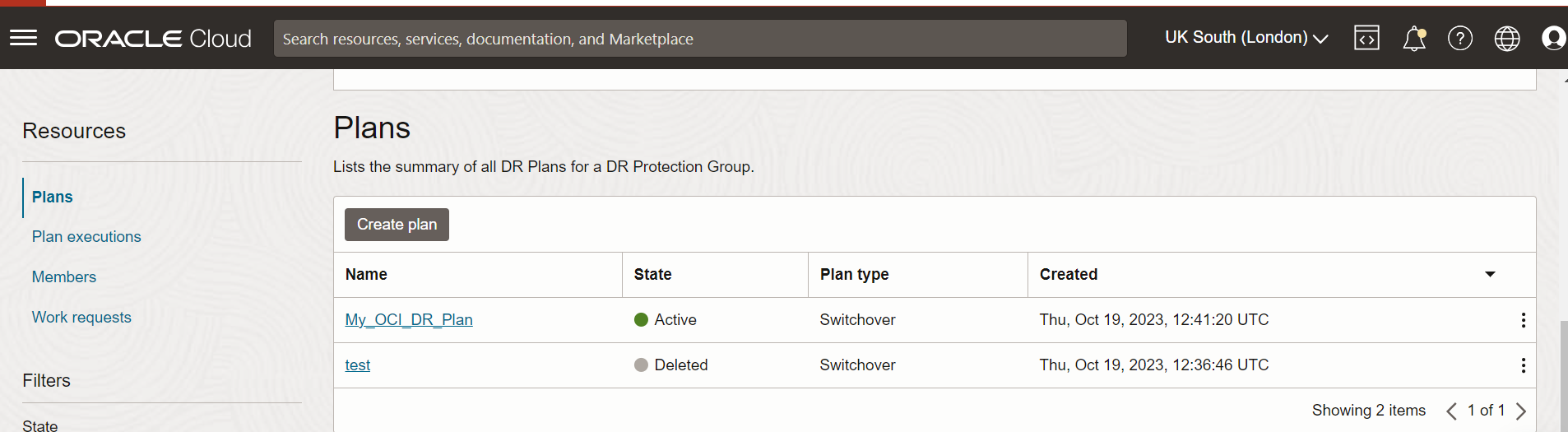
スタンバイ・リージョン(ロンドン)でDR計画を確認し、「ハンバーガー」メニューをクリックして、「移行とディザスタ・リカバリ」、CLI_storage_secondary_testおよび「プラン」に移動します。
タスク5: ユーザー定義のプラン・グループによるスイッチオーバー・プランのカスタマイズ
-
Full Stack DRでは、ユーザー定義の計画グループを作成して、タスク4で作成した
drPlanIdで識別されるDR計画のDR plans.Getの詳細をカスタマイズできます。oci disaster-recovery dr-plan get --dr-plan-id ocid1.drplan.oc1......... > dr-plan-get.jsonこれにより、OCI Linux VMの現在の作業ディレクトリに次の内容を含む
dr-plan-get.JSONというJSONファイルが作成されます。{ "data": { "compartment-id": "ocid1.compartment.oc1................................", "defined-tags": { "Oracle-Tags": { "CreatedBy": "oracleidentitycloudservice/sathish.mahadev@oracle.com", "CreatedOn": "2023-11-23T09:22:09.222Z" } }, "display-name": "My OCI DR Plan", "dr-protection-group-id": "ocid1.drprotectiongroup.oc1.................", "freeform-tags": {}, "id": "ocid1.drplan.oc1.eu-frankfurt-1.aaaaaaaacmfg3v..................", "life-cycle-details": null, "lifecycle-state": "ACTIVE", "peer-dr-protection-group-id": "ocid1.drprotectiongroup.oc1............", "peer-region": "uk-london-1", "plan-groups": [ { "display-name": "Built-In Prechecks", "id": "sgid1.group..AwplAFAmPMSjruIpY8m2cw4v.......................", "steps": [ { "display-name": "drtestwls-bastion-instance", "error-mode": "STOP_ON_ERROR", "group-id": "sgid1.group..AwplAFAmPMvn4IpY8m...................", "id": "sgid1.step..PO9O2GisLb05WkUKebi4Hofc0...................", "is-enabled": true, "member-id": "ocid1.instance.oc1.uk-london-1...................", "timeout": 3600, "type": "COMPUTE_INSTANCE_LAUNCH_PRECHECK", "user-defined-step": null }, { "display-name": "drtestwls-bastion-instance", "error-mode": "STOP_ON_ERROR", "group-id": "sgid1.group..AwplAFAmPMSjrPIH1zlApY...............", "id": "sgid1.step..IwKsQfyM6w78JcvklS2JulU2GdH6l...............", "is-enabled": true, "member-id": "ocid1.instance.oc1.uk-london-1.anw...............", "timeout": 3600, "type": "COMPUTE_INSTANCE_REMOVE_PRECHECK", "user-defined-step": null }, { "display-name": "drtestwls-bastion-instance", "error-mode": "STOP_ON_ERROR", "group-id": "sgid1.group..AwplAFAmPMm2cw4v.....................", "id": "sgid1.step..XASO1rLLQkrsOUPN............................", "is-enabled": true, "member-id": "ocid1.instance.oc1...............................", "timeout": 3600, "type": "COMPUTE_INSTANCE_STOP_PRECHECK", "user-defined-step": null }, { "display-name": "fsdr_volume_group_test", "error-mode": "STOP_ON_ERROR", "group-id": "sgid1.group..AwplAFAmpY8m2cw4v....................", "id": "sgid1.step..VcHYP3vKNNTrg0gMYuw.........................", "is-enabled": true, "member-id": "ocid1.volumegroup.oc1............................", "timeout": 3600, "type": "UNKNOWN_ENUM_VALUE", "user-defined-step": null }, { "display-name": "fsdr_volume_group_test", "error-mode": "STOP_ON_ERROR", "group-id": "sgid1.group..AwplAFAmPY8m2cw4v....................", "id": "sgid1.step..wRdVq2t2d9It8P5TT2CvpMN7sy496o..............", "is-enabled": true, "member-id": "ocid1.volumegroup.oc1............................", "timeout": 3600, "type": "VOLUME_GROUP_RESTORE_SWITCHOVER_PRECHECK", "user-defined-step": null } ], "type": "BUILT_IN_PRECHECK" }, { "display-name": "Stop Compute Instances", "id": "sgid1.group..XEqWbSZn72MsIKfPAPh2cdBah9.....................", "steps": [ { "display-name": "drtestwls-bastion-instance", "error-mode": "STOP_ON_ERROR", "group-id": "sgid1.group..XEqWbSZn72MsIKfP.....................", "id": "sgid1.step..GhvhuUwDXmyqaJe15ZrFc7......................", "is-enabled": true, "member-id": "ocid1.instance.oc1...............................", "timeout": 3600, "type": "COMPUTE_INSTANCE_STOP", "user-defined-step": null } ], "type": "BUILT_IN" }, { "display-name": "Switchover Volume Groups", "id": "sgid1.group..32adaPzUEQ7aH1uDWQ5VM1j........................", "steps": [ { "display-name": "fsdr_volume_group_test", "error-mode": "STOP_ON_ERROR", "group-id": "sgid1.group..32adaPzUEQ7aH........................", "id": "sgid1.step..ef9UNZtJ1rZIbAmW7aZK........................", "is-enabled": true, "member-id": "ocid1.volumegroup.oc1............................", "timeout": 3600, "type": "VOLUME_GROUP_RESTORE_SWITCHOVER", "user-defined-step": null } ], "type": "BUILT_IN" }, { "display-name": "Launch Compute Instances", "id": "sgid1.group..5hcYKKlYTRiBwIDJcbt............................", "steps": [ { "display-name": "drtestwls-bastion-instance", "error-mode": "STOP_ON_ERROR", "group-id": "sgid1.group..5hcYKKlYT............................", "id": "sgid1.step..woJnsXF5wTpY3uf6M...........................", "is-enabled": true, "member-id": "ocid1.instance.oc1...............................", "timeout": 3600, "type": "COMPUTE_INSTANCE_LAUNCH", "user-defined-step": null } ], "type": "BUILT_IN" }, { "display-name": "Reverse Volume Groups' Replication", "id": "sgid1.group..zPThgbBHnakEowbozz57EWGg.......................", "steps": [ { "display-name": "fsdr_volume_group_test", "error-mode": "STOP_ON_ERROR", "group-id": "sgid1.group..zPThgbBHnakEo........................", "id": "sgid1.step..w5n1aGHFGCCWGtkfbm9U........................", "is-enabled": true, "member-id": "ocid1.volumegroup.oc1............................", "timeout": 3600, "type": "VOLUME_GROUP_REVERSE", "user-defined-step": null } ], "type": "BUILT_IN" }, { "display-name": "Terminate Compute Instances", "id": "sgid1.group..dfo08HuDTUIdkpt5l..............................", "steps": [ { "display-name": "drtestwls-bastion-instance", "error-mode": "STOP_ON_ERROR", "group-id": "sgid1.group..dfo08H...............................", "id": "sgid1.step..7SMxaezWR5lYX...............................", "is-enabled": false, "member-id": "ocid1.instance.oc1...............................", "timeout": 3600, "type": "COMPUTE_INSTANCE_TERMINATE", "user-defined-step": null } ], "type": "BUILT_IN" }, { "display-name": "Remove Compute Instances from DR Protection Group", "id": "sgid1.group..pOeXUaXGLb1uhTQRwSJEB4.........................", "steps": [ { "display-name": "drtestwls-bastion-instance", "error-mode": "STOP_ON_ERROR", "group-id": "sgid1.group..pOeXUaXGLb1uhT.......................", "id": "sgid1.step..WilcZMUCDF42M0dhABNy........................", "is-enabled": true, "member-id": "ocid1.instance.oc1...............................", "timeout": 3600, "type": "COMPUTE_INSTANCE_REMOVE", "user-defined-step": null } ], "type": "BUILT_IN" }, { "display-name": "Terminate Volume Groups", "id": "sgid1.group..FfcGwUBiibLFaYFfcnmHv2Q591.....................", "steps": [ { "display-name": "fsdr_volume_group_test", "error-mode": "STOP_ON_ERROR", "group-id": "sgid1.group..FfcGwUBiibLFaY.......................", "id": "sgid1.step..wipkZ4tXRQaIxJ0bAWzOI.......................", "is-enabled": false, "member-id": "ocid1.volumegroup.oc1............................", "timeout": 3600, "type": "VOLUME_GROUP_TERMINATE", "user-defined-step": null } ], "type": "BUILT_IN" }, { "display-name": "Remove Volume Groups from DR Protection Group", "id": "sgid1.group..RWQ1nwbf6JkIir5vMOgz0frx.......................", "steps": [ { "display-name": "fsdr_volume_group_test", "error-mode": "STOP_ON_ERROR", "group-id": "sgid1.group..RWQ1nwbf6JkIir.......................", "id": "sgid1.step..7bPFQyPkxXU4zaywzFNfp.......................", "is-enabled": true, "member-id": "ocid1.volumegroup.oc1............................", "timeout": 3600, "type": "VOLUME_GROUP_REMOVE", "user-defined-step": null } ], "type": "BUILT_IN" } ], "system-tags": {}, "time-created": "2023-11-23T09:22:09.690000+00:00", "time-updated": "2023-11-24T06:25:43.748000+00:00", "type": "SWITCHOVER" }, "etag": "b73b71668a7f52474c4c7df9c779d9c7aae77c27109be--gzip" } -
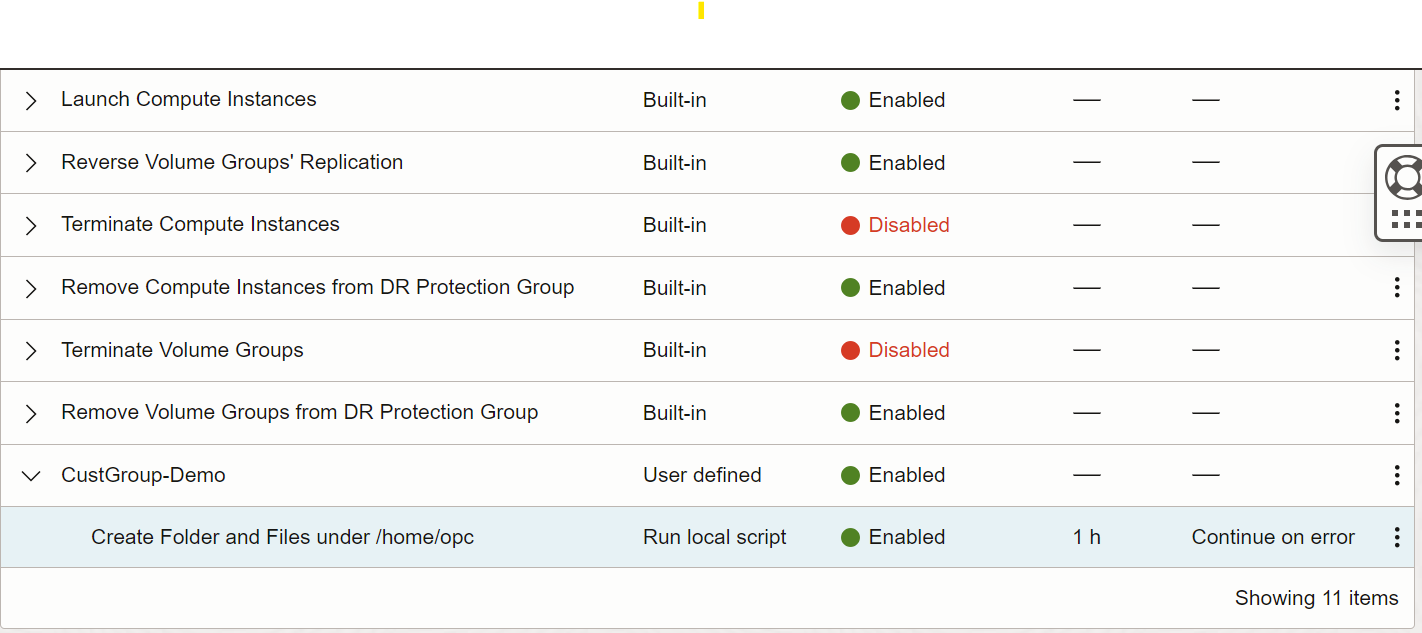
フル・スタックDRによって組込みグループおよびステップを含む初期DR計画が作成された後、ユーザー定義グループおよびステップをディザスタ・リカバリ(DR)計画に追加できます。スクリプトまたはOCI関数をユーザー定義ステップの一部として使用できます。詳細は、OCIフル・スタック・ディザスタ・リカバリのユーザー定義プラン・グループを参照してください。ユーザー定義計画グループは、組込み事前チェック計画グループの後にDR計画の任意の場所に配置できます。このチュートリアルでは、ユーザー定義プラン・グループ(CustGroup-Demo)を追加して、プランの終わりを追加します。このステップでは、ロンドン・リージョンでコンピュート・インスタンスが起動されると、単純なシェル・スクリプトを使用してフォルダおよびファイルを作成します。
-
前のステップで作成した
dr-plan-get.jsonを更新して、ファイル・コンテンツの最後にステップがあるユーザー定義プラン・グループを既存のプラン・グループに追加し、ファイルdr-plan-get.jsonの名前をdr-plan-get_updated.jsonに変更します。最後に、新しいユーザー定義グループを追加すると、JSONファイルが次のようになります。
[ { "display-name": "Built-In Prechecks", "id": "sgid1.group..AwplAFAmPMSjrPIH1zlAIqu....................", "steps": [ { "display-name": "drtestwls-bastion-instance", "error-mode": "STOP_ON_ERROR", "group-id": "sgid1.group..AwplAFAmP....................", "id": "sgid1.step..PO9O2GisLb05WkUKeb..................", "is-enabled": true, "member-id": "ocid1.instance.oc1.......................", "timeout": 3600, "type": "COMPUTE_INSTANCE_LAUNCH_PRECHECK", "user-defined-step": null }, { "display-name": "drtestwls-bastion-instance", "error-mode": "STOP_ON_ERROR", "group-id": "sgid1.group..AwplAFAmPMSj.................", "id": "sgid1.step..IwKsQfyM6w78JcvklS2.................", "is-enabled": true, "member-id": "ocid1.instance.oc1.......................", "timeout": 3600, "type": "COMPUTE_INSTANCE_REMOVE_PRECHECK", "user-defined-step": null }, { "display-name": "drtestwls-bastion-instance", "error-mode": "STOP_ON_ERROR", "group-id": "sgid1.group..AwplAFAmPMSjrP...............", "id": "sgid1.step..XASO1rLLQk2GfJjKYlOf5...............", "is-enabled": true, "member-id": "ocid1.instance.oc1.......................", "timeout": 3600, "type": "COMPUTE_INSTANCE_STOP_PRECHECK", "user-defined-step": null }, { "display-name": "fsdr_volume_group_test", "error-mode": "STOP_ON_ERROR", "group-id": "sgid1.group..AwplAFAmPMSjrP...............", "id": "sgid1.step..VcHYP3vKNNTr6Ha5CB..................", "is-enabled": true, "member-id": "ocid1.volumegroup.oc1....................", "timeout": 3600, "type": "UNKNOWN_ENUM_VALUE", "user-defined-step": null }, { "display-name": "fsdr_volume_group_test", "error-mode": "STOP_ON_ERROR", "group-id": "sgid1.group..AwplAFAmPM...................", "id": "sgid1.step..wRdVq2..............................", "is-enabled": true, "member-id": "ocid1.volumegroup.oc1....................", "timeout": 3600, "type": "VOLUME_GROUP_RESTORE_SWITCHOVER_PRECHECK", "user-defined-step": null } ], "type": "BUILT_IN_PRECHECK" }, { "display-name": "Stop Compute Instances", "id": "sgid1.group..XEqWbSZn72MsIKfPAPh2cdBah9F1rW.............", "steps": [ { "display-name": "drtestwls-bastion-instance", "error-mode": "STOP_ON_ERROR", "group-id": "sgid1.group..XEqWbSZn72Ms.................", "id": "sgid1.step..GhvhuUwDXmyqaJe1....................", "is-enabled": true, "member-id": "ocid1.instance.oc1.......................", "timeout": 3600, "type": "COMPUTE_INSTANCE_STOP", "user-defined-step": null } ], "type": "BUILT_IN" }, { "display-name": "Switchover Volume Groups", "id": "sgid1.group..32adaPzUEQ7aH1uDWQ5VM......................", "steps": [ { "display-name": "fsdr_volume_group_test", "error-mode": "STOP_ON_ERROR", "group-id": "sgid1.group..32adaPzUEQ7aH1uD.............", "id": "sgid1.step..ef9UNZtJ1rZ.........................", "is-enabled": true, "member-id": "ocid1.volumegroup.oc1....................", "timeout": 3600, "type": "VOLUME_GROUP_RESTORE_SWITCHOVER", "user-defined-step": null } ], "type": "BUILT_IN" }, { "display-name": "Launch Compute Instances", "id": "sgid1.group..5hcYKKlYTRiBwIDJcbt3mxvA...................", "steps": [ { "display-name": "drtestwls-bastion-instance", "error-mode": "STOP_ON_ERROR", "group-id": "sgid1.group..5hcYKKlYTRi..................", "id": "sgid1.step..woJnsXF5wTpY3.......................", "is-enabled": true, "member-id": "ocid1.instance.oc1.......................", "timeout": 3600, "type": "COMPUTE_INSTANCE_LAUNCH", "user-defined-step": null } ], "type": "BUILT_IN" }, { "display-name": "Reverse Volume Groups' Replication", "id": "sgid1.group..zPThgbBHnakEowbozz57EW4vAdM9O", "steps": [ { "display-name": "fsdr_volume_group_test", "error-mode": "STOP_ON_ERROR", "group-id": "sgid1.group..zPThgbBH.....................", "id": "sgid1.step..w5n1aGHFGCCWGtk.....................", "is-enabled": true, "member-id": "ocid1.volumegroup.oc1....................", "timeout": 3600, "type": "VOLUME_GROUP_REVERSE", "user-defined-step": null } ], "type": "BUILT_IN" }, { "display-name": "Terminate Compute Instances", "id": "sgid1.group..dfo08HuDTUIdkpt5loA5zB.....................", "steps": [ { "display-name": "drtestwls-bastion-instance", "error-mode": "STOP_ON_ERROR", "group-id": "sgid1.group..dfo08HuDTUIdkpt5lo...........", "id": "sgid1.step..7SMxaezWR5lYXQ......................", "member-id": "ocid1.instance.oc1.......................", "timeout": 3600, "type": "COMPUTE_INSTANCE_TERMINATE", "user-defined-step": null } ], "type": "BUILT_IN" }, { "display-name": "Remove Compute Instances from DR Protection Group", "id": "sgid1.group..pOeXUaXGLb1uhTQRwSJEB4Yw...................", "steps": [ { "display-name": "drtestwls-bastion-instance", "error-mode": "STOP_ON_ERROR", "group-id": "sgid1.group..pOeXUaXGLb1..................", "id": "sgid1.step..WilcZMUCDF42M0dhAB..................", "is-enabled": true, "member-id": "ocid1.instance.oc1.......................", "timeout": 3600, "type": "COMPUTE_INSTANCE_REMOVE", "user-defined-step": null } ], "type": "BUILT_IN" }, { "display-name": "Terminate Volume Groups", "id": "sgid1.group..FfcGwUBiibLFaYZvHEUmQRDSd..................", "steps": [ { "display-name": "fsdr_volume_group_test", "error-mode": "STOP_ON_ERROR", "group-id": "sgid1.group..FfcGwUBiibLFaYFfcnmH.........", "id": "sgid1.step..wipkZ4tXRQaIxJ0bAWzOINqf............", "is-enabled": false, "member-id": "ocid1.volumegroup.oc1....................", "timeout": 3600, "type": "VOLUME_GROUP_TERMINATE", "user-defined-step": null } ], "type": "BUILT_IN" }, { "display-name": "Remove Volume Groups from DR Protection Group", "id": "sgid1.group..RWQ1nwbf6JkIir5vMOgz0Eti...................", "steps": [ { "display-name": "fsdr_volume_group_test", "error-mode": "STOP_ON_ERROR", "group-id": "sgid1.group..RWQ1nwbf6JkIir...............", "id": "sgid1.step..7bPFQyPkxXU4zaywzFN.................", "is-enabled": true, "member-id": "ocid1.volumegroup.oc1....................", "timeout": 3600, "type": "VOLUME_GROUP_REMOVE", "user-defined-step": null } ], "type": "BUILT_IN" }, { "display-name": "CustGroup-Demo", "steps": [ { "display-name": "Create Folder and Files under /home/opc", "error-mode": "CONTINUE_ON_ERROR", "is-enabled": true, "member-id": "ocid1.instance.oc1.......................", "timeout": 3600, "type": "USER_DEFINED", "user-defined-step": { "run-as-user": "opc", "run-on-instance-id": "ocid1.instance.oc1..........", "run-on-instance-region": "uk-london-1", "script-command": "/home/opc/scripts/testCommand.sh", "step-type": "RUN_LOCAL_SCRIPT" } } ], "type": "USER_DEFINED" } ] -
このコマンドを使用して、新しく更新された
DR-plan-get_updated.jsonファイルを使用して、drPlanIdで識別されるDR計画を更新します。oci disaster-recovery dr-plan update --dr-plan-id ocid1.drplan.oc1.eu-frankfurt-1.aaaajfq --from-json file://dr-plan-get_updated.json --debug -
スタンバイ・リージョン(ロンドン)で新しく作成されたユーザー定義グループを確認し、「ハンバーガー」メニューをクリックして、「移行とディザスタ・リカバリ」、「ディザスタ・リカバリ保護グループ」、「プラン実行」およびMy_OCI_DR_Planに移動します。
タスク6: スタンバイ・リージョンでのスイッチオーバー計画の事前チェックの実行
-
スイッチオーバー計画の事前チェックを実行する構文を次に示します。
使用方法:
oci disaster-recovery dr-plan-execution create-switchover-precheck [OPTIONS]必須パラメータ:
--plan-id [text] -
次の内容のJSONファイルを作成し、
PrecheckExecution.JSONという名前を付けます。ファイルを優先場所に保存します。ファイルはOCI Linux VMの現在の作業ディレクトリに格納されています。{ "displayName": "My_OCI_DR_Plan", "planId": "ocid1.drplan.oc1.............................................", "executionOptions": { "planExecutionType": "SWITCHOVER_PRECHECK" } } -
次のコマンドを使用して、スタンバイ・リージョン(ロンドン)のスイッチオーバー計画の事前チェックを実行します。
oci disaster-recovery dr-plan-execution create-switchover-precheck --from-json file://PrecheckExecution.json --debug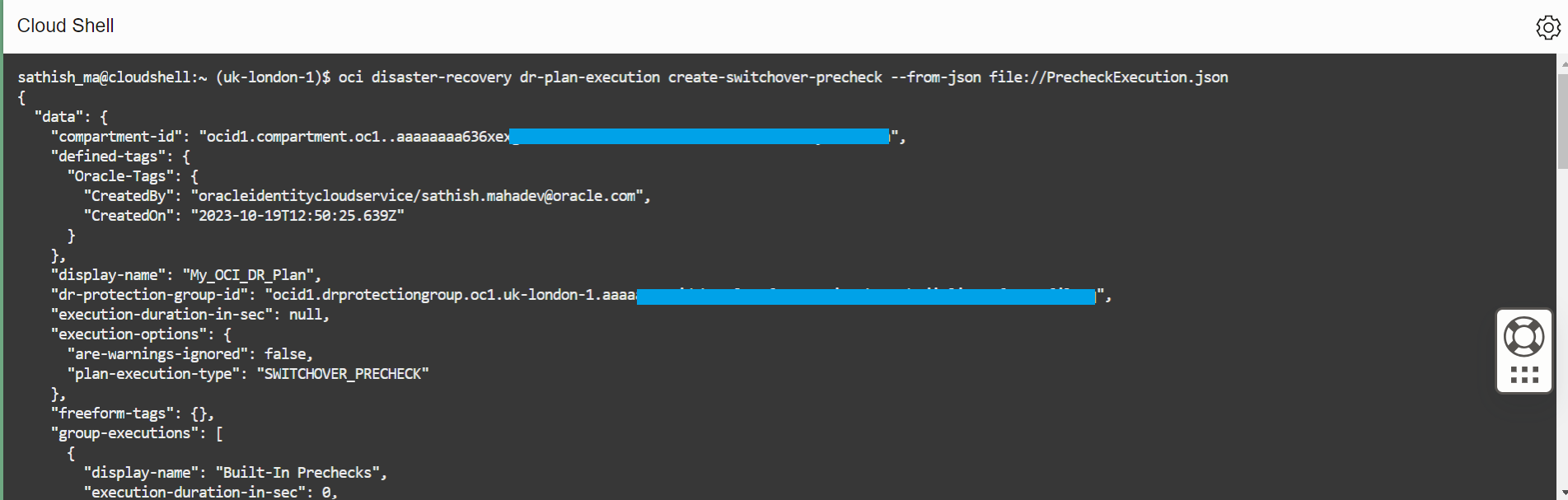
-
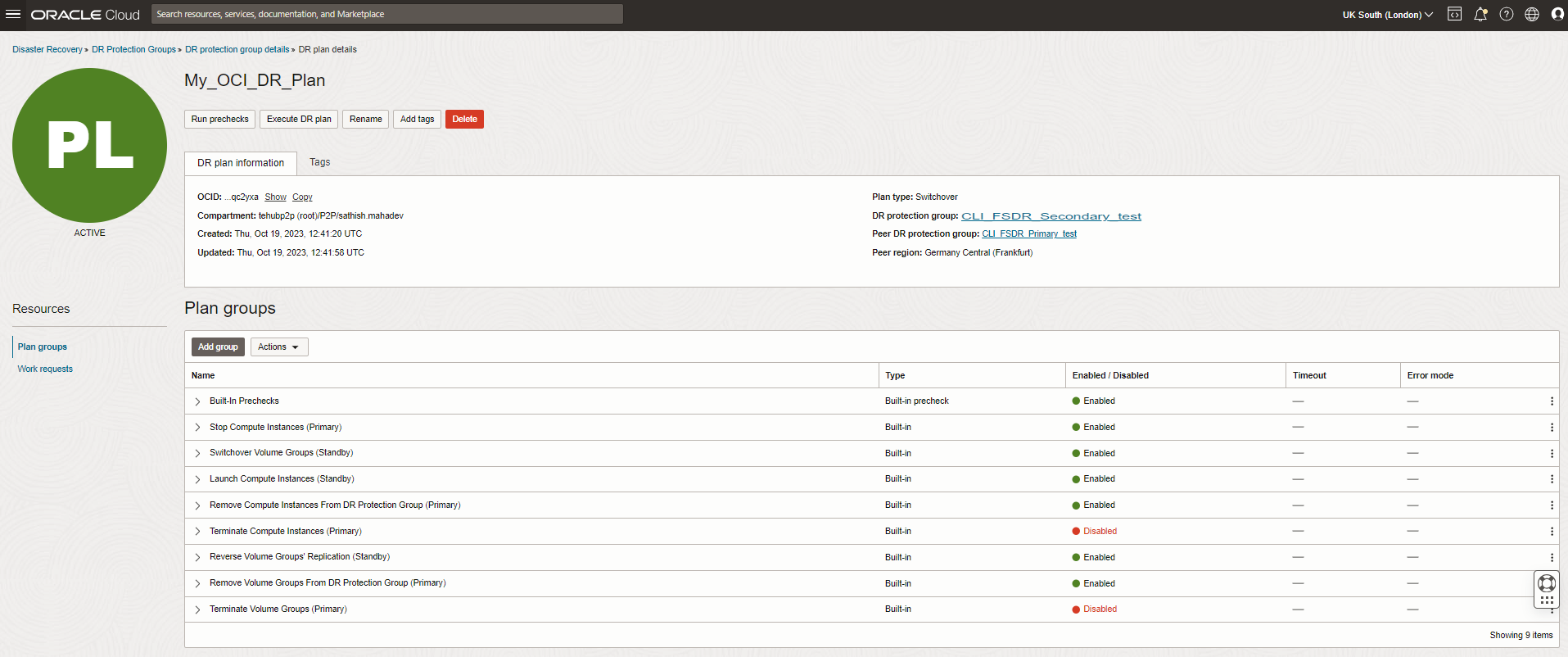
スタンバイ・リージョン(ロンドン)でスイッチオーバー事前チェックのステータスを確認し、「ハンバーガー」メニューをクリックして、「移行とディザスタ・リカバリ」、「ディザスタ・リカバリ保護グループ」、「プラン実行」および「自分のOCI DR計画」に移動します。
タスク7: スタンバイ・リージョン(ロンドン)でのスイッチオーバー計画の実行
-
スイッチオーバー計画を実行するための構文を次に示します。
使用方法:
oci disaster-recovery dr-plan-execution create-switchover [OPTIONS]必須パラメータ:
--plan-id [text] -
次の内容のJSONファイルを作成し、
SwitchoverExecution.JSONという名前を付けます。ファイルを優先場所に保存します。ファイルはOCI Linux VMの現在の作業ディレクトリに格納されています。関連のJSONファイル
{
  "displayName": "executeDRplan",
  "planId": "ocid1.drplan.oc1.............................................",
  "executionOptions": {
    "planExecutionType": "SWITCHOVER"
  }
}
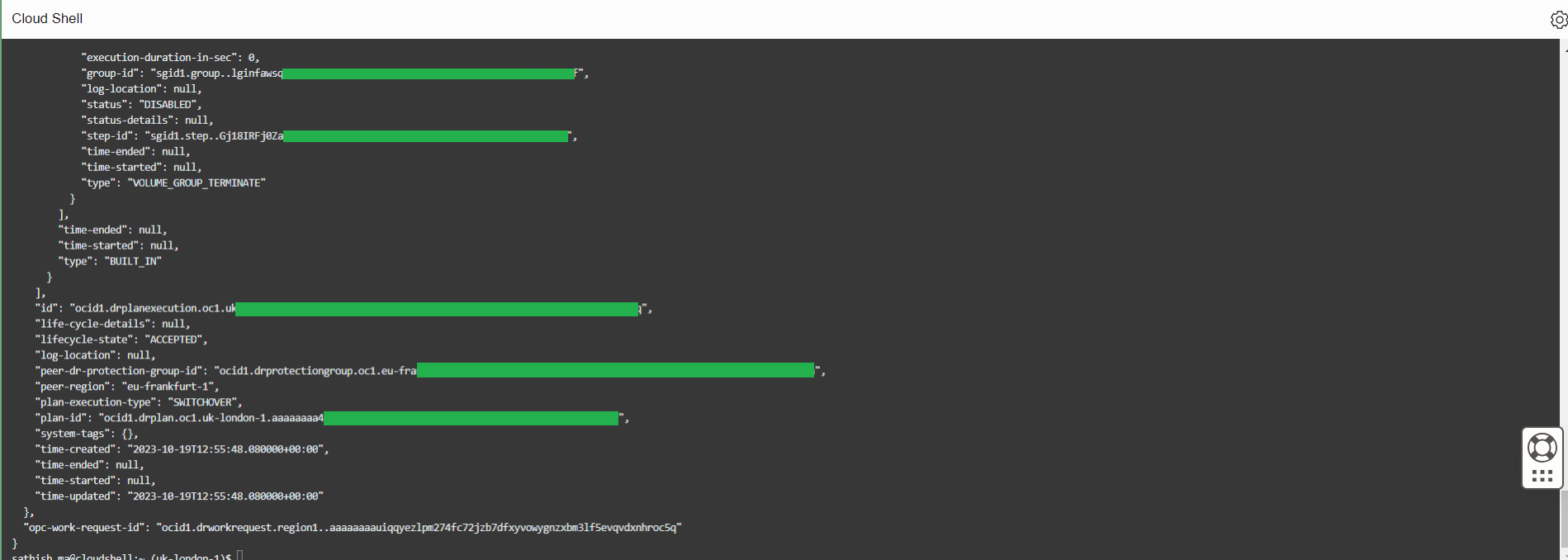
DR計画を実行するには、次のコマンドを使用します。
oci disaster-recovery dr-plan-execution create --from-json file://SwitchoverExecution.json --debug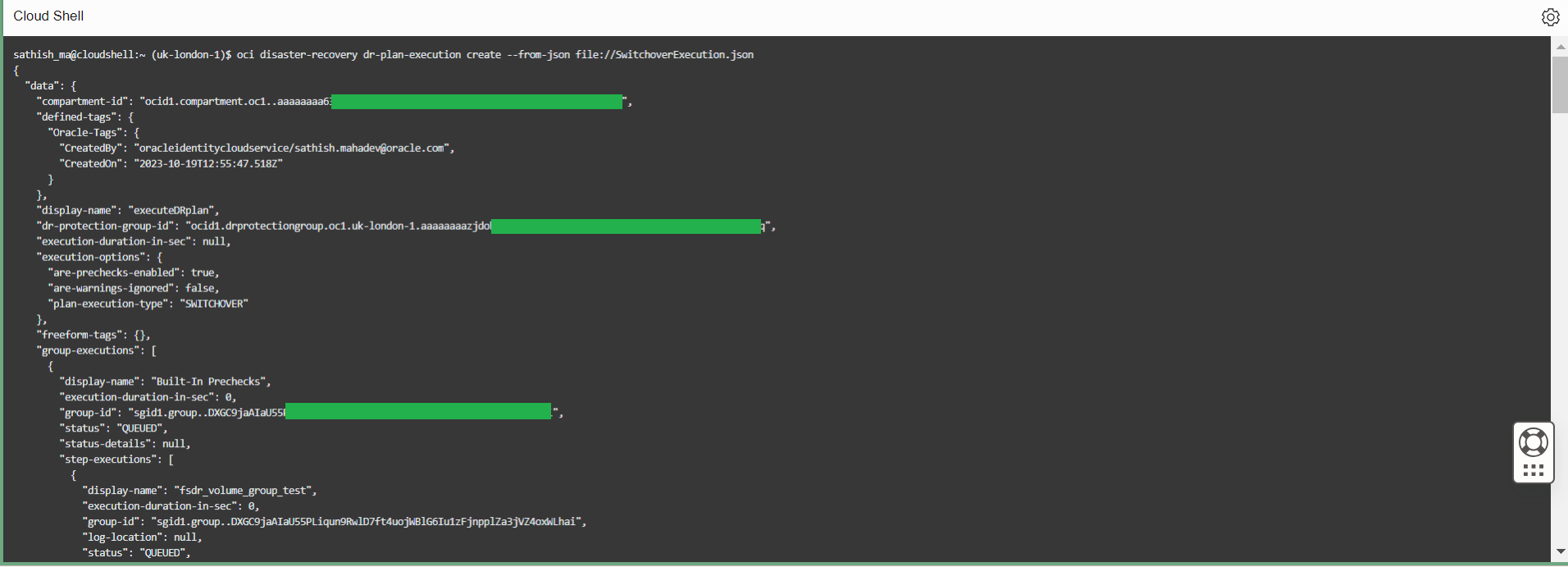
-
スタンバイ・リージョン(ロンドン)で計画実行ステータスを確認し、「ハンバーガー」メニューをクリックし、「移行とディザスタ・リカバリ」、「ディザスタ・リカバリ保護グループ」に移動して、「計画実行」をクリックします。
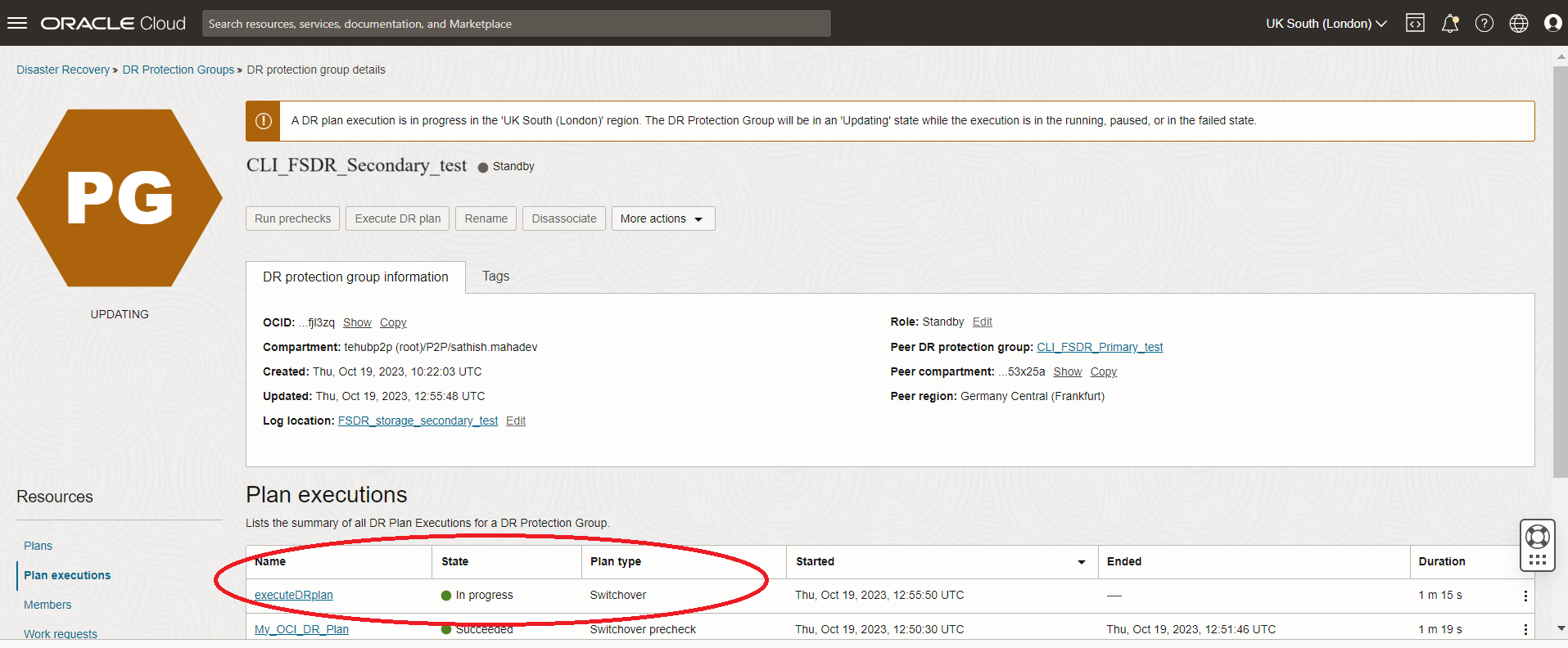
-
スタンバイ・リージョン(ロンドン)でDR計画実行ステータスを確認し、「ハンバーガー」メニューをクリックし、「移行とディザスタ・リカバリ」、「ディザスタ・リカバリ保護グループ」、「計画実行」に移動してExecuteDRplanをクリックします。
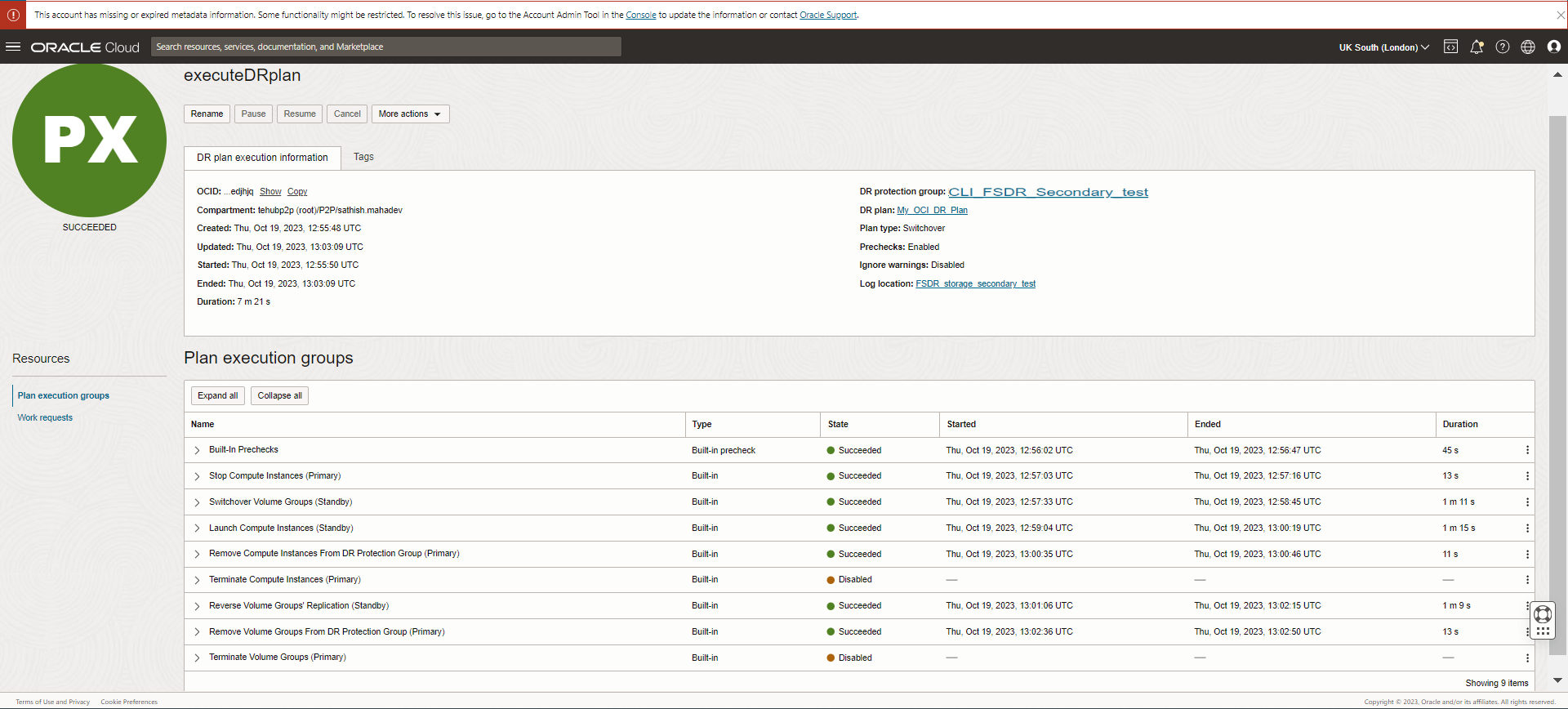
次のステップ
OCI CLIコマンドを使用して、DR保護グループの作成、関連付け、メンバーの追加、DR計画の作成、事前チェックおよびDR計画の実行を行う方法を確認しました。OCI CLIを使用して、さまざまなフルスタックDRライフサイクル操作をバイスネス・システムに大規模に実行できます。
関連リンク
確認
- 著者 - Sathish Mahadev(実装技術リーダー- Oracle Lift Services)、Vasudeva Manikandan(実装技術リーダー- Oracle Lift Services)、Suraj Ramesh(フル・スタック・ディザスタ・リカバリ製品マネージャー)
その他の学習リソース
docs.oracle.com/learnの他のラボをご覧いただくか、Oracle Learning YouTubeチャネルで無料のラーニング・コンテンツにアクセスしてください。また、education.oracle.com/learning-explorerにアクセスしてOracle Learning Explorerになります。
製品ドキュメントは、Oracle Help Centerを参照してください。
Automate Full Stack Disaster Recovery with OCI CLI for a Cold Standby Topology
F90398-01
December 2023
Copyright © 2023, Oracle and/or its affiliates.