주:
- 이 사용지침서에서는 Oracle Cloud에 액세스해야 합니다. 무료 계정에 등록하려면 Oracle Cloud Infrastructure Free Tier 시작하기를 참조하십시오.
- Oracle Cloud Infrastructure 인증서, 테넌시 및 구획에 예제 값을 사용합니다. 실습을 완료할 때 이러한 값을 클라우드 환경과 관련된 값으로 대체하십시오.
OCI 통지를 사용하여 AIDP 워크플로우 작업 및 사용자정의 시나리오에 대한 통지 구성
소개
이 자습서에서는 OCI 통지 및 이벤트 서비스를 사용하여 AIDP 워크플로우 작업에 대한 통지를 구성하는 방법을 설명합니다. 또한 AIDP 노트북에서 Python 프로그램을 사용하여 사용자 정의 알림 논리를 구현하는 방법을 배웁니다.
OCI Notifications 서비스는 게시-구독 모델을 사용하여 안정적이고 안전하게 메시지를 전달합니다.
목표
이 자습서가 끝나면 다음을 수행할 수 있습니다.
- OCI 통지 토픽 및 구독 생성
- AIDP 워크플로우 작업 상태에 대한 이벤트 규칙 구성
- 작업 실패에 대한 전자메일 통지 수신
- Python을 사용하여 커스텀 통지 논리 구현
- 프로그래밍 방식으로 통지 트리거
필수 조건
- OCI 콘솔에 액세스
- 워크플로우 작업이 있는 AIDP 작업 영역
- 통지 및 이벤트 생성 권한
- Python SDK 사용에 대한 OCI 구성 설정
작업 1: 통지 항목 및 가입 생성
- OCI 콘솔에 로그인합니다.
- 개발자 서비스 → 통지로 이동합니다.
- 항목 생성을 누르고 다음을 제공합니다.
- 이름
- 설명
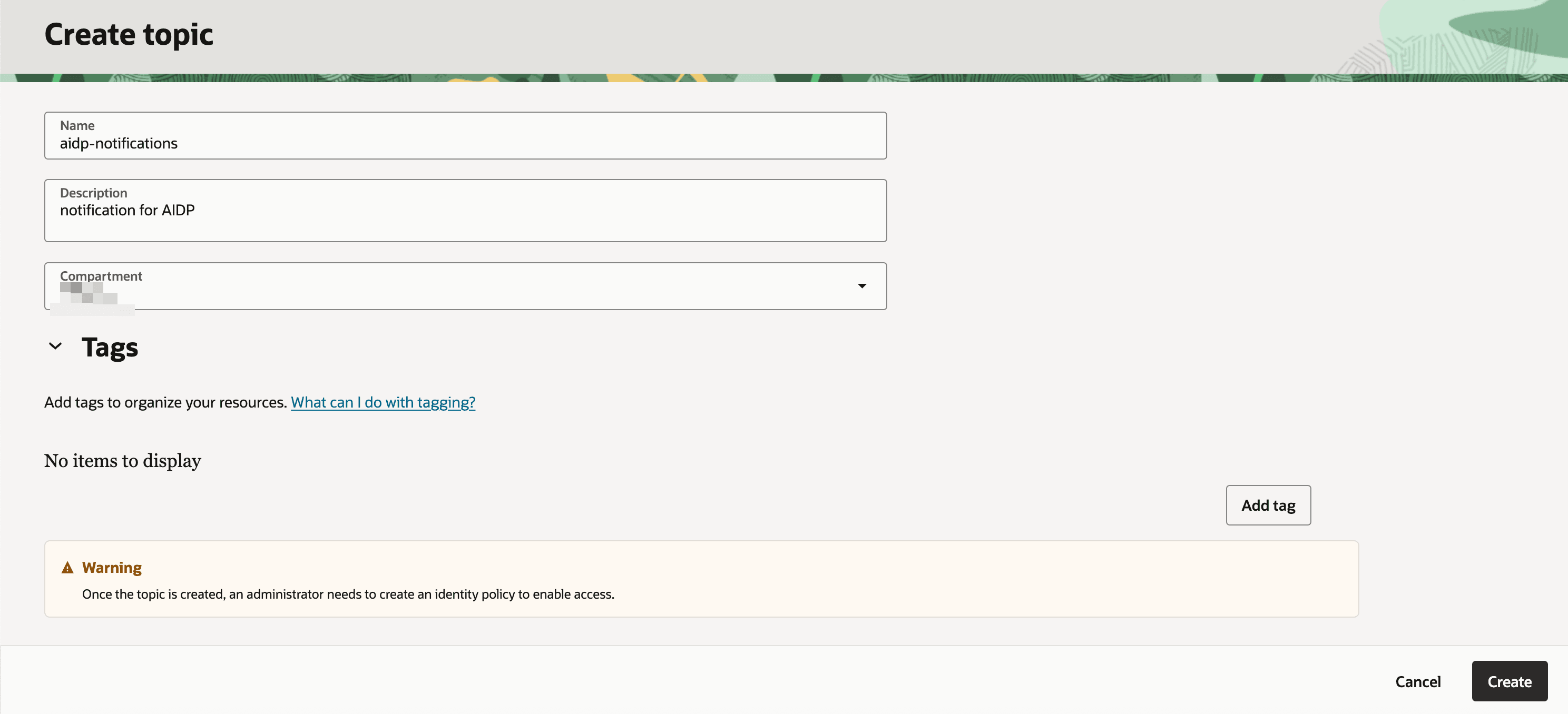
- 구독 생성:
- 프로토콜: 전자메일
- 전자메일: 전자메일 주소
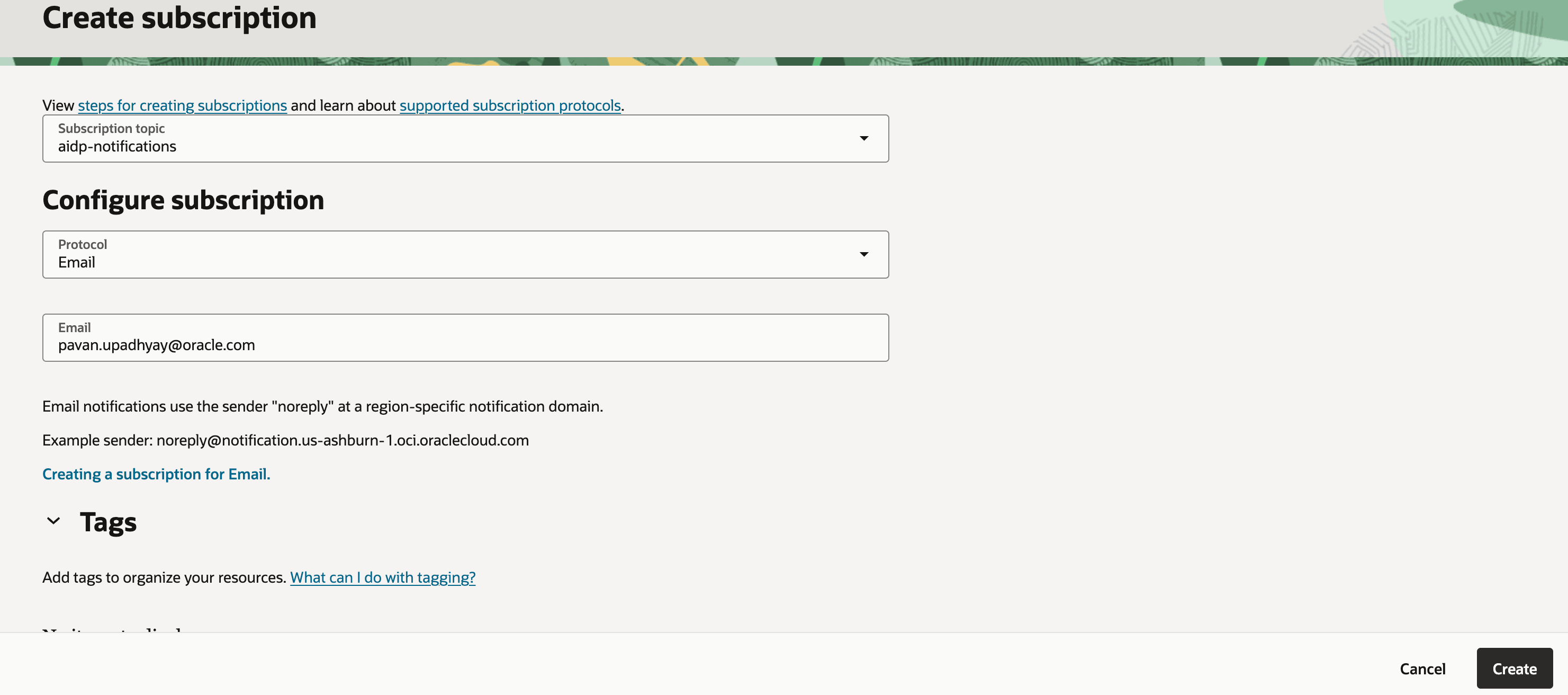
-
이메일을 확인하고 구독을 확인하세요.
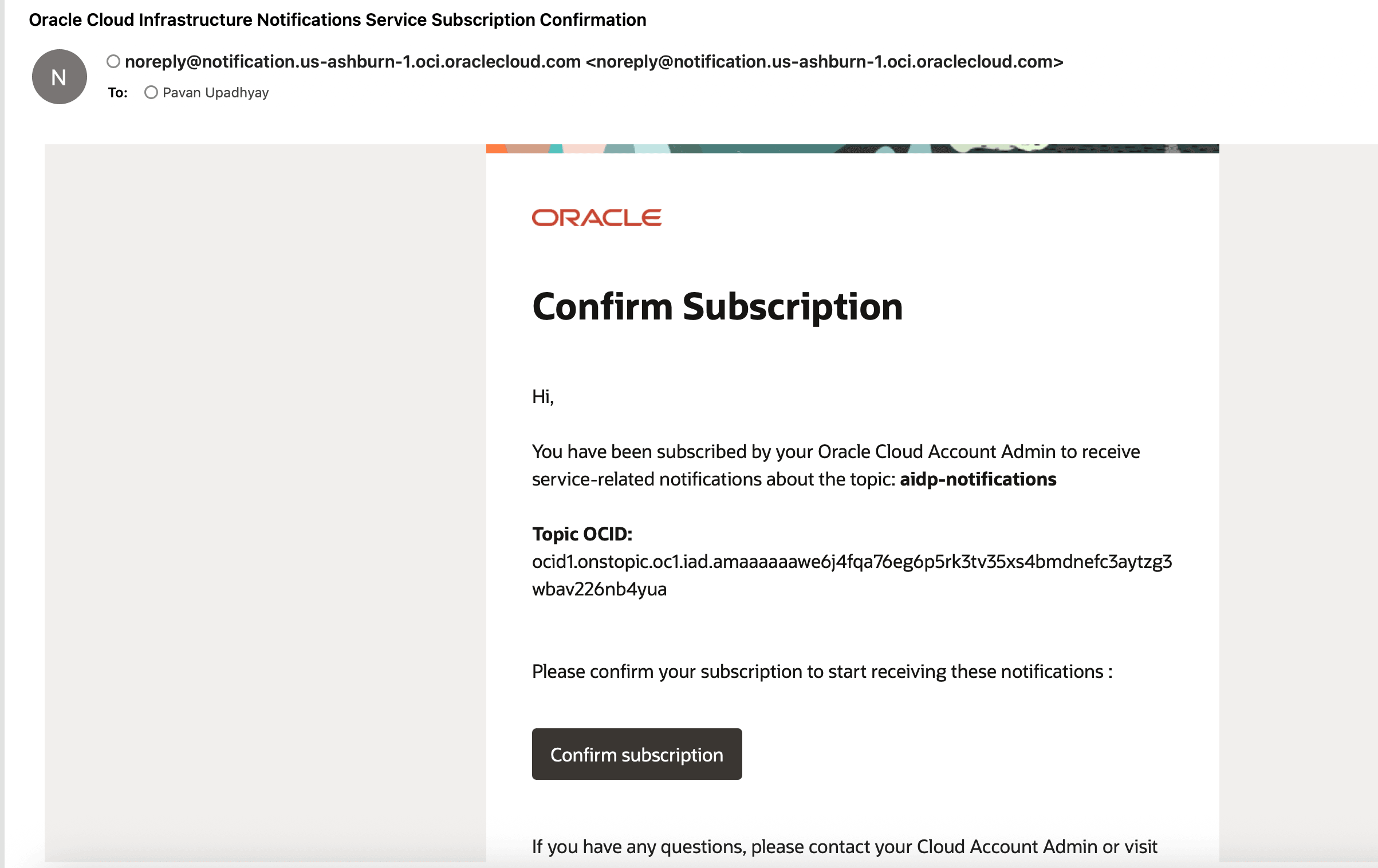
주: 가입 상태는 확인 후 보류 중에서 활성으로 변경됩니다.
태스크 2: AIDP 워크플로우에 대한 이벤트 규칙 구성
- Observability & Management → Events Service → Rules로 이동합니다.
- 규칙 생성를 누릅니다.
- 구성:
- 서비스: 지능형 데이터 레이크
- 이벤트 유형: 작업 실행 - 종료
- 속성명 1 : jobKey
- 속성 값1: 보조 워크플로우 ID 유지
- 속성명 2 : jobStatus
- 속성 값2: 실패
- 작업 설정:
- 이전에 생성된 통지 토픽 선택
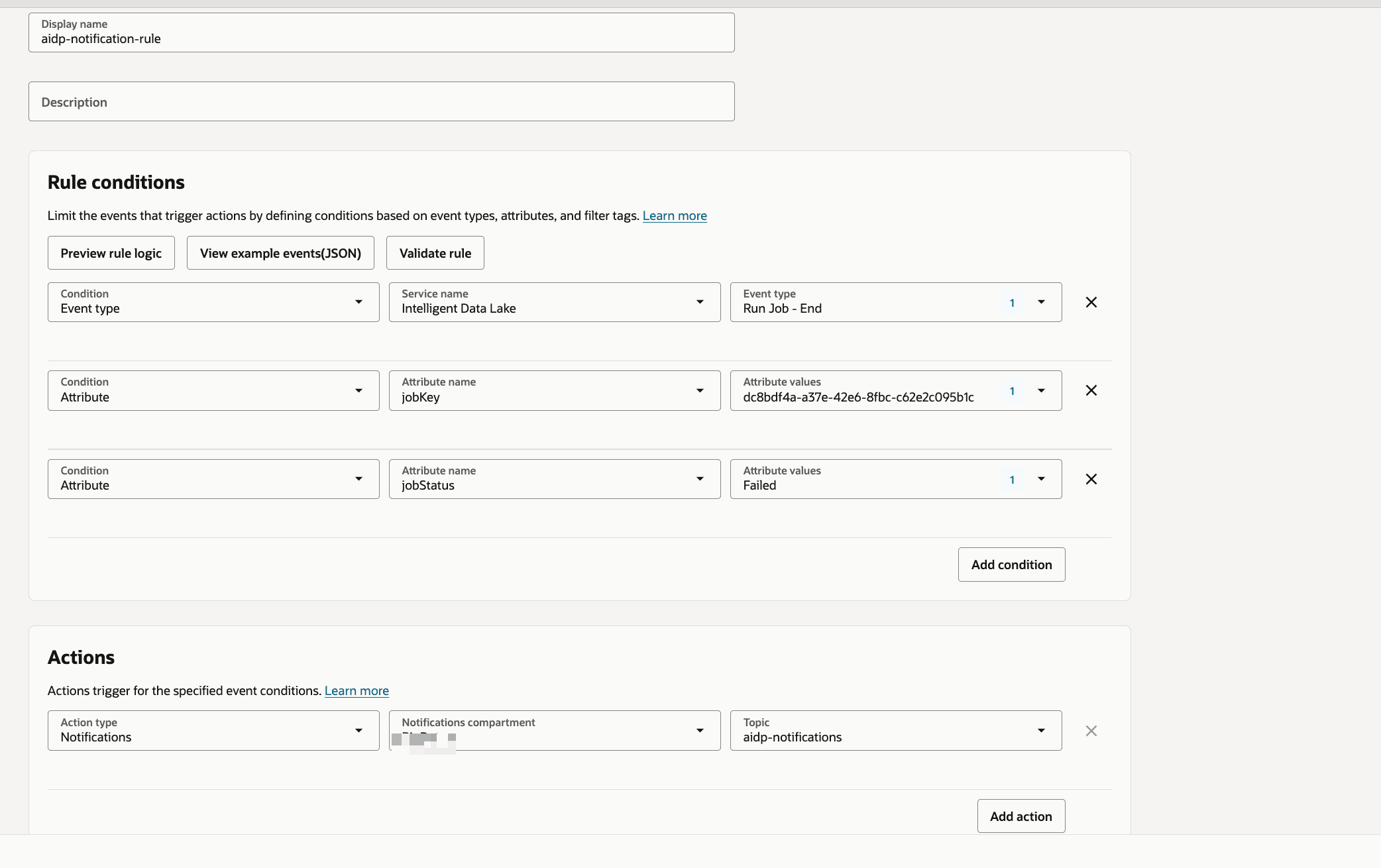
참고: 성공 또는 실행과 같은 다른 상태에 대한 규칙을 사용자정의할 수 있습니다.
작업 3: 전자 메일 통지 검증
- 워크플로우 작업을 트리거하거나 실행합니다.
- 필요한 경우 실패 시나리오를 강제 적용합니다.
-
전자메일 받은 편지함을 선택합니다.
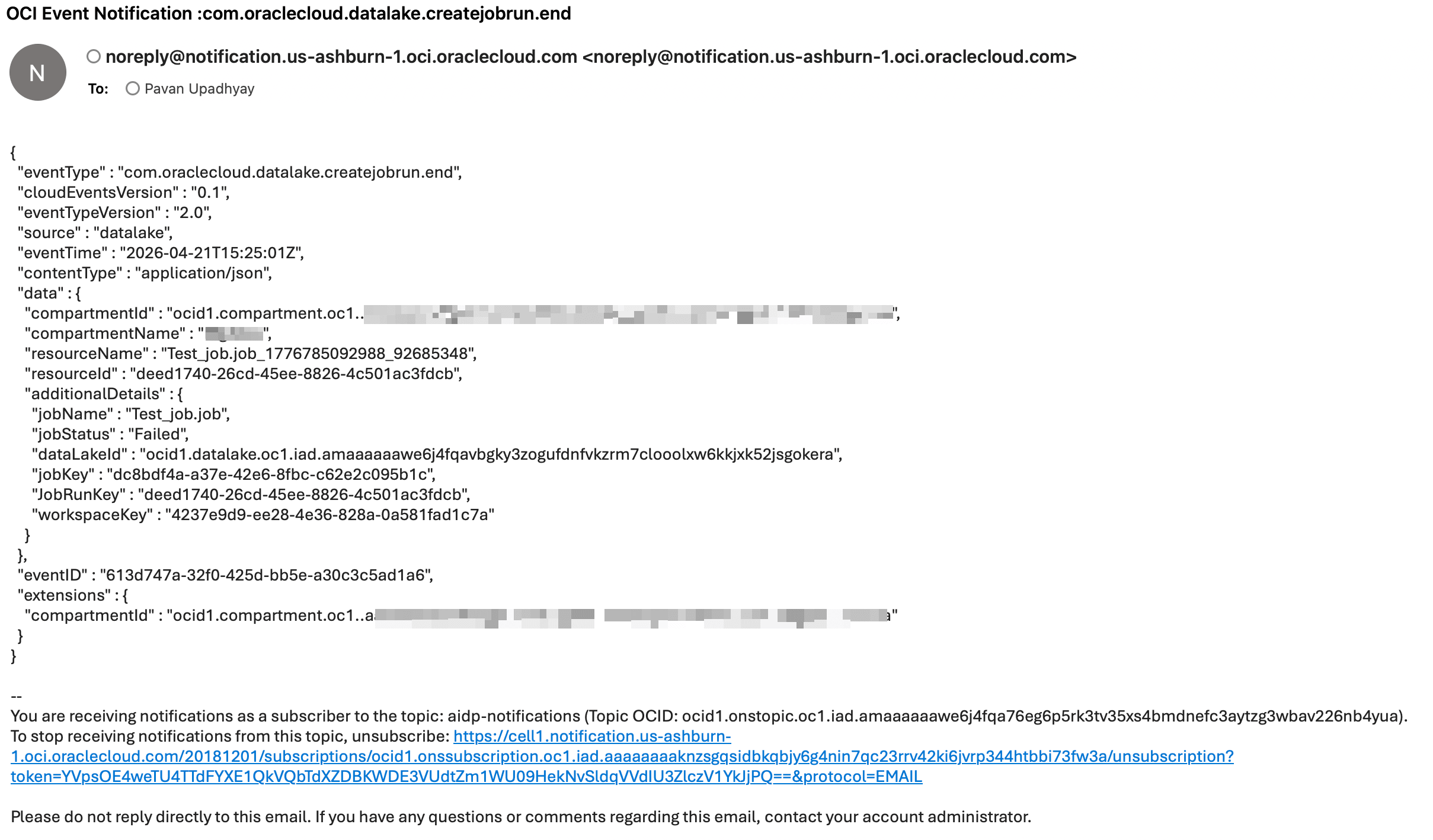
주: 통지에는 작업 이름 및 상태와 같은 작업 세부정보가 포함됩니다.
작업 4: Python을 사용하여 사용자 정의 알림 구현
다음은 OCI SDK를 사용하여 통지를 전송하는 샘플 Python 프로그램입니다.
import oci
from oci.ons.models import MessageDetails

config = oci.config.from_file("~/.oci/config", "DEFAULT")
client = oci.ons.NotificationDataPlaneClient(config)

topic_id = "<your_topic_ocid>"

message_details = MessageDetails(
    title="Test Notification",
    body="Hello from AIDP!"
)

response = client.publish_message(
    topic_id=topic_id,
    message_details=message_details
)

print("Message sent:", response.data.message_id)
작업 5: 고급 사용자 정의 통지 클래스
import oci
import logging
import time
from typing import List, Optional, Dict

logger = logging.getLogger("OCI_Notifier")
logger.setLevel(logging.INFO)

handler = logging.StreamHandler()
formatter = logging.Formatter(
    "%(asctime)s - %(name)s - %(levelname)s - %(message)s"
)
handler.setFormatter(formatter)
logger.addHandler(handler)

class OCINotifier:
    def __init__(
        self,
        topic_id: str,
        config_file: str = "~/.oci/config",
        profile: str = "DEFAULT",
        max_retries: int = 3,
        retry_delay: int = 2,
    ):
        """
        Initialize OCI Notification client

        Args:
            topic_id: OCI Notification Topic OCID
            config_file: Path to OCI config
            profile: Config profile name
            max_retries: Retry attempts
            retry_delay: Delay between retries (seconds)
        """
        self.topic_id = topic_id
        self.max_retries = max_retries
        self.retry_delay = retry_delay

        try:
            self.config = oci.config.from_file(config_file, profile)
            self.client = oci.ons.NotificationDataPlaneClient(self.config)
            logger.info("OCI Notifier initialized successfully")
        except Exception as e:
            logger.error(f"Failed to initialize OCI client: {e}")
            raise


    def send(
        self,
        title: str,
        message: str,
        metadata: Optional[Dict] = None,
    ) -> bool:
        """
        Send notification message

        Args:
            title: Notification subject
            message: Notification body
            metadata: Optional metadata dictionary

        Returns:
            bool: True if success, False otherwise
        """

        payload = {
            "title": title,
            "body": message,
        }

        if metadata:
            payload["metadata"] = metadata

        for attempt in range(1, self.max_retries + 1):
            try:
                response = self.client.publish_message(
                    self.topic_id,
                    payload
                )
                logger.info(
                    f"Notification sent successfully | "
                    f"Message ID: {response.data.message_id}"
                )
                return True

            except Exception as e:
                logger.error(
                    f"Attempt {attempt} failed: {str(e)}"
                )
                if attempt < self.max_retries:
                    time.sleep(self.retry_delay)
                else:
                    logger.error("Max retries reached. Notification failed.")
                    return False


def notify_success(notifier: OCINotifier, job_name: str):
    notifier.send(
        title=f"{job_name} SUCCESS",
        message=f"Job '{job_name}' completed successfully."
    )


def notify_failure(notifier: OCINotifier, job_name: str, error: str):
    notifier.send(
        title=f"{job_name} FAILED",
        message=f"Job '{job_name}' failed.\nError: {error}"
    )
작업 6: AIDP 노트북에서 사용자 정의 알림 호출
워크플로우 또는 노트북 내에서 통지 논리를 호출할 수 있습니다.
from notifier import notify_failure

notify_failure(notifier, "SampleJob", "Error details here")
문제 해결 및 팁
참고: OCI 구성 파일 경로가 올바른지 확인합니다.
주: 토픽 OCID 및 구독 상태를 확인하십시오.
참고: 신뢰성을 위해 사용자정의 통지자에서 재시도를 사용합니다.
다음 단계
- Slack 또는 HTTPS 구독 추가
- 성공 이벤트에 대한 통지 확장
- 모니터링 대시보드와 통합
감사의 글
- 작성자 - Pavan Upadhyay(주체 클라우드 엔지니어), Saket Bihari(주체 클라우드 엔지니어)
추가 학습 자원
docs.oracle.com/learn에서 다른 랩을 탐색하거나 Oracle Learning YouTube 채널에서 더 많은 무료 학습 콘텐츠에 액세스하세요. 또한 education.oracle.com/learning-explorer를 방문하여 Oracle Learning Explorer가 되십시오.
제품 설명서는 Oracle Help Center를 참조하십시오.
Configure Notifications for AIDP Workflow Jobs and Custom Scenarios Using OCI Notifications
G56830-01