Using Knockout.js Templates and the ojModule Binding
The Oracle JET Cookbook and many sample applications use the native templating mechanism included with Knockout.js and the Oracle JET ojModule namespace to manage the binding. Knockout templates capture the HTML markup contained in an element and use it as a template to render against an arbitrary data item. Knockout templates allow you to reuse code and provide a simple mechanism for building UI structures as a function of your viewModel data.
For example, the SPA-ojModule-ojRouter sample single-page application uses five templates to define the HTML markup for the application. The image below shows the main page for the Oracle JET Sample Single Page application as it runs on the desktop, with arrows pointing to the names of the templates defining view content for the application.
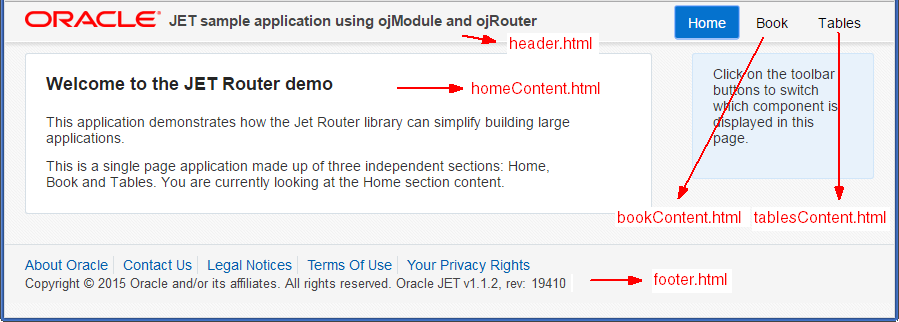
The homeContent template is shown below. In the highlighted code, the first data-bind definition uses Knockout's text binding to set the h1 element's content to a text node containing the value of $root.title. The second data-bind definition uses Knockout's foreach binding to iterates through the content, and the list items display the text defined in line.
<div class="oj-row">
  <div class="oj-xl-9 oj-lg-9 oj-md-9 oj-sm-12 oj-col">
    <div role="main" class="oj-panel demo-page-content-area">
      <h2 data-bind="text: title"></h2>
      <!-- ko foreach: description -->
        <p data-bind="text: line"></p>
      <!-- /ko -->
    </div>
  </div>
  <div class="oj-xl-3 oj-lg-3 oj-md-3 oj-sm-12 oj-col">
    <div class="oj-panel oj-panel-alt2 demo-page-content-area">
      <p>Click on the toolbar buttons to switch which component is displayed in this page.</p>
    </div>
  </div>
</div>
The code that defines the title and line is contained in the viewModel for the home section's content, stored in the homeContent.js viewModel.
/* Home content module, example of singleton view model object. */
define(['knockout', 'ojs/ojknockout', 'ojs/ojbutton'], function(ko) {
  return {
   title: 'Welcome to the JET Router demo',
   description: [{
     line: 'This application demonstrates how the Jet Router \
library can simplify building large applications.'
       }, {
     line: 'This is a single page application made of three independent components: \
Home, Book and Tables. You are currently looking at the Home component.'
     }]
   };
});
To add Knockout.js templates and the ojModule binding to your Oracle JET application:
-
Create the application that will house your main HTML5 page and supporting JavaScript. For additional information, see Getting Started with Oracle JET.
-
To modify the default location of the application’s view templates and viewModel scripts, add code to the application's main script that initializes the location of the viewModels and view templates and defines the suffix for the view templates.
The
ojModulebinding namespace contains the default location and names of managed templates and viewModels.Property Description viewPathDefines the path to the view templates. Defaults to
text!..views/viewSuffixDefines the suffix for view templates. Defaults to
.html.modelPathDefines the location of the viewModel scripts. Defaults to
viewModels/The Oracle JET SPA-ojModule-ojRouter sample application uses the default locations and paths for its view templates and viewModels. However, the Oracle JET QuickStart Basic Template application stores the templates in the
js/templatesfolder, and the viewModels in themodules/folder. The application also uses.tmpl.htmlfor the view templates' suffix. The code sample below shows the lines to add to your application's main script to change the default locations and names of managed templates and viewModels.oj.ModuleBinding.defaults.modelPath = 'modules/'; oj.ModuleBinding.defaults.viewPath = 'text!../templates/'; oj.ModuleBinding.defaults.viewSuffix = '.tmpl.html';
-
In your RequireJS bootstrap file (typically
main.js) addojs/ojmoduleto the list of RequireJS modules, along with any other modules that your application uses.require(['ojs/ojcore', 'knockout', 'jquery', 'ojs/ojknockout', 'ojs/ojmodule', 'ojs/ojrouter', 'text'], -
If needed, create a templates folder in the default location or in the
viewPathif you defined one in the previous step. -
Create your view templates and add them to the
viewPathfolder.Use the default
viewSuffixor the value you set for theviewSuffixin Step 2. -
If needed, create a folder for your viewModels in the default location or in the
modelPathyou specified in Step 2. -
As needed, create your viewModel scripts and add them to the
modelPathfolder.Use the same name for the module that you used for the template in Step 5. For example, if your template is named
bookContent.html, usebookContent.jsfor the viewModel's name. -
Add code to the application's HTML page to reference the view template or viewModel in the
ojModulebinding.If the page section contains only a view template, use
ojModulewith theviewNameoption:<header id="headerWrapper" role="banner" data-bind="ojModule: { viewName: 'sampleView'}"></div>To reference a viewModel with a view template, use
ojModulewith thenameoption:<header id="headerWrapper" role="banner" data-bind="ojModule: { name: 'sampleViewModel'}"></div>If you're using
oj.Router, useojModulewith therouter.moduleConfigoption.<div id="mainContainer" data-bind="ojModule: router.moduleConfig"></div>
For more information about oj.Router and ojModule, see the Oracle JET oj.Router and ojModule API documentation.
For more information about using Knockout's template binding, see http://knockoutjs.com/documentation/template-binding.html.