注意:
- 本教程需要访问 Oracle Cloud。要注册免费账户,请参阅开始使用 Oracle Cloud Infrastructure 免费套餐。
- 它使用 Oracle Cloud Infrastructure 身份证明、租户和区间的示例值。完成实验室时,请将这些值替换为特定于云环境的值。
使用 OCI 通知为 AIDP 工作流作业和定制方案配置通知
简介
本教程介绍了如何使用 OCI Notifications and Events 服务为 AIDP 工作流作业配置通知。您还将学习如何使用 AIDP 笔记本中的 Python 程序实现自定义通知逻辑。
OCI Notifications 服务使用发布 - 订阅模型安全可靠地传送消息。
目标
在本教程结束时,您将能够:
- 创建 OCI 通知主题和订阅
- 为 AIDP 工作流作业状态配置事件规则
- 接收有关作业失败的电子邮件通知
- 使用 Python 实施自定义通知逻辑
- 以编程方式触发通知
Prerequisites
- 访问 OCI 控制台
- 具有工作流作业的 AIDP 工作区
- 创建通知和事件的权限
- 用于 Python SDK 的 OCI 配置设置
任务 1:创建通知主题和订阅
- 登录到 OCI 控制台。
- 导航到 Developer Services → Notifications 。
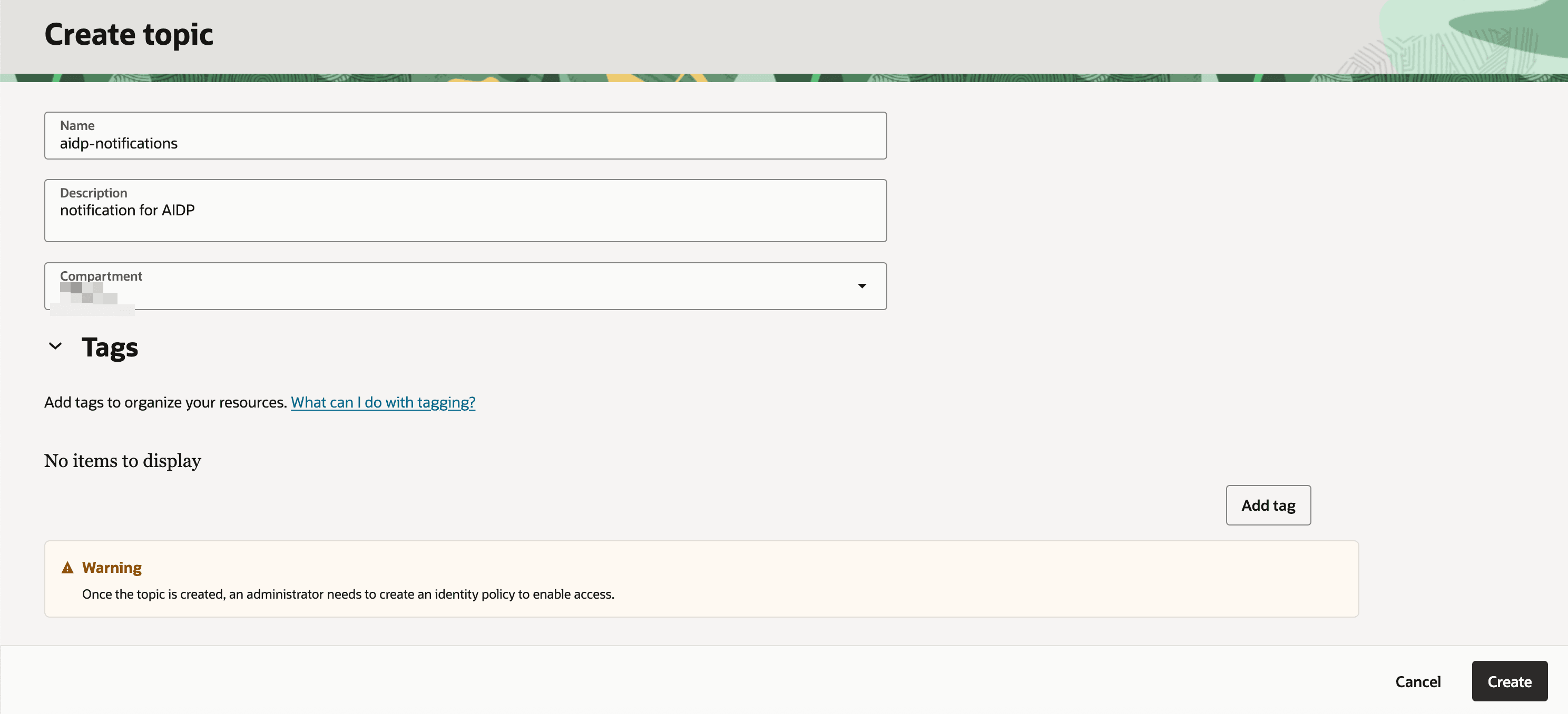
- 单击创建主题并提供:
- 名称
- 说明
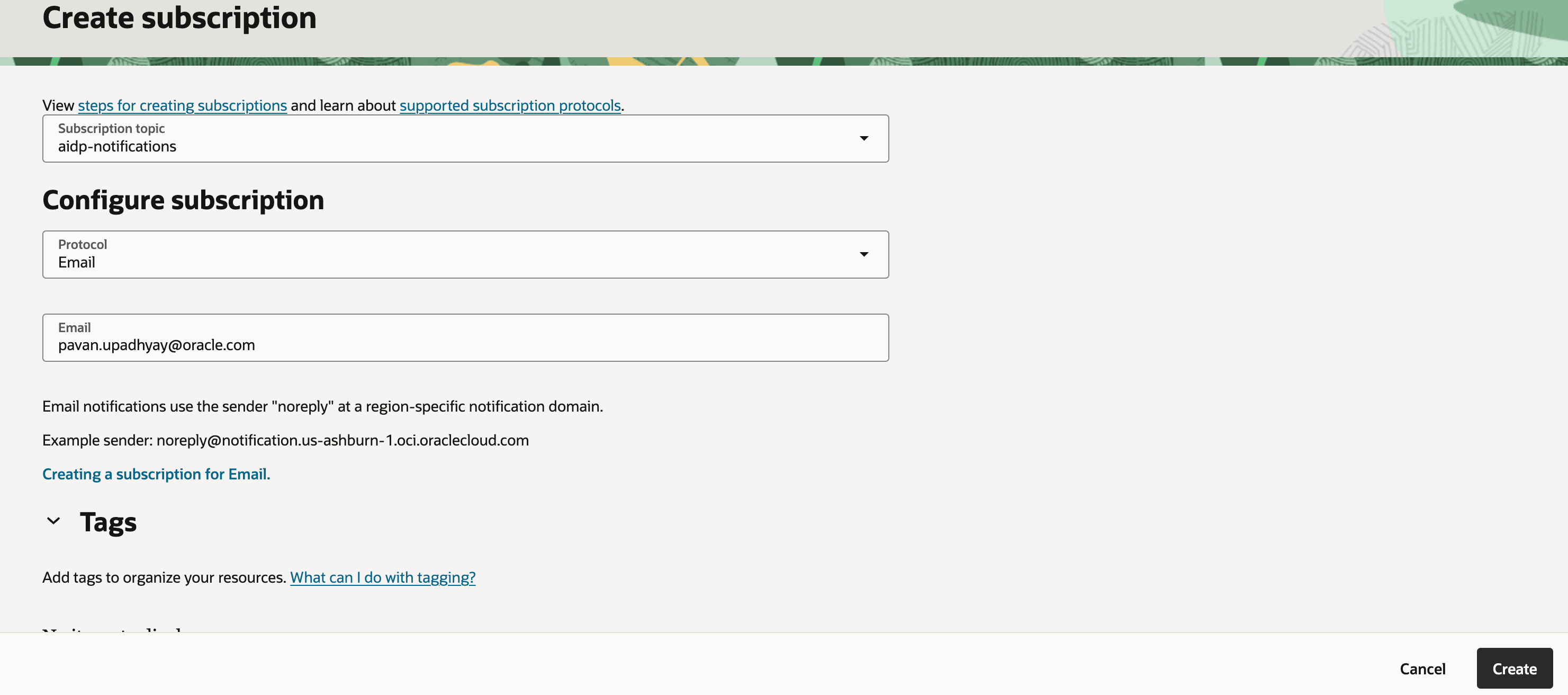
- 创建预订:
- 协议:电子邮件
- 电子邮件:您的电子邮件地址
-
检查您的电子邮件并确认订阅。
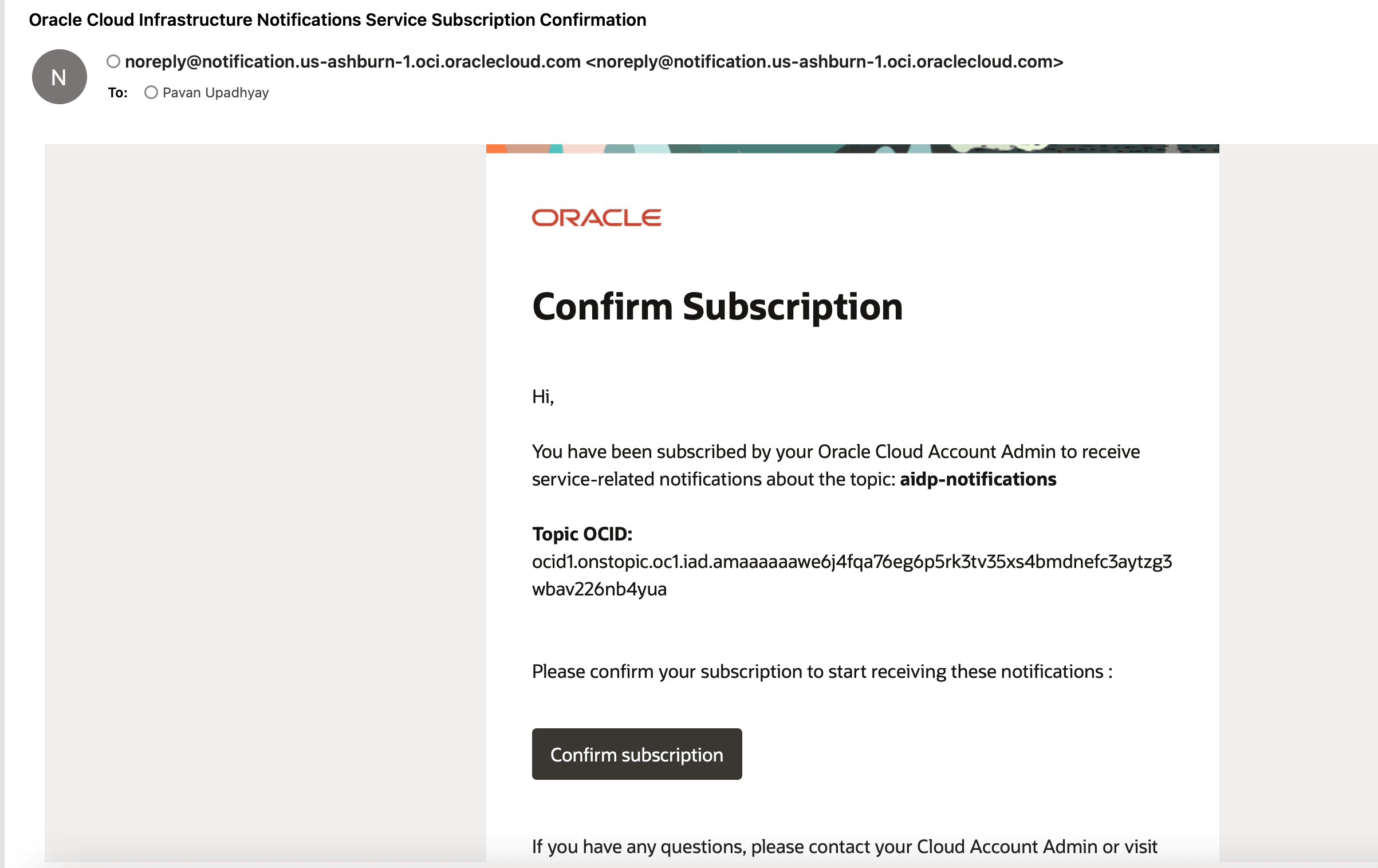
注意:确认后,订阅状态从待定更改为有效。
任务 2:为 AIDP 工作流配置事件规则
- 导航到 Observability & Management → Events Service → Rules 。
- 单击“创建规则”。
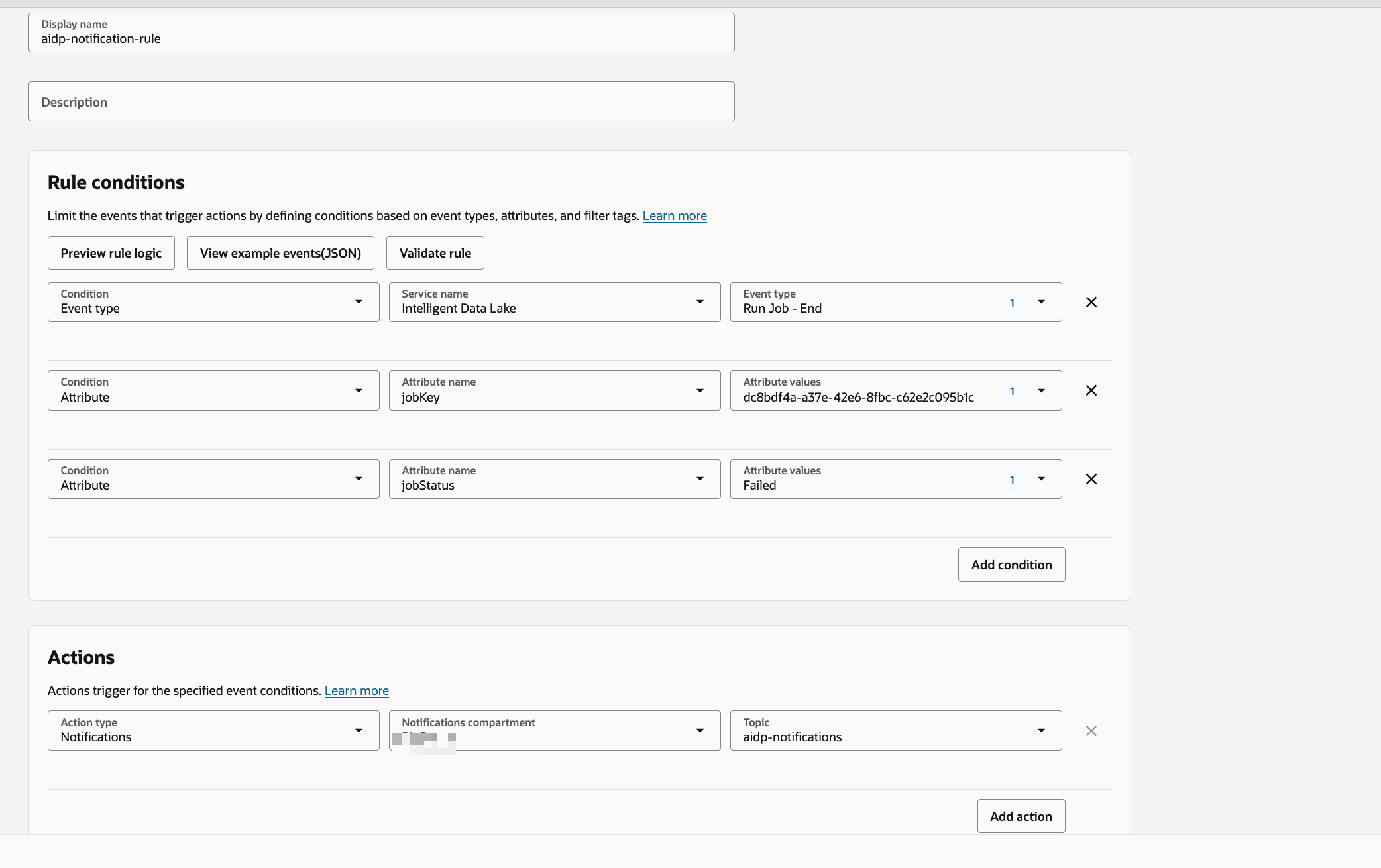
- 配置:
- 服务:智能数据湖
- 事件类型:运行作业 - 结束
- 属性名称 1:jobKey
- 属性值 1:保留帮助工作流标识
- 属性名称 2:jobStatus
- 属性值 2:失败
- 设置操作:
- 选择之前创建的通知主题
提示:您可以为“成功”或“正在运行”等其他状态自定义规则。
任务 3:验证电子邮件通知
- 触发或运行工作流作业。
- 如果需要,强制执行失败方案。
-
检查您的电子邮件收件箱。
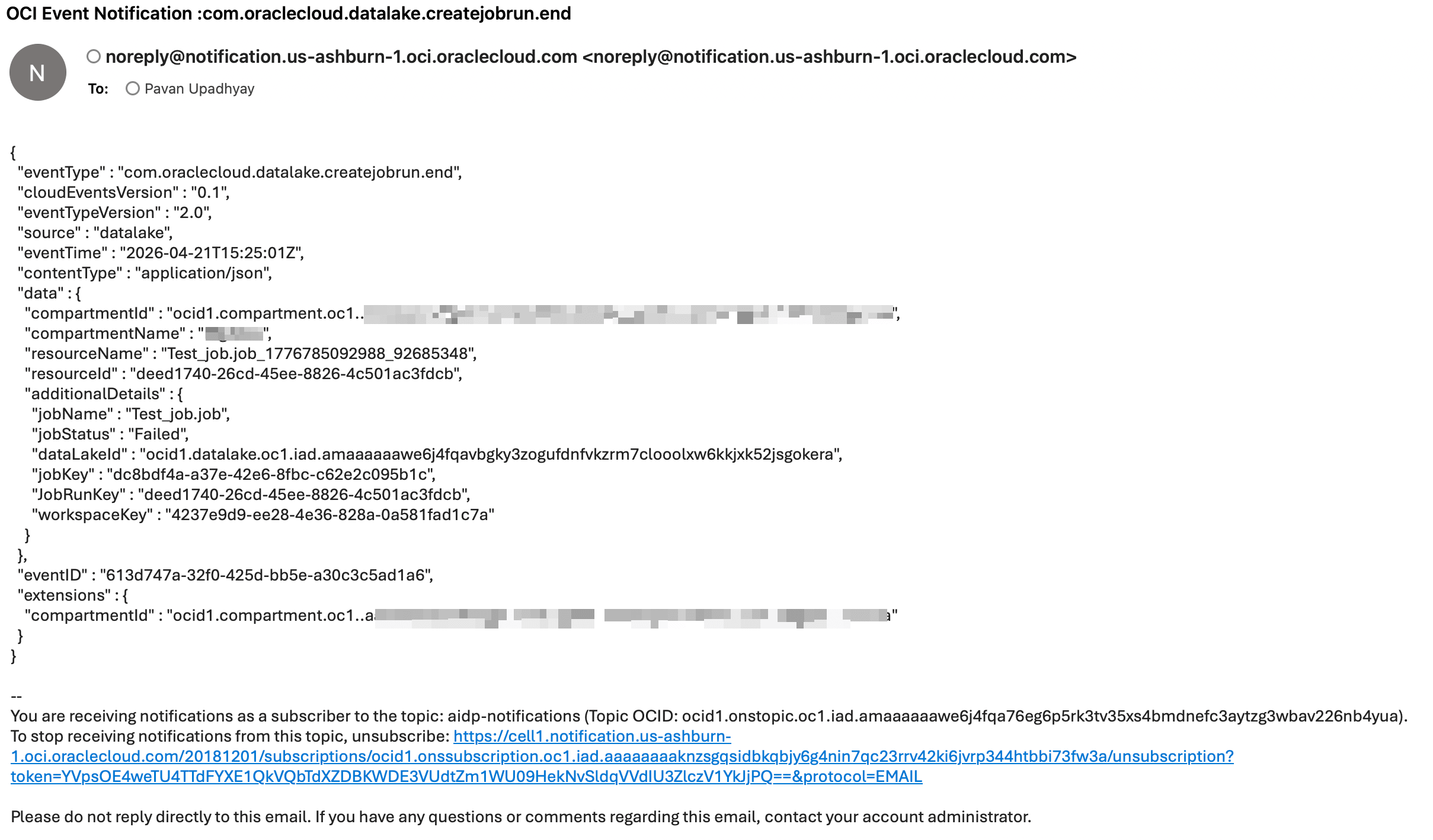
注:通知包括任务详细信息,如任务名称和状态。
任务 4:使用 Python 实施自定义通知
下面是使用 OCI SDK 发送通知的示例 Python 程序。
import oci
from oci.ons.models import MessageDetails

config = oci.config.from_file("~/.oci/config", "DEFAULT")
client = oci.ons.NotificationDataPlaneClient(config)

topic_id = "<your_topic_ocid>"

message_details = MessageDetails(
    title="Test Notification",
    body="Hello from AIDP!"
)

response = client.publish_message(
    topic_id=topic_id,
    message_details=message_details
)

print("Message sent:", response.data.message_id)
任务 5:高级自定义通知分类
import oci
import logging
import time
from typing import List, Optional, Dict

logger = logging.getLogger("OCI_Notifier")
logger.setLevel(logging.INFO)

handler = logging.StreamHandler()
formatter = logging.Formatter(
    "%(asctime)s - %(name)s - %(levelname)s - %(message)s"
)
handler.setFormatter(formatter)
logger.addHandler(handler)

class OCINotifier:
    def __init__(
        self,
        topic_id: str,
        config_file: str = "~/.oci/config",
        profile: str = "DEFAULT",
        max_retries: int = 3,
        retry_delay: int = 2,
    ):
        """
        Initialize OCI Notification client

        Args:
            topic_id: OCI Notification Topic OCID
            config_file: Path to OCI config
            profile: Config profile name
            max_retries: Retry attempts
            retry_delay: Delay between retries (seconds)
        """
        self.topic_id = topic_id
        self.max_retries = max_retries
        self.retry_delay = retry_delay

        try:
            self.config = oci.config.from_file(config_file, profile)
            self.client = oci.ons.NotificationDataPlaneClient(self.config)
            logger.info("OCI Notifier initialized successfully")
        except Exception as e:
            logger.error(f"Failed to initialize OCI client: {e}")
            raise


    def send(
        self,
        title: str,
        message: str,
        metadata: Optional[Dict] = None,
    ) -> bool:
        """
        Send notification message

        Args:
            title: Notification subject
            message: Notification body
            metadata: Optional metadata dictionary

        Returns:
            bool: True if success, False otherwise
        """

        payload = {
            "title": title,
            "body": message,
        }

        if metadata:
            payload["metadata"] = metadata

        for attempt in range(1, self.max_retries + 1):
            try:
                response = self.client.publish_message(
                    self.topic_id,
                    payload
                )
                logger.info(
                    f"Notification sent successfully | "
                    f"Message ID: {response.data.message_id}"
                )
                return True

            except Exception as e:
                logger.error(
                    f"Attempt {attempt} failed: {str(e)}"
                )
                if attempt < self.max_retries:
                    time.sleep(self.retry_delay)
                else:
                    logger.error("Max retries reached. Notification failed.")
                    return False


def notify_success(notifier: OCINotifier, job_name: str):
    notifier.send(
        title=f"{job_name} SUCCESS",
        message=f"Job '{job_name}' completed successfully."
    )


def notify_failure(notifier: OCINotifier, job_name: str, error: str):
    notifier.send(
        title=f"{job_name} FAILED",
        message=f"Job '{job_name}' failed.\nError: {error}"
    )
任务 6:从 AIDP 记事本调用自定义通知
您可以在工作流或记事本中调用通知逻辑:
from notifier import notify_failure

notify_failure(notifier, "SampleJob", "Error details here")
故障排除和技巧
提示:确保 OCI 配置文件路径正确。
注:验证主题 OCID 和订阅状态。
提示:在自定义通知程序中使用重试次数以提高可靠性。
后续步骤
- 添加 Slack 或 HTTPS 订阅
- 扩展成功事件的通知
- 与监视仪表盘集成
致谢
- 作者 — Pavan Upadhyay(首席云工程师),Saket Bihari(首席云工程师)
更多学习资源
通过 docs.oracle.com/learn 浏览其他实验室,或者通过 Oracle Learning YouTube 频道访问更多免费学习内容。此外,请访问 education.oracle.com/learning-explorer 以成为 Oracle Learning Explorer。
有关产品文档,请访问 Oracle 帮助中心。
Configure Notifications for AIDP Workflow Jobs and Custom Scenarios Using OCI Notifications
G56832-01
Copyright ©2026,
Oracle 和/或其关联公司。