将 SDDC 部署到云
Oracle Cloud VMware 解决方案根据 VMware 建议的最佳实践进行部署。所有 VMware 组件都分布在给定区域的可用性域中的 Oracle Cloud Infrastructure 容错域中。
准备部署
要开始使用 Oracle Cloud VMware 解决方案,您需要创建 VCN 或使用现有 VCN 来部署 SDDC。如果您打算使用现有 VCN,建议使用 IP 地址 CIDR 大小为/22 或更大的 VCN 来运行 SDDC。该 CIDR 分为八个段,用于预配子网和七个 vlan。
作为 SDDC 预配的一部分,将为各种 VMware 功能创建以下网段。这些网络段可确保相应的通信量分隔。
| 网络名称 | 目的 |
|---|---|
| 预配/管理 | ESXi 管理接口(vmk0)驻留在此子网上。 |
| vSphere | 此 VLAN 用于 Oracle Cloud VMware Solution 的管理组件,例如 vCenter Server、NSX Manager 和 NSX Edge。 |
| vMotion | 此 VLAN 用于对管理和客户工作量组件进行 VMware vMotion 迁移。 |
| vSAN | 此 VLAN 用于 vSAN (VMware 存储)数据通信流量。 |
| NSX VTEP | 此 VLAN 用于 ESXi 主机之间的数据平面流量。 |
| NSX 边缘 | VTEP 此 VLAN 用于 ESXi 主机和 NSX 边缘之间的数据平面通信。 |
| NSX Edge Uplink 1 | 此 VLAN 用于 VMware SDDC 和 Oracle Cloud Infrastructure 之间的通信。 |
| NSX Edge Uplink 2 | 此 VLAN 保留供将来用于在 VMware SDDC 上部署面向公众的应用程序。 |
| HCX | (可选)此 VLAN 用于 HCX 流量。如果您计划在预配 SDDC 时启用 HCX,请创建它。 |
部署 SDDC
在 Oracle Cloud Infrastructure 上请求新的 VMware SDDC 时,Oracle Cloud VMware 解决方案将执行下图所示的步骤。
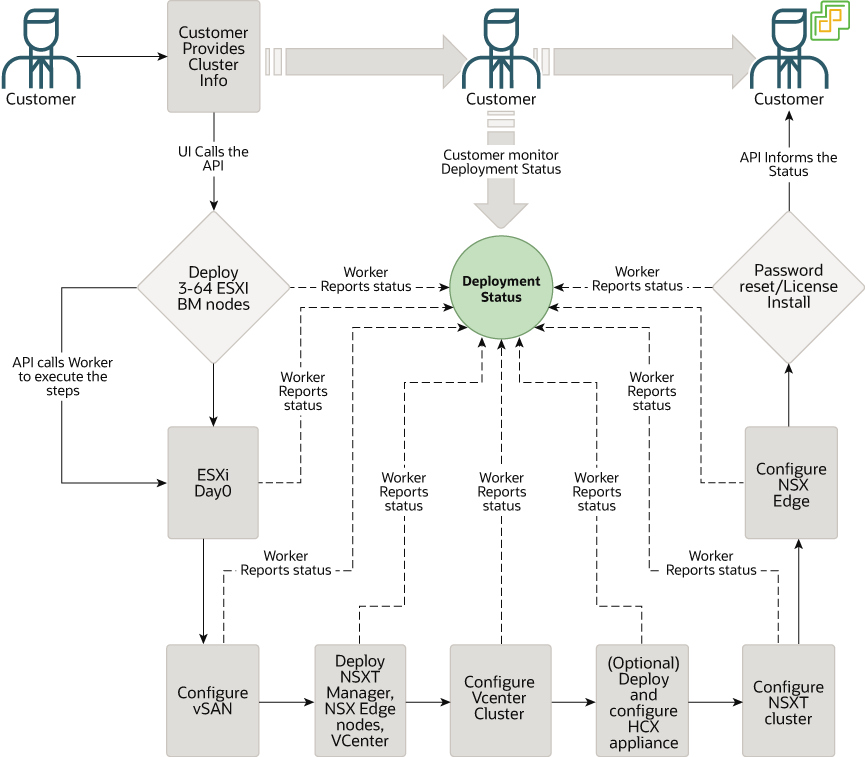
插图 ovcs_cluster_creation.png 的说明
要创建 SDDC,请执行以下步骤:
监视 SDDC 创建流程
要监视 SDDC 创建进度,请单击概要页顶部的 URL。此时将打开 SDDC 详细信息页。在此页中,可以执行以下操作:
- 请验证 SDDC 信息。单击工作请求以检查预配的状态。
- “工作请求详细信息”页显示预配的进度和详细的日志消息。
- 成功创建 SDDC 后,此百分比显示 100,日志消息确认是完成。
访问 SDDC
成功创建 SDDC 后,与其相关的所有信息都将列在 SDDC 详细信息页上。预配过程会为 SDDC 创建 vCenter 和 NSX 管理器 url 以及管理登录身份证明。SDDC 详细信息页上提供了这些信息。
要访问 vCenter Server 和 NSX Manager 控制台,您可以在 VCN 的公共子网中创建 Windows 实例。您也可以使用已在 VCN 上运行的现有 Windows 实例。创建 Windows 实例后,您可以从远程桌面客户机连接到它。然后,使用 SDDC 详细信息页中提供的 URL 和凭据访问 vCenter 和 NSX Manager 控制台:
- 使用 vSphere Client URL 访问 vCenter Server。
- 使用 NSX Manager URL 访问 NSX Manager。
- 使用 SSH 可以通过使用私有 SSH 密钥以管理员用户身份连接到 ESXi 主机:
ssh -i id_rsa opc@ my-sddc-1-1
Warning: Permanently added '10.0.2.3' (RSA) to the list of known hosts.
The time and date of this login have been sent to the system logs.

WARNING:
	All commands run on the ESXi shell are logged and may be included in
	support bundles. Do not provide passwords directly on the command line.
	Most tools can prompt for secrets or accept them from standard input.

VMware offers supported, powerful system administration tools.
Please see www.vmware.com/go/sysadmintools for details.

The ESXi Shell can be disabled by an administrative user. See the
vSphere Security documentation for more information.
[opc@my-sddc-1-1:~]
[opc@my-sddc-1-1:~]
[opc@my-sddc-1-1:~]