23 代理程式部署
部署代理程式會將您的代理程式轉換成代管的應用程式。
您可以將代理程式部署到連接到其遊樂場或不同 AI 運算的相同 AI 運算中。當您將代理程式的最新變更部署到附加的 AI 運算時,部署的代理程式代表部署時代理程式的快照。若要將部署的代理程式更新為最新版本,您必須重新部署代理程式。
每個代理程式都有穩定的部署 URL,取決於唯一的代理程式金鑰。重新建置代理程式多次會覆寫建置 URL 後面的代理程式。
- 代理程式在任何指定時間都只能部署到一個 AI 運算叢集。
- 在相同的 AI 運算叢集多次部署相同的代理程式,會覆寫先前部署的代理程式重複。
部署專員之後,您可以擷取線上交談 URI,以程式設計方式發出查詢,並從專員的詳細資料頁籤中擷取專員的回應。
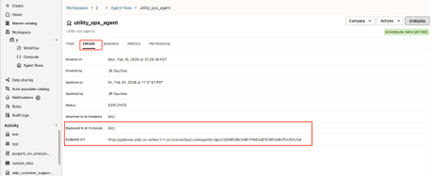
端點 URL 穩定且與每個代理程式連結。此 URL 包含指派給每個代理程式的唯一 agentID。換句話說,如果您取消建置代理程式並再次建置代理程式,URL 會保持不變。優點是您不需要修改呼叫端點的從屬端程式碼,這項缺點是您可以覆寫生產環境中的代理程式。
https://gateway.aidp.{oci-region}.oci.oraclecloud.com/agentendpoint/{agentId}/{protocol}oci-region對應至 Oracle AI Data Platform 實例區域;agentId是與代理程式關聯的唯一 IDprotocol是通訊協定:chat,遵循 OpenAI 回應 API 格式,而a2a則遵循代理程式對代理程式通訊協定。每個代理程式端點均可使用這兩種協定。如需詳細資訊,請參閱 A2A 代理程式部署。
附註:
「詳細資訊」頁籤中會列出兩個 AI 計算。連附至 AI 運算主要用於測試操場中的代理程式。部署到 AI Compute 會代管部署的代理程式。部署代理程式之後,就會填入端點 URL 欄位。您可以從生產環境應用程式呼叫此端點 URL。
代理程式:執行身分
您可以選擇建置的代理程式用於平台程式實際執行作業的識別。您可以使用自己的身分識別或服務帳戶,讓部署與個別使用者的存取權無關。
「執行身分」適用於已部署代理程式的平台作業。它不會判斷誰可以呼叫代理程式,或其工具如何向下游系統進行認證。部署代理程式的人員仍然是已授權且已稽核的要求者。
身分識別類型
部署代理程式時,您可以從兩種類型的身分識別中選擇「執行身分」:自己的身分識別和服務帳戶。
自己的身分識別: AI Data Platform 會檢查您是否已在「證明資料存放區」中儲存證明資料。如果存在,則會自動使用。
服務帳戶:儲存在「證明資料存放區」中的服務帳戶也可以選取為「以身分執行」,但只有在您至少獲得該服務帳戶之證明資料的 USE 權限時,才能選取該服務帳戶。
如需有關建立和共用證明資料的資訊,請參閱證明資料存放區 (預覽) 。
編輯與重新部署行為的所有權
如果使用者按一下「重新部署」來編輯或重新部署代理程式,但未變更其服務帳戶「執行身分」選項,則會保留該選項;系統不會再次檢查其現有證明資料的 USE 權限。如果他們明確選取服務帳號,則需要其認證的 USE 權限,或要求未通過驗證。「執行身分」不會在缺少該權限時自動切換至編輯器。如果明確清除服務帳戶選擇或未設定服務帳戶,則它會切換至編輯器的識別。
如果使用者取消部署代理程式,然後再次部署代理程式,則必須再次選取「以身分執行」識別。
部署代理程式
您部署已建立並設定的代理程式,讓其他使用者能夠在 Oracle AI Data Platform 執行處理中查看並使用該代理程式。
- 在代理程式旁邊,按一下
 動作,然後按一下建置。您也可以按一下代理程式名稱來開啟它,然後按一下右上方的部署。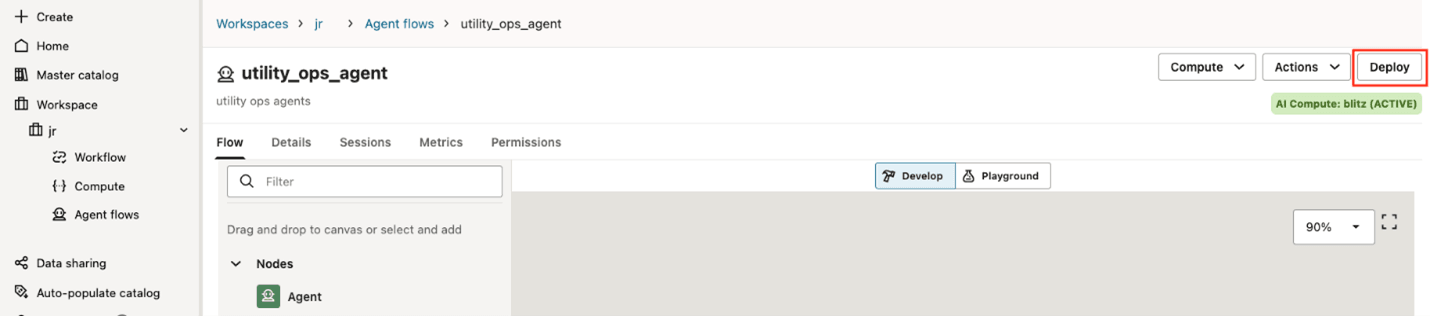
使用 OAuth2 部署代理程式
您可以部署已建立並設定為使用 OAuth2 認證連線至外部身分識別提供者的代理程式。
- 在代理程式旁邊,按一下 動作,然後按一下建置。您也可以按一下代理程式名稱,然後按一下右上方的部署。

A2A 代理程式部署
Agent2Agent (A2A) 通訊協定是獨立 AI 代理程式之間通訊的開放標準,包括使用不同架構建置的代理程式、由不同供應商代管,或以不透明的遠端系統執行。
其目的是為這些專員提供共用的互動模型,以便他們探索彼此的功能、協商支援的輸入 / 輸出格式、委派或協作任務,以及安全地交換資訊,而不公開內部記憶體、工具或導入詳細資料。如需詳細資訊,請參閱 Agent2Agent (A2A) Protocol 。
A2A 旨在解決代理程式互通性:從屬端或其他代理程式可以使用一組通用概念和作業,與任何符合 A2A 規範的遠端代理程式互動,而不是每個自訂的代理程式整合。此規格中心包含訊息、任務、零件、構件、串流更新和推播通知;它支援同步回覆、長時間執行的非同步工作、串流和企業風格的認證 / 安全模式。
在 Oracle AI Data Platform 中,所有已部署的代理程式都提供 /A2A 呼叫路徑,可供 A2A 從屬端應用程式呼叫。
什麼是代理卡?
代理程式卡是由 A2A 伺服器發布的 JSON 描述資料文件。在 AIDP 中,A2A 伺服器是代管代理程式部署的 AI 運算。
此卡描述代理程式的身分識別、服務端點、支援的協定 / 傳輸、功能、技能、支援的輸入 / 輸出模式以及認證需求;從屬端會使用此卡來尋找代理程式是否適合,以及如何呼叫它。正確記錄的代理程式卡是 A2A 通訊協定的必要條件。
Oracle AI Data Platform 中的代理程式卡為「草稿」狀態,表示該代理程式尚未部署或「已發布」,表示該卡已與代理程式一起部署。
代理卡動作
在開發客服員期間,卡可在客服員的「動作」功能表中使用。
- 草稿卡會反映代理程式目前開發中的狀態。
- 發布的卡片會對應至建置代理程式時所取得的卡片快照。發布的卡會反映已部署代理程式的狀態。
專員卡欄位
AI 資料平台支援目前 A2A 通訊協定代理程式卡欄位的子集,可從此處取得: A2A 通訊協定 - 代理程式卡。
| 欄位 | 這是必要欄位。 | 描述 |
|---|---|---|
name |
是 | 代理程式的人類可讀名稱。範例:「處方代理程式」 |
description |
是 | 人為可判讀的專員描述,可協助使用者和其他專員瞭解其目的。範例:「幫助使用食譜和烹飪的代理程式」。 |
Agent Version |
是 | 代理程式的版本。範例:"1.0.0" |
Documentation URL |
編號 | 提供代理程式其他相關文件的 URL。 |
Provider - Organization |
編號 | 代理程式的服務提供者。 |
Provider - URL |
編號 | 服務提供者的 URL。 |
Capabilities |
是 | 代理程式支援的 A2A 功能集。
只能設定 |
Skills
|
是 | 技能代表服務人員的能力。這大致上是描述性的概念,但代表專員可能成功的一組更重點的行為。技能代表 AgentSkill 的陣列。 |
每個 AgentSkill 都是由數個記錄代理程式功能的欄位所組成。在服務人員卡中定義服務人員技能是最耗時的作業,而且是反覆的處理。技能可在部署前在服務人員卡草稿中編輯 (連同其他服務人員卡)。
附註:
inputModes、outputModes 及 securityRequirements 由 AI 資料平台 提供,且無法修改。
| 欄位 | 這是必要欄位。 | 描述 |
|---|---|---|
Skill ID |
是 | 專員技能的唯一識別碼。 |
Skill Name |
是 | 技能的人類可讀名稱。 |
Description |
是 | 技能的詳細描述。 |
Tags |
是 | 一組描述技能能力的關鍵字。 |
Examples |
編號 | 此技能可處理的提示或案例範例。 |
代理程式部署端點 A2A 路徑
除了 /chat 之外,已部署代理程式的 URL 中會顯示一個 /a2a 路徑。
例如,代理程式會將這些路徑公開給外部用戶端:
https://gateway.aidp.{oci-region}.oci.oraclecloud.com/agentendpoint/{agentId}/chathttps://gateway.aidp.{oci-region}.oci.oraclecloud.com/agentendpoint/{agentId}/a2a
兩個路徑 (/chat、/a2a) 都可由個別的從屬端使用。
A2A 中的階段作業變數
階段作業變數的值可以傳遞至訊息 metadata 欄位中的 A2A 代理程式。下方的 JSON 片段顯示發出給 a2a 代理程式之使用者訊息的有效負載 (包含三個階段作業變數):userName、geoLocation 和 os:
{
  "jsonrpc": "2.0",
  "method": "message/send",
  "params": {
    "contextId": "session_12345",
    "taskId": "task_67890",
    "message": {
      "role": "user",
      "parts": [
        {
          "text": "What is the current status of my order?",
        }
      ],
      "metadata": {
        "sessionvariables.userName": "George",
        "sessionvariables.geoLocation": “Dallas, TX”,
        "sessionvariables.os": "mobile_ios"
      }
    }
  },
  "id": "rpc-99821"
}
範例:使用 OCI CLI 呼叫 A2A 代理程式 (非串流處理)
oci raw-request \
  --http-method POST \
  --auth security_token \
  --request-body '{
    "id": "<your-request-id>",
    "jsonrpc": "2.0",
    "method": "message/send",
    "params": {
      "configuration": {
        "acceptedOutputModes": [
          "text/plain",
          "text"
        ]
      },
      "message": {
        "contextId": "<your-context-id>",
        "kind": "message",
        "messageId": "<your-message-id>",
        "parts": [
          {
            "kind": "text",
            "text": "What is the capital of India?"
          }
        ],
        "role": "user"
      }
    }
  }' \
  --request-headers '{
    "x-session-id": "<your-session-id>",
    "dh-user-principal": "<your-user-principal>"
  }' \
  --target-uri " <your-a2a-agent-endpoint-url>"
範例:使用 OCI CLI 呼叫 A2A 代理程式 (串流)
oci raw-request \
  --http-method POST \
  --auth security_token \
  --request-body '{
    "id": "<your-request-id>",
    "jsonrpc": "2.0",
    "method": "message/stream",
    "params": {
      "configuration": {
        "acceptedOutputModes": [
          "text/plain",
          "text"
        ]
      },
      "message": {
        "contextId": "<your-context-id>",
        "kind": "message",
        "messageId": " <your-message-id>",
        "parts": [
          {
            "kind": "text",
            "text": "What is the capital of India?"
          }
        ],
        "role": "user"
      }
    }
  }' \
  --request-headers '{
    "x-session-id": "<your-session-id>",
    "dh-user-principal": "<user-principal>"
  }' \
  --target-uri "<your-a2a-agent-endpoint-url>"
範例:A2A Client SDK
import asyncio
import json
import logging
import typing
from collections.abc import Iterator
import uuid
import httpx
import oci
from a2a.client import A2AClient, ClientFactory
from a2a.types import (
    AgentCard,
    Message,
    Part,
    Role,
    TextPart,
    SendMessageRequest,
    MessageSendParams,
    MessageSendConfiguration,
    Task, SendMessageSuccessResponse, SendStreamingMessageRequest,
)

class OCIAuth(httpx.Auth):
    """httpx auth implementation using OCI signer via requests auth adapter."""

    def __init__(self, signer: oci.signer.AbstractBaseSigner):
        self._requests_auth = _OCIRequestsAuth(signer)

    def auth_flow(self, request: httpx.Request) -> Iterator[httpx.Request]:
        req = RequestsRequest(
            method=request.method,
            url=str(request.url),
            headers=dict(request.headers),
            data=request.content,
        )
        prepared: RequestsPreparedRequest = req.prepare()
        prepared = self._requests_auth(prepared)
        request.headers.update(dict(prepared.headers))
        yield request


def getOCIAuth():
    conf = oci.config.from_file(profile_name="DEFAULT")
    token_file = conf['security_token_file']
    token = None
    with open(token_file, 'r') as f:
        token = f.read()
    private_key = oci.signer.load_private_key_from_file(conf['key_file'])
    signer = oci.auth.signers.SecurityTokenSigner(token, private_key)
    auth = OCIAuth(signer=signer)
    return auth


async def _call_agent_with_a2a(agent_url: str, query: str, context_id: str,auth:OCIAuth) -> str:
    """Call an agent using the A2A protocol."""
    try:
        # Initialize OCI signer
        #headers = {"dh-user-principal": "dh-user"}
        headers = {"Accept": "*/*",
                   "dh-user-principal": "eyJhbGciOiJIUzI1NiIsInR5cCI6IkpXVCJ9..."}

        async with httpx.AsyncClient(timeout=60.0, auth=auth,headers=headers) as hc:
            agent_card = await _get_agent_card(agent_url,auth)
            print(f"Agent card is {agent_card}")

            client =  A2AClient(httpx_client=hc, agent_card=agent_card)
            # Create message
            message = Message(
                message_id=str(uuid.uuid4()),
                context_id=context_id,
                role=Role.user,
                parts=[Part(root=TextPart(text=query))],
                metadata={"sessionvariables.cred.mcp.weatherReportMCP.bearer": "valid-123"}
            )
            request = SendMessageRequest(
                id=str(uuid.uuid4()),  # Add the required id field
                params=MessageSendParams(
                    message=message,
                    configuration=MessageSendConfiguration(acceptedOutputModes=["text/plain", "text"]),
                ),
            )
            #json_string = json.dumps(message, indent=4)
            print(f"Send request : {request}")

            response = await client.send_message(request)

            logging.info("Received response from A2A server: %s", response.root.result)
            # Extract response
            result = response.root.result
            # Handle different response types


            if isinstance(result, Task):
                # Task response
                if result.artifacts:
                    # Extract text from artifacts
                    texts = []
                    for artifact in result.artifacts:
                        for part in artifact.parts:
                            if hasattr(part, "root") and hasattr(part.root, "text"):
                                texts.append(part.root.text)
                    return "\n".join(texts) if texts else "Task completed with no text response"
                elif result.status and result.status.message:
                    logging.info(f"Received Task status {result.status.state} from A2A server and status message is {result.status.message}", result.status.message)
                    if  result.status.state== "failed":
                        print("Failure observed in Task invocation")
                        for m_part in result.status.message.parts:
                           print(f"Error message  { m_part.root.text}")

                    return get_message_text(result.status.message)
                else:
                    return f"Task {result.id} status: {result.status.state if result.status else 'unknown'}"

            elif isinstance(result, Message):
                return get_message_text(result)
            else:
                logging.warning(f"Unexpected response type: {type(result)}")
                return "Received response but unable to extract text"
    except Exception as ex:
        logging.error(f"Error calling agent at {agent_url}: {ex}", exc_info=True)
        return f"Error communicating with agent: {str(ex)}"


async def _call_agent_with_a2a_with_stream(agent_url: str, query: str, context_id: str, auth: OCIAuth) -> str:
    """Call an agent using the A2A protocol with streaming (SSE) and return the final artifact text."""
    try:
        async with httpx.AsyncClient(timeout=60.0, auth=auth) as hc:
            agent_card = await _get_agent_card(agent_url)
            if not agent_card:
                return "No Agent Card Found"
            print(f"Agent card is {agent_card}")

            client = A2AClient(httpx_client=hc, agent_card=agent_card)
            message = Message(
                message_id=str(uuid.uuid4()),
                context_id=context_id,
                role=Role.user,
                parts=[Part(root=TextPart(text=query))],
            )
            request = SendStreamingMessageRequest(
                id=str(uuid.uuid4()),
                params=MessageSendParams(
                    message=message,
                    configuration=MessageSendConfiguration(acceptedOutputModes=["text/plain", "text"]),
                ),
            )
            print("Invoking Remote Agent request (beautified JSON):")
            print(json.dumps(request.model_dump(), indent=2, ensure_ascii=False))
            # Expected event types:
            # - TaskStatusUpdateEvent (working/in-progress)
            # - TaskArtifactUpdateEvent (contains Artifact.parts[].root.text) -> final output
            final_artifact_text_parts: list[str] = []

            async for event in client.send_message_streaming(request):
                # Print each SSE event as-is (SDK object)
                print(f"[A2A stream event] {event}")

                try:
                    result = getattr(event.root, "result", None)
                    if not result:
                        continue

                    # TaskArtifactUpdateEvent and TaskStatusUpdateEvent are SDK types; to avoid tight coupling,
                    # extract by attribute presence.
                    artifact = getattr(result, "artifact", None)
                    if artifact and getattr(artifact, "parts", None):
                        for part in artifact.parts:
                            root = getattr(part, "root", None)
                            txt = getattr(root, "text", None)
                            if txt:
                                final_artifact_text_parts.append(txt)
                except Exception:
                    # Keep streaming even if an event can't be parsed
                    continue

            return "\n".join([t for t in final_artifact_text_parts if t]).strip() or "Stream completed (no artifact text)."
    except Exception as ex:
        logging.error(f"Error calling agent at {agent_url}: {ex}", exc_info=True)
        return f"Error communicating with agent: {str(ex)}"
編輯草稿專員卡
您可以編輯尚未建置之代理程式的代理程式卡。
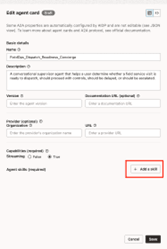
- 按一下動作,然後按一下檢視服務人員卡與草稿服務人員卡。

- 按一下編輯。
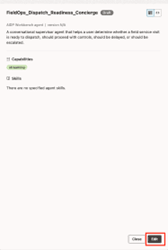
- 您可以按一下右上方的表單或 JSON 來切換檢視。JSON 檢視較完整,但為唯讀。您只能編輯「表單」檢視中的欄位。
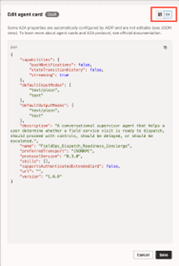
- 按一下新增技能以新增要對 A2A 從屬端公開的技能。
編輯已發布的專員卡
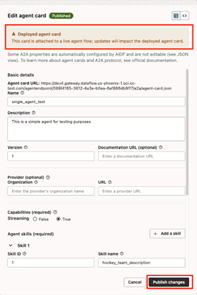
您可以修改已發布的代理程式卡,而不需取消部署或重新部署代理程式。
附註:
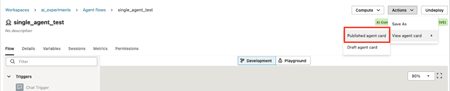
您對已發佈的卡片所做的變更會立即反映在 A2A 用戶端可存取的 agent-card.json 檔案中。- 按一下動作,然後按一下檢視服務人員卡與已發布的服務人員卡。
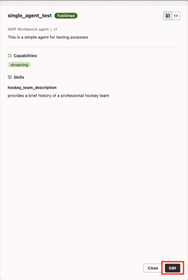
- 按一下編輯。
- 按一下新增技能以新增要對 A2A 從屬端公開的技能。
https://gateway.aidp.{oci-region}.oci.oraclecloud.com/agentendpoint/{agentId}/a2a/agent-card.json