附註:
- 此教學課程需要存取 Oracle Cloud。若要註冊免費帳戶,請參閱開始使用 Oracle Cloud Infrastructure Free Tier 。
- 使用 Oracle Cloud Infrastructure 證明資料、租用戶以及區間的範例值。完成實驗室時,請將這些值替代為雲端環境特定的值。
使用 OCI 通知設定 AIDP 工作流程工作和自訂案例的通知
簡介
本教學課程說明如何使用 OCI 通知和事件服務設定 AIDP 工作流程工作的通知。您也將瞭解如何在 AIDP 筆記型電腦中使用 Python 程式實作自訂通知邏輯。
OCI Notifications 服務使用發佈 - 訂閱模型,以可靠且安全的方式傳遞訊息。
目標
在本教學課程結束之前,您將能夠:
- 建立 OCI 通知主題和訂閱
- 設定 AIDP 工作流程工作狀態的事件規則
- 接收工作失敗的電子郵件通知
- 使用 Python 實作自訂通知邏輯
- 以程式設計方式觸發通知
必備條件
- 存取 OCI 主控台
- 含工作流程工作的 AIDP 工作區
- 建立通知與事件的權限
- Python SDK 使用量的 OCI 組態設定
作業 1:建立通知主題與訂閱
- 登入 OCI 主控台。
- 瀏覽至開發人員服務 → 通知。
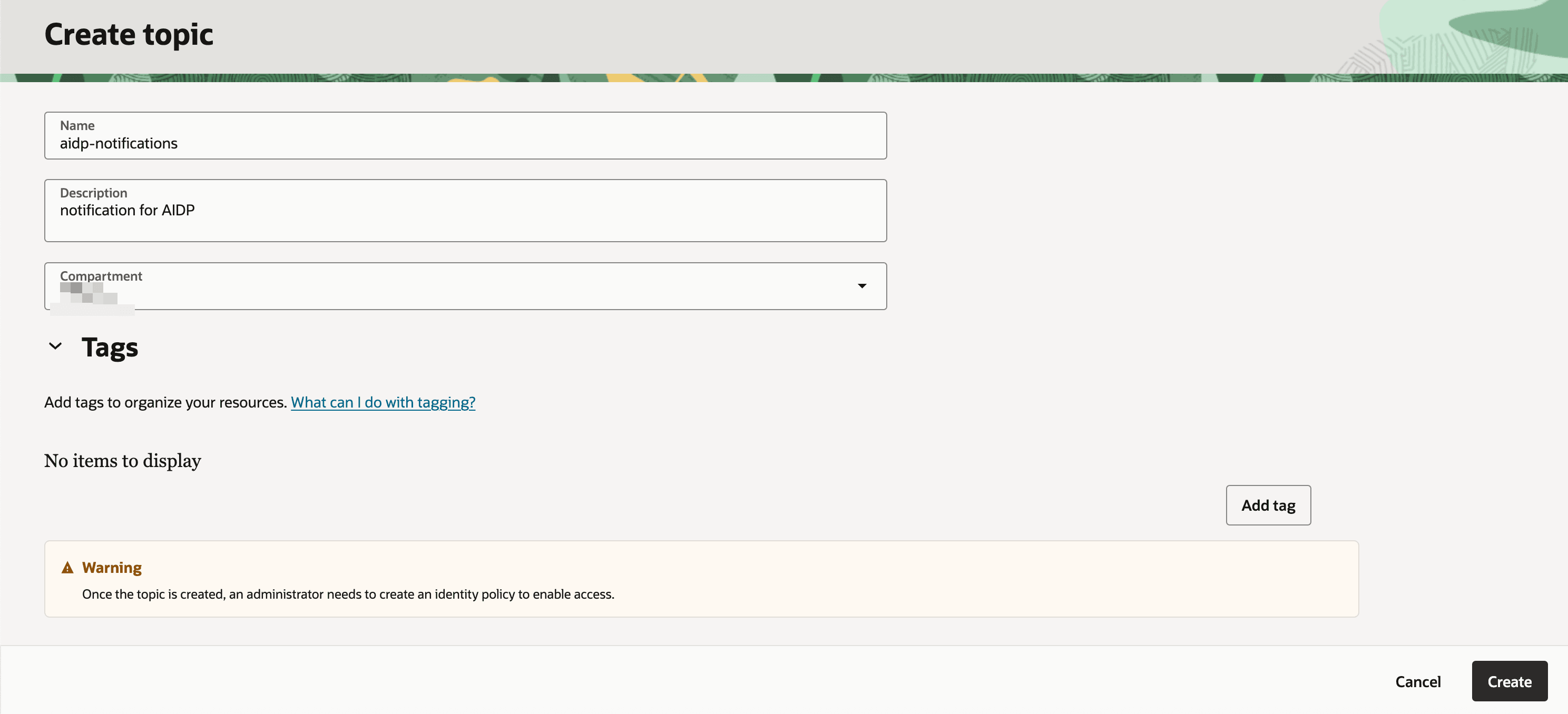
- 按一下建立主題,然後提供:
- 名稱
- 描述
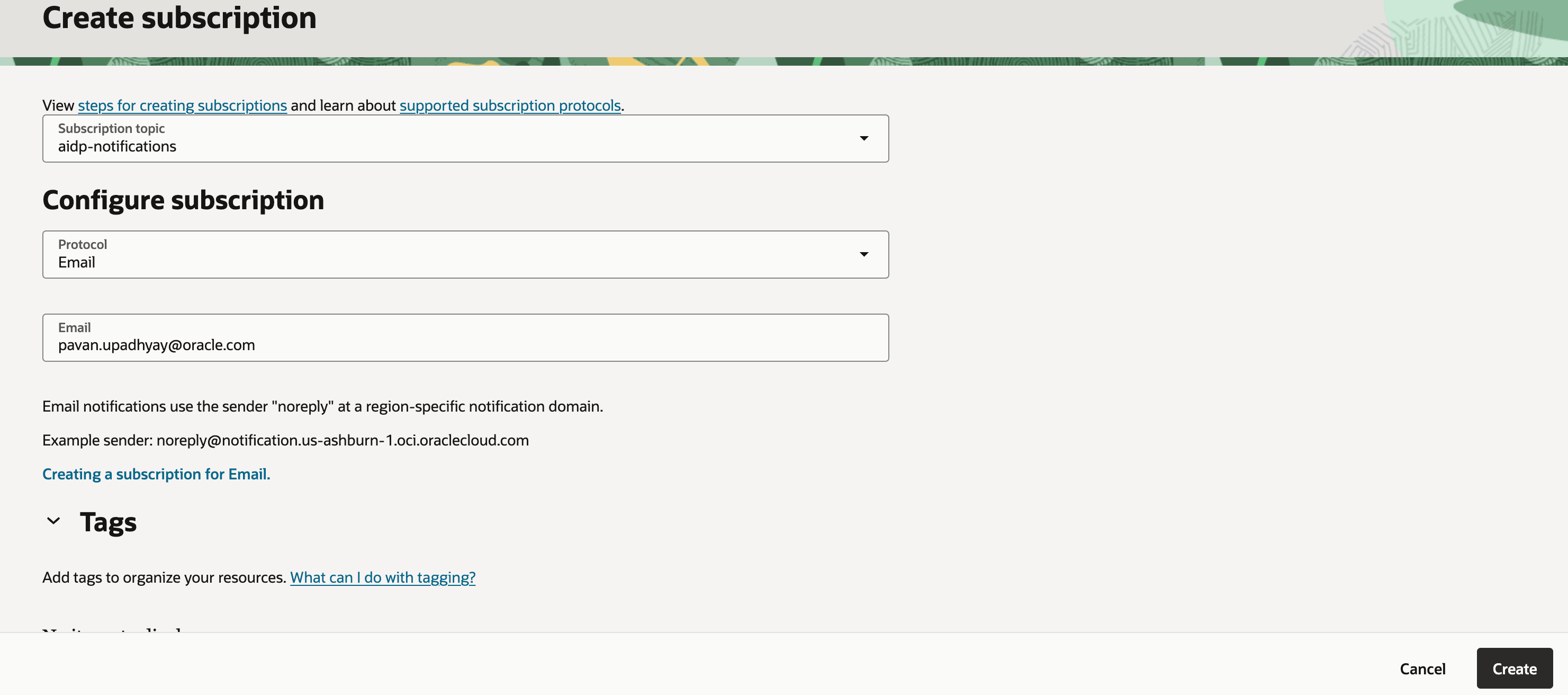
- 建立訂閱。
- 通訊協定:電子郵件
- 電子郵件:您的電子郵件地址
-
請檢查您的電子郵件信箱,並確認訂閱。
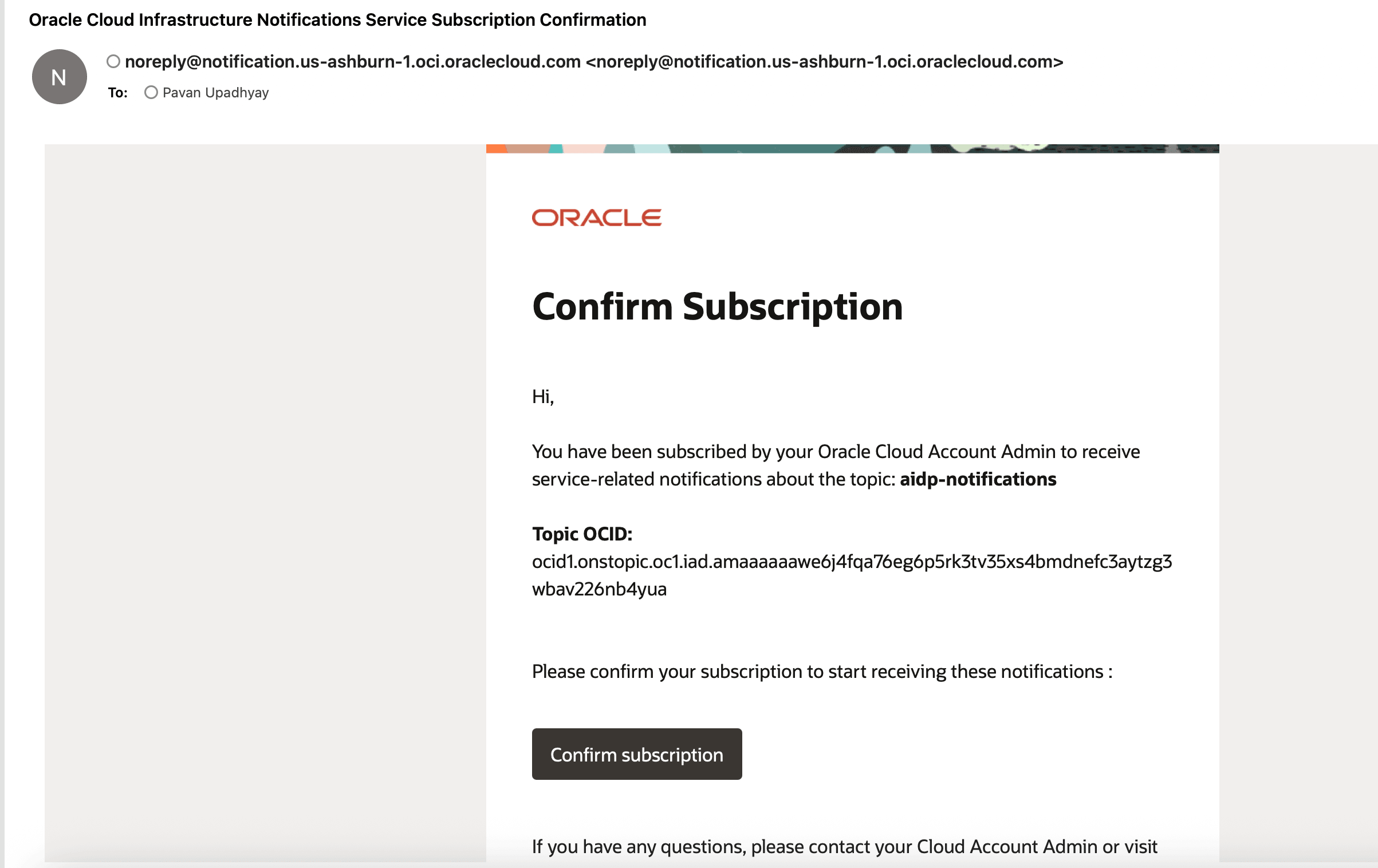
備註:訂閱狀態在確認後會從待處理變更為現用。
作業 2:設定 AIDP 工作流程的事件規則
- 瀏覽至可觀測性與管理 → 事件服務 → 規則。
- 按一下建立規則。
- 設定:
- 服務:智慧型資料湖
- 事件類型:執行工作 - 結束
- 屬性名稱 1 :jobKey
- 屬性值 1:保留輔助工作流程識別碼
- 屬性名稱 2 :jobStatus
- 屬性值 2:失敗
- 設定動作:
- 選取先前建立的通知主題
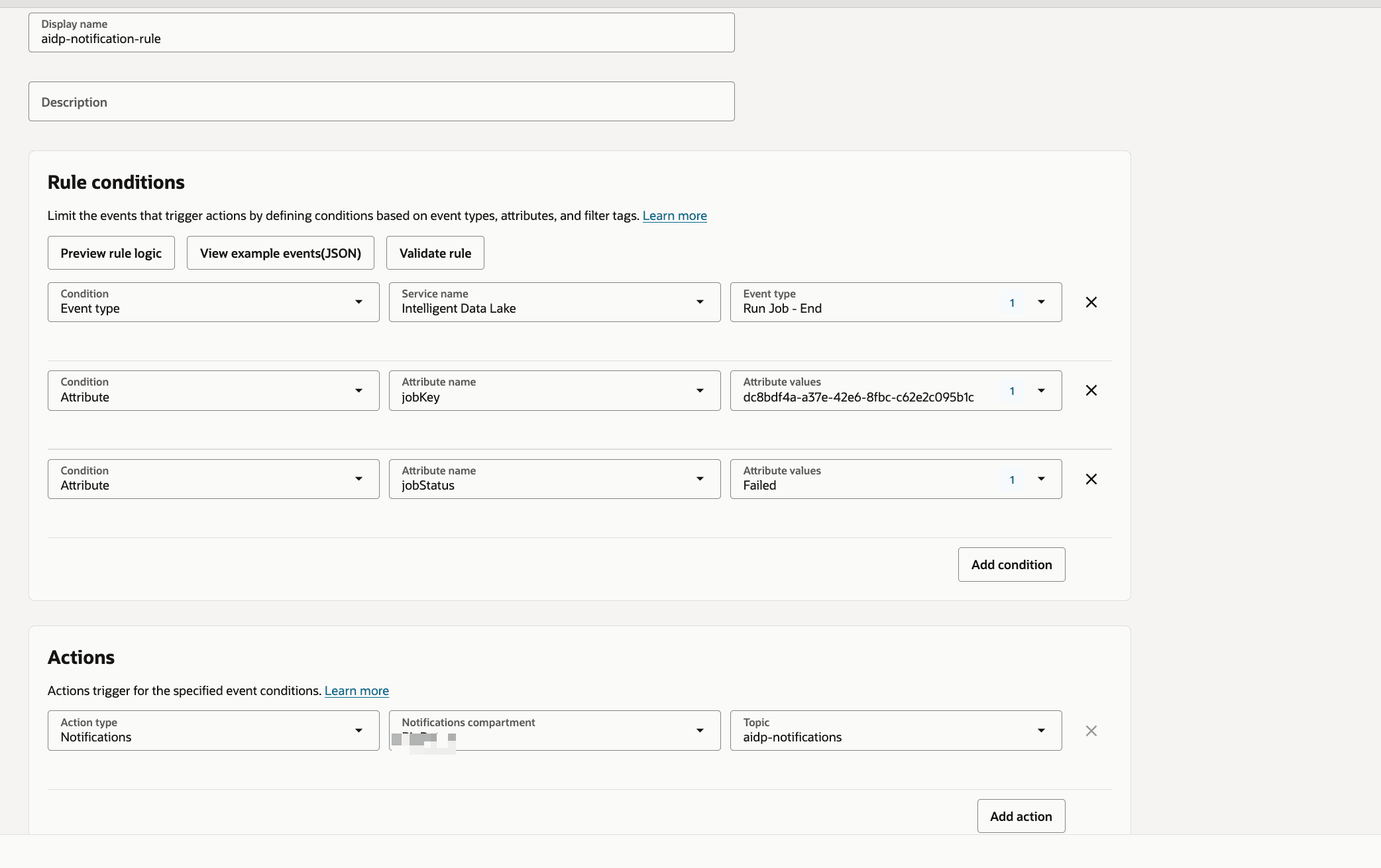
提示:您可以自訂其他狀態的規則,例如「成功」或「執行中」。
作業 3:驗證電子郵件通知
- 觸發或執行工作流程工作。
- 視需要強制執行失敗案例。
-
請檢查您的電子郵件收件匣。
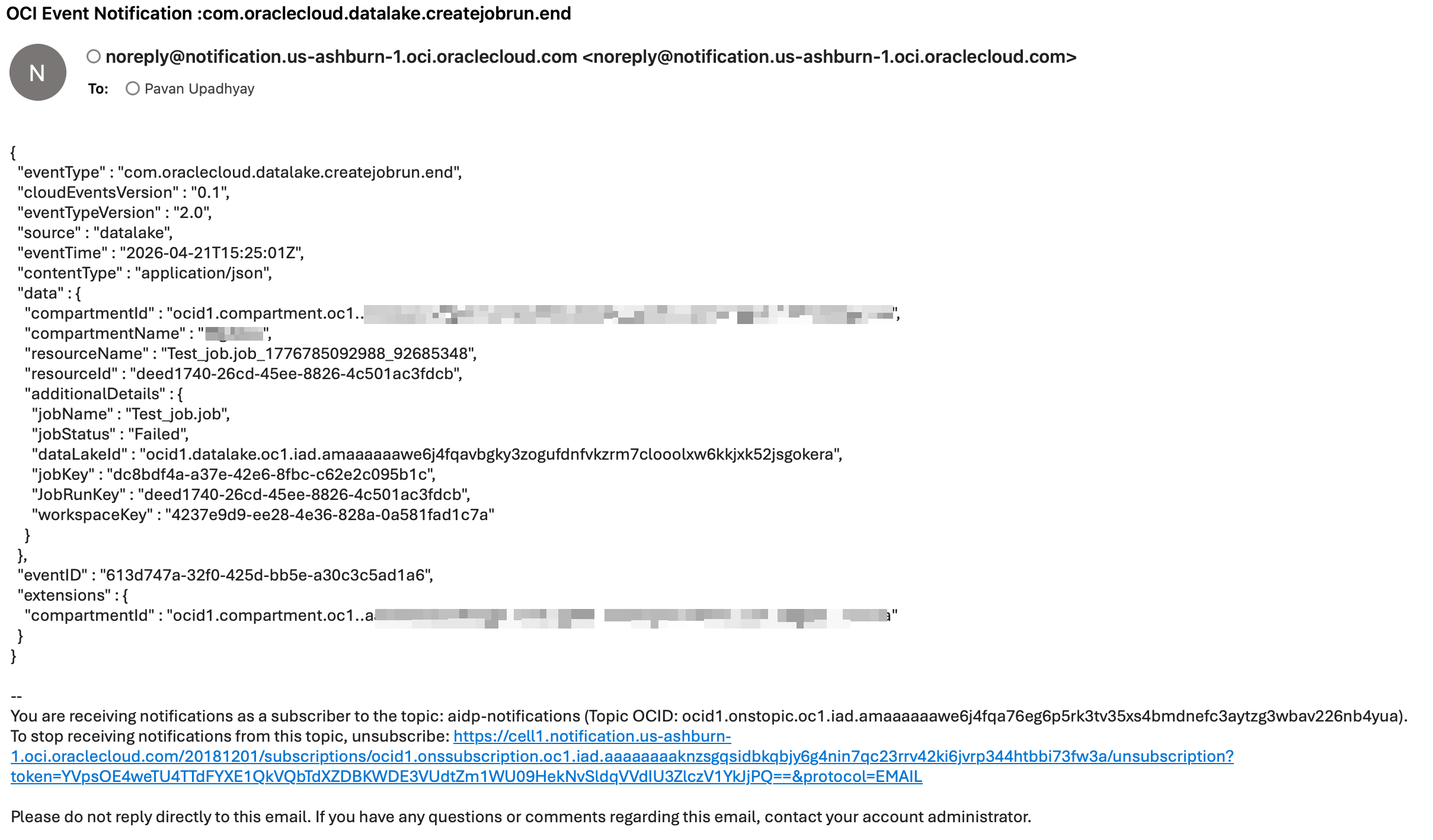
注意:通知包含工作詳細資訊,例如工作名稱和狀態。
工作 4:使用 Python 實作自訂通知
以下是使用 OCI SDK 傳送通知的範例 Python 程式。
import oci
from oci.ons.models import MessageDetails

config = oci.config.from_file("~/.oci/config", "DEFAULT")
client = oci.ons.NotificationDataPlaneClient(config)

topic_id = "<your_topic_ocid>"

message_details = MessageDetails(
    title="Test Notification",
    body="Hello from AIDP!"
)

response = client.publish_message(
    topic_id=topic_id,
    message_details=message_details
)

print("Message sent:", response.data.message_id)
作業 5:進階自訂通知類別
import oci
import logging
import time
from typing import List, Optional, Dict

logger = logging.getLogger("OCI_Notifier")
logger.setLevel(logging.INFO)

handler = logging.StreamHandler()
formatter = logging.Formatter(
    "%(asctime)s - %(name)s - %(levelname)s - %(message)s"
)
handler.setFormatter(formatter)
logger.addHandler(handler)

class OCINotifier:
    def __init__(
        self,
        topic_id: str,
        config_file: str = "~/.oci/config",
        profile: str = "DEFAULT",
        max_retries: int = 3,
        retry_delay: int = 2,
    ):
        """
        Initialize OCI Notification client

        Args:
            topic_id: OCI Notification Topic OCID
            config_file: Path to OCI config
            profile: Config profile name
            max_retries: Retry attempts
            retry_delay: Delay between retries (seconds)
        """
        self.topic_id = topic_id
        self.max_retries = max_retries
        self.retry_delay = retry_delay

        try:
            self.config = oci.config.from_file(config_file, profile)
            self.client = oci.ons.NotificationDataPlaneClient(self.config)
            logger.info("OCI Notifier initialized successfully")
        except Exception as e:
            logger.error(f"Failed to initialize OCI client: {e}")
            raise


    def send(
        self,
        title: str,
        message: str,
        metadata: Optional[Dict] = None,
    ) -> bool:
        """
        Send notification message

        Args:
            title: Notification subject
            message: Notification body
            metadata: Optional metadata dictionary

        Returns:
            bool: True if success, False otherwise
        """

        payload = {
            "title": title,
            "body": message,
        }

        if metadata:
            payload["metadata"] = metadata

        for attempt in range(1, self.max_retries + 1):
            try:
                response = self.client.publish_message(
                    self.topic_id,
                    payload
                )
                logger.info(
                    f"Notification sent successfully | "
                    f"Message ID: {response.data.message_id}"
                )
                return True

            except Exception as e:
                logger.error(
                    f"Attempt {attempt} failed: {str(e)}"
                )
                if attempt < self.max_retries:
                    time.sleep(self.retry_delay)
                else:
                    logger.error("Max retries reached. Notification failed.")
                    return False


def notify_success(notifier: OCINotifier, job_name: str):
    notifier.send(
        title=f"{job_name} SUCCESS",
        message=f"Job '{job_name}' completed successfully."
    )


def notify_failure(notifier: OCINotifier, job_name: str, error: str):
    notifier.send(
        title=f"{job_name} FAILED",
        message=f"Job '{job_name}' failed.\nError: {error}"
    )
任務 6:從 AIDP 筆記型電腦呼叫自訂通知
您可以在工作流程或記事本中呼叫通知邏輯:
from notifier import notify_failure

notify_failure(notifier, "SampleJob", "Error details here")
疑難排解與秘訣
秘訣: 確定 OCI 組態檔路徑正確無誤。
注意:請檢查主題 OCID 和訂閱狀態。
提示:在自訂通知程式中使用重試以獲得可靠性。
接下來的步驟
- 新增 Slack 或 HTTPS 訂閱
- 擴充成功事件的通知
- 與監控儀表板整合
致謝
- 作者 - Pavan Upadhyay (首席雲端工程師)、Saket Bihari (首席雲端工程師)
其他學習資源
您可以在 docs.oracle.com/learn 上探索其他實驗室,或在 Oracle Learning YouTube 頻道上存取更多免費學習內容。此外,請造訪 education.oracle.com/learning-explorer 以成為 Oracle Learning Explorer。
如需產品文件,請造訪 Oracle Help Center 。
Configure Notifications for AIDP Workflow Jobs and Custom Scenarios Using OCI Notifications
G56833-01
Copyright ©2026,
Oracle 和 (或) 其關係企業。