注意:
- 此教學課程需要存取 Oracle Cloud。若要註冊免費帳戶,請參閱開始使用 Oracle Cloud Infrastructure Free Tier 。
- 它會使用 Oracle Cloud Infrastructure 證明資料、租用戶及區間的範例值。完成實驗室時,請將這些值替代為您雲端環境特定的值。
使用 Velero 將 Azure Kubernetes 服務叢集或 Amazon EKS 叢集移轉至 Kubernetes 容器引擎
簡介
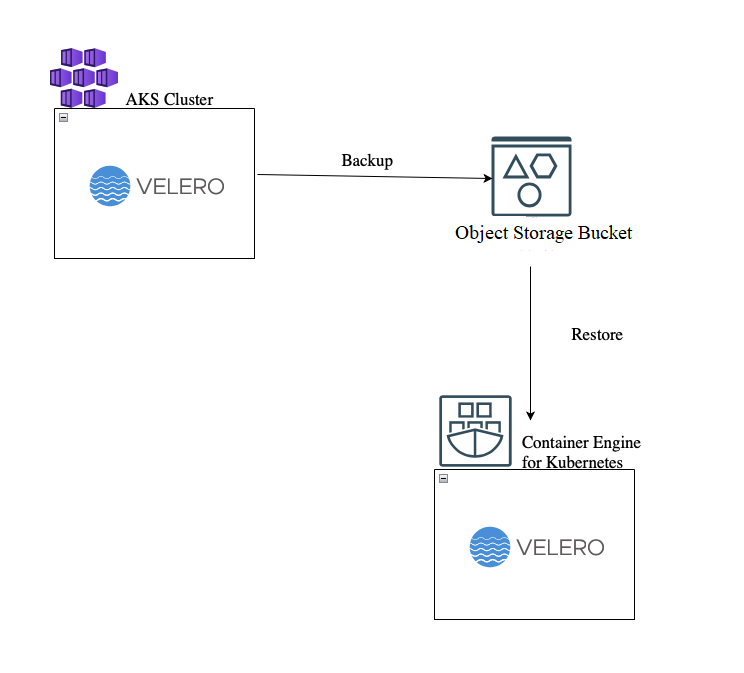
Velero 是一種開放原始碼工具,可安全地備份和還原、執行災害復原並移轉 Kubernetes 叢集資源和永久磁碟區。Oracle Cloud Infrastructure (OCI) 物件儲存為 S3-Compatible,因此可以使用 Velero 的 AWS 外掛程式。在本教學課程中,我們將使用 Azure Kubernetes Service (AKS),但步驟也可以在 Amazon Elastic Kubernetes Service (Amazon EKS) 中順暢運作。
下圖概述處理程序的運作方式。
本教學課程準備了 NGINX Pod,其中已附加永久磁碟區宣告和自訂 index.html 檔案,以及虛擬加密密碼。
  > kubectl get pods --n nginx
  NAME          READY   STATUS    RESTARTS   AGE
  task-pv-pod   1/1     Running   0          47h
  > kubectl exec -it task-pv-pod --n nginx -- curl localhost
  AKS to OKE Migration with PVC attached
  >kubectl get secrets --namespace nginx
  NAME           TYPE     DATA   AGE
  okemigration   Opaque   1      2s
目標
- 建立要與物件儲存的儲存桶 S3 端點搭配使用的客戶秘密金鑰。
- 在 AKS 和 Oracle Cloud Infrastructure Container Engine for Kubernetes (OKE) 中設定 Velero。
- 執行備份和回復,將 Kubernetes 命名空間移轉至 OKE。
必要條件
- Kubernetes 的中繼知識。
- 將作為備份點的物件儲存的儲存桶。
- 物件儲存的儲存桶中的讀取 / 寫入使用者權限。
- 您用來連線至 Kubernetes 叢集的電腦上,或在 Microsoft Azure 和 OCI 的 Cloud Shell 內使用 Velero 二進位檔。
作業 1:建立內含客戶秘密金鑰的 velero-credentials 檔案
-
如果您還沒有客戶秘密金鑰,可以依照這些步驟進行。
-
在您用來存取 AKS/EKS 和 OKE 叢集 (或 Cloud Shell) 的機器上,使用下列內容建立
velero-credentials檔案:[default] aws_access_key_id=<<Access Key ID>> aws_secret_access_key=<<Generated Key>>
工作 2:下載並安裝 Velero
-
使用下列指令繼續在 AKS 和 OKE 叢集中安裝 Velero。
注意:如果您下載二進位檔,請在開頭使用 ./ 執行 velero:
velero install \ --provider aws \ --bucket <<Bucket name>> \ --prefix <<Tenancy name>> \ --use-volume-snapshots=false \ --plugins velero/velero-plugin-for-aws:v1.6.0 \ --secret-file <<Location of the file created with the customer secret key>> \ --backup-location-config region=<<Region>>,s3ForcePathStyle="true",s3Url=https://<<tenancy name>>.compat.objectstorage.<<region>>.oraclecloud.com \ --use-node-agent -
執行下列命令以驗證 Velero 是否安裝在 AKS 與 OKE 中 。
> kubectl get deployment -n velero
NAME     READY   UP-TO-DATE   AVAILABLE   AGE
velero   1/1     1            1           47h
作業 3:備份叢集
-
在您的 AKS 叢集中,執行下列命令。在本教學課程中,我們將在下載的 velero 二進位檔案使用 Azure CLI。
velero-v1.11.1-rc.1-linux-amd64> ./velero backup create nginxoke --include-namespaces nginx --default-volumes-to-fs-backup Backup request "nginxoke" submitted successfully. Run `velero backup describe nginxoke` or `velero backup logs nginxoke` for more details. -
檢查叢集是否已備份。
velero-v1.11.1-rc.1-linux-amd64> ./velero backup describe nginxoke Name: nginxoke Namespace: velero Labels: velero.io/storage-location=default Annotations: velero.io/source-cluster-k8s-gitversion=v1.24.10 velero.io/source-cluster-k8s-major-version=1 velero.io/source-cluster-k8s-minor-version=24 Phase: Completed Namespaces: Included: nginx Excluded: <none> ................. You can also check the Object Storage Bucket: 
作業 4:回復或遷移至 OKE
-
AKS、EKS 以及 OKE 在永久磁碟區宣告中使用不同的
storageClassNames,因此必須建立 configMap,此storageClassNames會將來源轉譯為 OCI 相容的類別名稱。若要這麼做,我們使用下列內容建立configMap.yaml檔案。適應您的來源storageClassName。重要事項:您必須完成步驟 1,否則您的 Pod 將維持擱置中狀態。
apiVersion: v1 kind: ConfigMap metadata: # any name can be used; Velero uses the labels (below) # to identify it rather than the name name: change-storage-class-config # must be in the velero namespace namespace: velero # the below labels should be used verbatim in your # ConfigMap. labels: # this value-less label identifies the ConfigMap as # config for a plugin (i.e. the built-in change storage # class restore item action plugin) velero.io/plugin-config: "" # this label identifies the name and kind of plugin # that this ConfigMap is for. velero.io/change-storage-class: RestoreItemAction data: # add 1+ key-value pairs here, where the key is the old # storage class name and the value is the new storage # class name. <old-storage-class>: oci-bv -
使用下列指令將 configMap 套用至您的 OKE 叢集。
kubectl apply -f configMap.yaml -
確認 OKE 叢集可從物件儲存存取備份。
$ velero get backup NAME STATUS ERRORS WARNINGS CREATED EXPIRES STORAGE LOCATION SELECTOR nginxoke Completed 0 0 2023-07-22 14:40:33 +0300 EEST 29d default <none> -
使用下列命令建立回復。
$ velero restore create --from-backup nginxoke Restore request "nginxoke-20230722145553" submitted successfully. Run `velero restore describe nginxoke-20230722145553` or `velero restore logs nginxoke-20230722145553` for more details. -
驗證回復狀態。
$ velero restore describe nginxoke-20230722145553 Name: nginxoke-20230722145553 Namespace: velero Labels: <none> Annotations: <none> Phase: Completed Total items to be restored: 7 Items restored: 7 Started: 2023-07-22 14:55:54 +0300 EEST Completed: 2023-07-22 14:56:45 +0300 EEST .......... -
確認已順利移轉叢集。
$ kubectl get pod -n nginx
NAME          READY   STATUS    RESTARTS   AGE
task-pv-pod   1/1     Running   0          2m15s
$ kubectl get secrets -n nginx
NAME           TYPE     DATA   AGE
okemigration   Opaque   1      2m21s
$ kubectl get pvc -n nginx
NAME            STATUS   VOLUME                                     CAPACITY   ACCESS MODES   STORAGECLASS   AGE
task-pv-claim   Bound    csi-d03267f7-32cf-4068-8809-d29aa649dcba   50Gi       RWO            oci-bv         2m31s
$ kubectl exec task-pv-pod -n nginx -- curl http://localhost
AKS to OKE Migration with PVC attached
相關連結
確認書
- Guido Alejandro Ferreyra (主要雲端架構師)
其他學習資源
探索 docs.oracle.com/learn 的其他實驗室,或者存取更多 Oracle Learning YouTube 頻道上的免費學習內容。此外,請瀏覽 education.oracle.com/learning-explorer 以成為 Oracle Learning 檔案總管。
如需產品文件,請造訪 Oracle Help Center 。
Migrate your Azure Kubernetes Service Cluster or Amazon EKS Cluster to Container Engine for Kubernetes using Velero
F84712-01
August 2023
Copyright © 2023, Oracle and/or its affiliates.