附註:
- 此教學課程需要存取 Oracle Cloud。若要註冊免費帳戶,請參閱開始使用 Oracle Cloud Infrastructure Free Tier 。
- 它會使用 Oracle Cloud Infrastructure 證明資料、租用戶及區間的範例值。完成實驗室時,請將這些值替代為您雲端環境特定的值。
在 OCI 監控中設定 Oracle Cloud Infrastructure Events 的電子郵件通知
簡介
Oracle Cloud Infrastructure (OCI) 服務會發出事件,也就是表示資源變更的結構化訊息。建立規則以使用事件,並指定尋找相符事件時要觸發的動作。
電子郵件通知動作是您為事件相符所定義的回應。OCI 電子郵件傳遞服務提供快速可靠的託管解決方案,以傳送安全、大量和交易的電子郵件通知。
目標
- 使用 OCI Email Delivery 傳送電子郵件相關 OCI 事件通知。
必要條件
Oracle Cloud Infrastructure Identity and Access Management (OCI IAM) 管理員應該建立:
-
OCI 函數的動態群組和原則可呼叫及傳送電子郵件通知。
-
動態群組
為函數區間建立動態群組。
# Replace OCID for function compartment All {resource.type = 'fnfunc', resource.compartment.id = '<function-compartment>'} Example: All {resource.type = 'fnfunc', resource.compartment.id = 'ocid1.compartment.oc1..aaaaaaaanovmfmmnonjjyxeq4jyghszj2eczlrkgj5svnxrt...'} -
原則
建立原則以指定函數的動態群組。
# Replace dynamic-group-name, function-compartment and OCID of vault secret for OCI function

Allow dynamic-group <dynamic-group-name> to read secret-family in compartment <function-compartment> where target.secret.id='<ocid of smtp password vaultsecret>'
Allow dynamic-group <dynamic-group-name> to inspect compartments in tenancy
Allow dynamic-group <dynamic-group-name> to read repos in compartment <function-compartment>
-
-
簡易郵件傳輸協定 (SMTP) 服務帳戶 (僅具備
SMTP credentials的有限使用者功能)。產生 SMTP 證明資料並向開發人員共用。 -
適用於開發人員的區間、群組和原則,可建立加密密碼並部署此功能。
# Replace group-name as per your tenancy
Allow group <group-name> to manage repos in compartment <function-compartment>
Allow group <group-name> to manage vaults in compartment <function-compartment>
Allow group <group-name> to manage keys in compartment <function-compartment>
Allow group <group-name> to manage secret-family in compartment <function-compartment>
Allow group <group-name> to manage approved-senders in compartment <function-compartment>
allow group <group-name> to use cloud-shell in tenancy
allow group <group-name> to manage functions-family in compartment <function-compartment>
allow group <group-name> to use virtual-network-family in compartment <network-compartment>
Allow group <group-name> to read objectstorage-namespaces in tenancy
如需有關訂閱和偏好的電子郵件傳遞區域的詳細資訊,請參閱設定 SMTP 連線端點。
作業 1:在電子郵件傳遞中設定核准的寄件者
必須為透過 OCI 傳送郵件的所有「寄件者:」地址設定核准寄件者。它與區間關聯,並且只存在於設定核准寄件者的區域中。
您可以將網域名稱或預設 oracle 通知用於核准寄件者,如下所述。
-
開啟 OCI 主控台的導覽功能表,然後按一下開發人員服務。
-
在「應用程式整合」底下,按一下電子郵件傳遞。
-
在「電子郵件傳遞」底下,按一下核准的寄件者。
-
按一下建立核准的寄件者,然後輸入您要列為核准寄件者的電子郵件地址。
注意:如果您的 OCI 電子郵件傳遞 SMTP 連線端點為
smtp.email.ap-mumbai-1.oci.oraclecloud.com,請在區域中新增noreply@notification,然後輸入核准的寄件者電子郵件地址。例如,noreply@notification.ap-mumbai-1.oci.oraclecloud.com。 -
按一下新增以新增電子郵件地址至「核准的寄件者」清單。
作業 2:建立標記命名空間和金鑰定義
-
開啟導覽功能表,然後按一下治理和管理。
-
在「租用戶管理」底下,按一下標記命名空間。
-
在「標記命名空間 (Tag Namespaces)」頁面上,按一下建立標記命名空間 (Create Tag Namespaces) 。
-
在「建立標記命名空間」面板中,選取適當的區間,然後在命名空間名稱中輸入自訂,並提供說明。
-
在自訂命名空間上,按一下建立標記索引鍵定義並在標記索引鍵中輸入 recipient ,然後建立標記索引鍵。
注意:您可以在需要通知的每個 OCI 資源中,將收件者電子郵件地址新增至定義的標記。此解決方案將使用
recipient addresses通知 (若可在雲端事件中使用),否則函數組態中將使用defaultrecepient位址。例如,demouser1@abc.com,demouser2@abc.com
作業 3:在 OCI 保存庫建立加密密碼
-
開啟導覽功能表,按一下識別與安全,然後按一下保存庫。
-
在「清單」範圍下,選取包含該保存庫的區間。
注意:如果您需要建立新的保存庫和主要加密金鑰,請依照 Create Vault 和 Master Encryption Key 中的指示操作。
-
在「資源」底下,按一下建立加密密碼,然後選取適當的主要加密金鑰。
-
在名稱欄位中輸入 smptppass ,並說明 OCI 電子郵件傳遞認證的 SMTP 密碼。
-
選取「加密密碼類型樣板」的格式 plain-text ,然後輸入 smtp 密碼,以瞭解加密密碼的內容。
注意:使用 OCI IAM 管理員共用的 SMTP 密碼。
-
作業 4:建立並部署 OCI 函數
-
在 OCI 主控台上,按一下頂端導覽中的 Cloud Shell 。
-
使用 Cloud Shell 的 Fn 專案 CLI 建立函數。
fn init --runtime python <function-name> Example: fn init --runtime python emaildelivery-func -
將目錄變更為新建立的目錄。
-
建立應用程式以部署函數。
# Specify the OCID of subnet fn create app emaildeliveryapp --annotation oracle.com/oci/subnetIds='["<subnet OCID>"]' Example: fn create app emaildeliveryapp --annotation oracle.com/oci/subnetIds='["ocid1.subnet.oc1.ap-mumbai-1.aaaaaaaabitp32dkyox37qa3tk3evl2nxivwb....."]' -
藉由覆寫現有內容,在
func.py檔案中複製並貼上下方指令碼。# python script for sending SMTP configuration with Oracle Cloud Infrastructure Email Delivery import io import json import logging import oci from fdk import response import smtplib import email.utils import ssl import base64 from email.mime.text import MIMEText from email.mime.multipart import MIMEMultipart from email.mime.base import MIMEBase # Get Resource Principal Credentials signer = oci.auth.signers.get_resource_principals_signer() # Get instance principal context secret_client = oci.secrets.SecretsClient(config={}, signer=signer) identity_client = oci.identity.IdentityClient(config={}, signer=signer) tenancy_data = identity_client.get_tenancy(tenancy_id=signer.tenancy_id).data t_name = str(tenancy_data.name) t_id = signer.tenancy_id # Retrieve secret def read_secret_value(secret_client, secret_id): response = secret_client.get_secret_bundle(secret_id) base64_Secret_content = response.data.secret_bundle_content.content base64_secret_bytes = base64_Secret_content.encode('ascii') base64_message_bytes = base64.b64decode(base64_secret_bytes) secret_content = base64_message_bytes.decode('ascii') return secret_content # Sender name sendername = 'noreply' # If you're using Email Delivery in a different region, replace the HOST value with an appropriate SMTP endpoint. # Use port 25 or 587 to connect to the SMTP endpoint. port = 587 # Reading company logo information in base64 encoded with open("companylogo.png", "rb") as image_file: image_data = base64.b64encode(image_file.read()) image_data = '<img src="data:image/png;base64,'+str(image_data)[2:]+'" alt="company logo" />' def handler(ctx, data: io.BytesIO=None): try: # Extracting function config values cfg = ctx.Config() smtp_user = cfg["smtpuser"] host = cfg["host"] sender = cfg["sender"] smtp_defrec = cfg["defaultrecipient"] smtp_pass = cfg["smtppass"] # Secrets from vault smtp_pass = read_secret_value(secret_client, secret_id=smtp_pass ) # Extracting values from triggered OCI event body = json.loads(data.getvalue()) e_Type = body.get("eventType") e_time = body.get("eventTime") r_name = body["data"]["resourceName"] c_id = body["data"]["compartmentId"] c_name = body["data"]["compartmentName"] r_id = body["data"]["resourceId"] add_detail = "" try: # Extracting additional details from OCI event details = body["data"]["additionalDetails"] for key, value in details.items(): add_detail = add_detail+str(key)+' : '+str(value)+'<br>' except (Exception, ValueError) as ex: add_detail = "Additional details not available for this OCI event" try: # Extracting recepient details if available in OCI event recipient = body["data"]["definedTags"]["custom"]["recipient"] except Exception as e: recipient = smtp_defrec # Extract event type e_Type = e_Type.split('com.oraclecloud.')[1] # Extract region name r_id = r_id.split('.')[3] # The subject line of the email. SUBJECT = 'Event | '+ r_name + ' | ' + e_Type + ' | ' + e_time BODY_HTML = """\ <html> <head></head> <body> """ +str(image_data)+ """ <h2>Oracle Cloud Notification</h2> <hr> <b>Event Time : </b>""" +str(e_time)+ """ <br> <b>Event Type : </b>""" +str(e_Type)+ """ <br> <b>Tenancy Name : </b>""" +str(t_name)+ """ <br> <b>Tenancy ID : </b>""" +str(t_id)+ """ <hr> <b>Resource Name : </b>""" +str(r_name)+ """ <br> <b>Region Name : </b>""" +str(r_id)+ """ <br> <b>Compartment ID : </b>""" +str(c_id)+ """ <br> <b>Compartment Name : </b>""" +str(c_name)+ """ <hr> <b>Details : </b><br>""" +str(add_detail)+ """ <hr> <br> <p> Thank you, <br> The OCI team <br><br><br> Please do not reply directly to this email. This mailbox is not monitored. If you have any questions regarding this notification, contact your account administrator. <br> </p> </body> </html> """ # create message container msg = MIMEMultipart() msg['Subject'] = SUBJECT msg['From'] = email.utils.formataddr((sendername, sender)) msg['To'] = recipient # Attach HTML body for email msg.attach(MIMEText(BODY_HTML, 'html')) # Attach JSON payload as attachement attach_file = json.dumps(body,indent=2) payload = MIMEBase('application', 'octate-stream') payload.set_payload(attach_file) payload.add_header('Content-Disposition', 'attachment', filename='event_output.json') msg.attach(payload) # Try to send the message. server = smtplib.SMTP(host, port) server.ehlo() # most python runtimes default to a set of trusted public CAs that will include the CA used by OCI Email Delivery. # However, on platforms lacking that default (or with an outdated set of CAs), customers may need to provide a capath that includes our public CA. server.starttls(context=ssl.create_default_context(purpose=ssl.Purpose.SERVER_AUTH, cafile=None, capath=None)) # smtplib docs recommend calling ehlo() before & after starttls() server.ehlo() server.login(smtp_user, smtp_pass) # our requirement is that SENDER is the same as From address set previously server.sendmail(sender, recipient, msg.as_string()) server.close() # Display an error message if something goes wrong. except (Exception, ValueError) as ex: logging.getLogger().info('error parsing json payload: ' + str(ex)) return response.Response(ctx, response_data=json.dumps({"message": "success"}),headers={"Content-Type": "application/json"}) -
您可以將 companylogo.png 取代為公司標誌,然後在指令碼中將 HTML 文字更新為電子郵件內文。預設值為 Oracle 標誌。
-
執行下方命令以部署函數。
fn -v deploy --app <app-name> Example: fn -v deploy --app emaildeliveryapp -
在下方執行以新增每個組態索引鍵和值的函數組態。
-
寄件者:使用任務 1 中設定的核准寄件者。
-
smtpuser:OCI IAM 管理員共用的 SMTP 使用者。
-
smtppass:使用 SMTP 密碼保存庫加密密碼的 OCID,並更新 smtppass 組態值。
-
主機:依先決條件使用 SMTP 連線端點。
-
defaultrecipient:提供電子郵件地址作為預設收件者。此解決方案將使用
_recipient addresses_通知 (若可在雲端事件中使用),否則函數組態中將會使用_defaultrecepient_位址。
fn config function <app-name> <function-name> <config-key> <config-value> Example: fn config function emaildeliveryapp emaildelivery-func sender noreply@notification.ap-mumbai-1.oci.oraclecloud.com -
作業 5:建立事件規則
-
開啟導覽功能表,然後按一下可觀察性與管理。
-
在「事件服務」下,按一下規則。
-
按一下建立規則,然後在「建立規則」面板中提供規則的易記名稱,以及規則功能的描述。
-
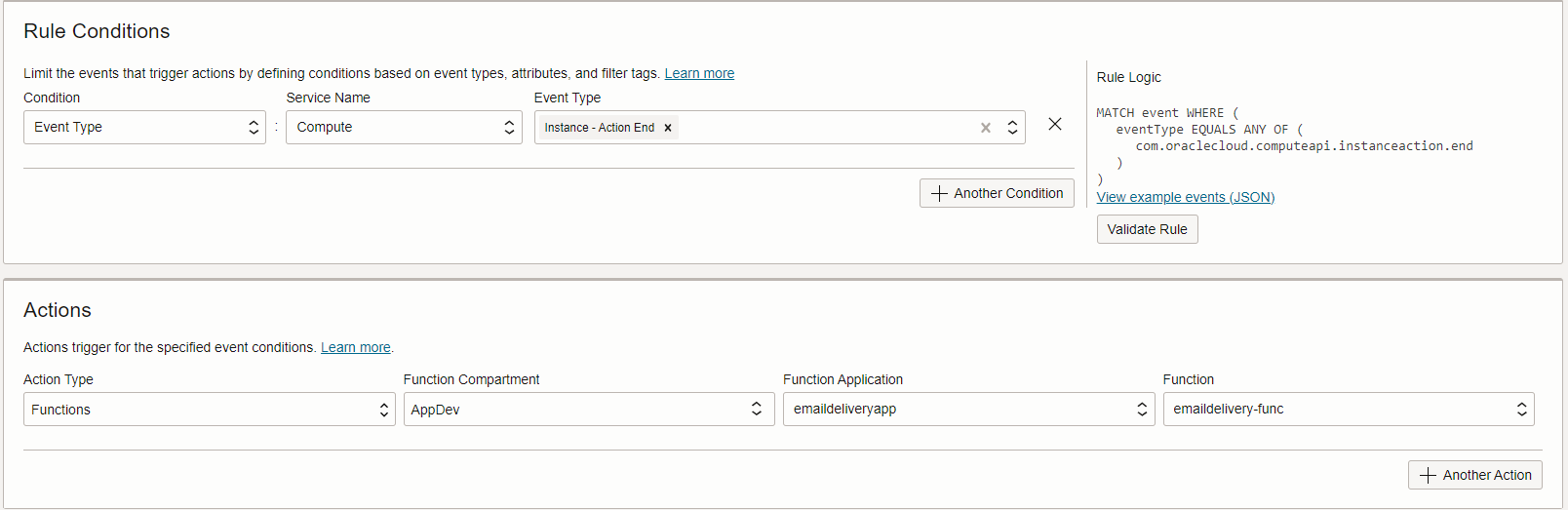
在規則條件區域中,指定觸發函數的事件類型與動作。您可以根據事件類型、屬性和標記定義篩選,以限制觸發動作的事件。以下為觸發運算執行處理啟動或停止事件的範例。
作業 6:驗證電子郵件通知
-
啟動或停止區間中已建立事件規則以觸發 OCI 事件的運算執行處理。
-
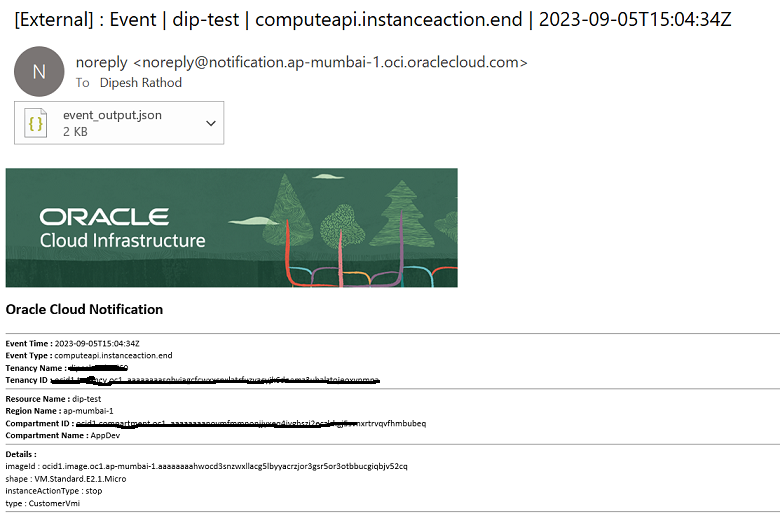
您將會收到電子郵件友善通知,連同附加的原始 JSON。
相關連結
確認
作者 - Dipesh Kumar Rathod (基礎架構的主要雲端架構)
其他學習資源
探索 docs.oracle.com/learn 的其他實驗室,或者存取更多 Oracle Learning YouTube 頻道上的免費學習內容。此外,請瀏覽 education.oracle.com/learning-explorer 以成為 Oracle Learning 檔案總管。
如需產品文件,請造訪 Oracle Help Center 。
Set Up Email Notifications for Oracle Cloud Infrastructure Events in OCI Monitoring
F87596-01
October 2023
Copyright © 2023, Oracle and/or its affiliates.