 JD Edwards EnterpriseOne Canadian Payroll Overview
This chapter discusses:
JD Edwards EnterpriseOne Canadian Payroll overview.
JD Edwards EnterpriseOne Canadian Payroll business processes.
JD Edwards EnterpriseOne Canadian Payroll integrations.
JD Edwards EnterpriseOne Canadian Payroll implementation.
JD Edwards EnterpriseOne Canadian Payroll Overview
Processing payroll internally enables the organization to eliminate costly service bureau charges and to gain complete control of the payroll functions. The JD Edwards EnterpriseOne Payroll system offers simple yet complete solutions for the entire payroll processing needs. You can use this flexible system to efficiently manage the unique payroll needs of the organization, even as the business grows and the requirements change.
To streamline data entry between payroll and human resources users, you enter much payroll-related information into the JD Edwards EnterpriseOne Human Capital Management Foundation system. This system contains the central database for all of the information that human resources and payroll users typically share. For example, when a human resources clerk updates an employee's information, the employee's payroll information is also updated. A central database:
Eliminates redundant data entry.
Maintains current and accurate information across all of the business operations.
Improves communication among departments.
You use the JD Edwards EnterpriseOne Human Capital Management Foundation system to track:
Complete employee information.
Job information.
Pay type, deduction, benefit, and accrual (PDBA) information.
Time and labor information.
The JD Edwards EnterpriseOne Payroll system contains the additional functions that you need to process payroll for employees.
Both human resources and payroll users can enter information into the foundation system. However, to prevent unauthorized access to confidential information, you can set up system security so that users can access only the information that they need for their jobs. Typically, the system administrator sets up system security during system implementation. The system administrator can set up security for an entire form or for specific fields on a form.
JD Edwards EnterpriseOne Canadian Payroll Business Processes
The process flow illustrates the JD Edwards EnterpriseOne Canadian Payroll business processes:
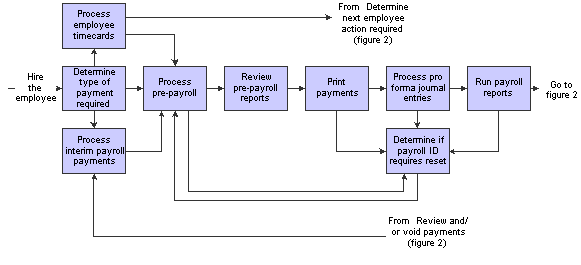
Canadian Payroll business processes: figure 1
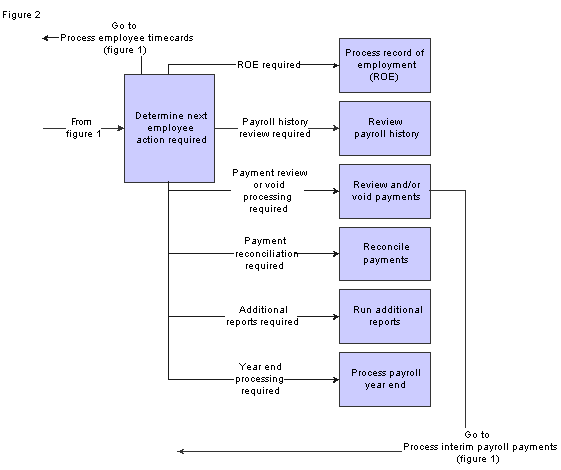
Canadian Payroll business processes: figure 2
We discuss these business processes in the business process chapters in this implementation guide, and in the JD Edwards EnterpriseOne Payroll 9.0 Implementation Guide.
See JD Edwards EnterpriseOne Payroll 9.0 Implementation Guide.
JD Edwards EnterpriseOne Canadian Payroll IntegrationsThe JD Edwards EnterpriseOne Canadian Payroll system integrates with these JD Edwards EnterpriseOne products from Oracle:
JD Edwards EnterpriseOne Asset Lifecycle Management
JD Edwards EnterpriseOne Financial Management
JD Edwards EnterpriseOne Human Capital Management
JD Edwards EnterpriseOne Project Management
JD Edwards EnterpriseOne Supply Chain Management
We discuss integration considerations in the implementation chapters in this implementation guide. Supplemental information about third-party application integrations is located on the Oracle | PeopleSoft Customer Connection website.
JD Edwards EnterpriseOne Asset Lifecycle Management
Payroll integrates with the Asset Lifecycle Management applications to streamline processes, improve operational and performance management, and allow the tracking of time and labor costs related to managing assets.
JD Edwards EnterpriseOne Financial Management
The JD Edwards EnterpriseOne Payroll system automatically creates vouchers for payroll taxes, insurance premiums, and other payroll liability amounts that must be paid to third parties. Accounts Payable integration automates the tasks of calculating the payments due to each third-party and of generating the associated accounts payable vouchers.
JD Edwards EnterpriseOne Payroll integrates with JD Edwards EnterpriseOne General Accounting to automatically update general ledger transactions and account balances. Payroll can create and post transactions to the general ledger using the automatic accounting instructions (AAIs) that you define. You can use full detail on the labor accounts and run a summary of the liabilities and cash accounts.
The JD Edwards EnterpriseOne Payroll system uses employee names and addresses that are stored in the JD Edwards EnterpriseOne Address Book.
JD Edwards EnterpriseOne Human Capital Management
Payroll integrates with the other JD Edwards EnterpriseOne Human Capital Management applications so that changes to employee, human resource, time and labor, and benefit information are immediately reflected throughout the system, ensuring that each paycheck and report is up to date.
JD Edwards EnterpriseOne Project Management
Project Management and Payroll integrate to recognize labor and overhead expenses as they occur, for precise planning and variance analysis.
JD Edwards EnterpriseOne Supply Chain Management
Payroll integrates with the Supply Chain Management applications to give insights into the connection between operations and human capital costs.
JD Edwards EnterpriseOne Canadian Payroll ImplementationThis section provides an overview of the steps that are required to implement the JD Edwards EnterpriseOne General Accounting system.
In the planning phase of your implementation, take advantage of all JD Edwards EnterpriseOne sources of information, including the installation guides and troubleshooting information. A complete list of these resources appears in the preface in About These Implementation Guides with information about where to find the most current version of each.
When determining which electronic software updates (ESUs) to install for JD Edwards EnterpriseOne Canadian Payroll, use the EnterpriseOne and World Change Assistant. EnterpriseOne and World Change Assistant, a Java-based tool, reduces the time required to search and download ESUs by 75 percent or more and enables you to install multiple ESUs at one time.
See See JD Edwards EnterpriseOne Tools 8.98 Software Update Guide
 Global Implementation Steps
This table lists the global implementation steps for the JD Edwards EnterpriseOne Canadian payroll system:
|
Step |
Reference |
|
1. Set up fiscal date patterns, companies, and business units. |
|
|
2. Set up accounts. |
|
|
3. Set up General Accounting constants. |
|
|
4. Set up multicurrency processing, including currency codes and exchange rates. |
|
|
5. Set up ledger type rules. |
|
|
6. Enter Address Book records. |
|
|
7. Set up Human Capital Management fundamental information. |
See JD Edwards EnterpriseOne Human Capital Management Application Fundamentals 9.0 Implementation Guide. |
Core Implementation Steps
This table lists the core implementation steps for the JD Edwards EnterpriseOne Canadian payroll system:
|
Step |
Reference |
|
1. Set up the Payroll Cycle Workbench. |
|
|
2. Set up Master Pay Cycles. |
|
|
3. Create a payroll ID. |
|
|
4. Attach a Master Pay Cycle to a payroll ID. |
|
|
5. Set up payroll cycle control parameters. |
|
|
6. Set up pay cycle reports. |
|
|
7. Set up payment information. |
|
|
8. Set up payment types. |
|
|
9. Set up debit account information for automatic deposits. |
|
|
10. (Optional) Set up multiple version processing. |
|
|
11. (Optional) Attach multiple version information to a payroll ID. |
|
|
12. Set up the Interims Workbench. |
|
|
13. Create an interim payroll ID. |
|
|
14. Roll pay period dates forward for an interim ID. |
|
|
15. Set up reports for an interim ID. |
|
|
16. Set up unemployment insurance rates. |
|
|
17. Set up workers' compensation insurance-basis tables. |
|
|
18. Set up workers' compensation insurance rates. |
|
|
19. (Optional) Set up job step progression information for employees. |
|
|
20. (Optional) Set up job step progression parameters. |
|
|
21. (Optional) Set up timecard automation for stand-alone job step progression. |
|
|
22. (Optional) Set up rule sets for job step progression processing. |
|
|
23. Set up garnishment tables. |
|
|
24. Set up standard annual exemption amounts and additional exemption amounts for disabilities. |
|
|
25. Set up exemption calculation tables for exemption rules. |
JD Edwards Canadian Payroll Implementation StepsThis table lists the suggested application-specific implementation steps for the JD Edwards Canadian payroll system:
|
Step |
Reference |
|
1. Set up tax area information, corporate tax IDs, and employment insurance rates. |
|
|
2. Set up pay types, tax-deferred compensation deduction, and taxable fringe benefits. |
See Setting Up Pay Types, Deductions, Benefits, and Accruals. |
|
3. Enter country-specific employee information and additional tax information for an employee. |