 JD Edwards EnterpriseOne Advanced Pricing Overview
This chapter discusses:
JD Edwards EnterpriseOne Advanced Pricing overview.
JD Edwards EnterpriseOne Advanced Pricing business processes.
JD Edwards EnterpriseOne Advanced Pricing integrations.
JD Edwards EnterpriseOne Advanced Pricing implementation.
JD Edwards EnterpriseOne Advanced Pricing Overview
Pricing is probably one of the most complex aspects of the business; it may take you considerable time to plan, set up, and maintain pricing information. Setting up JD Edwards EnterpriseOne Advanced Pricing is straightforward and requires minimal maintenance. You can use JD Edwards EnterpriseOne Advanced Pricing from Oracle to manage pricing in these JD Edwards EnterpriseOne systems:
Procurement
Sales Order Management
Service Management
Case Management
Blend Management
If a sales organization does not require the extensive features of JD Edwards EnterpriseOne Advanced Pricing, you can use the standard price adjustment module, or base pricing, available in JD Edwards EnterpriseOne Sales Order Management.
With JD Edwards EnterpriseOne Advanced Pricing, you can adjust prices for each promotion or deal, and then combine adjustments into a pricing structure or schedule. You can define unlimited price adjustments and combine regular discounts and promotions within the same schedule. Set up free goods catalogs to display and promote items and use rebates to encourage customers to purchase a greater volume of goods or services.
JD Edwards EnterpriseOne Advanced Pricing enables you to group customers and items so you can accommodate different market sectors and product lines; you do not have to define adjustments for each item or customer. You can define price groups by customers, items, customer groups, or item groups. You can also identify customers by Sold To, Ship To, or Parent addresses. Use buying structures to manage and customize a customer's pricing based on their organizational level.
The Pricing Workbench enables you to view all pricing scenarios on one form; you can locate all pricing-related information for a customer and different scenarios and avoid conducting numerous customer inquiries. The Price Matrix enables you to add and edit multiple pricing records on one form.
Using the JD Edwards EnterpriseOne Advanced Pricing and Procurement systems, you can process adjustments per line item or change the price on a batch of purchase orders or receipts. You can also create hierarchical search sequences. You can set up and track free goods and rebates using JD Edwards EnterpriseOne Advanced Pricing. You can conduct an online review of adjustment history as well.
Using the JD Edwards EnterpriseOne Advanced Pricing and Blend Management systems, you can base the price you pay for grapes on information in a contract, minimum and maximum prices you set, and quality tests you perform on the grapes. You can also change the price during receipts entry and override the price that you pay for grapes.
This implementation guide discusses the setup and implementation features of the JD Edwards EnterpriseOne Advanced Pricing, Procurement, and Sales Order Management systems. It also discusses the implementation features of JD Edwards Blend Management. The JD Edwards EnterpriseOne Advanced Pricing system also integrates with the JD Edwards Grower, Pricing, and Payments and Grower Management systems. Additional setup information is located in the JD Edwards Grower, Pricing, and Payments 9.0 Implementation Guide and the JD Edwards Grower Management 9.0 Implementation Guide. JD Edwards EnterpriseOne Service Management and JD Edwards EnterpriseOne Case Management advanced pricing information is located in the JD Edwards EnterpriseOne Service Management 9.0 Implementation Guide and the JD Edwards EnterpriseOne CRM Support Applications 9.0 Implementation Guide.
See JD Edwards Blend Management 9.0 Implementation Guide.
See JD Edwards Grower, Pricing, and Payments 9.0 Implementation Guide.
See JD Edwards Grower Management 9.0 Implementation Guide.
See JD Edwards EnterpriseOne Customer Relationship Management 9.0 Support Applications Implementation Guide.
See JD Edwards EnterpriseOne Service Management 9.0 Implementation Guide.
Advanced Pricing Business Processes in JD Edwards EnterpriseOne Systems
These diagrams illustrate how the system processes pricing information in JD Edwards EnterpriseOne Sales Order Management and Procurement systems:
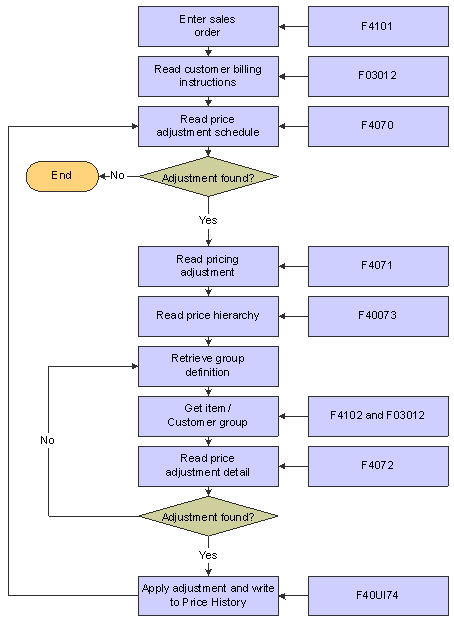
Pricing process flow for a sales order
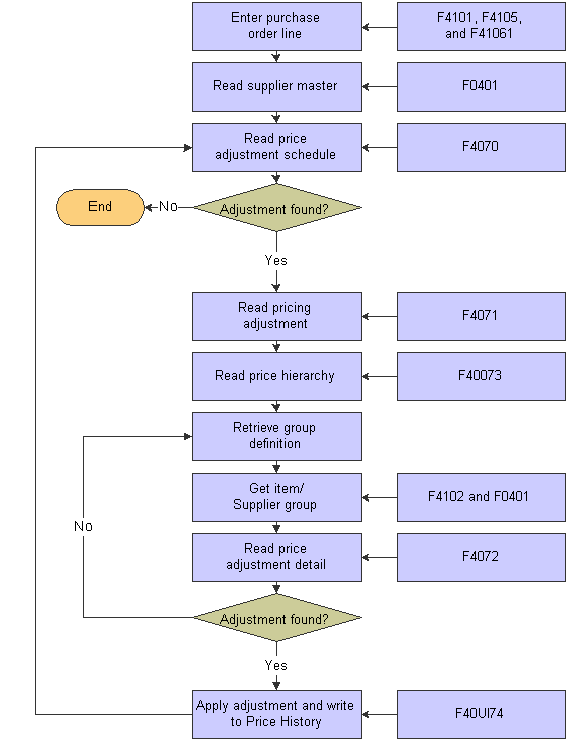
Pricing process flow for a purchase order
We discuss these business processes in the business process chapters of this implementation guide.
JD Edwards EnterpriseOne Advanced Pricing IntegrationsThe JD Edwards EnterpriseOne Sales Advanced Pricing system integrates with these JD Edwards EnterpriseOne systems:
JD Edwards EnterpriseOne Accounts Payable.
JD Edwards EnterpriseOne Accounts Receivable.
JD Edwards EnterpriseOne Inventory Management.
JD Edwards EnterpriseOne Sales Order Management.
JD Edwards EnterpriseOne Procurement.
JD Edwards EnterpriseOne Service Management.
JD Edwards EnterpriseOne Case Management.
JD Edwards EnterpriseOne General Accounting.
JD Edwards Blend Management.
JD Edwards Grower, Pricing, and Payments.
JD Edwards Grower Management.
JD Edwards EnterpriseOne Quality Management.
We discuss integration considerations in the implementation chapters of this implementation guide. Supplemental information about third-party application integrations is located on the Customer Connection website.
JD Edwards EnterpriseOne Accounts Payable
You set up supplier records in the Supplier Master. The system uses supplier information, such as the Adjustment Schedule or supplier group, as a pricing default. The JD Edwards EnterpriseOne Accounts Payable system tracks and accrues rebate and approved ship and debit claim information.
JD Edwards EnterpriseOne Accounts Receivable
You set up customer records in the Customer Master and then define price groups by customer or customer group. In the Customer Billing instructions, you set up the customer information, such as the Adjustment Schedule or customer group, that the system uses as a price default. The JD Edwards EnterpriseOne Accounts Receivable system tracks rebate and price adjustment information and can be set up to print the adjustment information on customer invoices.
JD Edwards EnterpriseOne Inventory Management
You set up items and sales and purchase price levels in the JD Edwards EnterpriseOne Inventory Management system and then define price groups by item or item group. You can use the category codes to create item groups and you can set up the standard units of measure for all items across all branch/plants to convert to the specified pricing unit of measure. In the JD Edwards EnterpriseOne Inventory Management system, you can specify multiple units of measure to locate base prices and adjustments.
JD Edwards EnterpriseOne Sales Order Management
When a sales order is processed, the system first verifies the base price of the item, and then bypasses the standard price adjustments and applies specific schedules and adjustments to the order from the JD Edwards EnterpriseOne Advanced Pricing system.
JD Edwards EnterpriseOne Procurement
When a purchase order is processed, the system first verifies the unit cost of the item, and then bypasses the standard price adjustments and applies specific schedules and adjustments to the order from the JD Edwards EnterpriseOne Advanced Pricing system.
JD Edwards EnterpriseOne Service Management
Pricing hierarchies in the JD Edwards EnterpriseOne Advanced Pricing system can be set up and applied to contracts and work orders. When the system processes a work order, it uses the hierarchy to calculate the adjustments to apply to the work order for billing.
JD Edwards EnterpriseOne Case Management
Pricing hierarchies in the JD Edwards EnterpriseOne Advanced Pricing system can be set up and applied to cases. When the system processes a case, it uses the hierarchy to calculate the adjustments to apply to the case for billing.
JD Edwards EnterpriseOne General Accounting
Automatic Accounting Instructions (AAIs) provide the rules the system uses to create general ledger entries automatically. AAIs direct how price adjustments are recorded in the general ledger.
You will want to maintain the contract and the price that you pay for grapes over a long period of time. When you purchase grapes for a winery, you can control the price you pay on receipt of the grapes. You can adjust the price, for example, at receipts entry, on a batch of receipts or purchase orders, or you can override the price.
JD Edwards EnterpriseOne Quality Management
You can base the price for items on quality tests you perform on the items upon receipt. For example, you can base the price of the grapes on quality tests you perform on the grapes upon receipt. This action enables you to adjust the price, for example, for material other than grapes or rot.
JD Edwards Grower, Pricing, and Payments
You can set the price you pay for the agricultural items in a contract in the JD Edwards Grower, Pricing, and Payments system. You can attach price adjustments to the contract for minimum and maximum prices.
You can adjust the price you pay for agricultural items based on many factors. For example, being able to identify the grower and the growing region where grapes are grown enables you to adjust the price you pay for grapes. Additionally, when there are changes in the harvest, you can adjust prices for agricultural items based on this information.
JD Edwards EnterpriseOne Advanced Pricing Implementation
This section provides an overview of the steps that are required to implement the JD Edwards EnterpriseOne Advanced Pricing system.
In the planning phase of your implementation, take advantage of all sources of information, including the installation guides and troubleshooting information. A complete list of these resources appears in the preface of About This Documentation along with information about where to find the most current version of each.
When determining which electronic software updates (ESUs) to install for JD Edwards EnterpriseOne Advanced Pricing, use the EnterpriseOne and World Change Assistant. EnterpriseOne and World Change Assistant, a Java-based tool, reduces the time required to search and download ESUs by 75 percent or more and enables you to install multiple ESUs at one time.
See JD Edwards EnterpriseOne Tools 8.98 Software Update Guide
 Global Implementation Steps
This table lists the suggested global implementation steps for JD Edwards EnterpriseOne Advanced Pricing:
|
Step |
Reference |
|
1. Set up global user-defined codes (UDCs). |
See EnterpriseOne Tools 8.98 System Administration Guide |
|
2. Set up companies, fiscal date patterns, and business units. |
|
|
3. Set up next numbers. |
|
|
4. Set up accounts and the chart of accounts. |
|
|
5. Set up the General Accounting constants. |
|
|
6. Set up multi-currency processing, including currency codes and exchange rates. |
|
|
7. Set up ledger type rules. |
|
|
8. Enter address book records. |
|
|
9. Set up inventory information such as branch/plant constants, default locations and printers, manufacturing and distribution AAIs, and document types. |
|
|
10. Set up shop floor calendars. |
|
|
11. Set up order activity rules. |
Application-Specific Implementation Steps
This table lists the required implementation steps for the JD Edwards EnterpriseOne Advanced Pricing system:
|
Step |
Reference |
|
1. Set up system and Advanced Pricing constants. |
|
|
2. Set up AAIs. |
Procurement-Specific Implementation Steps
This table lists the required implementation steps to use the JD Edwards EnterpriseOne Advanced Pricing and Procurement systems:
|
Step |
Reference |
|
1. Set up order line types. |
|
|
2. Set up supplier and item information. |
|
|
3. Define supplier prices. |
|
|
4. (Optional) Define supplier rebate agreements. |
See Managing Suppliers. |
|
5. (Optional) Set up landed costs. |
See Managing Suppliers. |
EnterpriseOne Sales Order Management-Specific Implementation Steps
This table lists the required implementation steps to use the JD Edwards EnterpriseOne Advanced Pricing and Sales Order Management systems:
|
Step |
Reference |
|
1. Set up customer information. |
|
|
2. Set up item and price information. |
|
|
3. Define customer billing instructions. |
|
|
4. Set up order line types. |
|
|
5. (Optional) Set up commissions. |