
Overview of JAXR
This section provides a brief overview of JAXR. It covers the following topics:
About Registries and Repositories
An XML registry is an infrastructure that enables the building, deployment, and discovery of web services. It is a neutral third party that facilitates dynamic and loosely coupled business-to-business (B2B) interactions. A registry is available to organizations as a shared resource, normally in the form of a web-based service.
Currently there are a variety of specifications for XML registries. These include
- The ebXML Registry and Repository standard, which is sponsored by the Organization for the Advancement of Structured Information Standards (OASIS) and the United Nations Centre for the Facilitation of Procedures and Practices in Administration, Commerce and Transport (U.N./CEFACT). ebXML stands for Electronic Business using eXtensible Markup Language.
- The Universal Description, Discovery, and Integration (UDDI) project, which is developed by a vendor consortium
A registry provider is an implementation of a registry that conforms to a specification for XML registries.
While a UDDI registry stores information about businesses and the services they offer, an ebXML registry has a much wider scope. It is a repository as well as a registry. A repository stores arbitrary content as well as information about that content. In other words, a repository stores data as well as metadata. The ebXML Registry standard defines an interoperable Enterprise Content Management (ECM) API for web services.
An ebXML registry and repository is to the web what a relational database is to enterprise applications: it provides a means for web services and web applications to store and share content and metadata.
An ebXML registry can be part of a registry federation, an affiliated group of registries. For example, the health ministry of a country in Europe could operate a registry, and that registry could be part of a federation that included the registries of other European health ministries.
About JAXR
JAXR enables Java software programmers to use a single, easy-to-use abstraction API to access a variety of XML registries. A unified JAXR information model describes content and metadata within XML registries.
JAXR gives developers the ability to write registry client programs that are portable across various target registries. JAXR also enables value-added capabilities beyond those of the underlying registries.
The current version of the JAXR specification includes detailed bindings between the JAXR information model and the ebXML Registry specifications. You can find the latest version of the JAXR specification at
The Service Registry includes a JAXR provider that implements the level 1 capability profile, which allows full access to ebXML registries. The ebXML specifications and the JAXR specification are not in perfect alignment, because the ebXML specifications have advanced beyond the JAXR specification. For this reason, the JAXR provider for the Registry includes some additional implementation-specific methods that implement the ebXML specifications and that are likely to be included in the next version of the JAXR specification.
JAXR Architecture
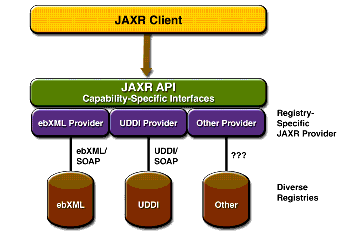
The high-level architecture of JAXR consists of the following parts:
- A JAXR client: This is a client program that uses the JAXR API to access a registry through a JAXR provider.
- A JAXR provider: This is an implementation of the JAXR API that provides access to a specific registry provider or to a class of registry providers that are based on a common specification. This guide does not describe how to implement a JAXR provider.
A JAXR provider implements two main packages:
javax.xml.registry, which consists of the API interfaces and classes that define the registry access interface.javax.xml.registry.infomodel, which consists of interfaces that define the information model for JAXR. These interfaces define the types of objects that reside in a registry and how they relate to each other. The basic interface in this package is theRegistryObjectinterface.The most basic interfaces in the
javax.xml.registrypackage are
Connection. TheConnectioninterface represents a client session with a registry provider. The client must create a connection with the JAXR provider in order to use a registry.RegistryService. The client obtains aRegistryServiceobject from its connection. TheRegistryServiceobject in turn enables the client to obtain the interfaces it uses to access the registry.The primary interfaces, also part of the
javax.xml.registrypackage, are
QueryManagerandBusinessQueryManager, which allow the client to search a registry for information in accordance with thejavax.xml.registry.infomodelinterfaces. An optional interface,DeclarativeQueryManager, allows the client to use SQL syntax for queries. The ebXML provider for the Registry implementsDeclarativeQueryManager.LifeCycleManagerandBusinessLifeCycleManager, which allow the client to modify the information in a registry by either saving it (updating it) or deleting it.When an error occurs, JAXR API methods throw a
JAXRExceptionor one of its subclasses.Many methods in the JAXR API use a
Collectionobject as an argument or a returned value. Using aCollectionobject allows operations on several registry objects at a time.Figure 8-1 illustrates the architecture of JAXR. For the Registry, a JAXR client uses the capability level 0 and level 1 interfaces of the JAXR API to access the JAXR provider, which is an ebXML provider. The JAXR provider in turn accesses the Registry, an ebXML registry.
About the Examples
Many sample client programs that demonstrate JAXR features are available as part of the Java Web Services Developer Pack (Java WSDP). If you install the Java WSDP, you will find them in the directory
<INSTALL>/registry/samples. (<INSTALL>is the directory where you installed the Java WSDP.)Each example or group of examples has a
build.xmlfile that allows you to compile and run each example using the Ant tool. Eachbuild.xmlfile has acompiletarget and one or more targets that run the example or examples. Some of the run targets take command-line arguments.Before you run the examples, you must edit two files in the directory
<INSTALL>/registry/samples/common. The filebuild.propertiesis used by the Ant targets that run the programs. The fileJAXRExamples.propertiesis a resource bundle that is used by the programs themselves.In addition, a
targets.xmlfile in the<INSTALL>/registry/samples/commondirectory defines the classpath for compiling and running the examples. It also contains acleantarget that deletes thebuilddirectory created when each example is compiled.Because Tomcat and the Sun Java System Application Server Platform Edition 8.1 have different file structures, there are two versions of the
build.propertiesandtargets.xmlfiles, with the suffixtomcatfor Tomcat and the suffixasfor the Application Server.Edit the file
build.properties.asas follows:
- Set the property
container.hometo the location of Sun Java System Application Server Platform Edition 8.1.- Set the property
registry.hometo the directory where you installed the Java WSDP.- Set the properties
proxyHostandproxyPortto specify your own proxy settings. The proxy host is the system on your network through which you access the Internet. You usually specify the proxy host in your web browser settings.The proxy port has the value 8080, which is the usual one. Change this string if your proxy uses a different port. Your entries usually follow this pattern:
proxyHost=proxyhost.mydomain
proxyPort=8080
Edit the file
build.properties.tomcatas follows:
- Set the property
tomcat.hometo the directory where you installed the Java WSDP.- Set the properties
proxyHostandproxyPortto specify your own proxy settings. The proxy host is the system on your network through which you access the Internet. You usually specify the proxy host in your web browser settings.The proxy port has the value 8080, which is the usual one. Change this string if your proxy uses a different port. Your entries usually follow this pattern:
proxyHost=proxyhost.mydomain
proxyPort=8080
Copy the files as follows:
Edit the file
JAXRExamples.propertiesas follows:
- Edit the properties
query.urlandpublish.urlto specify the URL of the Registry. The file provides a default setting oflocalhost:8080for the host and port, but you may need to change this to another host or port if the Registry is installed on a remote server or at a non-default port.- Edit the following properties to specify the properties required for logging in to the Registry.
security.keystorePath=
security.storepass=ebxmlrr
security.alias=
security.keypass=
The
security.keystorePathproperty specifies the location of the keystore file. Thesecurity.storepassproperty has a default setting ofebxmlrr. Thesecurity.aliasandsecurity.keypassproperties are the alias and password you specify when you use the User Registration Wizard of the Java UI. See Getting Access to the Registry for details.- Feel free to change any of the data in the remainder of the file as you experiment with the examples. The Ant targets that run the client examples always use the latest version of the file.
All of the material in The Java(TM) Web Services Tutorial is copyright-protected and may not be published in other works without express written permission from Sun Microsystems.


