Oracle® Insurance Rules Palette 9.4.0.0 E18894_01
Child funds can be generated if defined in the Fund Type section of the ChildFundScreen business rule.
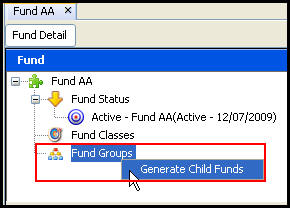
Right-click on the Fund Group node in the Configuration Area and select Generate Child Funds. Child funds will be generated and listed under the Funds Groups heading.
Note: Child funds are not supported when working with Unit Linked funds.
Fund Groups Right-Click Option
Copyright © 2009, 2011, Oracle and/or its affiliates. All rights reserved. Legal Notices