
Back Panel
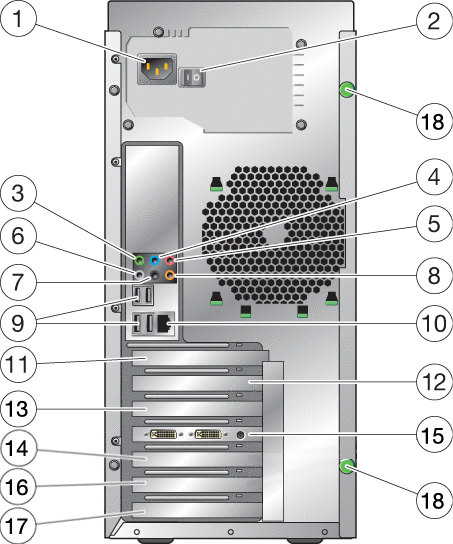
|
1 |
AC power connector |
10 |
Ethernet connector |
|
2 |
11 |
Cover plate (no slot) |
|
|
3 |
Audio jack (green) |
12 |
Slot 0, PCIe2 x16 |
|
4 |
Line-in jack (blue) |
13 |
Slot 1, PCIe2 (x8 mechanical, x4 electrical) |
|
5 |
Microphone jack (blue) |
14 |
Slot 2, PCIe2 x16 |
|
6 |
Audio jack (gray) |
15 |
Slot 3, PCIe x1 |
|
7 |
Audio jack (black) |
16 |
Slot 4, PCI 33MHz, 32–bit slot |
|
8 |
Audio jack (orange) |
17 |
Slot 5, PCIe (x8 mechanical, x4 electrical) |
|
9 |
Four USB 2.0 ports |
18 |
Thumbscrew (for side cover) |
- © 2010, Oracle Corporation and/or its affiliates