


| C User's Guide | |
Incremental Link Editor (
ild)This chapter describes
ild,ild-specific features, example messages, andildoptions. This chapter is organized into the following sections:
- Introduction
- Overview of Incremental Linking
- How to Use ild
- How ild Works
- What ild Cannot Do
- Reasons for Full Relinks
- ild Options
- Environment
- Notes
Introduction
ildis an incremental version of the Link Editorld, and replacesldfor linking programs. Useildto complete the edit, compile, link, and debug loop efficiently and more quickly. You can avoid relinking entirely by using the fix and continue feature of dbx which allows you to work without relinking. However, if you need to relink, the process can be faster if you useild. For more information on fix and continue, see Chapter 11 in Debugging a Program Withdbx.
ildlinks incrementally so you can insert modified object code into an executable file that you created earlier, without relinking unmodified object files. The time required to relink depends upon the amount of code modified. Linking your application on every build does not require the same amount of time; small changes in code can be relinked very quickly.On the initial link,
ildrequires about the same amount of time thatldrequires, but subsequentildlinks can be much faster than anldlink. The cost of the reduced link time is an increase in the size of the executable.Overview of Incremental Linking
When you use
ildin place ofld, the initial link causes the various text, data, bss, exception table sections, etc., to be padded with additional space for future expansion (see FIGURE 5-1). Additionally, all relocation records and the global symbol table are saved into a new persistent state region in the executable file. On subsequent incremental links,ilduses timestamps to determine which object files have changed and patches the changed object code into a previously built executable. That is, previous versions of the object files are invalidated and the new object files are loaded into the space vacated, or into the pad sections of the executable when needed. All references to symbols in invalidated object files are patched to point to the correct new object files.
ilddoes not support allldcommand options. Ifildis passed a command option that it does not support,ilddirectly invokes /usr/ccs/bin/ldto perform the link. See Notes for more information on commands that are not supported by the Incremental Linker.How to Use
ild
ildis invoked automatically by the compilation system in place ofldunder certain conditions. When you invoke a compilation system, you are invoking a compiler driver. When you pass certain options to the driver, the driver usesild. The compiler driver reads the options from the command line and executes various programs in the correct order and adds files from the list of arguments that are passed.For example,
ccfirst runsacomp(the front-end of the compiler), thenacompruns the optimizing code generator, thenccdoes the same thing for the other source files listed on the command line. The driver can then generate a call to eitherildorld, depending on the options, passing it all of the files just compiled, plus other files and libraries needed to make the program completeThe following figures shows an example of incremental linking.
FIGURE 5-1 An Example of Incremental Linking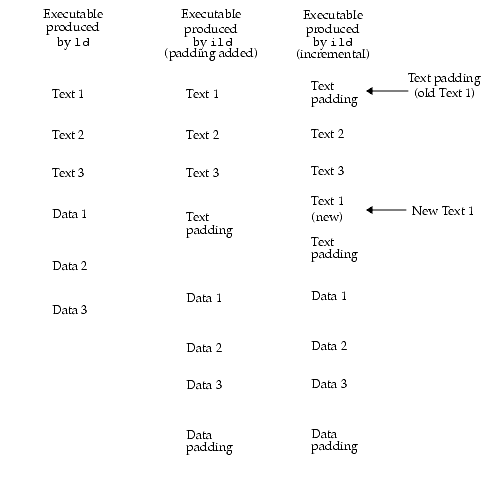
The following compilation system options control whether a link step is performed by
ildorld:
-xildon- Always useild-xildoff- Always useld
Note – If-xildonand-xildoffare both present, the last command listed is used by the linker.
-g- When neither-xildoffor-Gare given, useildfor link-only invocations (no source files on the command line). For a complete explanation of-g, see -g.-G- Prevents the-goption from having any effect on linker selection. For a complete explanation of-G, see -G.When you use the
-goption to invoke debugging, and you have the default Makefile structure (which includes compile-time options such as-gon the link command line), you useildautomatically when doing development.How
ildWorksOn an initial link,
ildsaves information about:
- All of the object files looked at.
- The symbol table for the executable produced.
- All symbolic references not resolved at compile time.
Initial
ildlinks take about as much time as anldlink.
- Determines which files have changed.
- Relinks the modified object files.
- Uses stored information to modify changed symbolic references in the rest of the program.
Incremental
ildlinks are much faster thanldlinks.In general, you do one initial link and all subsequent links are incremental.
For example,
ildsaves a list of all places where symbolfoois referenced in your code. If you do an incremental link that changes the value offoo,ildmust change the value of all references tofoo.
ildspreads out the components of the program and each section of the executable has padding added to it. Padding makes the executable modules larger than when they were linked byld. As object files increase in size during successive incremental links, the padding can become exhausted. If this occurs,ilddisplays a message and does a complete full relink of the executable.For example, as FIGURE 5-1 shows, each of the three columns shows the sequence of text and data in a linked executable program. The left column shows text and data in an executable linked by
ld. The center column shows the addition of text and data padding in an executable linked byild. Assume that a change is made to the source file for Text 1 that causes the Text section to grow without affecting the size of the other sections. The right column shows that the original location of Text 1 has been replaced by Text padding (Text 1 has been invalidated). Text 1 has been moved to occupy a portion of the Text padding space.To produce a smaller nonincremental executable, run the compiler driver (for example,
ccorCC) with the-xildoffoption, andldis invoked to produce a more compact executable.The resulting executable from
ildcan be debugged bydbxbecausedbx/Debugger understands the padding thatildinserts between programs.For any command-line option that
ilddoes not understand,ildinvokesld.ildis compatible withld(in /usr/ccs/bin/ld). See ild Options, for details.There are no special or extra files used by
ild.What
ildCannot DoWhen
ildis invoked to create shared objects,ildinvokesldto create the link.Performance of
ildmay suffer greatly if you change a high percentage of object files.ildautomatically does an full relink when it detects that a high percentage of files have been changed.Do not use
ildto produce the final production code for shipment.ildmakes the file larger because parts of the program have been spread out due to padding. Because of the padding and additional time required to link, it is recommended that you do not use the-xildonoption for production code. (Use-xildoffon the link line if-gis present.)
ildmay not link small programs much faster, and the increase in size of the executable is greater than that for larger programs.Third-party tools that work on executables may have unexpected results on
ild-produced binaries.Any program that modifies an executable, for example
stripormcs, might affect the ability ofildto perform an incremental link. When this happens,ildissues a message and performs a full relink. For more information on a full relink, see Reasons for Full Relinks.Reasons for Full Relinks
The following section explains under which circumstances
ildcallsldto complete a link.
ildDeferred-Link MessagesThe message
`ild: calling ld to finish link' . . .means thatildcannot complete the link, and is deferring the link request toldfor completion. By default, these messages are displayed as needed. You can suppress these messages by using the-zi_quietoption.The following message is suppressed if
ildis implicitly requested (-g), but is displayed if-xildonis on the command line. This message is displayed in all cases if you use the-zi_verboseoption, and never displayed if you use the-zi_quietoption.
ild: calling ld to finish link --cannot handle shared libraries in archivelibrary nameHere are further examples of
-zi_verbosemessages:
ild:callingldtofinishlink--cannothandlekeywordKeyword
ild:callingldtofinishlink--cannothandle-dKeyword
ild:callingldtofinishlink--cannothandle-zkeyword
ild:callingldtofinishlink--cannothandleargumentkeyword
ildRelink MessagesThe message `
ild: (Performing full relink)' . . . means that for some reasonildcannot do an incremental link and must do a full relink. This is not an error. It is to inform you that this link will take longer than an incremental link (see How ild Works, for more details).ildmessages can be controlled byildoptions-zi_quietand-zi_verbose. Some messages have a verbose mode with more descriptive text.You can suppress all of these messages by using the
ildoption-zi_quiet.If the default message has a verbose mode, the message ends with an ellipsis ([...]) indicating more information is available. You can view the additional information by using the-zi_verboseoption. Example messages are shown with the-zi_verboseoption selected.Example 1:
internalfreespaceexhaustedThe most common of the full relink messages is the
internal free space exhaustedmessage:
These commands show that going from a one-line compile to a two-line compile causes debugging information to grow in the executable. This growth causes
ildto run out of space and do an full relink.Example 2: Running
stripAnother problem arises when you run
strip. Continuing from Example 1:
Example 3:
ildversionWhen a new version of
ildis run on an executable created by an older version ofild, you see the following error message:
Note – The numbers (2/16) are used only for internal reporting.
Example 4:
toomanyfileschangedSometimes
ilddetermines that it will be faster to do a full relink than an incremental link. For example:
Here, use of the
touchcommand causesildto determine that filesx0.othroughx8.ohave changed and that a full relink will be faster than incrementally relinking all nine object files.Example 5:
fullrelinkThere are certain conditions that can cause a full relink on the next link, as compared to the previous examples that cause a full relink on this link.
The next time you try to link that program, you see the message:
$cc -xildon-zi_verbosebroken.oild: (Performing full relink) cannot do incremental relink due to problems in the previous link
Example 6: New working directory
ildOptionsThis section describes the linker control options directly accepted by the compilation system and linker options that may be passed through the compilation system to
ild.
-aIn static mode only, produce an executable object file; give errors for undefined references. This is the default behavior for static mode.
-Bdynamic|staticOptions governing library inclusion. Option
-Bdynamicis valid in dynamic mode only. These options can be specified any number of times on the command line as toggles: if the-Bstaticoption is given, no shared objects are accepted until -Bdynamicis seen. See option -lx.
-d y|nWhen
-dy(the default) is specified,ilduses dynamic linking; when-dnis specified,ilduses static linking. See option -B dynamic | static.
-e epsymSet the entry point address for the output file to be that of the symbol
epsym.
-gThe compilation systems invoke
ildin place ofldwhen the-goption (output debugging information) is given, unless any of the following are true:
- The
-Goption (produce a shared library) is given- The
-xildoffoption is present- Any source files are named on the command line
-InameWhen building an executable, use name as the path name of the interpreter to be written into the program header. The default in static mode is no interpreter; in dynamic mode, the default is the name of the runtime linker,
/usr/lib/ld.so.1. Either case may be overridden by-Iname.execonly loads this interpreter when it loadsa.outand will pass control to the interpreter rather than toa.outdirectly.
-iIgnores
LD_LIBRARY_PATHsetting. This option is useful when anLD_LIBRARY_PATHsetting is in effect to influence the runtime library search, which would interfere with the link editing being performed. (This also applies to the setting ofLD_LIBRARY_PATH_64).
-LpathAdds path to the library search directories.
ildsearches for libraries first in any directories specified by the-Loptions, and then in the standard directories. This option is useful only if it precedes the-loptions to which it applies on the command line. You can use the environment variableLD_LIBRARY_PATHandLD_LIBRARY_PATH_64to supplement the library search path (see LD_LIBRARY_PATH).
-lxSearches a library
libx.soorlibx.a, the conventional names for shared object and archive libraries, respectively. In dynamic mode, unless the-Bstaticoption is in effect,ildsearches each directory specified in the library search path for a filelibx.soorlibx.a. The directory search stops at the first directory containing either.ildchooses the file ending in .soif-lexpands to two files whose names are of the formlibx.soandlibx.a. If nolibx.sois found, thenildacceptslibx.a. In static mode, or when the-Bstaticoption is in effect,ildselects only the file ending in .a. A library is searched when its name is encountered, so the placement of-lis significant.
-mProduce a memory map or listing of the input/output sections on the standard output.
-ooutfileProduces an output object file named outfile. The name of the default object file is
a.out.
-Qy|nUnder
-Qy, anidentstring is added to the .commentsection of the output file to identify the version of the link editor used to create the file. This results in multipleldidentswhen there have been multiple linking steps, such as when usingld-r. This is identical with the default action of thecccommand. Option-Qnsuppresses version identification.
-RpathThis option gives a colon-separated list of directories that specifies library search directories to the runtime linker. If present and not null, path is recorded in the output object file and passed to the runtime linker. Multiple instances of this option are concatenated and separated by a colon.
-sStrips symbolic information from the output file. Any debugging information and associated relocation entries are removed. Except for relocatable files or shared objects, the symbol table and string table sections are also removed from the output object file.
-tTurn off the warning about multiply defined symbols that are not the same size.
-usymnameEnter symname as an undefined symbol in the symbol table.This is useful for loading entirely from an archive library, since initially the symbol table is empty and an unresolved reference is needed to force the loading of the first routine. The placement of this option on the command line is significant; it must be placed before the library that defines the symbol.
-VOutput a message about the version of
ildbeing used.
-xildoffIncremental linker off. Force the use of bundled
ld. This is the default if-gis not being used, or-Gis being used. You can override this default with-xildon.
-xildonIncremental linker. Force the use of
ildin incremental mode. This is the default if-gis being used. You can override this default with-xildoff.
-YP,dirlist(
cconly) Changes the default directories used for finding libraries. Option dirlist is a colon-separated path list.
Note –ilduses the-zname form for special options. The i_ prefix to the-zoptions identifies those options peculiar toild.
-z allextract|defaultextract|weakextractAlter the extraction criteria of objects from any archives that follow. By default archive members are extracted to satisfy undefined references and to promote tentative definitions with data definitions. Weak symbol references do not trigger extraction. Under
-zallextract, all archive members are extracted from the archive. Under-zweakextract, weak references trigger archive extraction. -zdefaultextractprovides a means of returning to the default following use of the former extract options.
-zdefsForces a fatal error if any undefined symbols remain at the end of the link. This is the default when building an executable. It is also useful when building a shared object to assure that the object is self-contained, that is, that all its symbolic references are resolved internally.
-zi_dryrun(
ildonly.) Prints the list of files that would be linked byildand exits.
-zi_full(
ildonly.) Does a complete relink in incremental mode.
-zi_noincr(
ildonly.) Runsildin nonincremental mode (not recommended for customer use -- used for testing only).
-zi_quiet(
ildonly) Turns off all ild relink messages.
-zi_verbose(
ildonly) Expands on default information on someildrelink messages.
-znodefsAllows undefined symbols. This is the default when building a shared object. When used with executables, the behavior of references to such "undefined symbols" is unspecified.
Options Passed to
ildfrom the Compilation SystemThe following options are accepted by ild, but you must use the form:
-Wl,arg,arg (forcc), or-Qoptionldarg,arg (for others), to pass them toildvia the compilation system
-aIn static mode only, produces an executable object file; gives errors for undefined references. This is the default behavior for static mode. Option
-acannot be used with the-roption.
-mProduces a memory map or listing of the input/output sections on the standard output.
-
tTurn off the warning about symbols that are defined more than once and that are not the same size.
-eepsymSets the entry point address for the output file to be that of the symbol
epsym.
-InameWhen building an executable, uses name as the path name of the interpreter to be written into the program header. The default in static mode is no interpreter; in dynamic mode, the default is the name of the runtime linker, /
usr/lib/ld.so.1. Either case can be overridden by-Iname. Theexecsystem call loads this interpreter when it loads thea.outand passes control to the interpreter rather than to thea.outdirectly.
-usymnameEnters symname as an undefined symbol in the symbol table. This is useful for loading entirely from an archive library because, initially, the symbol table is empty and an unresolved reference is needed to force the loading of the first routine. The placement of this option on the command line is significant; it must be placed before the library that defines the symbol.
Environment
A list of directories which is searched for the libraries that are specified with the
-loption. Multiple directories are separated by a colon. In the most general case, it contains two directory lists separated by a semicolon:
;dirlist2
If
ildis called with any number of occurrences of-L, as in:
ild...-Lpath1 ... -Lpathn ...
then the search path ordering is:
LIBPATH
When the list of directories does not contain a semicolon, it is interpreted as follows:
LD_LIBRARY_PATHis also used to specify library search directories to the runtime linker. That is, ifLD_LIBRARY_PATHexists in the environment, the runtime linker searches the directories named in it, before its default directory, for shared objects to be linked with the program at execution.
Note – When running aset-user-IDorset-group-IDprogram, the runtime linker searches only for libraries in/usr/lib. It also searches for any full pathname specified within the executable. A full pathname is the result of a runpath being specified when the executable was constructed. Any library dependencies specified as relative pathnames are silently ignored.
On Solaris 7 and Solaris 8, this environment variable is similar to
LD_LIBRARY_PATHbut overrides it when searching for 64-bit dependencies.When you run Solaris 7 or Solaris 8 on a
SPARCprocessor and link in 32-bit mode,LD_LIBRARY_PATH_64is ignored. If onlyLD_LIBRARY_PATHis defined, it is used for both 32-bit and 64-bit linking. If bothLD_LIBRARY_PATHandLD_LIBRARY_PATH_64are defined, the 32-bit linking will be done usingLD_LIBRARY_PATHand the 64-bit linking will be done usingLD_LIBRARY_PATH_64.LD_OPTIONSA default set of options to
ild.LD_OPTIONSis interpreted byildas though its value had been placed on the command line immediately following the name used to invokeild, as in:
ild$LD_OPTIONS... other-arguments ...
A list of shared objects that are to be interpreted by the runtime linker. The specified shared objects are linked in after the program being executed and before any other shared objects that the program references.
Note – When running aset-user-IDorset-group-IDprogram, this option is silently ignored.
An alternative mechanism for specifying a runpath to the link editor (see the
-Roption). If bothLD_RUN_PATHand the-Roption are specified, the-Ris used.(not supported by
ild) Provide a list of tokens that cause the runtime linker to print debugging information to the standard error. The special token help indicates the full list of tokens available.
Note – Environment variable names beginning with the characters `LD_` are reserved for possible future enhancements told. Environment variable-names beginning with the characters `ILD_` are reserved for possible future enhancements toild.
Notes
If
ilddetermines that a command line option is not implemented,ilddirectly invokes /usr/css/bin/ldto perform the link.
ldOptions Not Supported byildThe following options, which may be given to the compilation system, are not supported by
ild.
-BsymbolicIn dynamic mode only, when building a shared object, bind references to global symbols to their definitions within the object, if definitions are available. Normally, references to global symbols within shared objects are not bound until runtime, even if definitions are available, so that definitions of the same symbol in an executable or other shared objects can override the object's own definition.
ldissues warnings for undefined symbols unless-zdefs overrides.
-bIn dynamic mode only, when creating an executable, does not do special processing for relocations that reference symbols in shared objects. Without the
-boption, the link editor creates special position-independent relocations for references to functions defined in shared objects and arranges for data objects defined in shared objects to be copied into the memory image of the executable by the runtime linker. With the-boption, the output code can be more efficient, but it is less sharable.
-GIn dynamic mode only, produces a shared object. Undefined symbols are allowed.
-hnameIn dynamic mode only, when building a shared object, records name in the object's dynamic section. Option name is recorded in executables that are linked with this object rather than the object's UNIX System file name. Accordingly, name is used by the runtime linker as the name of the shared object to search for at runtime.
-zmuldefsAllows multiple symbol definitions. By default, multiple symbol definitions occurring between relocatable objects result in a fatal error condition. This option suppresses the error condition and allows the first symbol definition to be taken.
-ztextIn dynamic mode only, forces a fatal error if any relocations against non-writable, allocatable sections remain.
Additional Unsupported Commands
In addition, the following options that may be passed directly to
ld, are not supported byild:
-Dtoken,token,...Prints debugging information as specified by each token, to the standard error. The special token help indicates the full list of tokens available.
-
FnameUseful only when building a shared object. Specifies that the symbol table of the shared object is used as a "filter" on the symbol table of the shared object specified by name.
-MmapfileReads mapfile as a text file of directives to
ld. See SunOS 5.3 Linker and Libraries Manual for a description of mapfiles.
-rCombines relocatable object files to produce one relocatable object file.
lddoes not complain about unresolved references. This option cannot be used in dynamic mode or with-a.Files That
ildUses
libx .alibrariesa.outoutput fileLIBPATHusually /usr/lib
|
Sun Microsystems, Inc. Copyright information. All rights reserved. Feedback |
Library | Contents | Previous | Next | Index |