 Understanding PeopleSoft Inventory Policy Planning
This chapter provides an overview of PeopleSoft Inventory Policy Planning and discusses:
Policy concepts and components.
Policy processing.
Integration with other applications.
Understanding PeopleSoft Inventory Policy Planning
Use PeopleSoft Inventory Policy Planning to create a set of guidelines that controls an organization's inventory investment over time. The application can use forecasts from Demantra Demand Management flat files.
The system establishes a balance between inventory investment in safety stock, customer service, and operational efficiency, while at the same time respecting the practical constraints imposed by operations, such as order quantities and order multiples. To determine the optimal level of inventory investment in cycle stock, PeopleSoft Inventory Policy Planning also attempts to balance the cost of processing an order and the carrying costs of inventory.
PeopleSoft Inventory Policy Planning processes and analyzes policies and publishes them to other PeopleSoft Supply Chain Management (PeopleSoft SCM) applications (internal), or other external materials management or planning systems (external).
The item in Oracle Demantra Demand Management should represent a stockkeeping unit or an item ID for a particular business unit. The forecast deviation is calculated by Inventory Policy Planning based on the average and may not represent a true and exact forecast deviation for the stockkeeping unit where aggregation of forecasts has occurred.
Normally, the demand forecast from the Advanced Planning, Demantra component is for finished goods and components items that are sold independently. For example, bicycle tires are used as a component in the assembly of a bicycle that is sold, while the tires themselves can also be sold and forecasted. PeopleSoft Inventory Policy Planning has the ability to explode the demand forecast through the bill of materials to derive a total demand, both independent and dependent, for all of the finished goods and component items. This total demand can be used to establish inventory policies for both finished goods and component items.
The goal of an inventory policy depends on the organization and its needs. For example, warehousing might be the most important need because of its geographic location or lack of space. In this case, limiting maximum quantities and efficient use of warehouse space is the priority in planning. On the other hand, if the organization's goal is to keep the service fill percentage above 98 percent, then the planning priority is to maintain a suitable safety stock level, which might require more warehouse space. Or, possibly, the goal is to replenish stock in the most economic quantities. In this case, order quantities and multiples are the key focus in planning. PeopleSoft Inventory Policy Planning assists you in analyzing these goals and methods and strives to strike a balance to achieve the goals.
This diagram illustrates how you can use the various inventory policy system components to create inventory policies:
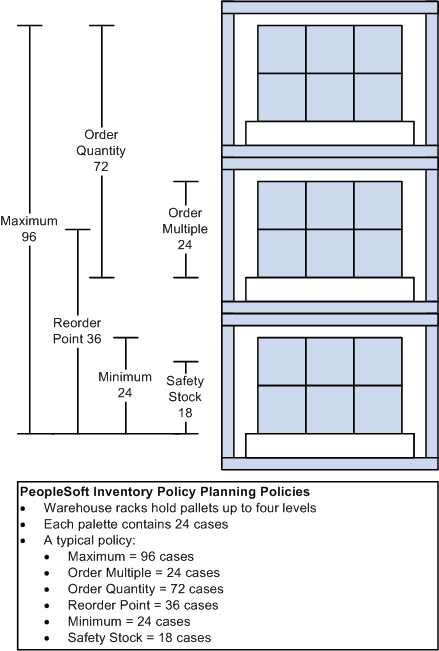
Warehouse four-level rack system
PeopleSoft Inventory Policy Planning generates inventory policies based on a set of methods and associated parameters for forecast item replenishment order quantity, safety stock, reorder point, and minimum and maximum stock levels.
As the warehouse four-level rack system diagram displays, there are four levels of a rack in a warehouse that are designated as the item inventory location. Suppose, for example, the inventory is slow-moving, hard to make, has batch requirements, but, more importantly, has a stable demand.
Here's how inventory replenishment might be accomplished for this inventory location:
The storage rack holds 96 cases, so you know that you do not want to exceed that quantity, and this can be set as the maximum policy. With storage constraints, order multiples are set at a full pallet. With batch or order constraints, the order quantity is set at 72. With a stable demand, you have more flexibility to work with safety stock and minimum inventory levels. So you can set these levels lower without reducing service fill percentages.
As the example describes, inventory policies are made up of a variety of organizational needs. You can use inventory policies that you develop to plan inventory and meet supply requirements across the system.
Policy Concepts and Components
This section discusses:
Inventory calculation methods.
User-defined fields.
Policy sets.
Policy control groups.
 Inventory Calculation Methods
PeopleSoft Inventory Policy Planning provides a variety of calculation methods to use when you generate inventory policy for items. Calculate both static and time-phased values for the policy components.
The system can recalculate inventory policy for items when changes occur in one or more of these components:
Order quantity method or argument.
Safety stock method or argument.
Reorder point method or argument.
Minimum and maximum methods or arguments.
Lead time.
Standard cost, carrying cost percentage, or ordering cost.
Forecast.
Establishes replenishment order quantities. Calculation methods include a days supply, fixed quantity, economic order quantity (EOQ), and lot for lot. You can also set upper and lower limits for these, where applicable. PeopleSoft Inventory can use the static value result of the order quantity, while PeopleSoft Supply Planning can use the time-phased result.
Defines safety stock levels based on a days supply, a fixed quantity, the percentage of replenishment cycles without a shortage, the percentage of demand fill, or the maximum lead time usage. You can also set upper and lower limits for these, where applicable. PeopleSoft Inventory uses the static value result of the safety stock, while PeopleSoft Supply Planning can use the time-phased results.
Calculates the inventory level at which a replenishment order is generated using a days supply, a fixed quantity, the replenishment lead time, or the replenishment lead time plus safety stock. PeopleSoft Inventory uses the static value result of the reorder point.
Uses minimum and maximum stock levels to determine warning limits. The minimum level can be determined by using a days supply, a fixed quantity, the current safety stock value, or the maximum lead time usage. The minimum policy component is for informational purposes only and does not influence any other system. The maximum level can be determined by using either a days supply, a fixed quantity, or the current safety stock plus the current order quantity. The static value result of the maximum level can be used by PeopleSoft Inventory, while the time-phased results can be used by PeopleSoft Supply Planning.
If PeopleSoft Inventory is in use, then the lead time can be retrieved when the policy item is created. The lead time is used not only as an indication of the replenishment time, but also as the frequency between orders. The lead time is used to determine the amount of forecast deviation or variation that should be buffered when using a dynamic policy for determining safety stock.
Standard Cost, Carrying Cost Percentage, Ordering Cost
When using the economic order quantity method, these cost variables are used in both the calculation for order quantities and for determining the total estimated inventory investment and annual costs associated with maintaining that level of inventory.
Uses the published forecast defined by the policy set. The forecast can be one of many forecast sets and is associated with a forecast deviation error that is a measurement of the amount of variation that could be expected from that forecast.
User-Defined Fields
After determining organizational inventory requirements, set up user-defined field and a functional description for user data fields. You can map user data fields to existing planning fields, or you can establish these fields to be truly user-defined and maintain the value within the PeopleSoft Inventory Policy master record for the item. User-defined fields enable you to use data from PeopleSoft Inventory.
User Data Codes
The system combines user data fields to create a user data code, which policy sets use to store relevant information for a policy item.
User Data Fields
PeopleSoft Inventory Policy Planning has 40 different character-field lengths and 10 numeric fields that are available for mapping. This adds to the flexibility of creating the sets of user data. Of the fields that can be defined as characters, the first 10 can have a length of 30, the next 10 can have a length of 20, and the remaining 20 can have a length of 10. The 10 numeric fields are defined as a maximum of a 16.4 format.
These user data fields are populated with information from PeopleSoft Inventory if inventory is in use, . Refresh this information as needed.
Policy Sets
A policy set defines a group of items for which the system calculates inventory policies. The set includes basic control data for generating a policy for each item in the set. When you create a policy set, design the format that the system uses to generate the actual inventory policy. Part of this design is to designate a user data code that you associate with the policy set.
User data fields, which make up the user data code, can be refreshed from the associated planning fields if PeopleSoft Inventory is In Use.
You establish the use of PeopleSoft Inventory on the policy set. If you are not using PeopleSoft Inventory, the system uses the flat files that are provided by Demantra Demand Management in Advanced Planning to create policy items. If you are using PeopleSoft Inventory, the creation of policy items retrieves relevant information from that application. In either case, the forecast is transferred and recorded against the newly created policy items.
See Integrating with Oracle's Demantra Demand Management.
When you use PeopleSoft Inventory, the system assumes a one-to-one correlation between the policy master item and a business unit item defined in PeopleSoft Inventory. At various places throughout the inventory policy processing, the system retrieves default values for certain inventory parameters from PeopleSoft Inventory for the associated inventory item ID and business unit. This establishes the inventory policies for the policy item.
For example, if you've already defined an order quantity for the item in PeopleSoft Inventory, then the creation of the policy item sets up the order quantity as a fixed quantity, with the order quantity from PeopleSoft Inventory as its argument and final result. This helps to eliminate double maintenance during the implementation of a policy set. It also helps to establish a bench mark to determine the overall value and performance of the inventory parameters that you maintain in PeopleSoft Inventory.
After performing some fine tuning in PeopleSoft Inventory Policy Planning, compare those results against the previous benchmark. This displays some of the benefits and return on investment that you can achieve from PeopleSoft Inventory Policy Planning.
Select a calendar and identify the period code that determines the bucketing for the time-phased data that is calculated for the policy items. A start period and year will be defined and should correspond to a time period within the published forecast used as input.
Demantra Demand Management Integration
Use the Define Field Mappings page to define the field map for the item code and location based on the item or product forecast. To access the page select SCM Integrations, Advanced Planning, Demantra. On the Policy Set page, set the map ID for the forecast set that you want to use. The imported forecast from Demantra will be at the lowest level which is the item/location level . You can also filter which forecast items will be populated in this policy set.
See Integrating with Oracle's Demantra Demand Management.
The item code definition for the policy set should represent the actual item (manufactured or purchased part). If you have set PeopleSoft Inventory as in use, then the item code definition should match the inventory item ID (INV_ITEM_ID). Because the forecast may consist of either a product forecast or an item forecast. The item code is represented by the Demantra Item field (DM_ITEM_CODE) that is defined on the selected map.
The location definition for the policy set should represent the warehouse or business unit for the item. When using PeopleSoft Inventory, the location definition should match the inventory business unit (BUSINESS_UNIT_IN). The location is represented by the Demantra Location field (DM_ORG_CODE) defined on the selected map.
Policy Control Groups
A policy control group contains reorder and stocking policies that the system may use as default values. When other data is not available for the policy item, PeopleSoft Inventory Policy Planning automatically applies this policy information during the creation of new policy items. One policy control group is identified in the policy set as being a default for providing that policy information during policy item creation.
Policy control inheritance is the process of having the system automatically assign policy methods and arguments to items in a policy set that are associated with a control group. You can assign policies for one or all policy controls to multiple items that belong to a specific control group. You can also select specific policies that you want to populate to the items within the selected control groups.
After you define inherited policy parameters from a control group to policy items, generate the policy to update the affected policy items.
Policy Processing
This section discusses:
Policy creation steps.
Cycle procedures.
Process deletions.
Policy Creation StepsTo create policies:
Define calendars.
Create a new calendar or use an existing calendar. You also define a period code to represent the time-phased results.
Define a policy set.
This includes assigning the map ID, a calendar, period code, and a forecast from Oracle Demantra Demand Management.
Define security and authorize user roles.
Create a valid role and grant some level of access for the policy set.
Create control groups.
Maintain the predefined DEFAULT control group for the policy set or create new groups as you determine necessary.
Create and maintain policy items.
Create items manually, create them from Oracle Demantra Demand Management, or populate them from PeopleSoft Inventory. If you want to summarize investment and inventory costs for groups of inventory policy items, you can also create cost summary groups.
Generate a policy.
Select from multiple options to create a policy. Typically, you transfer the forecast data from a published forecast and then create new policy items in the policy set. If you're using PeopleSoft Inventory, the system retrieves item information to assist in the creation of those policy items. If you're using bills of materials, you can explode the forecast through the bills and derive dependent demand for component items from the finished goods forecasts.
Publish the policy.
After you generate, verify, and approve the policy, publish it to other applications that use the information. Where PeopleSoft Inventory is in use, you should publish the policy as internal for use in other PeopleSoft SCM applications like Supply Planning and Inventory. To publish the policy to non-PeopleSoft SCM applications, publish the policy to an external file.
Cycle Procedures
Cycle procedures are tasks that you must carry out on a regular basis. This typically happens when a new or updated forecast has been made available.
You can begin a new cycle when:
The Oracle Demantra Demand Management.
When a new or updated forecast is made available, run the policy generation cycle to transfer the forecast. This enables you to view revisions and recalculation policies based on those changes. You can then perform certain analysis steps to determine what items must have policies reviewed and modified.
Any of the control group or policy item parameters change.
If you must make changes at a control-group level, inherit those changes to the applicable items for that control group in the policy set. When the system performs the inheritance, you can generate the policy to update the policies on those items based on the inherited parameters.
Use the Generate Policy process (DP_CALCPOLCY) to create static and time-phased inventory policies for all of the items that are associated with a policy set.
To generate inventory policies:
Finalize and publish the forecast in Oracle Demantra Demand Management.
Change the default policy control group as needed.
Make any changes you want to apply to the new policy items created from the forecast.
Run the Generate Policy process.
Set the process to transfer the forecast, to create missing policy items, and to update (recalculate) the policy.
Review the Work Queue alerts.
Check for new policy items and perform policy item maintenance as necessary.
Review policy items.
Review items using review routines or by cost summary groups. You can publish policy information to an external file and use spreadsheet tools to perform analysis based on a variety of selections, such as the turn rate or service-fill percentage, which is used to determine specific policy items that need tuning.
Perform control group inheritance.
When a group of policy items need tuning at a macro level, you may decide to tune the control group and then inherit those parameters to the policy items assigned to that group.
Run the Generate Policy process again to recalculate inventory policy.
This processes any changes made to policy items.
Perform policy simulation.
This helps to determine whether to make changes to individual policy parameters. If a policy item must be reassigned to another policy control group, you can select the new group by using simulation routines. Compare the current and simulated policy, and continue to tune the policy until you are satisfied with the result. Then you apply the new policy.
Publish the inventory policies for items.
Create or maintain a publish specification and export policy information to Internal or External Users.
Policy Reviews
PeopleSoft Inventory Policy Planning enables you to view a snapshot of the policy items using a review that presents time-phased forecast (along with a variety of policy parameters). The system provides display templates for you to define the parameters to display for specific users. Save the display template by using the User Preference feature. The purpose of review is to display the inventory pattern over time, based on the forecast demand and the selected inventory policy methods and parameters.
A cost summary group summarizes investment and carrying costs for groups of inventory policy items. Individual items within a policy set compose the group. Selection criteria, that is based on the Inventory Policy master record, determine which items make up that particular summary group.
By applying different policy parameters to various items within the group, you can see the effect that each item has on the group's total costs. Because a single item can belong simultaneously to multiple groups, it is possible to analyze inventory costs based on a variety of criteria.
Policy Simulation
PeopleSoft Inventory Policy Planning simulation provides immediate answers to adjustments that you might consider making to meet goals in customer service levels, inventory turnover rates, and returns on investment. Use simulation to view the effects of various stocking scenarios, compare current policy with simulated policy, and determine the best investment strategy. You can also experiment with and compare different inventory policies before committing them into operation. Review the results of the simulations on an item-by-item basis or for user-defined aggregates in the cost summary groups.
Process DeletionsThe system enables you to permanently remove a variety of inventory policy elements from the system. You use the Process Deletions component to access the elements. You can delete these elements:
Policy sets.
See Deleting Policy Sets.
Policy control groups.
See Pages Used to Create and Maintain Policy Control Groups.
Policy items.
Cost summary groups.
User data codes.
See Pages Used to Create User-Defined Fields and User Data Codes.
Calendars.
See Creating Calendars.
Work Queue specifications.
Work Queue alerts.
Integration with Other Applications
PeopleSoft Inventory Policy Planning uses policy data from a variety of sources to develop policies. Use the Import feature to load data for policy items. After generating a policy, use the Commit feature to publish the processed policy data back to the sources.
Oracle Demantra Demand ManagementOracle Demantra Demand Management provides forecast data upon which the system creates inventory policies.
Policy Data ImportWhen you import inventory policy data, the system retrieves inventory data from internal or external sources and places it into PeopleSoft Inventory Policy Planning tables. You can import a variety of data to create or update policy item data. PeopleSoft provides a group of user-defined data fields to use when configuring the extract processes; therefore, you can segment the data import according to the requirements.
Policy Data PublishAfter generating a policy, use the Commit feature to make approved and ready-to-use policy data available to PeopleSoft SCM and to external systems. For example, you can publish forecasted inventory item replenishment needs for the next month fore internal use. There, analysts can determine the required item quantities and the time period in which they are required.
You have considerable flexibility when choosing which data to export. Create specifications that contain the fields that you want to include in the published policy and unit of measure conversions. Save publish specifications to avoid repetitive set up each time that you want to export a particular set of data.
PeopleSoft InventoryPeopleSoft Inventory uses the static policy results of the policy items for replenishment information. Because PeopleSoft Inventory is not time-phased, you may need to smooth or offset the static policies to suit replenishment needs.
PeopleSoft Supply PlanningPeopleSoft Supply Planning uses time-phased policy data that is populated with the published policy data. The system provides fine-tuned inventory policies, such as safety stock and order modifiers, to PeopleSoft Supply Planning for use in its creation of replenishment plans.