
Validating and Loading Staged Person Competency Data
To validate and load staged person competency data, use the Load Person Competency Tables (LM_RUNCTL_OBJV) component.
This topic provides an overview of staged person competency data, lists a prerequisite, and discusses how to load and validate staged person competency data.
Pages Used to Process and Review Staged Person Competency Data
|
Page Name |
Definition Name |
Navigation |
Usage |
|---|---|---|---|
|
Load Person Competency Tables |
LM_RUNCTL_OBJV |
|
Run the LM_PRSCOMP process to perform data validation against staged person competency data, and load person competency data from staging tables to application tables. |
|
Verify Evaluations |
LM_PERSCOMP_STG |
|
Review information in the LM_STG_EVALS staging table. |
|
Verify Learner Competencies |
LM_PERSCOMP_STG2 |
|
Review information in the LM_STG_LRNRCOMP staging table. |
|
Review Learner Competencies |
LM_LRNR_COMP |
|
Review and verify imported person competencies and rating values. You can search by employee ID, learner ID, first and last names, business unit, and department name. |
Understanding Staged Person Competency Data
When you run the PERSON_COMPETENCY_FULLSYNC EIP, the systems loads person competency data from the external human resources system into staging tables. You must validate and move the data in the staging tables into the Enterprise Learning Management application tables.
Note: The system loads competency values that it receives from the PERSON_COMPETENCY_SYNC message directly into the Learner Objectives table.
To validate and load staged person competency data:
Ensure that the EIP message has completed processing in the external human resources and Enterprise Learning Management systems, and that no errors exist.
Review the data in the staging tables through the Load Person Competency Tables component.
Review the Verify Evaluations page for information in the LM_STG_EVALS staging table.
Review the Verify Learner Competencies page for information in the LM_STG_LRNRCOMP staging table.
If there are errors, correct the errors in the external human resources system and return to step 1.
Note: Enterprise Learning Management also enables you to continue to validate and load the valid person competency data. You can correct, validate, and load erroneous data at a later time. After you correct the errors in the external human resources system, you can reload person competency data from the external human resources system and then validate and load only the corrected data.
Select the Person Competencies Validate option on the Learner Competency page and run the LM_PRSCOMP Application Engine process to validate the data in the staging tables.
Review the PeopleSoft Enterprise Process Scheduler logs for the validation step.
If you are satisfied, continue to the next step. Otherwise, correct the errors in the external human resources system and return to step 1.
Select the Person Competencies Load option on the Learner Competency page and run the LM_PRSCOMP process to move the validated person competency data from the staging tables to the Evaluations (LM_EVALS), Learner Competency (LM_LRNR_COMP), and Learner Objectives (LM_LRNR_OBJV) tables.
Review the loaded person competency data on the Learner Competency page.
Prerequisite
Run the full sync table publish process for the PERSON_COMPETENCY_FULLSYNC EIP.
The system loads data into the LM_STG_EVALS and LM_STG_LRNR_COMP staging tables and deletes all current rows.
Load Person Competency Tables Page
Use the Load Person Competency Tables page (LM_RUNCTL_OBJV) to run the LM_PRSCOMP process to perform data validation against staged person competency data, and load person competency data from staging tables to application tables.
Image: Load Person Competency Tables page
This example illustrates the fields and controls on the Load Person Competency Tables page.
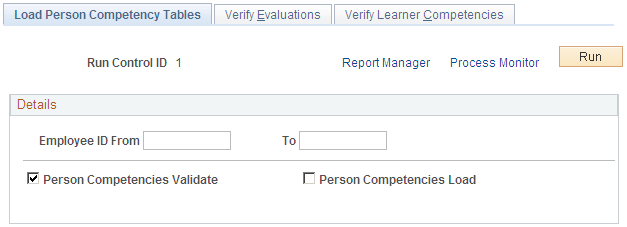
Click Run to run this request. Process Scheduler runs the LM_PRSCOMP process at user-defined intervals.
.