
Approving the Pay Cycle
This section discusses how to approve the pay cycle.
If you have selected user approval on the Payment Selection Criteria - Preferences page, then your pay cycles must be approved after you have completed payment creation and before you run your output processes.
Note: Payments for pay cycles that require user approval are not eligible for posting until the pay cycle has been approved.
Note: (USF) U.S. federal agencies use payment schedule certification rather than approval. You certify payment schedules after payment selection and before payment creation.
Page Used to Approve the Pay Cycle
|
Page Name |
Definition Name |
Navigation |
Usage |
|---|---|---|---|
|
Pay Cycle Approval |
PYCYCL_APPROVAL |
|
Verify and approve payments for a pay cycle if your payment selection criteria include a user approval requirement. |
Pay Cycle Approval Page
Use the Pay Cycle Approval page (PYCYCL_APPROVAL) to verify and approve payments for a pay cycle if your payment selection criteria include a user approval requirement.
Image: Pay Cycle Approval page
This example illustrates the fields and controls on the Pay Cycle Approval page. You can find definitions for the fields and controls later on this page.
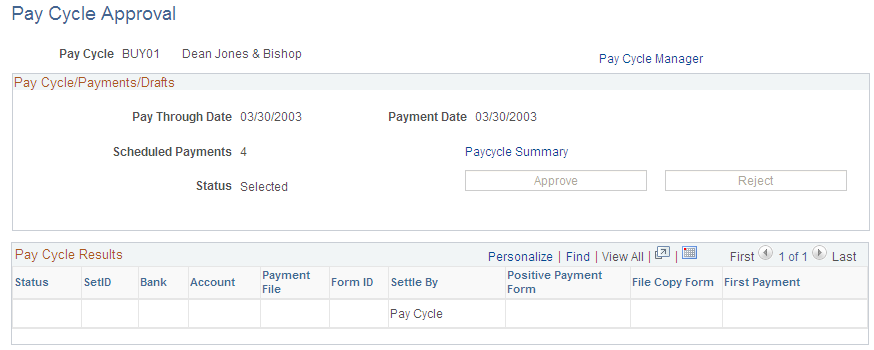
Pay Cycle/Payments/Drafts
Pay Cycle Results
This grid displays a row of data for each output process that must be run to generate payment files and negotiable documents. For EFT payments, because all payments regardless of bank account run as one output process, only one EFT row can appear. For checks, advices, positive payment files, and file copies, each bank account and payment method combination runs as a separate output process. This means multiple check rows, positive payment rows, and so forth can appear in the grid.