
Defining Bank Information
To define bank information, use the following components:
Bank Information component (COUNTERPARTY_DEFN_GBL).
Bank Branch Information component (BANK_BRANCHPNL_GBL).
Use the TR_BANK_BRANCH_CI component interface to load data into the Bank Branch Information tables.
Contact Information component (CONTACT_INFO_GBL).
Use the CONTACT component interface to load data into the Contact Information tables.
Settlement Instruction component (SETTLEMENT_INSTRUC_GBL).
Use the TR_SETTLEMENT_INSTRUCTIONS_CI component interface to load data into the Settlement Instruction tables.
This section discusses how to:
Define bank information.
Define bank addresses.
Set up electronic statements.
Define bank branches.
(Optional) Define bank branch addresses.
(Optional) Define branch contacts.
Define beneficiary bank information.
(Optional) Define beneficiary bank EFT options.
Define beneficiary bank addresses.
Define financial contacts.
(Optional) Define financial contact addresses.
Pages Used to Define Bank Information
|
Page Name |
Definition Name |
Navigation |
Usage |
|---|---|---|---|
|
Bank Information |
BANK_PNL1 |
|
Define each bank and its general characteristics. |
|
Address Information |
BANK_ADDR_PNL |
Click Address Information on the Bank Information page. |
Capture the address and phone information for the bank. |
|
Bank Contact Notes |
BANK_NOTES_SP |
Click Notes on the Bank Information page. |
Enter miscellaneous notes for the bank. |
|
VAT Defaults Setup |
VAT_DEFAULTS_DTL |
Click the VAT Defaults link on the Bank Information page. |
Specify default VAT (value-added tax) information for a bank. |
|
Bank Other Identification |
BANK_PNL_OTHID |
Click the Other Identification link on the Bank Information page. |
Provide values information for the bank for use in ISO and SEPA formats, such as issuer. |
|
Bank Branch Information |
BANK_BRNCHPNL |
|
Define bank branch information. |
|
Address |
BRANCH_ADDRESS_SEC |
Click Address Information on the Bank Branch Information page. |
Set up the bank branch address. |
|
Bank Contacts |
BRANCH_PNLCNTCT |
Click Contact Information on the Bank Branch Information page. |
Set up contact information for a specified branch. |
|
VAT Defaults Setup (value-added tax defaults setup) |
VAT_DEFAULTS_DTL |
Click the VAT Defaults link on the Bank Branch Information page. |
Specify default VAT information for a bank branch. |
|
Contact Information |
TR_CONTACT_PNL |
|
Enter information about how to contact the people with whom you do business. |
|
Contact Address Information |
TR_CONTACT_ADDRSEC |
Click Address Information on the Contact Information page. |
Enter address information for your financial contacts. You must enter branch address information correctly for this information to be available for use in Billing. |
Bank Information Page
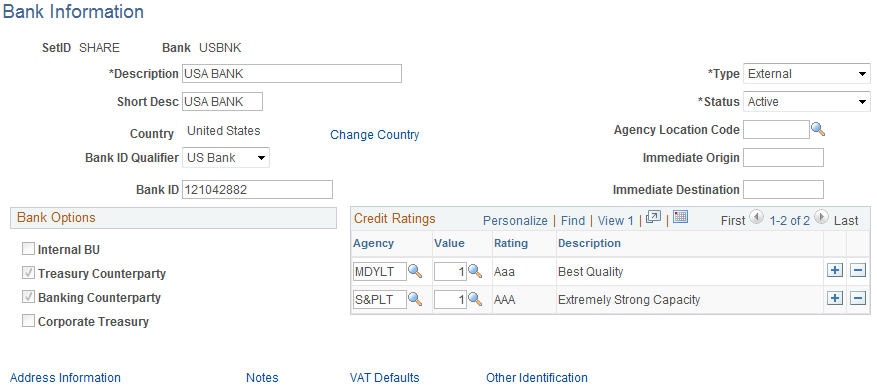
Use the Bank Information page (BANK_PNL1) to define each bank and its general characteristics.
Image: Bank Information page
This example illustrates the fields and controls on the Bank Information page. You can find definitions for the fields and controls later on this page.
Important! You can define the same bank ID for different setIDs; however, you can define a specified bank account number only once per bank ID.
Bank Options
The bank type determines the options that are available in the Bank Options group box.
Note: The VAT Defaults link appears on all Bank Information pages; however, it is available only if the country for the bank is set up for VAT.
Bank Branch Information Page
Use the Bank Branch Information page (BANK_BRNCHPNL) to edit bank branch information associated with an external account.
Image: Bank Branch Information page
This example illustrates the fields and controls on the Bank Branch Information page. You can find definitions for the fields and controls later on this page.

VAT Registration Options
Bank branches represent physical bank locations. In order for the system to determine the appropriate VAT treatment for transactions generated through each branch, you must define the VAT registration information, as well as the VAT default parameters to use in VAT accounting.
Contact Information Page
Use the Bank Branch Information - Contact Information page (BRANCH_PNLCNTCT) to set up contact information for a specified branch.

Defining Financial Contacts
Use the Contact Information page (TR_CONTACT_PNL) to enter information about how to contact the people with whom you do business.