Setting Up VAT Options and Defaults for General Ledger Processing
To set up VAT options and defaults, use the following components:
VAT Defaults (VAT_DEFAULT_SEARCH)
General Ledger Definition (BUS_UNIT_TBL_GL)
Journal Source (SOURCE)
Account (GL_ACCOUNT)
Use the ACCOUNT_CF component interface to load data into the tables for the Account component.
This section discusses how to:
Set up VAT defaults for the General Ledger VAT drivers.
Set up General Ledger Business Unit VAT Default options.
Set up VAT default options for Journal Source.
Set up VAT defaults for an account.
Pages Used to Set Up VAT Options and Defaults for General Ledger Processing
|
Page Name |
Definition Name |
Navigation |
Usage |
|---|---|---|---|
|
VAT Defaults Setup |
VAT_DEFAULTS_DTL |
|
Access VAT defaults to the journal line for the general ledger business units, source, and account. The default fields are available on the VAT Defaults Setup page for the business unit, the source, and the account based on the page where you select the VAT Default link. |
|
General Ledger Definition - VAT Defaults |
BUS_UNIT_TBL_GL5 |
|
Define VAT options that are provided by default to the journal line from your general ledger business units and select the VAT Default link to define additional central VAT defaults. This page only appears if the business unit is associated with a VAT entity. |
|
Journal Source - Definition |
SOURCE1 |
|
Specify whether the source is for goods or services and select the VAT Default link to define additional central VAT defaults. |
|
Account |
GL_ACCOUNT |
|
Specify whether the account is for goods or services and select the VAT Default link to define additional central VAT defaults. |
VAT Defaults Setup Page
Use the VAT Defaults Setup page (VAT_DEFAULTS_DTL) to access VAT defaults to the journal line for the general ledger business units, source, and account.
The default fields are available on the VAT Defaults Setup page for the business unit, the source, and the account based on the page where you select the VAT Default link.
Click the VAT Default link on either the General Ledger Definition - VAT Defaults page, the Journal Source - Definition page, or the Define ChartField - Account page.
Note: The default values on this page are dependent on the VAT driver that you select. This example uses the BUS_UNIT_TBL_GL VAT driver.
Image: VAT Defaults Setup page (1 of 2)
This example illustrates the fields and controls on the VAT Defaults Setup page (1 of 2). You can find definitions for the fields and controls later on this page.
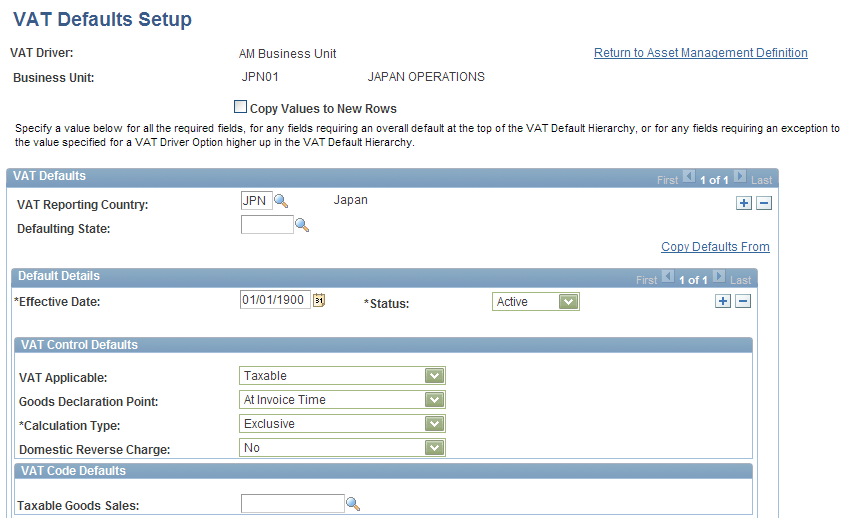
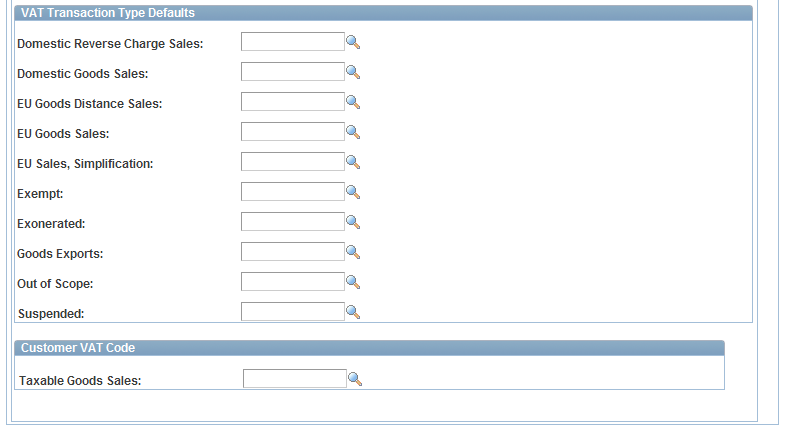
Image: VAT Defaults Setup page (2 of 2)
This example illustrates the fields and controls on the VAT Defaults Setup page (2 of 2). You can find definitions for the fields and controls later on this page.
Note: The VAT Defaults Setup pages are described in detail in the PeopleSoft Enterprise Global Options and Reports, "Working with VAT."
General Ledger Definition - VAT Defaults Page
Use the General Ledger Definition - VAT Defaults page (BUS_UNIT_TBL_GL5) to define VAT options that are provided by default to the journal line from your general ledger business units and select the VAT Default link to define additional central VAT defaults.
Image: General Ledger Business Unit Definition - VAT Defaults page
This example illustrates the fields and controls on the General Ledger Business Unit Definition - VAT Defaults page. You can find definitions for the fields and controls later on this page.

| VAT Reporting Entity |
Create a VAT entity for the levels in your organization that require reporting. You can associate more than one business unit with a VAT entity; however, you can only associate one VAT entity with a specific business unit. To associate a general ledger business unit to a VAT entity, navigate to See Identification Page. |
| Physical Nature |
Specify the default nature of transactions for the business unit as either Good or Service. The default can be overridden at the source and account levels. |
| Prorate Non-Recoverable VAT |
Select to post the non-recoverable VAT to the same ChartFields (including account, alternate account, and other ChartFields) that are specified on the associated expense journal line rather than to a separate VAT account. Selection of this option sets the default for the GL Journal Entry - VAT page, VAT Control group box. |
| Allocate Non-Recoverable VAT |
If non-recoverable VAT is not prorated (that is, the Prorate Non-Recoverable VAT option is not selected), then non-recoverable VAT amounts are posted to a separate VAT account and alternate account. Select this option to allow the ChartField to which non-recoverable VAT is posted to be determined by your ChartField Inheritance options. For each ChartField, you may specify that the value always be inherited from the associated expense journal line, that the value only be inherited when the VAT is being posted to the same general ledger business unit, that the value be obtained from the set of business unit default ChartFields, or that the VAT be posted to a specific VAT ChartField. Selection of this option sets the default for the GL Journal Entry - VAT page, VAT Control group box. |
| VAT Default |
Click this link to access the general ledger business unit driver's VAT Defaults page and define additional defaults for the business unit. |
Note: Although the VAT amount may be zero or the VAT may be 100 percent non-recoverable, the system generates a 0 (zero) Recoverable VAT entry. This action is necessary because the VAT Transaction Loader always uses the Recoverable VAT entry as the basis for generating the VAT_TXN_TBL entries.
Journal Source Definition Page
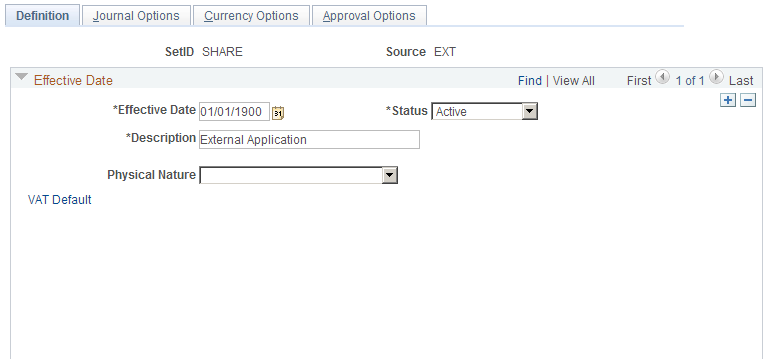
Use the Journal Source - Definition page (SOURCE1) to specify whether the source is for goods or services and select the VAT Default link to define additional central VAT defaults.
Image: Journal Source - Definition page
This example illustrates the fields and controls on the Journal Source - Definition page. You can find definitions for the fields and controls later on this page.
Setting Up VAT Defaults for an Account
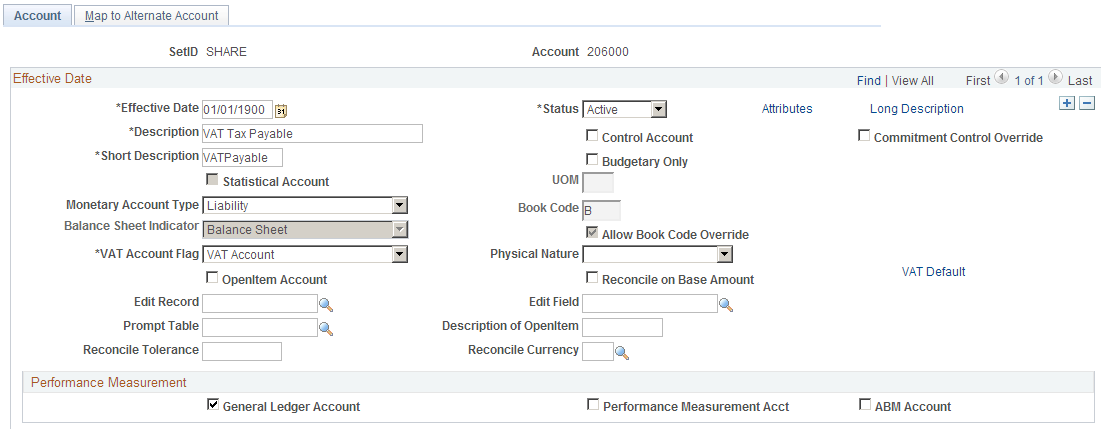
Use the Account page (GL_ACCOUNT) to specify whether the account is for goods or services and select the VAT Default link to define additional central VAT defaults.
Image: Account page
This example illustrates the fields and controls on the Account page. You can find definitions for the fields and controls later on this page.