
Setting Up Control Budget Definitions
To set up control budget definitions, use the Budget Definitions (KK_BUDGET) component.
This section discusses how to:
Define control budget options.
Define Ruleset ChartFields.
Define budget keys and translations.
Define Expiration ChartFields.
Define budget status by budget period.
Define control ChartFields.
Define offsets.
Include accounts as exceptions to excluded account types
Define excluded account types and accounts.
Pages Used to Set Up Control Budget Definitions
|
Page Name |
Definition Name |
Navigation |
Usage |
|---|---|---|---|
|
Control Budget Options |
KK_BUDG1 |
|
Define the budget's general parameters, including control ChartField, parents and children, associated budget definition, control options, Ruleset ChartField, and status. |
|
Ruleset Chartfield |
KK_BUDG7 |
|
Define the Ruleset ChartField values for each ruleset. |
|
Keys and Translations |
KK_BUDG3 |
|
Specify the ChartFields and calendar to use to identify budgets for each ruleset. |
|
Expiration ChartField |
KK_BUDG8 |
|
Use with an Expiration ChartField that you defined on the Control Budget Options page to establish beginning, ending, and expiration dates for a budget. |
|
Budget Period Status |
KK_BUDG9 |
|
Use to set budget status by budget periods. For a particular budget period you can open, have closed, put on hold, or change the status of a budget to a higher level by default. |
|
Control ChartField |
KK_BUDG4 |
|
Override and define budget options and attributes for particular control ChartField values. |
|
Offsets |
KK_BUDG5 |
|
Set up offset accounts for balancing source transaction and budget entries. This page is available only if the Entries Must Balance check box is selected on the Control Budget Options page. |
|
Excluded Account Types |
KK_BUDG6 |
|
Specify the account types and account value ranges to exclude from processing for this control budget definition. |
Budget Definition - Control Budget Options Page
Use the Control Budget Options page (KK_BUDG1) to define the budget's general parameters, including control ChartField, parents and children, associated budget definition, control options, Ruleset ChartField, and status.
Image: Budget Definition - Control Budget Options page
This example illustrates the fields and controls on the Budget Definition - Control Budget Options page. You can find definitions for the fields and controls later on this page.
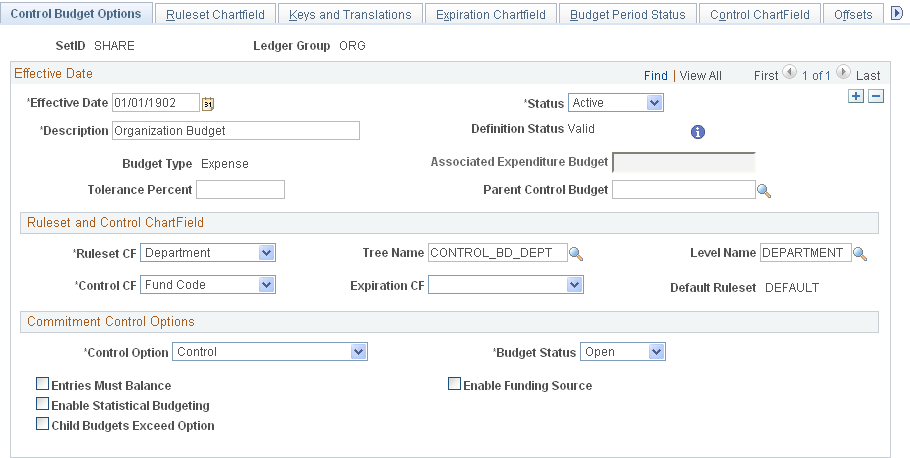
Ruleset and Control ChartFields
| Ruleset CF (ruleset ChartField) |
Select the Ruleset ChartField and, optionally, the names of the tree and level where the Budget Processor should look for the ChartField values that are valid for the ruleset. For expenditure budget definitions with funding source control, the Ruleset ChartField must be the same as the Control ChartField. |
| Control CF (control ChartField) |
Enter the key ChartField that the Budget Processor uses to determine whether to enforce budget checking. |
| (USF) Expiration CF (expiration ChartField) |
Use this field and the associated functionality to control and categorize processing against expired or closed budgets. Select a ChartField, typically Budget Reference, the value of which is used when you establish begin dates, expiration dates, and end dates for a budget using the Expiration ChartField page that is located within this same component. The value selected can then be used to categorize a budget as open, expired, or closed. All ChartFields supported in Commitment Control as budget keys are available. Note: Use this field in conjunction with Entry Event functionality to automatically generate budgetary entries for upward and downward adjustments of obligations against expired budgets as required by United States Federal Government accounting. See Processing Transactions Against Expired and Closed Budgets. See Using Entry Event Codes for Upward and Downward Adjustments. |
| Default Ruleset |
The default Ruleset for any Ruleset ChartField values that you do not specify on the Ruleset ChartField page. You specify the default ruleset on the Ruleset ChartField page. |
Commitment Control Options
| Control Option |
Select the degree of budgetary control that you want for this budget definition. You can override this value at lower levels. |
SeeCommon Elements.
| Budget Status |
You can override this value at lower levels. |
Budget Definition - Ruleset ChartField Page
Use the Ruleset Chartfield page (KK_BUDG7) to define the Ruleset ChartField values for each ruleset.
Image: Budget Definition - Ruleset Chartfield page
This example illustrates the fields and controls on the Budget Definition - Ruleset Chartfield page. You can find definitions for the fields and controls later on this page.
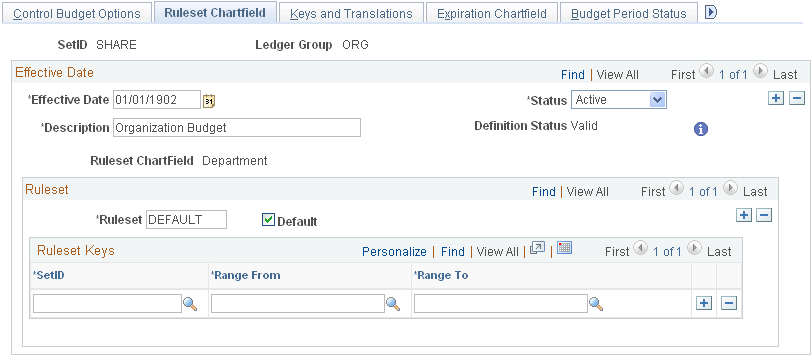
Ruleset
Enter the ruleset name. Select Default for the ruleset to be used as the default for any Ruleset ChartField values that you do not specify on this page. If you only require one ruleset for your budget definition, you do not need to enter any values on this page.
Note: The Budget Processor also uses the default ruleset when budget checking a source transaction that has no value for the Ruleset ChartField. If Value Required is selected on the Keys and Translations page for the Ruleset ChartField, the Budget Processor issues a Key ChartField is Blank exception.
Ruleset Keys
Enter the setID for each range of Ruleset ChartField values to which the Ruleset applies.
Note: The system performs validations that prevent you from including the same Ruleset ChartField value in more than one Ruleset.
Budget Definition - Keys and Translations Page
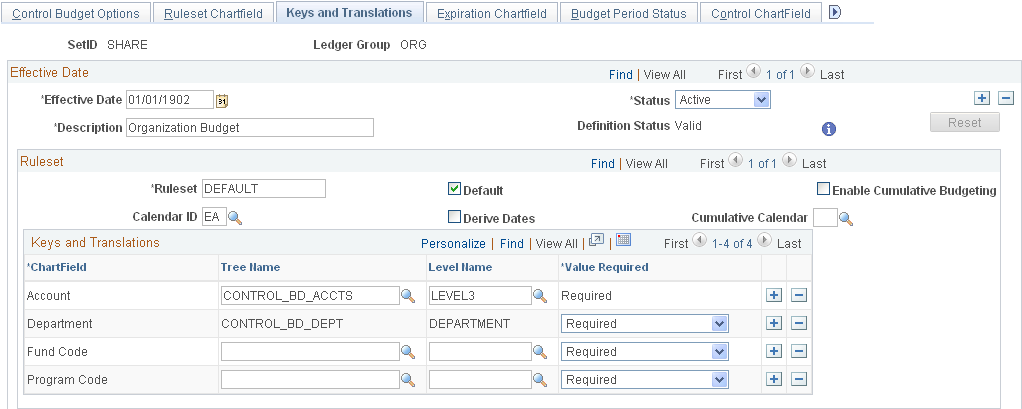
Use the Keys and Translations page (KK_BUDG3) to specify the ChartFields and calendar to use to identify budgets for each ruleset.
Image: Budget Definition - Keys and Translations page
This example illustrates the fields and controls on the Budget Definition - Keys and Translations page. You can find definitions for the fields and controls later on this page.
Ruleset
Keys and Translations
Budget Definition - Expiration ChartField Page
Use the Expiration ChartField page (KK_BUDG8) to use with an Expiration ChartField that you defined on the Control Budget Options page to establish beginning, ending, and expiration dates for a budget.
Image: Budget Definition - Expiration ChartField page
This example illustrates the fields and controls on the Budget Definition - Expiration ChartField page. You can find definitions for the fields and controls later on this page.
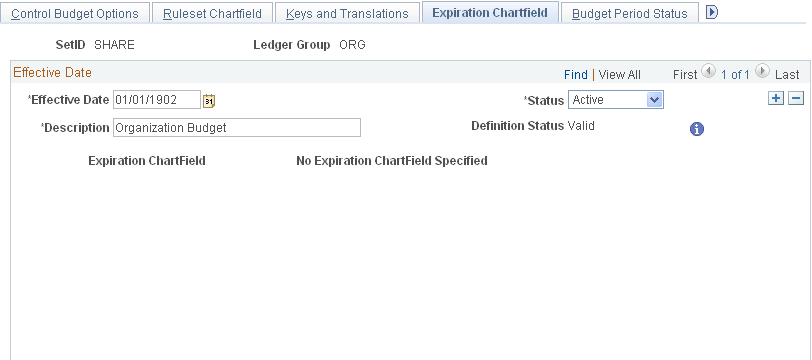
| Expiration ChartField |
Displays the Expiration ChartField that you define on the Control Budget Options page within the budget definition. |
| SetID |
Select a setID to uniquely identify the set of ChartField values and dates that you enter here. |
| (USF) Value |
Enter a value or multiple values that identify a valid budget year or years for United States Federal Government budgets. For a five-year budget or appropriation, the value might be BY2002-2006. |
| (USF) Begin Date |
Enter the first date that a budget is available for obligation. For example, for a United States Government budget, the begin date for BY2002-2006 is October 1, 2001. |
| (USF) Expiration Date |
Enter the last date that funds are available for obligation for this budget. For example, the five-year appropriation budget reference BY2002-2006 has the expiration date of September 30, 2006. The budget processor uses this date to categorize a budget as expired. When a budget is categorized as expired, transactions from Purchasing and Payables that affect the expired budget can optionally have their entries generated to appropriate United States standard general ledger (US SGL) budgetary accounts for expired budgets by the Entry Events generator. |
| (USF) End Date |
Enter the last date that payments can be processed against the budget. The budget is in effect closed on this date and the system does not allow processing against the budget. For example, for a United States Federal Government budget, assume that the end date is five years after the expiration date. Then, for a single year appropriation BY2002, the end date is September 30, 2007. For BY2002-2006 the end date is September 30, 2011. Both budgets would be closed on their respective end dates. The United States Federal requirement is that payments for closed budgets can be processed against the current budget, but payments cannot exceed one percent of budget. The 1 percent that is set aside of current-year budget for prior-year obligations is handled by manually creating a separate budget in the current year for the amount. Invoices that are received after the budget is closed would be recorded against the 1 percent budget in the current year. See Using Entry Event Codes for Upward and Downward Adjustments. See Processing Transactions Against Expired and Closed Budgets. |
Budget Definition - Budget Period Status Page
Use the Budget Period Status page (KK_BUDG9) to use to set budget status by budget periods.
For a particular budget period you can open, have closed, put on hold, or change the status of a budget to a higher level by default.
Image: Budget Definition - Budget Period Status page
This example illustrates the fields and controls on the Budget Definition - Budget Period Status page. You can find definitions for the fields and controls later on this page.

Budget Definition - Control ChartField Page
Use the Control ChartField page (KK_BUDG4) to override and define budget options and attributes for particular control ChartField values.
Image: Control ChartField page
This example illustrates the fields and controls on the Control ChartField page. You can find definitions for the fields and controls later on this page.
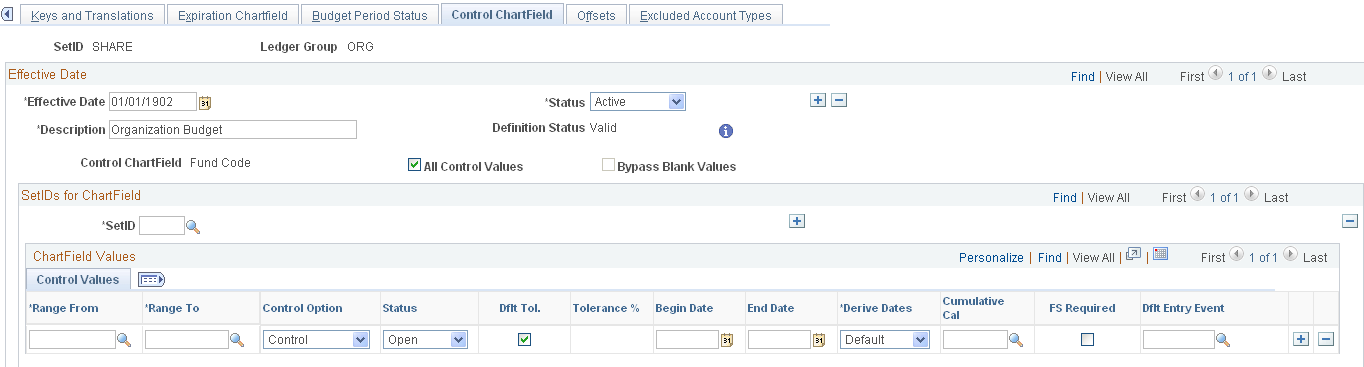
ChartField Values
Enter ChartField values both to specify values for budget checking (if you deselected the All Control Values check box), and to override the default tolerance, status, or other attributes for a specific ChartField value, whether or not you selected All Control Values.
The options that you select here override the defaults that you defined on the Control Budget Options page. You can, in turn, override these for specific business unit or budget combinations in the Budget Attributes component.
| Range From and Range To |
Enter a range of ChartField values that share control options. To enter one value, repeat it in both fields. |
| Control Option |
The control options are described in the common elements topic. |
| Status |
Budget status. |
| Dflt Tol. (default tolerance) |
Select to apply the over-budget tolerance percentage from the Control Budget Options page to this row. |
| Begin Date and End Date |
Enter values for either or both of these dates to restrict budget journal entries to budget periods that are at least partially within these dates. This also restricts source transactions to those whose budget dates fall within these dates. For example, assume that the budget date is equal to the accounting date, and the budget calendar is composed of 12 monthly budget periods, beginning with January. If the begin date is February 15, 2000, and no end date is specified, budget journal entries for budget periods 2 and 3 are postable, but those for period 1 are invalid. A purchase order with an accounting date of February 14, 2000 fails, but a purchase order with an accounting date of February 16, 2000 passes, assuming that funds are available. The End Date field affects transactions similarly. Note: You can also use these fields to restrict time periods for budget definitions without assigned budget period calendars, such as those with funding source tracking. |
| Derive Dates |
Described in the common elements topic. |
| Cumulative Cal (cumulative calendar) |
Described in the common elements topic. |
| FS Required (funding source required) |
This option is applicable only to budget definitions that have funding source control enabled on the Control Budget Options page. Deselect to disable funding source control for the row. Note: You must enable funding source control on the Control Budget Options page and select this check box for specific control ChartField values before you can allocate funding sources to the values using the Funding Source Allocation page. |
| Dflt Entry Event (default entry event) |
Select an entry event to support processing for generated parent budgets when applicable. The field is applicable only when entry events have been enabled at the installation level. This field is used by the budget posting process to populate the entry event for the system-generated parent budget when the use default entry event option has been selected and the entry event is either optional or required by the parent budget definition. See Generate Parent Budgets, Budget Adjustments, and Budget Transfers Automatically. See Generating Parent Budgets, Budget Adjustments and Budget Transfers Automatically. |
Budget Definition - Offsets Page
Use the Offsets page (KK_BUDG5) to set up offset accounts for balancing source transaction and budget entries.
This page is available only if the Entries Must Balance check box is selected on the Control Budget Options page.
Image: Offsets page
This example illustrates the fields and controls on the Offsets page. You can find definitions for the fields and controls later on this page.

If you selected Entries Must Balance on the Control Budget Options page, you must enter a default account value for at least one setID in the Budget Entry Offsets grid. You must also enter a source transaction offset account for each source transaction type that affects this budget definition.
You can enter a source transaction offset row with a blank source transaction type value. This can serve as a default. When the budget processor runs, it looks for a specific entry for the source transaction type that is being processed. If a row is not found, it looks for a blank row and if it finds a blank row, it uses the specified offset account to create the balancing line or lines.
Note: Balancing, or offset, lines are not created on the budget journals but are created during the posting process and are stored in the commitment control activity log.
Budget Definition - Excluded Account Types Page
Use the Excluded Account Types page (KK_BUDG6) to specify the account types and account value ranges to exclude from processing for this control budget definition.
Image: Budget Definition - Excluded Account Types page
This example illustrates the fields and controls on the Budget Definition - Excluded Account Types page. You can find definitions for the fields and controls later on this page.
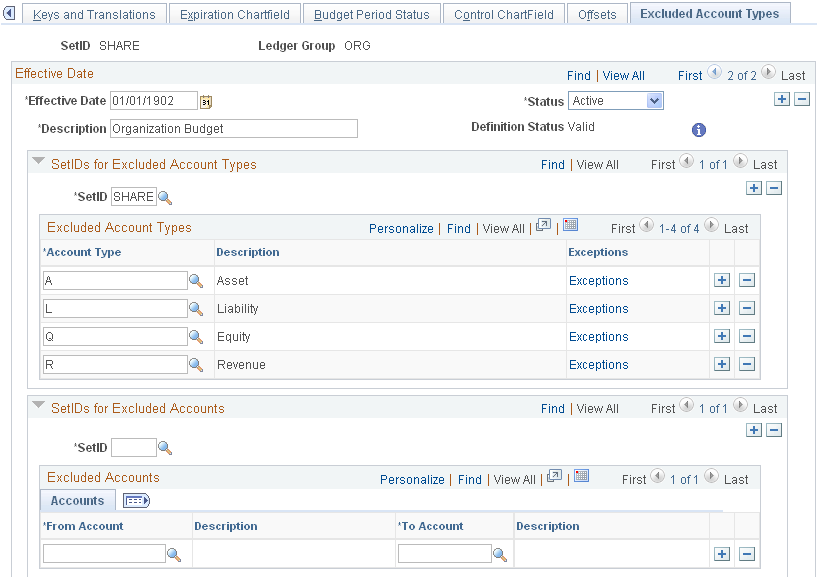
Image: Exclude Account Type Exceptions page
This example illustrates the fields and controls on the Exclude Account Type Exceptions page. You can find definitions for the fields and controls later on this page.
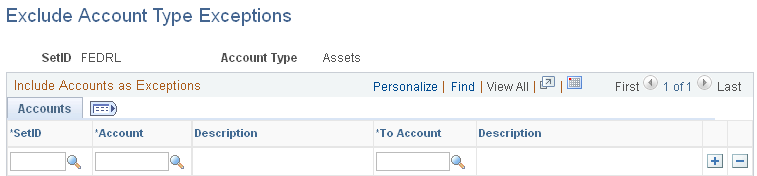
Note: For a particular setID and account type, you can specify ranges of accounts to be included in budget checking.
SetIDs for Excluded Account Types
SetIDs for Excluded Accounts
Example of Excluded Account and Types
For an expenditure budget definition, you exclude all asset, liability, and equity accounts from budget checking by selecting them in the Excluded Account Types grid. If you also want to exclude inventory transactions from budget checking, you enter your inventory expensed accounts in the Excluded Accounts grid.